-
-
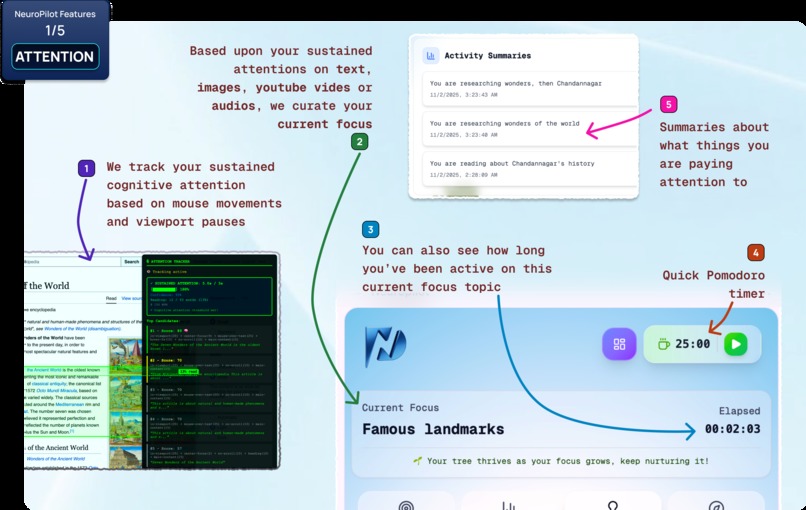
Features (1/5) - Cognitive Attention
-
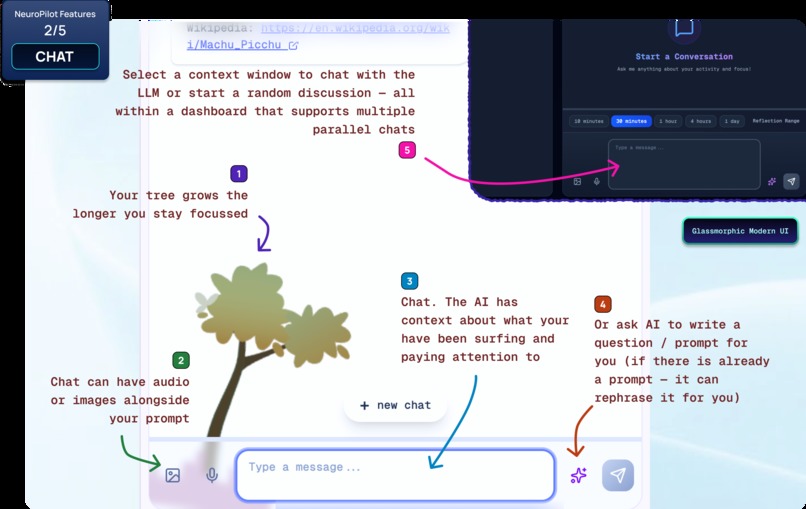
Features (2/5) - Contextual Chat
-
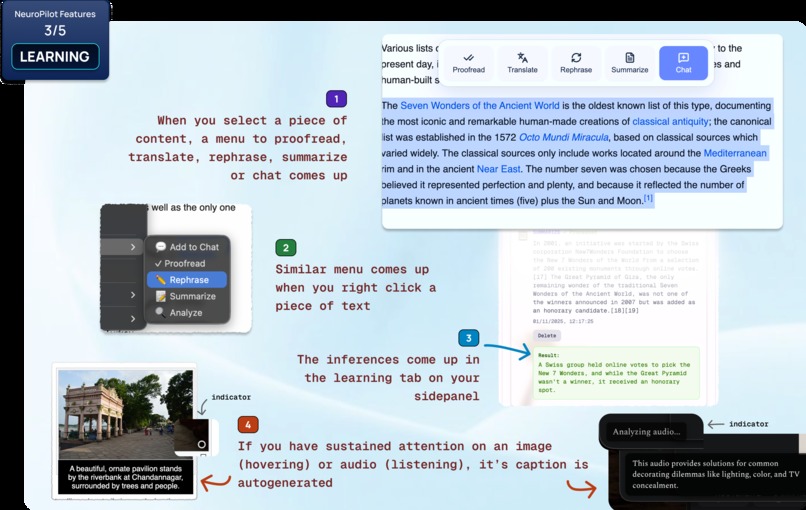
Features (3/5) - Adaptive Learning
-
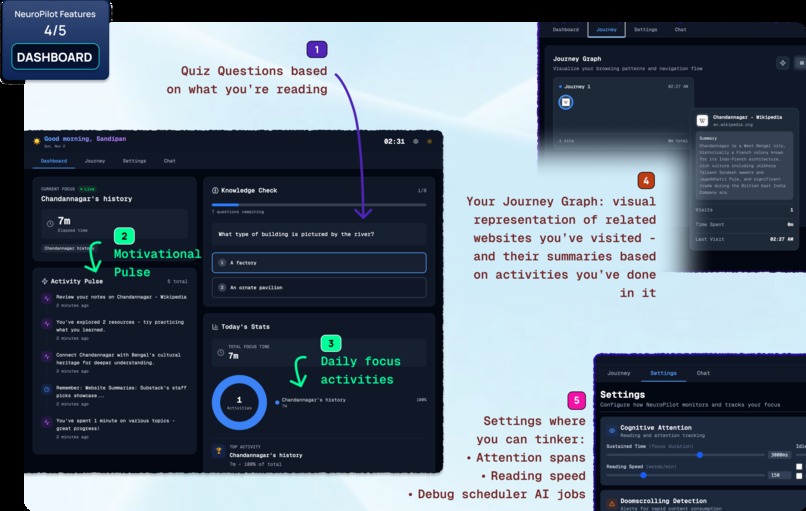
Features (4/5) - Dashboard: Quiz, Journey Graph & more ...
-
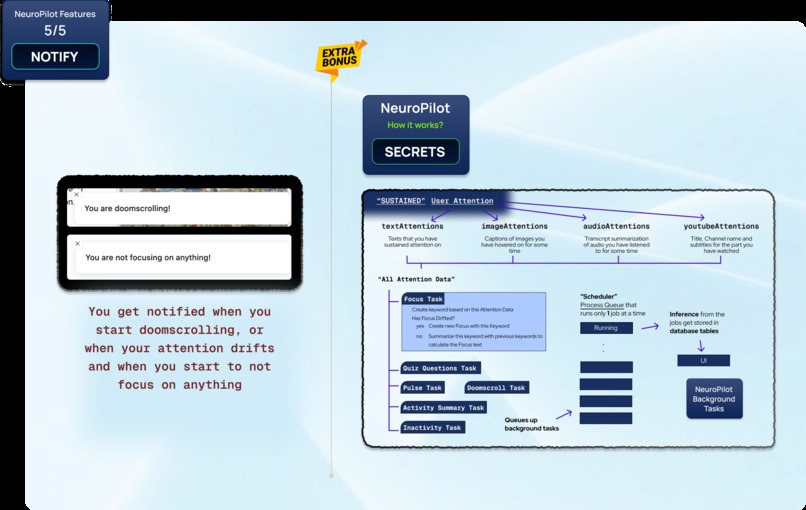
Features (5/5) - Notifications



Full Detailed Walkthrough Video → 🔗 Click Here (watch in 1.5x)
We're submitting for the following tracks:
- Most Helpful - Chrome Extension
- Best Multimodal AI Application - Chrome Extension

Inspiration 💡
If you write code or study on the web, you’ve likely lived this moment — a tab for documentation leads to a blog post, then a video, then a forum thread, and somewhere between the scrolls, the thread of your original question frays. Minutes later, you know you saw something useful, but you can’t quite recall where, or what 😭
“Distraction is the modern poverty. Focus is the new wealth.” — James Clear

| The internet has made information abundant, but our ability to retain and build on that knowledge hasn't kept pace. The truth is, our brains are wired to conserve energy, so the moment we pause to ponder, we begin to wander. This is why long browsing sessions often feel scattered. |  |
|---|
That's why we created NeuroPilot — a response to that quiet, familiar frustration.
We asked ourselves: what if Chrome could smartly understand where your attention actually settles, be it the content you read, the figure you saw, or the video you watched, and turn those moments into a private learning loop? We wanted to turn scattered web browsing into genuine learning, and that too without blocking sites or nagging you to focus, but by understanding what you're actually paying attention to and helping you build on it. Built on Chrome’s built-in AI (powered by Gemini Nano), NeuroPilot supercharges Chrome on your activity while keeping your data private. It notices, gently reflects, and helps you remember, the kind of help that keeps users rooted in Chrome because progress is felt, not forced!

What is NeuroPilot? 🦄
NeuroPilot is a smart Chrome extension that quietly tracks where your attention actually settles while you browse. It doesn’t block anything or try to push productivity. Instead, it helps you notice when your mind has drifted and guides you back to the thread you were following. Our brains are wired to conserve energy, so the moment we pause to ponder, we begin to wander. This is why long browsing sessions often feel scattered. NeuroPilot steps in at that exact point, especially for people who experience attention drift or ADHD-like patterns, helping the web feel connected again rather than fragmented.
What it does 🤔
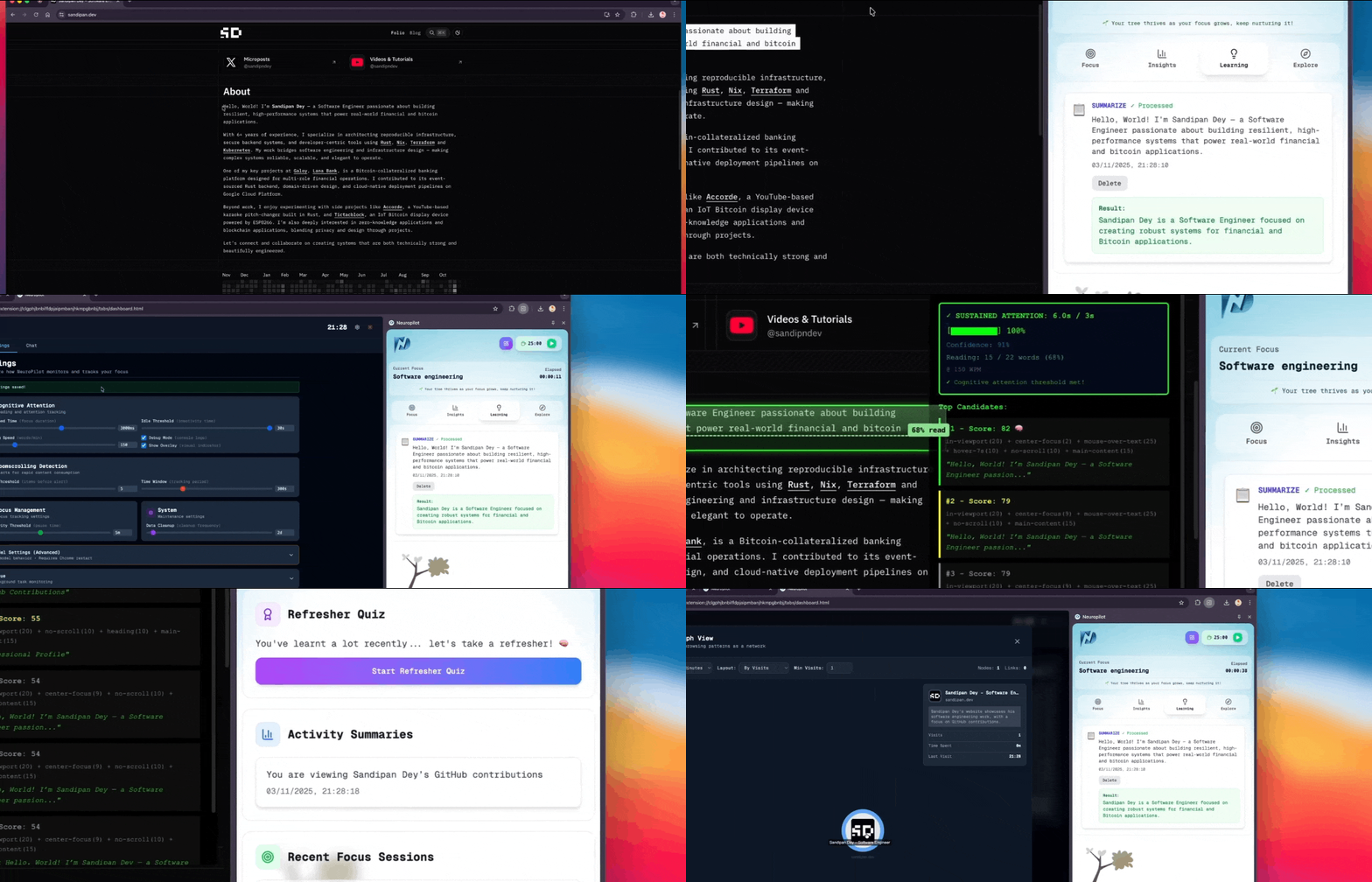
NeuroPilot acts as your AI co-pilot for focused learning on the web. It runs silently in the background, tracking what you actually pay attention to, including what you read, watch, and explore, and utilizes Chrome's built-in AI to help you stay focused, remember what matters, and test your understanding.
As you browse, NeuroPilot gradually turns your native attention into learning. When your focus slips, it offers gentle nudges to bring you back. When you finish reading or watching something, it surfaces quick recall prompts to reinforce what you just absorbed. It occasionally slips in short, well-timed quizzes to check your understanding while the idea is still fresh. And when you want to go deeper, its context-aware chat remembers where you’ve been, helping you connect ideas and build knowledge over time.
NeuroPilot is supercharged with a plethora of awesome features,
| Feature | Description | Preview |
|---|---|---|
| Your browser learns where your mind settles | NeuroPilot tracks sustained attention on text, images, videos and audio, based on real engagement, not just time on a page. It naturally forms your current focus topic as you browse. | 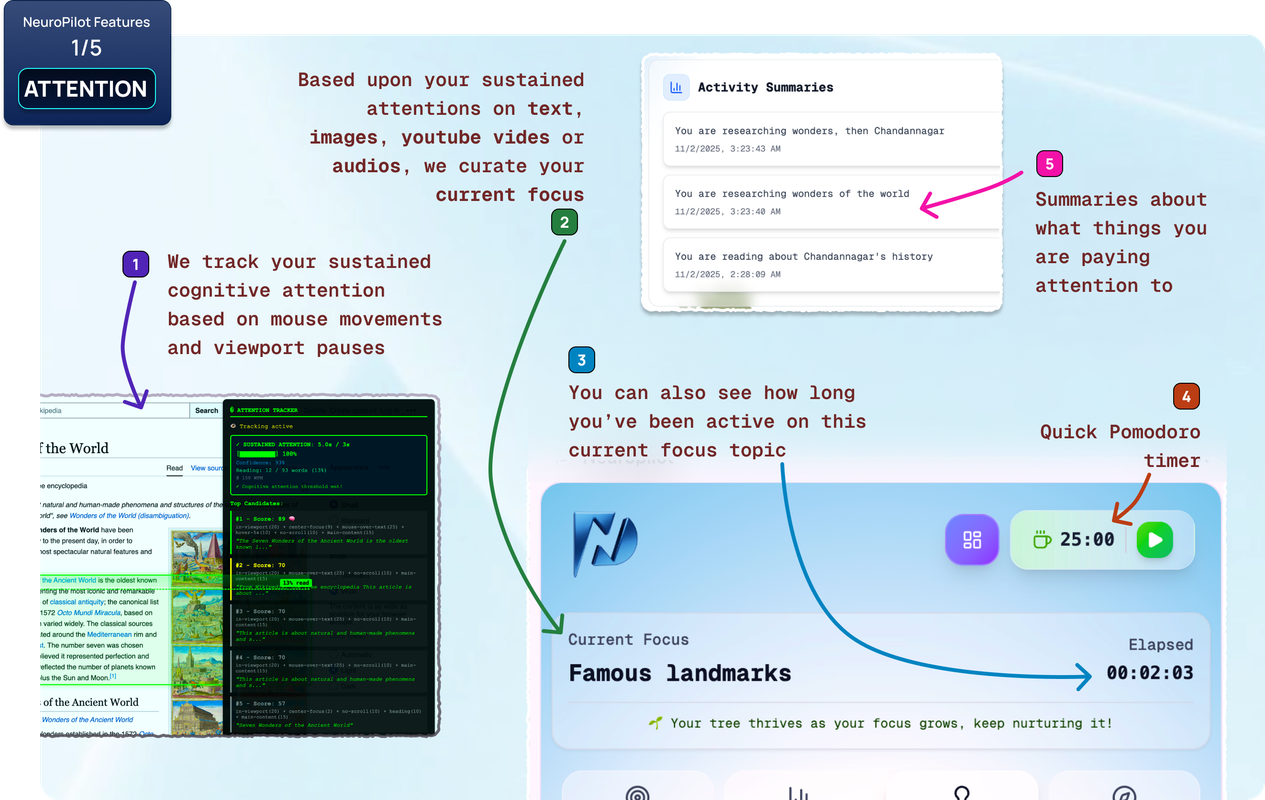 |
| A chat that remembers your browsing | You can talk to AI that already understands what you were reading or watching, so you do not have to repeat context. As your focus continues, your learning thread stays intact. | 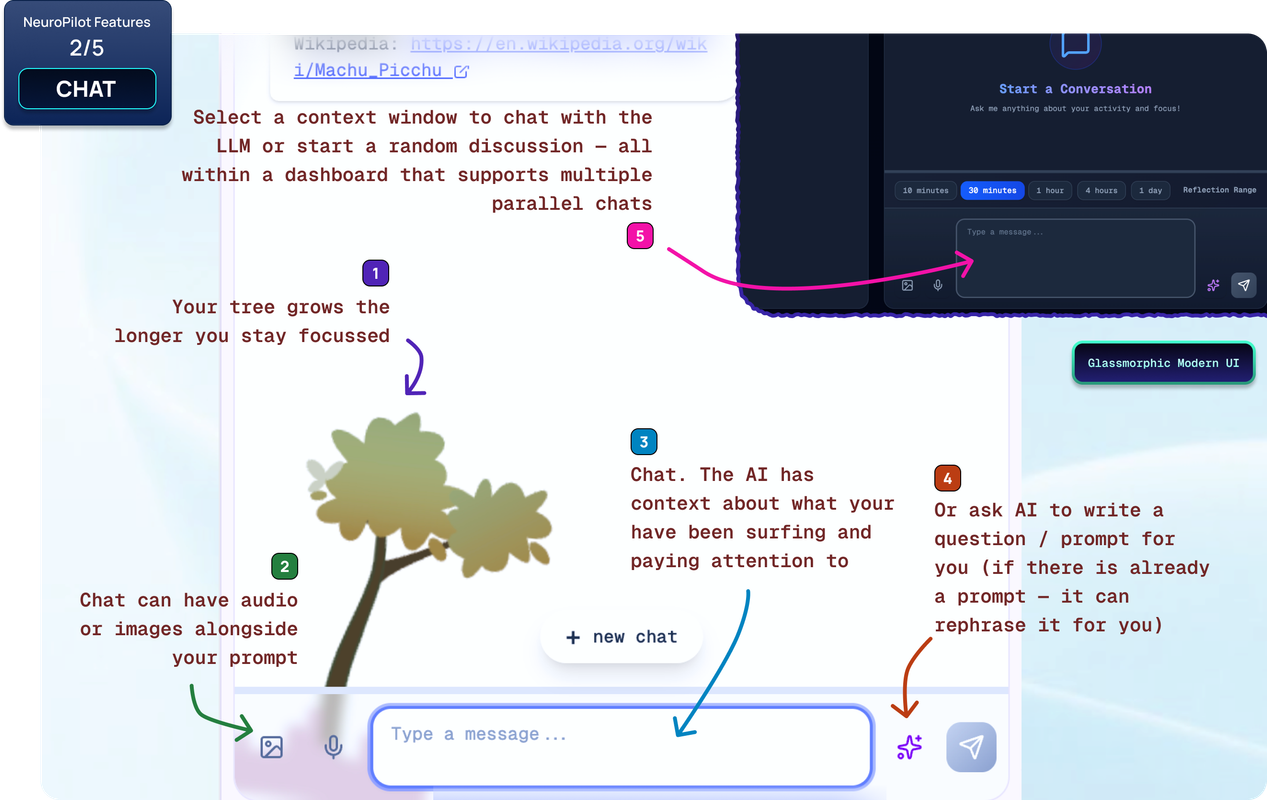 |
| Turn browsing into understanding | Highlight, hover or pause on content to summarize, translate, rephrase or analyze it. When you stay with an image or audio, captions and meaning are generated to support comprehension. | 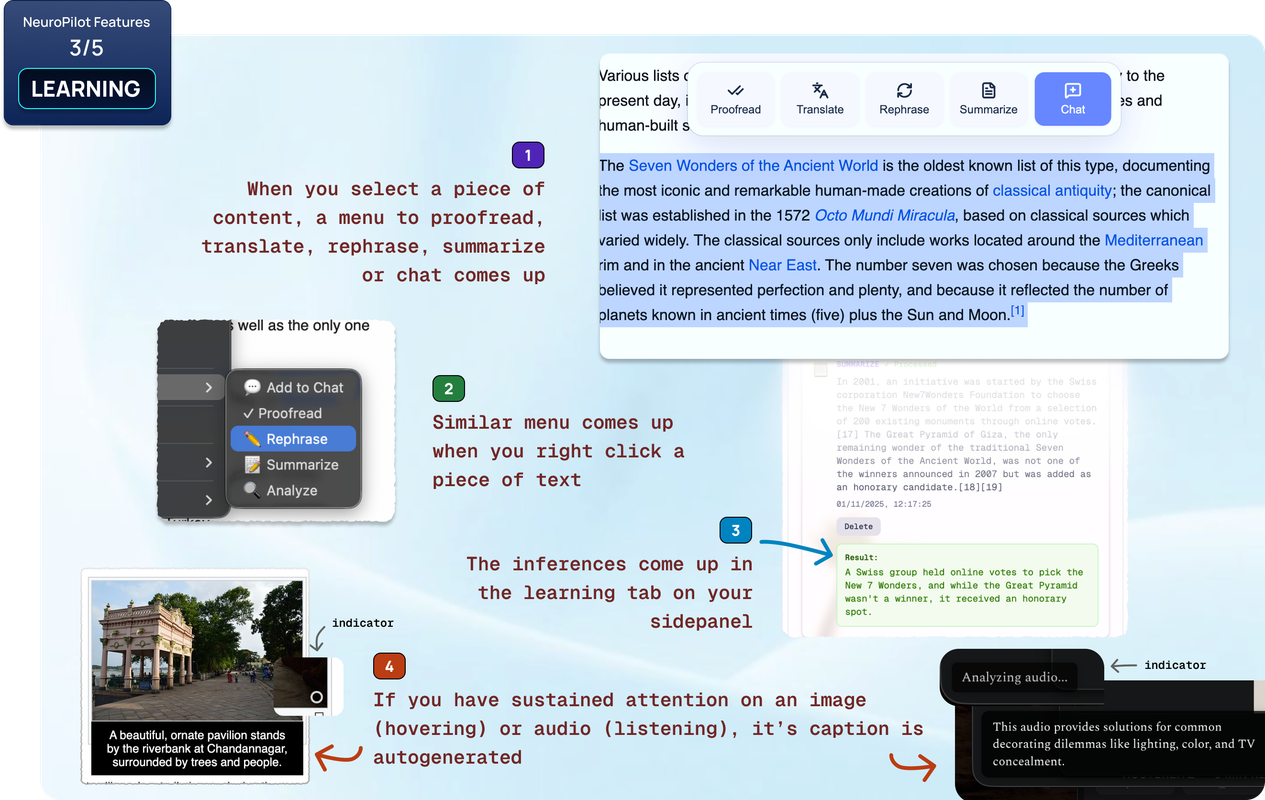 |
| Your focus, visualized clearly | The dashboard shows your active topic, quick recall prompts, daily focus time and a simple Journey Graph of the pages you explored. Small reinforcing pulses help ideas stay. | 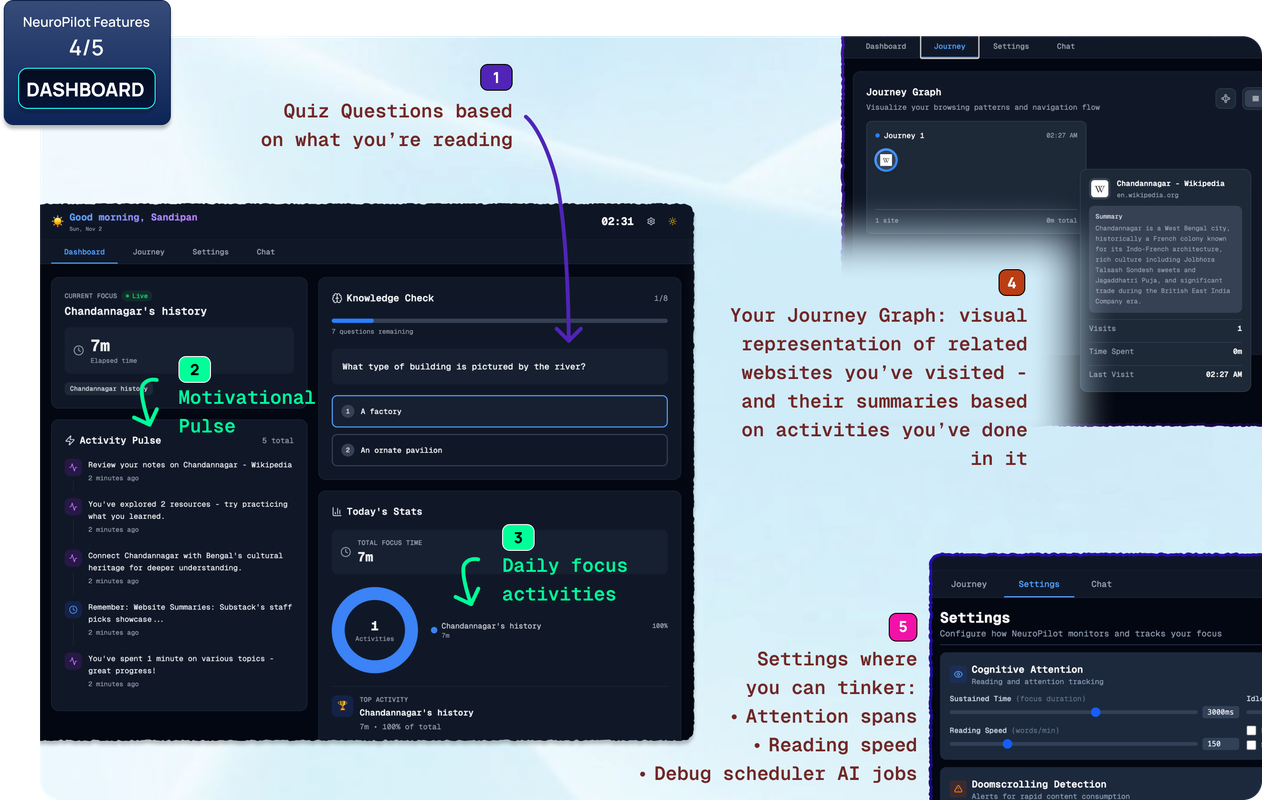 |
| Gentle reminders when attention drifts | If you begin scrolling without intention or lose the thread, NeuroPilot gives a quiet nudge. Not to interrupt you, but to help you notice and return. | 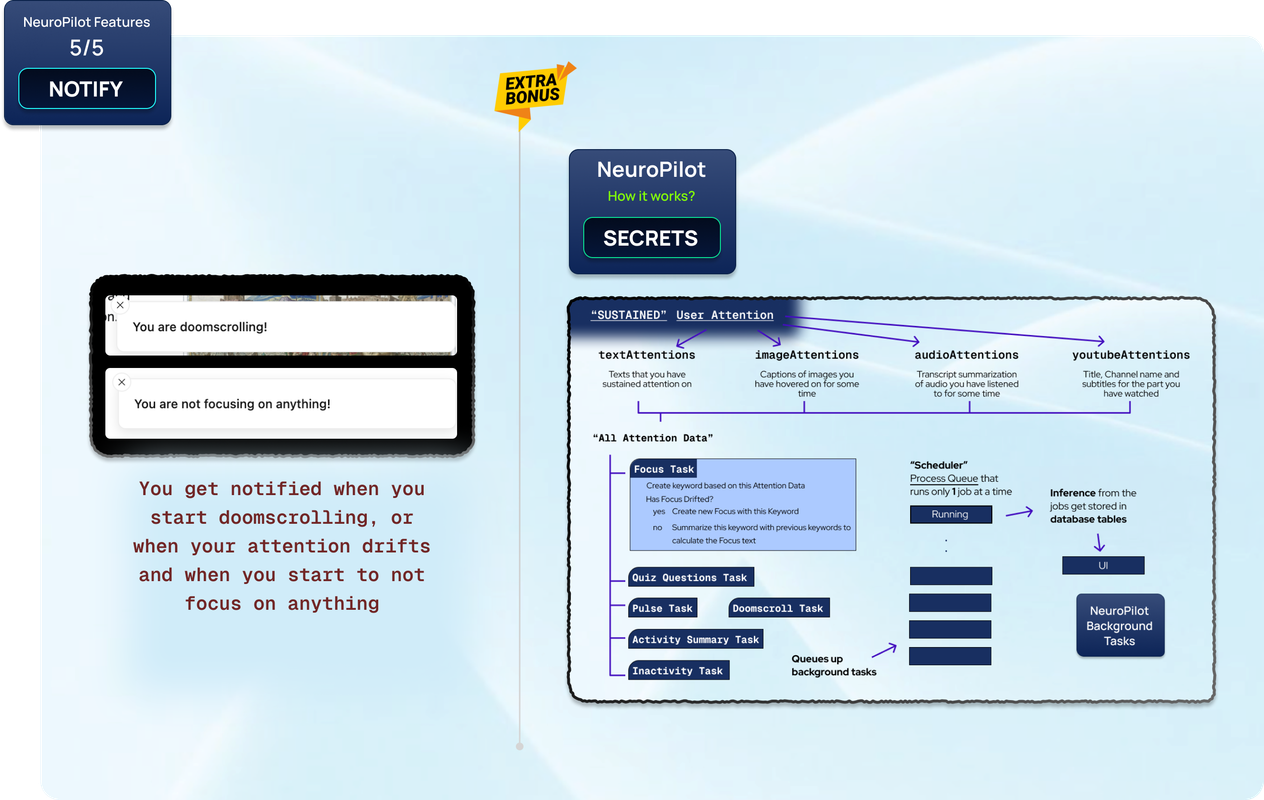 |
With NeuroPilot, your everyday browsing becomes active, intentional, and memorable. Same browser. Same habits. Just smarter — with a memory that’s yours!
User Flow 🎢
- Install & Onboard: Add the extension and go through a short setup. NeuroPilot handles the model download and gets Chrome’s AI features ready on its own.
- Browse as Usual: Just use the internet the way you normally do. NeuroPilot stays in the background and notices what you actually pay attention to.
- Stay in Focus: If your attention starts to wander, you’ll get small nudges, quick recalls, or short check-ins that help you stay on track — without breaking your rhythm.
- Check the Side Panel: Open the side panel any time to see what you’ve been focusing on, how your session is going, and what’s sticking.
- Chat With Context: If you want to go deeper, the chat remembers what you’ve been exploring and helps you connect the dots.
- Highlight & Act: Select any text to translate, rephrase, proofread, summarize, or send straight into the chat.
- Reflect on Past Wins: Look back at your previous focus sessions to see what you worked on and how your understanding has grown over time.
Installation 💻
- Download the ZIPped extension from 🗜 neuropilot/releases/tag/0.1.0
- Unzip it, load the unpacked extension from the unzipped directory
- When you install it should automatically open a welcome page
- Follow the onboarding steps to enable all the APIs
- Finally, give your name (for the scheduler to run AI jobs in the background)
- You need to surf the web a little and focus on something for 2-3 minutes for the focus stuff to come up.
An alternative way of installation can be found in the project repository README.
How we built it ⚙️
We all respect privacy, and thus the catch here was tracking real attention without being creepy. We built NeuroPilot as a privacy-first Chrome extension. The UI is made with React.js (with TypeScript), using TailwindCSS. We used IndexedDB (via Dexie.js) to store attention traces, focus sessions, chat history, and past wins, so all data stays on the device.
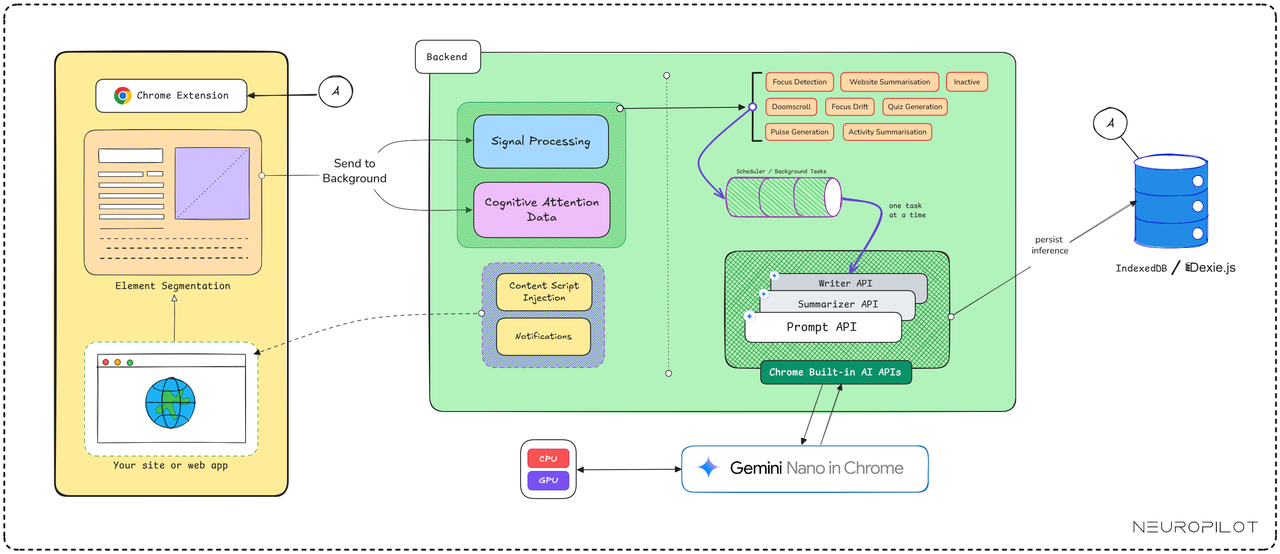
The intelligence runs in a background script that periodically reviews recent activity as it updates your current focus, notices when you drift, and generates tiny quiz-bits to help users recall at the right moments. We wrote separate listeners for text, images, audio, and YouTube, so engagement is measured by what you actually pay attention to & not just time spent on a tab. All of this is powered by Chrome’s built-in on-device AI (Prompt, Summarizer, Rewriter, Proofreader, Translator, etc.), with Gemini Nano running locally on the browser.
Chrome Built-in AI is “web platform APIs and browser features designed to integrate AI models, including large language models (LLMs), directly into the browser. This includes Gemini Nano, a lightweight version of the Gemini family designed to run locally on most modern laptops and desktops. Because the model runs on the device, it does not require a server or network call. Websites and extensions can process text, summarize pages, rewrite content, and understand on-screen context without sending data anywhere, supporting strong privacy and GDPR alignment.” NeuroPilot utilizes this to analyze & understand your active attention and create magic! ✨
NeuroPilot utilizes Chrome’s full suite of on-device AI (Gemini Nano) capabilities, including the Prompt, Summarizer, Rewriter, Writer, Proofreader, Translator, and Language Detection APIs. All these work locally in synergy, in real time, to support focus, recall, and clarity throughout the browsing experience — without sending data off your device.
The result is fast, private, and unobtrusive. NeuroPilot doesn’t tell you how to browse, it just quietly helps you learn from the browsing you’re already doing. For more comprehensive documentation, please refer to our DeepWiki.
Design 🎨
We wanted NeuroPilot to feel steady and quiet, not overwhelming. The interface is simple and easy to read, with subtle movements that guide your focus rather than pull it. It appears only when it’s actually helpful and steps back when you’re in the flow. The goal is to support your learning in Chrome without taking over your screen or interfering with your attention.
We were heavily inspired by the revised version of Double-Diamond design process, which not only includes visual design, but a full-fledged research cycle in which you must discover and define your problem before tackling your solution & then finally deploy it.
- Discover: a deep dive into the problem we are trying to solve.
- Define: synthesizing the information from the discovery phase into a problem definition.
- Develop: think up solutions to the problem.
- Deliver: pick the best solution and build that.
Moreover, we utilized design tools like Figma, Adobe Photoshop & Illustrator to prototype our designs before doing any coding. Through this, we are able to get iterative feedback so that we spend less time rewriting code.
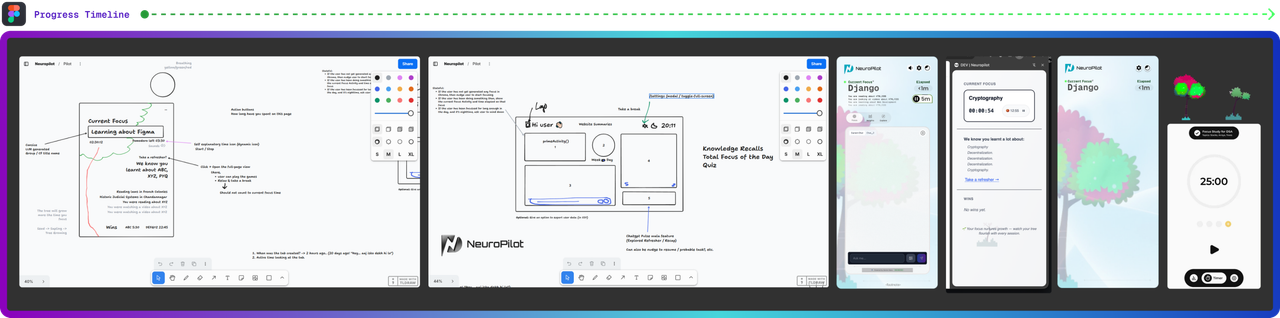

Research 📚
We don’t remember things just because we saw them. We remember them when we bring them back to mind. A small, well-timed reminder can turn a passing moment online into something that actually sticks. And it works better when the reminder supports your intention rather than trying to control your behavior. When your browser can quietly keep track of the ideas you spent time on and surface them again when you need them, the pressure of “trying to hold everything in your head” eases up.
This is especially supportive for people with ADHD, where working memory and task switching can feel heavy, and for people who experience early memory decline, where gentle spaced recall helps keep learning active. NeuroPilot helps keep the thread. Small nudges, quick check-ins, and context that stays with you, so you don’t have to start from scratch every time you return to a thought.
- Distractibility trait linked to ADHD
- Fighting ADHD along the hustle culture: How can employees keep their mental health in check
- Study of Internet addiction in children with attention-deficit hyperactivity disorder and normal control
- ADHD Youth and Digital Media Use
- Attention Spans — Podcast (APA)
- Digital Distractions (ADDitude Magazine – tag archive)
- What if the Attention Crisis Is All a Distraction? (The New Yorker)
- Distraction fatigue vs ADHD: How technology is reshaping our attention spans
- Retrieval practice helps strengthen memory by actively recalling information (FPSYG, 2019)
- Spaced retrieval improves retention by revisiting information over time (Mavmatrix, art. 1160)
- Small external cues and short recall prompts support working memory in ADHD
- Gentle reminders and cueing tools help reduce memory load in dementia (NCBI, 2017)
- Retrieval reactivates and stabilizes memory traces when spaced and repeated
- Everyday memory aids help maintain independence and reduce strain in dementia
NeuroPilot keeps attention anchored to meaning, not effort! ✨
Challenges we ran into 😤
We did run into a few challenges along the way. Since we were working from different time zones, coordinating calls and staying in sync took some extra effort. Most of our collaboration happened asynchronously, which meant we had to be very clear about decisions and hand-offs.
On the technical side, figuring out what “real attention” meant was something we had to refine multiple times. We experimented with how much weight to give scroll patterns, mouse movement, viewport position, and reading pace so that quick skims didn’t count as learning. Handling different types of content also took care — especially images and YouTube videos — since the context needed to stay meaningful, not noisy.
We also had to make sure the background processes didn’t slow Chrome down. That propelled us to develop a custom lightweight scheduler to execute daily cleanup for stored attention data, and to do careful indexing. And since the Chrome AI APIs are still evolving (and some under Origin trial), we added checks and fallbacks to make sure the experience stays smooth even when the model isn’t available.

Accomplishments that we’re proud of ✨
We didn’t build NeuroPilot as a quick AI experiment. We took the time to make it something you can actually use every day and to make Chrome a bit more intelligent. The attention tracking, the gentle nudges, the recall prompts, the chat that remembers context — these only feel simple on the surface because the system underneath is steady and well-structured. Running everything on-device meant we had to design our own data flow, timing logic, and storage patterns instead of leaning on servers or shortcuts.
NeuroPilot doesn’t just react to whatever is on the screen. It follows the thread of what you’re learning across sessions, spots when your focus slips, and supports you without breaking your pace. The pulses, quizzes, and highlight actions are small, but they show up at the right times and in ways that stay out of the way. This isn’t a prototype or a flash of novelty. It’s built to last, built to scale, and built to actually help learning stick.
What we learned 🙌
Proper sleep is very important! 😛
Well, a lot of things, both summed up in technical & non-technical sides. We learned that — it’s one thing to get the AI features working, and another to make them feel good while someone is actually browsing. Most of our time went into small details: when to nudge, when to stay quiet, how to store attention history without slowing Chrome, and how to keep things calm instead of distracting. Shipping NeuroPilot from a barebone idea into something stable took a lot of iteration, testing, and rethinking. It reminded us that real products are built in the tiny decisions, not the big demos! 🤗

What’s next for NeuroPilot 🚀
We’re moving NeuroPilot toward being a natural part of everyday browsing, where it quietly supports focus and recall without adding extra steps or friction. We'll keep on working on this to help release v1.1.0 in the next release cycle. The next phase includes spaced reminders that surface what you were learning at the moment it’s most likely to be forgotten, along with a simple way to see how topics you’ve explored relate to one another over time. We’re refining the micro-quiz experience so it feels smooth, optional, and helpful rather than interruptive. On the practical side, we’re expanding language support and improving runtime efficiency so NeuroPilot remains fast and reliable on long sessions and on lower-spec machines. We’re also exploring direct export into common note-taking tools and lightweight collaboration for shared study threads.
License — Apache-2.0 license, and Please drop a like ❤ if you like it!

Built With
- ai
- chromeextension
- chromium
- dexiejs
- e2ee
- focus
- gemini-nano
- hci
- machine-learning
- ondeviceai
- plasmo
- react
- tailwindcss
- typescript
- webai
- zod




Log in or sign up for Devpost to join the conversation.