-
-
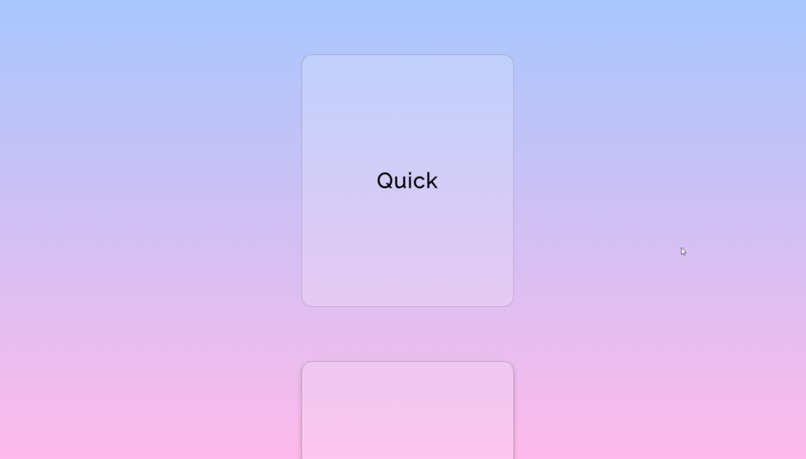
view memo
-
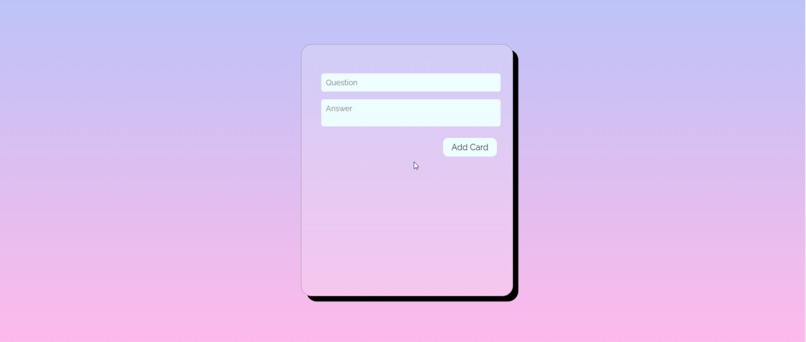
add memo


Inspiration 💡
Our inspiration for creating QuickMemo came from a shared desire to help students enhance their learning experience. We wanted to create a simple and efficient tool that assists them in remembering important information easily.
What it does 🚀
QuickMemo is a user-friendly flashcard website designed to help students memorize and review information effectively. It allows users to:
Add Flashcards: Users can create new flashcards by entering the question and answer for each card.
View Flashcards: QuickMemo displays the created flashcards for easy reference and review.
Delete Flashcards: Once users have mastered a flashcard, they can easily delete it from their collection, reducing clutter and focusing on what's left to learn.
How we built it 🔨
We built QuickMemo using basic web technologies:
HTML: To structure the web page and create forms for adding and viewing flashcards.
CSS: To style the website and make it visually appealing and user-friendly.
JavaScript: To handle user interactions, manage flashcards, and utilize the localStorage API for data storage.
Here's a timelapse of one of us working on the project. We deployed our website, using Netlify. Feel free to check it out.
Challenges we ran into 🤔
Throughout the development process, we encountered several challenges:
LocalStorage Limitations: Working with localStorage posed limitations in terms of storage capacity, which required us to implement efficient data management techniques.
Responsive Design: Ensuring that QuickMemo works seamlessly on various screen sizes and devices was a challenge that required careful CSS design.
Data Validation: Implementing data validation to ensure users provide both a question and answer for each flashcard without overcomplicating the user experience.
Accomplishments that we're proud of 🎉
Despite the challenges, we're proud of what we've achieved with QuickMemo:
User-Friendly Interface: We've created an intuitive and straightforward user interface that makes it easy for students of all ages to use.
Data Persistence: QuickMemo effectively utilizes localStorage to store flashcards, ensuring that users can access their study materials even after closing the browser.
Simplicity: We've kept the design and functionality simple and focused, making it accessible to a wide range of users.
What we learned 🧐
While working on QuickMemo, we learned valuable lessons about:
LocalStorage: We gained a deeper understanding of how to work with localStorage and manage data efficiently.
User Experience: We learned the importance of designing for a seamless user experience, especially when creating educational tools.
Team Collaboration: Working together as a team, we improved our communication and collaboration skills, which are essential in software development projects.
What's next for QuickMemo 🌟
We have exciting plans for the future of QuickMemo:
User Accounts: We're considering adding user accounts to allow users to access their flashcards from different devices.
Enhanced Features: We aim to expand QuickMemo's functionality by adding features such as quiz modes, card categories, and more.
Community and Sharing: We plan to enable users to share their flashcards with others, creating a collaborative learning environment.
We're dedicated to continuously improving QuickMemo to make it an even more powerful and versatile tool for students and learners of all kinds. Stay tuned for updates!
Built With
- css
- git
- github
- html
- javascript
- local-storage


Log in or sign up for Devpost to join the conversation.