Summary of HW(4.0) – Arduino and Microcontrollers: Microcontroller Morse Code System
The Microcontroller Morse Code System project involves creating a Morse code input device using pushbuttons connected to a microcontroller (Arduino). It detects button press durations to differentiate dots and dashes, converts sequences into alphanumeric characters using arrays, and provides real-time LED feedback. Buttons 2 and 3 handle backspace, space, and help functions via short and long presses. The design emphasizes modular, scalable code and practical hardware solutions like debouncing by hardware adjustment. The system can be used as a secure input method or adapted into a Morse code keyboard interface.
Parts used in the Microcontroller Morse Code System:
Microcontroller (Arduino)
Pushbuttons (3 units)
LEDs (for feedback)
220-ohm resistors
Breadboard
Connecting wires
Ideation and Design:
Microcontroller Morse Code System development initially aimed to create a functional Microcontroller Fidget Keyboard System by linking mechanical switches to a microcontroller. This section explains how the system captures and interprets button presses to convert user input into Morse code. This led to an early pivot in design, driven by practical challenges and hardware limitations.
To avoid soldering and unreliable sensors, the focus shifted to using pushbuttons from the microcontroller kit. The system uses these components to build a Morse code decoder that lets users input messages through button presses. Their tactile feel and similarity to real keys made them a practical and engaging alternative, especially for those interested in Morse code.
Physical Wiring and Breadboard:
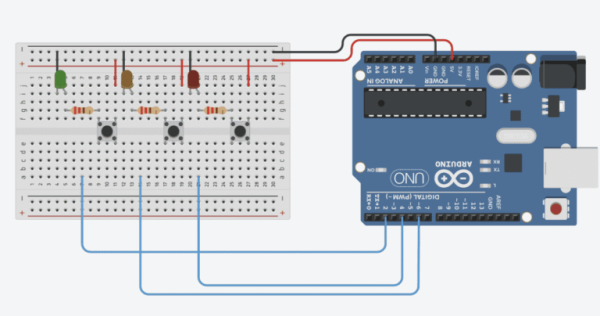
demonstrating a basic electronic circuit
Wiring a Morse code system on a breadboard in TinkerCAD involves connecting each button module to an Arduino input and pairing it with an LED and a 220-ohm resistor for visual feedback. The setup allows users to send Morse signals and instantly see responses, offering a clear, hands-on wiring guide.
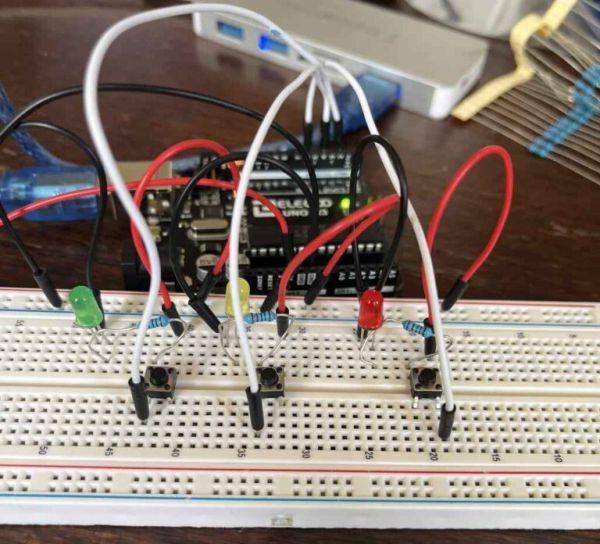
When built physically, the Breadboard looks like this:
common tools for prototyping circuits
The microcontroller Morse Code System uses LEDs to improve usability and provide real-time feedback. Each LED visually labels the function of its corresponding button and lights up when pressed, confirming the circuit is complete. This immediate, passive feedback helps users operate the device more intuitively. Since the wiring directly activates the LEDs—bypassing the microcontroller—the system stays simple yet still effectively indicates input.
Coding Process
The Microcontroller Morse Code System used a modular coding approach, starting with one input button as a base. This code was duplicated for two more buttons, each assigned specific functions in separate if statements. The method ensured consistency, simplified development, and made the system easier to scale and maintain.
Coding Initial Variables
// Button Input Setup
const int buttonPin1 = 2;           // Button #1 input pin
int button1State = 0;               // Current button state (0/1)
int button1PreviousState = 0;       // Previous button state to prevent multiple triggers
int button1Press = 0;               // Time when button was pressed
int button1Release = 0;             // Time when button was released
int button1Duration = 0;            // Duration of button press
int CurrentTime = 0;                // Time since code started

// Morse Code Input & Output
int Letter[5];                      // Array to store dots (1) and dashes (2)
int CurrentLoop = 0;                // Index for Letter[] array
String CurrentWord = "";            // Decoded output word

// Morse Code Character Mapping
char* AlphaNumericals[36] = {
  "A", "B", "C", "D", "E", "F", "G", "H", "I", "J",
  "K", "L", "M", "N", "O", "P", "Q", "R", "S", "T",
  "U", "V", "W", "X", "Y", "Z", "1", "2", "3", "4",
  "5", "6", "7", "8", "9", "0"
};

// Morse code patterns as integer sequences (e.g., 1 = dot, 2 = dash, 0 = end)
int MorseCodes[36] = {
  12000, 21110, 21210, 21100, 10000, 11210, 22100, 11110, 11000, 12220,
  21200, 12110, 22000, 21000, 22200, 12210, 22120, 12100, 11100, 20000,
  11200, 11120, 12200, 21120, 21220, 22110, 12222, 11222, 11122, 11112,
  11111, 21111, 22111, 22211, 22221, 22222
};
Manages several input buttons using an effective variable management strategy. Important factors like buttonPin, buttonState, and buttonDuration are initially specified for Button 1, then copied for Buttons 2 and 3 by just altering the number. This promotes readable, scalable, maintainable code, reduces redundancies, and guarantees clarity.
Explains the data structures used to store and process Morse code signals. The Letter[5] array holds the dot-dash pattern for each character, while CurrentLoop tracking the current index in that sequence. CurrentWord accumulates decoded characters into a readable output. This structure supports organized and efficient Morse code decoding.
The microcontroller Morse Code System uses key data structures to translate Morse code into readable characters. The AlphaNumericals array stores letters and numbers, while the MorseCodes array holds corresponding numeric Morse sequences. Each input matches an index in these arrays, enabling accurate, real-time decoding. This ensures efficient and organized translation of user input.
Set up Void Function
The initial setup configures hardware inputs and starts serial communication, allowing the system to receive user input and provide feedback. It connects buttons to the microcontroller and offers clear startup instructions, helping users interact with the Morse code system effectively from the beginning.
This section explains how the system captures and interprets button presses to convert user input into Morse code. The approach is based on detecting button press and release events in real time and calculating the duration of the press to determine the input type.
Sensing the downstroke: Captures the moment the button is pressed and updates the previous state for accurate timing.
Sensing the upstroke: Captures the moment the button is released to calculate how long the button was held.
Calculating duration of press: The difference between press and release times determines the type of signal.
If duration > 0.5 sec: Stores a 2 in the Letter[5] array for a dash (_) and increments the index.
If duration < 0.5 sec: Stores a 1 for a dot (.), also incrementing the index.
The input system’s design separates brief (dots) from long (dashes) using button press length. The system translates physical motions into digital Morse code by measuring how long the user holds the button. Although the code displayed is for Button 1, Buttons 2 and 3 share the same logic, hence the system is scalable and modular. This guarantees correct input detection throughout several controls and offers a dependable, easy-to-use interface for Morse code production.
The explanation covers the state-based logic for detecting and interpreting button input durations. The system’s main purpose is to uniquely identify each press (downstroke) and release (upstroke) by actively tracking button state changes. This approach measures the button hold duration, maintains accurate event timing, and avoids multiple reads from a single press.
Specifically, the method includes:
Sensing the downstroke only if state changes: This avoids repeat detection from continuous holds. The press time is recorded and PreviousState is set to HIGH.
Sensing the upstroke: On release, the time is recorded and PreviousState is set to LOW.
Calculating duration: Determines how long the button was held.
Classifying input: If held > 0.5 sec, a dash (‘_’) is stored; if < 0.5 sec, a dot (‘.’) is stored in Letter[5] at the CurrentLoop index.
Incrementing index: After each input, CurrentLoop is increased to store inputs sequentially.
This system ensures reliable, real-time conversion of button presses into Morse code symbols, enabling accurate message creation.
Automatic Wait Time and Morse Code Translation
This enhancement adds an automatic wait period before converting input into a letter or number. Its purpose is to give users a short window (X seconds) to complete or adjust their input. This makes the system more forgiving, reducing errors from brief pauses or incomplete entries and improving overall input accuracy.
CurrentTime = millis();
  int button1Pause = CurrentTime - button1Press;
  if (button1Pause > 3000 && Letter[0] != 0) {

    int CurrentCode;
    int Let = 0;
    for (int j=0; j<5;j++) {
      Let = Let * 10 + Letter[j];
    }

    for (int i=0; i<36; i++) {
      CurrentCode = MorseCodes[i];
        if (CurrentCode == Let) {
          Serial.println("");
          CurrentWord = CurrentWord + AlphaNumericals[i];
          Serial.println(CurrentWord);
          Serial.println("");
        }
    }
    for (int i=0; i < 5; i++) {
       Letter[i]=0;
    }
This section of the project converts user input (dots and dashes) into a form fit for Morse code analysis. It occurs after a 3-second gap, and if the Letter[5] array has data. Using a base10 accumulation approach, the system converts the array of digits (e.g., {1, 2, 3, 4, 5}) into a single integer (Let = 12345) . The system requires this because the MorseCodes array stores complete integers. The conversion technique ensures accurate identification of Morse characters from the input sequence.
Letter[] = {1,2,3,4,5}
Let = 0;
Expanded Loop:
Let = 0 + Let[1] = 0+1 = 1
Let = 1*10 + Let[2] = 10+2 = 12
Let = 12*10 + Let[3] = 120+3 = 123
Let = 123*10 + Let[4] = 1230+4 = 1234
Let = 1234*10 + Let[5] = 12340+5 = 12345
In the Microcontroller Morse Code System, dots are stored as ‘1’ and dashes as ‘2’ in the Letter[5] array to ensure each input is distinguishable from empty array slots, which default to ‘0’.Storing dots as ‘0’ would prevent the system from distinguishing between real inputs and unused slots, breaking the “multiply by 10 then add” conversion method. By using ‘1’ and ‘2’, the design guarantees accurate input representation and reliable Morse code translation.
At this point in the project, the system transforms the user’s input—saved as a Let integer—into its corresponding alphanumeric character. It does so by comparing Let to values in the MorseCodes array. The system appends the matching letter or number (A–Z or 0–9) to the CurrentWord string upon finding a match. As a result, users can watch their message develop in real time as the system converts Morse code inputs into legible text.
The final step in the system’s cycle is to reset key variables to prepare for the next input. The Letter[5] array is cleared by setting all values to 0, removing any leftover data. The CurrentLoop variable is also reset to 0, allowing the system to correctly start a new sequence. These resets are essential for accurate, independent processing of each Morse code character.
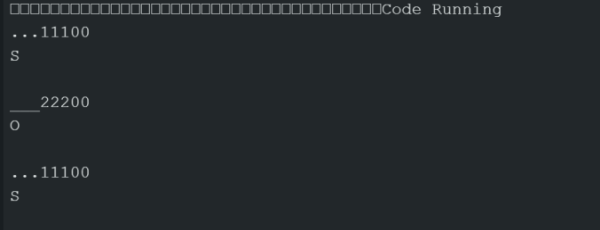
With this, I was able to type out letters!
SOSFirstTest
Buttons 2 and 3 – Space and Backspace
Active voice revision:
The system applies the same button-timing logic to buttons 2 and 3 for consistency. Still, there is a noted difference between the law and the physical layout in law; button 2 is the right red button( Backspace), and button 3 is the middle unheroic button( Space). This switch was purposeful to produce a further stoner-friendly and error-resistant layout by distancing secondary functions from the main input button.
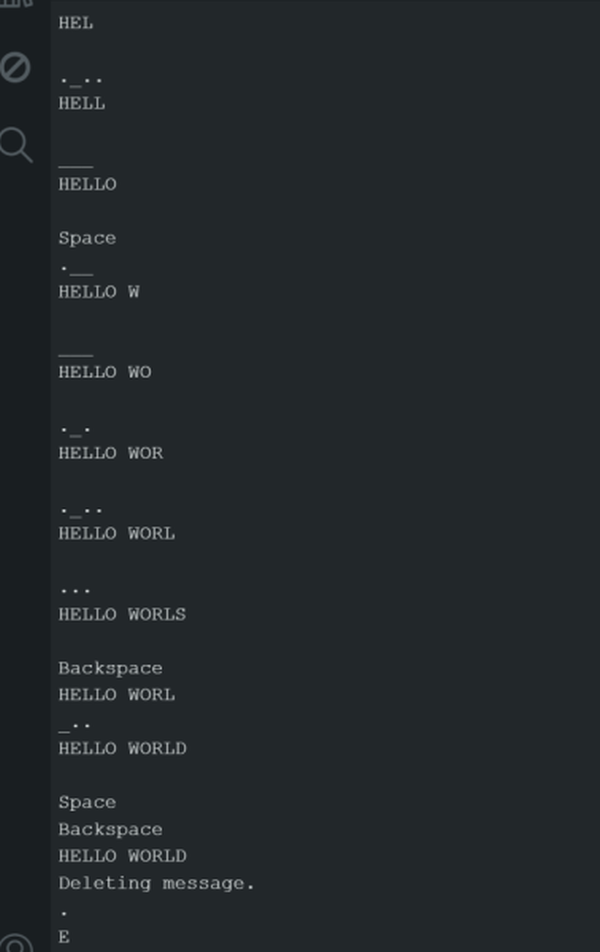
Button 2 handles two actions depending on press duration: a short press deletes the last character, and a long press clears the entire input. A press longer than 2 seconds clears the entireCurrentWord, functioning as a full delete. A press between 250 milliseconds and 2 seconds deletes only the last character, acting as a backspace. This dual-function design gives users more precise control over editing their input, improving efficiency and usability.
This final step of the backspace function removes the last character from the CurrentWord string and displays the updated result. It calculates the index of the last character (length minus one), removes itString.remove(index), and then prints the modified string. This gives users instant feedback, confirming that their input correction was successful.
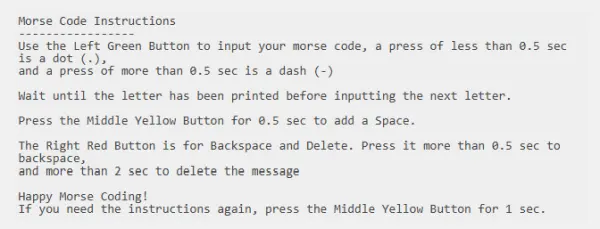
Button 3 triggers two actions based on press duration: a short press adds a space, while a long press displays abbreviated instructions.
A short press (250ms–1s) adds a space to the sentenceCurrentWord, helping users separate words. A longer press (over 1s) displays abbreviated instructions for user guidance. This makes the system more user-friendly by combining help and formatting into one button.
With this, I was able to write out a test with spaces and utilize the backspace function:
Microcontroller Morse Code System
Reflections
Difficulties and Challenges
The iterative design and debugging strategy used during code development involved creating multiple code versions and pseudocode to track progress and structure. The Serial Monitor output was frequently modified in earlier versions to test specific functions, such as displaying only _ and . During dot and dash input testing. This method helped isolate and verify individual components, ensuring accurate implementation and overall system reliability.
The issue of button bouncing, where vibrations cause repeated unwanted inputs, is addressed here. Instead of using software fixes, the developer physically adjusted the button’s metal pins to remove gaps between the button and breadboard. This practical solution stopped the bounce and made the system more accurate and reliable.
The main challenge faced by the inventor was understanding how Arduino and C handle data structures, especially compared to MATLAB. C uses zero-grounded indexing, unlike MATLAB’s one-grounded indexing, which added to the confusion. The inventor also acclimatized to how characters, strings, and integers work—for example, recognizing the difference between a single character (“A”), a character array like {“A”, “B”, “C”}, or a string array like {“ABC”, “DEF”}. This adaptation was pivotal for writing accurate law and ensuring the system worked properly.
The Microcontroller Morse Code System has its pros and cons. A key limitation is that design is restricted to the kit’s included parts, though extra components can be added as needed. A major advantage is its flexibility—for example, the developer spontaneously added LEDs as visual feedback, improving usability without prior planning.
Real-World Usage
The foundational concept of this project leverages the timing structures inherent in Morse Code. The basic purpose is to explore and implement a system that interprets timed button presses, much like Morse Code, for practical applications. One stated use is to enhance security by creating a unique Morse Code-based password mechanism for devices such as safes or locks. This project benefits others by offering an alternative and potentially more secure method of access control. The mention of integrating with a “mini-keyboard as a Morse Code input” further illustrates a practical application, showing how existing hardware could be adapted for this specialized input method.
I am an experienced technical writer holding a Master's degree in computer science from BZU Multan, Pakistan University. With a background spanning various industries, particularly in home automation and engineering, I have honed my skills in crafting clear and concise content. Proficient in leveraging infographics and diagrams, I strive to simplify complex concepts for readers. My strength lies in thorough research and presenting information in a structured and logical format.
This website uses cookies to improve your experience. We'll assume you're ok with this, but you can opt-out if you wish.ACCEPTCheck Privacy Policy
Manage consent
Privacy Overview
This website uses cookies to improve your experience while you navigate through the website. Out of these, the cookies that are categorized as necessary are stored on your browser as they are essential for the working of basic functionalities of the website. We also use third-party cookies that help us analyze and understand how you use this website. These cookies will be stored in your browser only with your consent. You also have the option to opt-out of these cookies. But opting out of some of these cookies may affect your browsing experience.
Necessary cookies are absolutely essential for the website to function properly. This category only includes cookies that ensures basic functionalities and security features of the website. These cookies do not store any personal information.
Any cookies that may not be particularly necessary for the website to function and is used specifically to collect user personal data via analytics, ads, other embedded contents are termed as non-necessary cookies. It is mandatory to procure user consent prior to running these cookies on your website.