
Summary of Snake Game on 8×8 Matrix using Arduino
This article describes an Arduino-based Snake Game project using an 8x8 LED dot matrix for the snake and food display, a 16x2 LCD for showing the score, and push buttons for control. The Arduino UNO manages the game logic, including snake movement, scoring, and game over conditions. The game begins with a welcome message, and players use directional buttons to move the snake to eat food, increasing the score and snake length until collision ends the game.
Parts used in the Arduino Snake Game:
- Arduino UNO
- 8x8 LED Dot Matrix Display
- Shift Register 74HC595
- 16x2 LCD
- POT 1K
- Push Buttons
- Connecting wires
- Bread Board
- Power Supply
Snake Game has been very popular since the beginning of the Mobile phones. Initially it was come in Black and white cell phones, and soon became very famous. Then with the advancement of the Cellphones, this game has also changed a lot, and now many graphical and colourful versions of this game are available.
Snake game has also become very popular DIY project for electronics Hobbyist and Students. So today we are going to demonstrate, Arduino Snake Game, with all its basic functionalities, while keeping it simple at the same time.
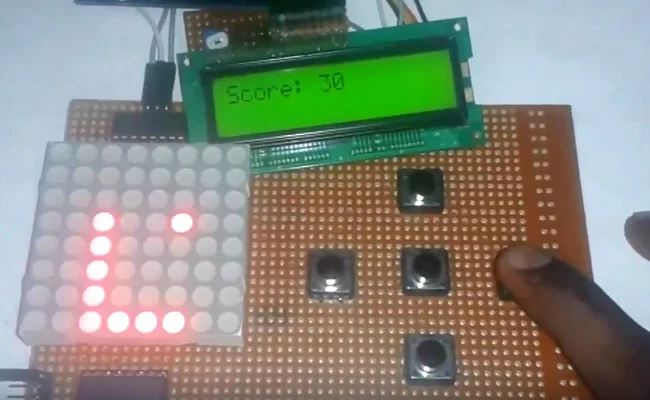
Components Used:
- Arduino UNO
- 8×8 LED Dot Matrix Display
- Shift Register 74HC595
- 16×2 LCD
- POT 1K
- Push Buttons
- Connecting wires
- Bread Board
- Power Supply
Working Explanation:
This is little complicated game to build. But in this tutorial, we have made it simple for you. To make this project, we have used an 8×8 red colour Dot matrix display for displaying the snake and its food dot, a LCD for displaying the points or score, 5 push buttons for giving directions and start the game and finally an Arduino UNO for controlling the whole the process. Pin diagram of 8×8 LED Dot Matrix Display with its original image has been given below: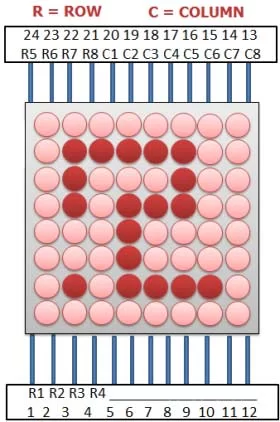
When we power up the circuit, first we show a welcome message and then a “Press Start To Play” hint on the LCD. After this, LCD shows the score as zero and dot matrix display shows two dots as snake and a single dot as food.
Now user need to press the middle button to start the game and snake start moving in upward direction by default. Then user needs to give direction to snake by pressing the ‘Direction keys’ around the middle button. Here we have used five keys (push buttons) namely Left key, Right key, Up key, Down key and Start key. Whenever the snake reaches to the food dot or eats the food, score increases by 5 points each time and the Snake length is increased by one dot (LED) each time, also snake speed become faster than before. And whenever snake would strike at any wall or reach at the end of LED matrix, then it would end the game (“Game Over”). Then user needs to start game again by pressing start key.
Read More: Snake Game on 8×8 Matrix using Arduino

