
Summary of Tracked Robot Bluetooth Controlled by Arduino Via Android Application
The project entails converting a Tamiya tracked robot platform to be controlled via Bluetooth using an Arduino UNO and an Android application. This setup replaces IR remote control with a more reliable Bluetooth connection, enabling longer range control through a free Android RC car app. The robot assembly involves mechanical setup of the Tamiya track and wheels, installing the Arduino, Bluetooth HC-06 module, L298N motor driver, LEDs, and a buzzer on the chassis, followed by wiring according to specified pins. Programming is straightforward, with no advanced coding skills required. The project is low-cost and suitable for home use.
Parts used in the Tracked Robot Bluetooth Controlled by Arduino Project:
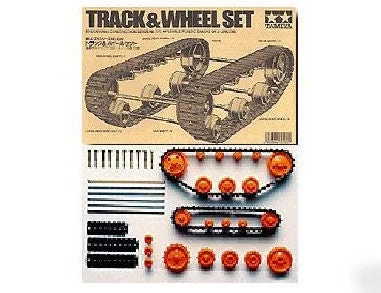
- Tamiya Track and wheel set
- Tamiya Gear box - Individual drive with two motors
- Tamiya perforated plastic plate
- Dupont wires (200 mm)
- Arduino UNO
- HC-06 Bluetooth module for Arduino
- L298N Dual H-Bridge motor drive module
- 2 LEDs (different colors)
- 2 Resistors (1 kohm, 1/4 watt)
- Piezo buzzer
- Battery (5-12V)
- Screwdriver (tool)
- Plier (tool)

After trying to remote tracked robot by IR remote control.I have proceed to control same robot platform by Bluetooth
Arduino controller via Android application.This method is more reliable,longer distance,pretty Android application enhancement.
Same principle,low cost play and home level technical skill.Programming khownledge is not necessary.
Thanks for free download Arduino Bluetooth RC Car from Google play.
Project more : http://hobbywitch666.blogspot.com
You can purchase electronic parts from Aliexpress, Banggood, ebay,etc.
Step 1: Materials and Tools
Materials
1.Tamiya Track and wheel set.
2.Tamiya Gear box – Individual drive-two motors.
3.Tamiya perforated plastic plate.
4.Dupont wires 200 mm.
5.Arduino UNO.
6.HC-06 Bluetooth module for Arduino.
7.L298N Dual H-Bridge motor drive module.
8. 2-LEDs(Different color)
9. 2-Resistor 1 kohm. 1/4 watt.
10.Piezo buzzer.
11.Battery 5-12V.
Tools
1.Screw driver.
2.Plier.
Step 2: Mechanical Assembly & Electrical Connecting

1.Assembly Track and wheel set as manual instruction.
2.Install Arduino UNO controller ,LEDs ,Buzzer,L298N motor drive module and battery on chassis.
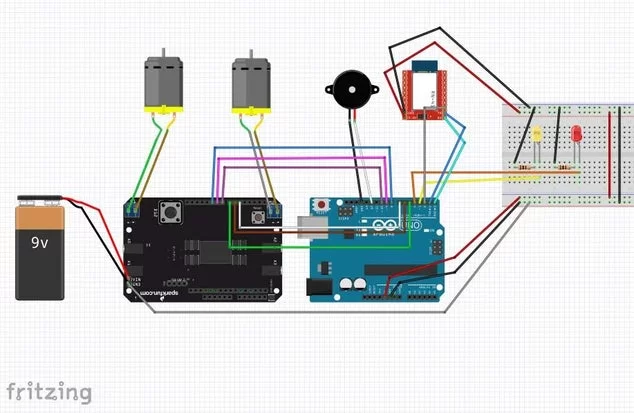
3.Wiring all components together as circuit diagram.(In diagram,It’s another motor drive module, I cannot find L298N device.)
Arduino pins to HC-06 :
0 – Rx
1 – Tx
2 – State
Arduino pins to L298N motor drive module :
10 – ENA
9 – IN1
8 – IN2
7 – IN3
6 – IN4
5 – ENB
Connect Arduino GND pin and L298N motor drive module GND.
Arduino pins to L298N motor drive module :
Connect power output to Motor A and B
Connect battery to Arduino controller and L298N drive module (can use battery up to 12V.)
Arduino pins to other parts :
Front light LED – 3
Back light LED – 4
Piezo buzzer – 12
Step 3: The Sketch Code and Android Application
Arduino sketch code :
1.Down load and install attached main sketch.
2.Upload sketch to Arduino controller.(Before click upload ,it’s necessary to take HC-06 Bluetooth 5V. power off)
3.Open Arduino software serial monitor to see output.
Smart phone/Tablet Android application installation :
1.Use Android smart phone to install “Arduino Bluetooth RC Car” free application from Google play store.
2.Pair Bluetooth communication between smart phone and HC-06.
2.1 Scan device and pair.Password of HC-06 is “1234” from factory.
2.2 After paired ,open application and choose BT connection menu on application to connect between devices.
2.3 If communication complete,green light will appear.If communication not complete,red light will blink.Try to pair device again.
Test each functions on application to find wrong wiring or any mistakes during installation.Normally,software have been tested many times.It should not have any problems.
Let’s enjoy!
Source: Tracked Robot Bluetooth Controlled by Arduino Via Android Application

