In this post, we feature a comprehensive article on Java Hash. We shall explain what are hashes in Java and how to use them in a data structure called Map.
Table Of Contents
1. What is a hash in Java
According to Wikipedia, a hash is a small, fixed size value which is the result of encoding data using a hash function. A hash is also called hash value, hash code, or digest. A hash function is a function that can be used to map data of arbitrary size to fixed-size values.
An example of a hash in Java function is shown in Figure 1, which maps a String of arbitrary size to a fixed size integer number.

A hash in Java-function should calculate the hash value as quickly as possible and if it is being used in security-critical applications, it shouldn’t be predictable (i.e. it should be very difficult or impossible to retrieve the initial value from the hash value). It should use what is called a scatter storage technique in order to avoid the hashes to be concentrated in specific areas. There are many ways to implement hash functions, e.g. to use prime number division, mid square, move or folding just to mention a few, but they are beyond the scope of this article.
The following hash function, written in jshell (jshell has been introduced in JDK 9) hashes numbers from 0 to 1000 to the [0-10] range inclusive (boundary checks in the hash() method are omitted for brevity):
jshell> int hash(int x) { return x%100; }
created method hash(int)

jshell> hash(5)
$1 ==> 5

jshell> hash(50)
$2 ==> 50

jshell> hash(150)
$3 ==> 50

jshell> hash(100)
$4 ==> 0

jshell> hash(500)
$5 ==> 0

jshell> hash(11)
$6 ==> 11

jshell> hash(111)
$7 ==> 11
You may notice that this hash function produces the same hash value for different inputs. This is called a collision and it is inevitable in most cases. Input values that produce the same hash are called synonyms. A good hash function should avoid collisions or reduce them as much as possible. A hash function that produces no collisions is called to be perfect but this is very rare to find. Hash functions with high number of collisions are said to demonstrate the phenomenon of clustering and should be avoided.
The following hash function does a better job but cannot eliminate collisions completely:
jshell> int hash(int x) { return x%7; }
 |  modified method hash(int)

jshell> hash(5)
$10 ==> 5

jshell> hash(50)
$11 ==> 1

jshell> hash(150)
$12 ==> 3

jshell> hash(100)
$13 ==> 2

jshell> hash(500)
$14 ==> 3

jshell> hash(11)
$15 ==> 4

jshell> hash(111)
$16 ==> 6
Using prime numbers in hash functions is a good technique. There are a number of techniques to tackle collisions that go beyond the scope of this article and are mentioned here for completion: open addressing, chaining and pseudochaining.
Open addressing has a number of subcategories:
- linear search (or linear probing or open overflow or progressive overflow) , where the key that collides is stored in the next available free slot. If the end of the map is reached, then the first available free slot from the beginning is being used in a cyclic way, i.e.
(hash(key) + 1) % m, wheremis the map’s size. - nonlinear search where e.g. binary tree hashing is used
- double hashing where in case of collision another hashing is attempted, different that the first
Chaining methods use another data structure (a chain) to store synonyms. Keys (which in this case are called headers or buckets) simply point to a ‘chain’, which usually is a linked list (which can be sorted or not) or a tree structure.
Pseudochaining doesn’t use a chain to store synonyms, but uses a ‘pseudo-index’ that logically links a key with its next synonym.
You may read more in Wikipedia.
2. When we should use a hash
Hash values are typically used as keys in hash tables. A hash table (or hash map or associative array) is a data structure that can map keys to values (see Figure 2). It uses a hash function to compute a hash that is used as an index into an array of buckets or slots, from which the desired value can be retrieved/stored. The indexes or keys must be unique.

Cryptographic hash functions produce an output from which reaching the input is close to impossible. This property of hash in Java functions is called irreversibility. Examples:
- in cryptography used to authenticate message integrity
- as password hashes
- as message digests (e.g. SHA256)
3. Hashing in Java
Data structures in Java are categorized into two big categories, collections or sequences that inherit from interface Collection (which in turn inherits from Iterable interface), and associative arrays which inherit from interface Map<K, V> (see Figure 4). Map is a generic interface (see Figure 3) that accepts two generic types, K for the type of the key, and V for the value type.
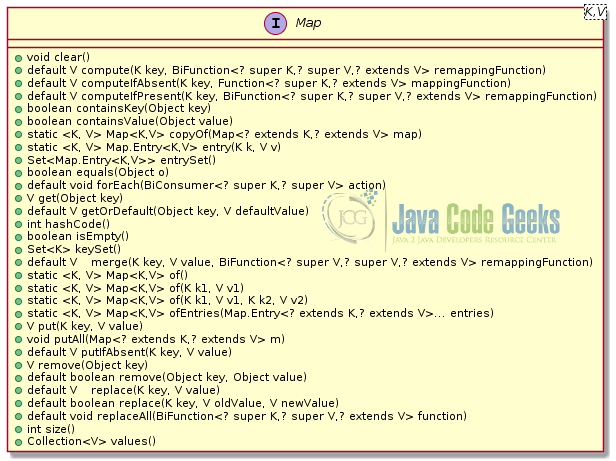

Sub-interface SortedMap guarantees that the keys are sorted while NavigableMap provides methods that allow to search for the key that has value closer to the value you provide. We shall explain all these in more detail in the following subsections.
Java, till version 13 at least, doesn’t allow primitives neither as keys nor as values in a Map. If you wish to store a primitive to a map, you need to use its wrapper type (Byte for byte, Short for short, Char for char, Integer for int, Long for long, Float for float, Double for double).
We saw previously how to calculate a hash of a number with the help of a hash function. But how can we calculate the hash of an object? Actually, the Object class, where all objects derive from, does have a method called hashCode() to override:
public int hashCode() {}
According to “Effective Java” book of Joshua Bloch, “you must override hashCode in every class that overrides equals. If you fail to do so, your class will violate the general contract for hashCode, which will prevent it from functioning properly in collections such as HashMap and HashSet.” Equal objects must have equal hash codes.
In short, a good hashCode() method must:
- always generate the same hash value for the same input
- be based only on those attributes that identify the object
- use the same attributes as
equals() - be performant
But how can you create a good hashCode() method implementation? This turns out to be an easy task with modern IDEs. All modern IDEs provide an action to generate an equals() and hashCode() method of a class based on the attributes of the class that you choose.
Let’s assume the following class:
public class Student {
    private final long id;
    private final String name;
    private short grade;

    public Student(long id, String name) {
        this.id = id;
        this.name = name;
    }
    // getters and setters
}
To generate an equals() and hashCode() method in IntelliJ Idea, right-click inside the editor and outside of any method and select Generate… from the popup menu, and then equals() and hashCode(). Depending on the version of Idea that you are using, a wizard with appear, which will allow you to choose the attributes to be used in the two methods; always choose the same fields (e.g. all three in our example, or only the id if you are sure that there cannot be two students with the same id) . The following code will be generated in the place where the cursor is:
@Override
public boolean equals(Object o) {
    if (this == o) return true;
    if (o == null || getClass() != o.getClass())
        return false;
    Student student = (Student) o;
    return id == student.id &&
            grade == student.grade &&
            Objects.equals(name, student.name);
}

@Override
public int hashCode() {
    return Objects.hash(id, name, grade);
}
In NetBeans the process is similar, right-click inside the editor and outside of any method and select equals() and hashCode()… from the popup menu. Select the attributes that you wish to include in the two methods (always choose the same fields for both) and click on Generate. The following code will be generated in the place where the cursor is:
@Override
public int hashCode() {
     int hash = 5;
     hash = 71 * hash + (int) (this.id ^ (this.id >>> 32));
     hash = 71 * hash + Objects.hashCode(this.name);
     hash = 71 * hash + this.grade;
     return hash;
 }
 @Override
 public boolean equals(Object obj) {
     if (this == obj) {
         return true;
     }
     if (obj == null) {
         return false;
     }
     if (getClass() != obj.getClass()) {
         return false;
     }
     final Student other = (Student) obj;
     if (this.id != other.id) {
         return false;
     }
     if (this.grade != other.grade) {
         return false;
     }
     if (!Objects.equals(this.name, other.name)) {
         return false;
     }
     return true;
 }
Finally, in Eclipse, right-click inside the editor and outside of any method and select Source -> Generate hashCode() and equals(). Select the attributes to use and click on OK. The following code will be generated in the place where the cursor is:
@Override
public int hashCode() {
     final int prime = 31;
     int result = 1;
     result = prime * result + grade;
     result = prime * result + (int) (id ^ (id >>> 32));
     result = prime * result + ((name == null) ? 0 : name.hashCode());
     return result;
}
@Override
public boolean equals(Object obj) {
     if (this == obj)
         return true;
     if (obj == null)
         return false;
     if (getClass() != obj.getClass())
         return false;
     Student other = (Student) obj;
     if (grade != other.grade)
         return false;
     if (id != other.id)
         return false;
     if (name == null) {
         if (other.name != null)
             return false;
     } else if (!name.equals(other.name))
         return false;
     return true;
 }
A good hashCode() implementation must distribute the hashes equally in the buckets of the map. Forgetting to implement a hashCode() method while adding your objects in a map is a bug often difficult to spot.
3.1 Deprecated map data structures
In the initial implementations of the language, a number of associative data structures where created (see Figure 5). These are legacy implementations and it is not recommended to be used in your programs any more, due to poor performance.
Hashtable implements the Map<K,V> interface and inherits from the abstract class Dictionary which is also legacy. However, Properties class which inherits from Hashtable is being used to store properties of programs to key-value properties files. These are configuration files that can be used to modify the properties of a Java program without the need to recompile it. Properties files are also heavily used to localize applications, i.e. present the user interface in many different languages (or locales) without the need to recompile them.

This article explains how to use the Properties class.
3.2 HashMap
HashMap in Java is implemented using chaining, as explained above, where a LinkedList is used as the chain. As of hash in Java 8, when the number of items in a hash is larger than a certain value, balanced trees are being used instead of linked lists, in order to improve performance from O(n) to O(log n). This implementation has been applied to java.util.HashMap, java.util.LinkedHashMap and java.util.concurrent.ConcurrentHashMap (see HashMap changes in Java 8 article for more details as well as Performance Improvement for HashMaps with Key Collisions).
A key object’s hashCode() method is used to find the bucket where to store/retrieve the value. If two key objects have the same hash (collision), they will end up into the same bucket (i.e. the associated LinkedList will contain two entries). This and this article explain how HashMaps are implemented in Java.
The following listing shows in jshell the creation of an instance of a HashMap that accepts Strings as keys and Strings as values (e.g. maps database names to their default ports):
jshell> Map<String, String> map = new HashMap<>();
map ==> {}
The String class implements the hashCode() method and as a result instances of it can be used as map keys without issues.
Since version 1.5, maps, like collections in the Java language, use generics to denote the types of keys and values that should be stored in this map.
3.2.1 Constructors about hash in Java
HashMap()creates an emptyHashMapHashMap(Map<? extends K,? extends V> map)a copy constructor that creates a newHashMapand copiesmapinto itHashMap(int initialCapacity)creates a newHashMapwith initial size equal toinitialCapacityHashMap(int initialCapacity, float loadFactor)creates a newHashMapwith initial size equal toinitialCapacityandloadFactorthe percentage by which the map will be rehashed (HashMaps in Java are dynamic i.e. they can grow). If the map’s size ismand the number of entries (keys) stored in itn, thenloadFactor = n/m(default is 0.75).
3.2.2 Insert elements
V put(K key, V value)adds a new key-value pair ifkeydoesn’t exist in the map or replaces thevaluewith the newvaluefor an existingkey; returns the oldvalueornullV putIfAbsent(K key, V value)mapskeytovalueonly if previous value isnull; ifvalueis notnullit replaces the old value with the new value and returns the old valuevoid putAll(Map<? extends K, ? extends V> map)adds all entries ofmapto this hash mapMap<K,V> of(K k1, V v1, ..., K k10, V v10)factory method that creates a new immutable map from the key-value pairs passed as parameters
jshell> map.putIfAbsent("mysql", "3306");
$1 ==> null

jshell> map.putIfAbsent("postgresql", "5432");
$2 ==> null

jshell> map.putIfAbsent("SQL Server", "1432");
$3 ==> null

jshell> map.put("SQL Server", "1433");
$4 ==> 1432

jshell> Map<String, String> roMap = Map.of("mysql", "3306", "postgresql", "5432", "SQL Server", "1432", "SQL Server", "1433");
 |  Exception java.lang.IllegalArgumentException: duplicate key: SQL Server
 |        at ImmutableCollections$MapN.(ImmutableCollections.java:800)
 |        at Map.of (Map.java:1373)
 |        at (#4:1)

jshell> Map<String, String> roMap = Map.of("mysql", "3306", "postgresql", "5432", "SQL Server", "1433");
roMap ==> {mysql=3306, postgresql=5432, SQL Server=1433}"
The method of() doesn’t allow null elements. You can also create an immutable map by using the method Map.ofEntries() which uses the nested class Map.Entry:
jshell> import static java.util.Map.entry;

jshell> Map<String, String> roMap = Map.ofEntries(
    …> entry("mysql", "3306"),
    …> entry("postgresql", "5432"),
    …> entry("SQL Server", "1433"));
roMap ==> {mysql=3306, postgresql=5432, SQL Server=1433}
V computeIfPresent(K key, BiFunction<? super K, ? super V, ? extends V> remappingFunction)attempts to compute a new mapping given thekeyand its current mappedvalue, if the value for the specifiedkeyis present and non-null. If the result of the remapping bifunction isnull, then the entry will be removed from the map.
In the following example we wish to build the JDBC URL of a database entry:
jshell> map.computeIfPresent("mysql", (k,v) -> "jdbc:" + k + "://localhost:" + v);
$5 ==> "jdbc:mysql://localhost:3306"

jshell> map.computeIfPresent("mysql", (k,v) -> "jdbc:" + k + "://localhost:" + v)
$6 ==> "jdbc:mysql://localhost:jdbc:mysql://localhost:3306"

jshell> map.computeIfPresent("derby", (k,v) -> "jdbc:" + k + "://localhost:" + v)
$7 ==> null

jshell> map
 map ==> {postgresql=5432, mysql=jdbc:mysql://localhost:jdbc:mysql://localhost:3306, SQL Server=1433}
The first command recalculates the value for the key "jdbc" and replaces the previous value "3306" to be "jdbc:mysql://localhost:3306". Calling computeIfPresent() again will recompute the value as shown in the second example, so you must be careful when using this method. Applying the operation on an non-existent entry returns null and the map remains untouched.
V computeIfAbsent(K key, Function<? super K, ? extends V> mappingFunction)computes a new value in case thekeydoes not exist in the map, by using themappingFuction. If themappingFunctionis evaluated tonull, then the map remains untouched and the returned value isnull.
The following example calculates the value of mongodb:
jshell> map.computeIfAbsent("mongodb",
    ..> k -> "jdbc:" + k + "://localhost:27017");
$8 ==> "jdbc:mongodb://localhost:27017"
Calling computeIfAbsent() again will not recompute the value. Since mongodb is now in the map (it was added at the previous call), the returned value will be the one returned above.
V compute(K key, BiFunction<? super K, ? super V,? extends V> remappingFunction)is a combination ofcomputeIfPresent()andcomputeIfAbsent().
jshell> map.compute("mongodb",
    ..> (k,v) -> "jdbc:" + k + "://localhost:"
    ..> + ((v == null) ? "27017" : v));
$9 ==> "jdbc:mongodb://localhost:27017"
In the above example we check whether the value exists or not and calculate the new value accordingly.
3.2.3 Replace elements
V replace(K key, V value)replaces the value retrieved by thekeywith the newvalueand returns the old value, ornullif the key didn’t exist or was pointing to anullvalueboolean replace(K key, V oldValue, V newValue)replaces the value retrieved by thekeywithnewValueonly if key’s value is equal tooldValuevoid replaceAll(BiFunction<? super K, ? super V, ? extends V> function)replaces all entries of a map based on the given function.
3.2.4 Access elements
V get(Object key)returns the value ofkeyornullif thekeydoesn’t exist or if it has not value associated with itV getOrDefault(Object key, V defaultValue)returns the value associated with thekeyordefaultValueif the key doesn’t exist or is not associated with any value
jshell> map.getOrDefault("mongodb", "27017");
$5 ==> "27017"
Set<Map.Entry<K, V>> entrySet()returns a set with the key-value associations of the hash mapMap.Entry<K, V> entry(K k, V v)returns an immutable key-value association of typeMap.Entryof the given keykand valuevSet<K> keySet()returns a set with the keys of the mapCollection<V> values()returns a collection with the values of the map
jshell> for (String name : map.keySet())
   ...> System.out.println(name);
postgresql
mysql
SQL Server

jshell> for (Map.Entry<String, String> entry : map.entrySet())
   ...> System.out.println(entry.getKey() + " : " +
   ...> entry.getValue())
postgresql : 5432
mysql : 3306
SQL Server : 1433
Map.Entry instances represent key-value associations, e.g. <"mysql" : "3305">:
interface Map.Entry { K getKey(); V getValue(); V setValue(V value); }
Keep in mind that HashMap is unordered. If you wish to keep the insertion order of the keys, use LinkedHashMap.
3.2.5 Remove elements
V remove(Object key)removes thekeyfrom the map and returns its valueV remove(Object key, Object value)removes thekeyfrom the map and returns its value only if has the givenvalueV removeIf(Predicate<? super E> filter)removes the entries from the map that satisfy the predicatevoid clear()deletes all entries of the map
jshell> map.remove("SQL Server", "1433");
$1 ==> 1433

jshell> map.entrySet().removeIf(e -> e.getValue().equals("1433"));
$2 ==> true
NavigableMap has two more methods to delete the first and last key of the sorted hashmap: pollFirstEntry() and pollLastEntry().
3.2.6 Search for elements
jshell> map.containsKey("SQL Server");
$7 ==> false
jshell> map.containsValue("3306");
$8 ==> true
3.2.7 Sort elements
TreeMap sorts its entries according to the natural ordering of its keys, or by a Comparator provided at the creation time. TreeMap inherits from SortedMap and NavigableMap:
jshell> TreeMap<String, String> treeMap = new TreeMap<>(map);
treeMap ==> {SQL Server=1433, mysql=3306, postgresql=5432}

jshell> treeMap.firstKey(); // NoSuchElementException if the map is empty
$1 ==> "SQL Server"

jshell> treeMap.firstEntry(); // NoSuchElementException if the map is empty
$2 ==> SQL Server=1433

jshell> treeMap.lastKey(); // NoSuchElementException if the map is empty
$3 ==> "postgresql"

jshell> treeMap.lastEntry() // NoSuchElementException if the map is empty
$4 ==> postgresql=5432

jshell> treeMap.subMap("m","p"); // "m" <= entries < "r"
$5 ==> {mysql=3306}

jshell> treeMap.subMap("m", true, "pr", true);  // inclusive = true
$6 ==> {mysql=3306, postgresql=5432}

jshell> treeMap.headMap("mysql"); // entries < "mysql"
$7 ==> {SQL Server=1433}

jshell> treeMap.headMap("mysql", true); // inclusive = true
$8 ==> {SQL Server=1433, mysql=3306}

jshell> treeMap.tailΜap("mysql"); // entries >= "mysql"
$9 ==> {mysql=3306, postgresql=5432}

jshell> treeMap.tailMap("mysql", false); // inclusive = false
$10 ==> {postgresql=5432}

jshell> treeMap.ceilingEntry("m"); // smallest entry >= "m"
$11 ==> mysql=3306

jshell> treeMap.floorEntry("n"); // biggest entry <= "S"
$12 ==> mysql=3306

jshell> treeMap.higherEntry("mysql"); // smallest entry > "mysql"
$13 ==> postgresql=5432

jshell> treeMap.lowerEntry("mysql");    // smallest entry < "mysql"
$14 ==> SQL Server=1433

jshell> treeMap.descendingMap()
$15 ==> {postgresql=5432, mysql=3306, SQL Server=1433}

jshell> treeMap.navigableKeySet()
$16 ==> [SQL Server, mysql, postgresql]

jshell> Iterator<String> i = treeMap.descendingKeySet().iterator()
 i ==> java.util.TreeMap$NavigableSubMap$DescendingSubMapKeyIterator@1b68ddbd
 jshell> while (i.hasNext())
    …> System.out.print(i.next() + " ");
 postgresql mysql SQL Server
One can also use the stream‘s sorted() method:
jshell> map.entrySet()
     .stream()
     .sorted(Map.Entry.comparingByKey(comparator))
     .collect(toMap(k -> k, v > v,
       (v1, v2) -> v1, LinkedHashMap::new));
You may replace Map.Entry.comparingByKey(comparator) with Map.Entry.comparingByValue(comparator) in order to sort the map by its values. We need to rely on LinkedHashMap instead of HashMap in order to preserve the iteration order. comparator might be for example:
Comparator comparator = Comparator.naturalOrder()
3.2.8 Copy elements
The following copy constructors perform a shallow copy:
HashMap(Map<? extends K,? extends V> map) creates a new HashMap from the entries of mapIdentityHashMap(Map<? extends K,? extends V> map)EnumMap(EnumMap<K, ? extends V> map)EnumMap(Map<K, ? extends V> map)TreeMap(SortedMap<K, ? extends V> map)ConcurrentHashMap(Map<? extends K,? extends V> map)ConcurrentSkipListMap(Map<? extends K,? extends V> map)ConcurrentSkipListMap(SortedMap<K,? extends V> map)
The following method also provides a shallow copy:
void putAll(Map<? extends K, ? extends V> map
Yet, a third way to do a shallow copy of a map is:
HashMap<String, String> copy = (HashMap<String, String>) map.entrySet().stream()
   .collect(Collectors.toMap(
       Map.Entry::getKey, Map.Entry::getValue));
For a deep copy you may use this library if you don’t want to do it by yourself.
Finally,
static Map<K,V> copyOf(Map<? extends K,? extends V> map)returns an unmodifiable map containing the entries of the given map.
3.2.9 Comparison
You can easily compare if two maps have equal entries by using its equals() method:
jshell> map.equals(roMap)
$1 ==> true
It all depends on the type of the values of course. If for example you use an array as the data type of the value of the map (e.g. Map<String, String[]> map), then because the array’s equals() method compares identities and not the contents of the arrays, the above method will return false (even if the arrays happen to contain the same values).
3.2.10 Merge
Merging two maps is the process of joining two maps into a single map that contains the elements of both maps. A decision needs to be made in case of key collisions (e.g. use the value belonging to the second map).
V merge(K key, V value, BiFunction<? super V, ? super V, ? extends V> remappingFunction)
If the given key is not associated with a value, or is associated with null, then the new value will be the provided value. If the given key is associated with a non-null value, then the new value is computed based on the given BiFunction. If the result of this BiFunction is null, and the key is present in the map, then this entry will be removed from the map.
In the following example, in case of key collisions, the sum of the values of each map is stored in the associated key of the resulting map:
jshell> Map<String, String> map1 = new HashMap<>(map);
map1 ==> {mysql=3306, SQL Server=1433, postgresql=5432}

jshell> map1.put("SQL Server", "1432")
$75 ==> "1433"

jshell> map.forEach(
     (key, value) -> map1.merge(key, value, (v1, v2) -> v1+", "+v2));
jshell> map1
map1 ==> {mysql=3306, 3306, SQL Server=1432, 1433, postgresql=5432, 5432}
Stream concatenation provides another solution to this problem:
Stream.concat(map.entrySet().stream(),
       map1.entrySet().stream()).collect(
         toMap(Map.Entry::getKey, Map.Entry::getValue,
       (v1, v2) -> v1+", "+v2));
For example, MongoDB listens to a number of ports 27017, 27018, 27019. The following commands concatenate all these ports:
jshell> map.merge("mongoDB", "27017, ", String::concat);
$1 ==> "27017, "

jshell> map.merge("mongoDB", "27018, ", String::concat);
$2 ==> "27017, 27018, "

jshell> map.merge("mongoDB", "27019", String::concat);
$3 ==> "27017, 27018, 27019"

jshell> map
map ==> {postgresql=5432, mysql=3306, mongoDB=27017, 27018, 27019}
3.2.11 Split
We may split (separate) a maps’ elements based on a Predicate.
Collectors.partitioningBy(Predicate p)separates the elements of a stream into two lists which are added as values to a map
jshell> Map<Boolean, List<String>> dbPortCategoriesMap = map.values().stream()
  .collect(Collectors.partitioningBy(
    (String p) -> Integer.valueOf(p) < 3000))
dbPortCategoriesMap ==> {false=[3306, 5432], true=[1433]}

jshell> List<String> portsGreaterThan3000 = dbPortCategoriesMap.get(false);
portsGreaterThan3000 ==> [5432, 3306]

jshell> List<String> portsLessThan3000 = dbPortCategoriesMap.get(true);
portsLessThan3000 ==> [1433]
3.3 Other Map types
3.3.1 LinkedHashMap
Insertion order is preserved in LinkedHashMap.
LinkedHashMap(int initialCapacity, float loadFactor, boolean accessOrder)ifaccessOrder == truethe entries are returned based on how recently they have been accessed, otherwise they are returned on insertion order
3.3.2 IdentityMap
Key comparison is done using == operator instead of equals().
jshell> Map<Integer, String> idMap = new IdentityHashMap<>();
idMap ==> {}

jshell> Integer i1 = new Integer(1);
i1 ==> 1

jshell> Integer i2 = new Integer(1);
i2 ==> 1

jshell> idMap.put(i1, "John")
$4 ==> null

jshell> idMap.put(i2, "Nick")
$5 ==> null

jshell> idMap
idMap ==> {1=John, 1=Nick}
As you might observe in the above example, even though i1.equals(i2), i1 != i2 because == operator checks for id equality of two objects. Objects i1 and i2 are not the same, even though they have the same value, as a result, they make two different keys. As an exercise, replace IdentityHashMap with HashMap.
3.3.3 EnumMap
It is used when we know in advance the keys to be used, and the keys won’t change so that we can assign an index to them. They have better performance than other maps.
Assume the following class Task:
class Task {
   private String description;
   private LocalDate dueDate;
   private Priority priority;
   // getters/setters
   // hashCode/equals
   // toString()
   ...
}
enum Priority {HIGH, MEDIUM, LOW};
Let’s create a map that stores lists of Tasks based on priority:
Map<Priority, ArrayDeque> taskMap = new EnumMap(Priority.class);
for (Priority p : Priority.values()) {
    taskMap.put(p, new ArrayDeque());
}

taskMap.get(Priority.HIGH).add(new Task("Birthday party", LocalDate.parse("2019-11-02"), Priority.HIGH));

taskMap.get(Priority.MEDIUM).add(new Task("Doctor appointment", LocalDate.parse("2019-11-18"), Priority.MEDIUM));

taskMap.get(Priority.HIGH).add(new Task("Book hotel", LocalDate.parse("2019-12-25"), Priority.MEDIUM));

Queue highPriorityTaskList = taskMap.get(Priority.HIGH);
System.out.println("Next high priority task: " + highPriorityTaskList.peek());
 // ==> Next high priority task: Birthday party
3.3.4 WeakHashMap
WeakHashMap uses WeakReferences for keys and strong references for values. An entry in a WeakHashMap will automatically be removed when its key is no longer used (i.e. loses all its references). Both null values and the null key are supported.
An example is provided in the article WeakHashMap In Java.
3.4 Thread safe maps
The above implementations of Map are not thread-safe. One way to make them thread safe is to wrap them with either Collections.synchronizedMap(Map<K,V> map) or Collections.synchronizedSortedMap(SortedMap<K,V> sortedMap)wrapper methods. These methods add a lock to every method of the map (or sorted map), providing unecessary (or too strict) locking thus affecting performance.
Java 5 added the ConcurrentHashMap while version 6 added the ConcurrentSkipListMap class (see Figure 6). They are both based on the simple idea that instead of needing to lock the whole data structure when making a change, it’s only necessary to lock the bucket that’s being altered.

The ConcurrentMap interface provides the following methods:
V putIfAbsent(K key, V value)associateskeywithvalueonly ifkeyis not currently present and returns the old value (may benull) if thekeywas present, otherwise it returnsnull-
boolean remove(Object key, Object value)removeskeyonly if it is currently mapped tovalue. Returnstrueif the value was removed,falseotherwise V replace(K key, V value)replaces entry forkeyonly if it is currently present in which case it returns the old value (may benull) if thekeywas present, otherwise it returnsnull-
boolean replace(K key, V oldValue, V newValue)replaces entry forkeyonly if it is currently mapped tooldValueand returnstrueif the value was replaced by thenewValue,falseotherwise
ConcurrentNavigableMap interface contains the methods of SortedMap and NavigableMap that extends.
3.4.1 ConcurrentHashMap
ConcurrentHashMap allows retrieval operations (for example, get()) without blocking. This means that retrieval operations may overlap with update operations (e.g. put() and remove()).
A ConcurrentHashMap consists of a set of tables, called segments, each of which can be independently locked. If the number of segments is large enough relative to the number of threads accessing the table, there will often be no more than one update in progress per segment at any time.
There are a few trade-offs, though. Map.size() and Map.isEmpty() are only approximations as they are far less useful in concurrent environments because these quantities are moving targets.
Constructors:
ConcurrentHashMap()ConcurrentHashMap(int initialCapacity)ConcurrentHashMap(int initialCapacity, float loadFactor)ConcurrentHashMap(int initialCapacity, float loadFactor, int concurrencyLevel)ConcurrentHashMap(Map<? extends K,? extends V> m)
java.util.concurrent.ConcurrentHashMap Example provides a nice example of use of ConcurrentHashMap.
3.4.2 ConcurrentSkipListMap
The thread-safe alternative to NavigableMap implements the ConcurrentNavigableMap interface. It is backed by a skip list, a modern alternative to binary trees. A skip list is a series of linked lists, each of which is a chain of cells consisting of two fields: one to hold a value, and one to hold a reference to the next cell. Elements are inserted into and removed from a linked list in constant time by pointer rearrangement. Beware that bulk operations like putAll(), equals(), toArray(), containsValue(), and clear() are not guaranteed to be performed atomically. For example, an iterator operating concurrently with a putAll() operation might view only some of the added elements.
An example is provided in the java.util.concurrent.ConcurrentSkipListMap Example.
4. Operations comparison in terms of complexity
Map | get() | containsKey() | iterator.next() |
HashMap | O(1) | O(1) | O(h/n) |
LinkedHashMap | O(1) | O(1) | O(1) |
IdentityHashMap | O(1) | O(1) | O(h/n) |
EnumMap | O(1) | O(1) | O(1) |
TreeMap | O(logn) | O(logn) | O(logn) |
ConcurrentHashMap | O(1) | O(1) | O(h/n) |
ConcurrentSkipListMap | O(logn) | O(logn) | O(1) |
Source: [Naftalin, Wadler (2006)]
** h is map’s size
Rehashing requires O(n).
| Attribute | Hashtable | HashMap | LinkedHashMap | TreeMap | ConcurrentHashMap | ConscurrentSkipListMap |
| Data Structure | Hashtable | Hashtable | Hashtable+LinkedList | Red-black tree | Hashtable | Skip List |
| Insertion order | Not preserved | Not preserved | Preserved | Not preserved | Not preserved | Not preserved |
| Duplicate keys | Not allowed | Not allowed | Not allowed | Not allowed | Not allowed | Not allowed |
| Sorting | No | No | No | Yes | No | Yes |
| Keys of different types | Yes | Yes | Yes | No | Yes | No |
null keys | No | Yes | Yes | No, only as root | No | No |
5. Hash applications
Hashing in Java finds a lot of applications in security critical applications. As we mentioned in the beginning of this article, it is very importable that for cryptographic cases, it should be extremely difficult or impossible to do the reverse, i.e. calculate the original input value from the hash value. It also means that it is very hard to try and find another string which has the same hash value.
A rainbow table is a precomputed table for reversing cryptographic hash in Java functions, usually for cracking password hashes. Tables are usually used in recovering passwords (or credit card numbers, etc.) up to a certain length consisting of a limited set of characters. It is similar to brute-force attack. Use of a key derivation function to calculate the hash that employs a salt makes this attack infeasible.
Hashes in Java are used as message digests. The code below generates a digest of message using an algorithm (e.g. MD5 or SHA256) and base64 encodes it to display it.
MessageDigest md = MessageDigest.getInstance(algorithm);
byte[] digest = md.digest(message.getBytes());
Base64 encoder = new Base64();
encoder.encodeToString(digest);
The output should be similar to:
Plain text input: This is a long message!
Message digest: neWNgutfQkbyB/5Hlfk1TEii6w0= }
Another example is password verification. When you log into an application, the operating system or a web service, you type your username and password to authenticate yourself. The password is not sent in clear text through the network to the server to check if that’s the correct password or not, because that message could be intercepted and then someone will know your password. Instead, a hash value of your password is computed on your client side and then sent to the server or operating system and the server compares that hash value with the hash value of the stored password and if those coincide, you get authenticated. It should also be extremely difficult that someone could actually construct a different string which has the same hash value as your password and then log in as you in the system, even if s/he intercepted the message with the hash value of your password going to the server.
Another common use of maps is for data caching, used often as the implementation data structure for the Flyweight design pattern.
Hashing is also used in the famous Rabin-Karp Algorithm, a string-searching algorithm which uses hashing to find any one set of patterns in a string.
A filesystem of an operating system uses a hashtable to map the filename to its filepath.
6. Summary
In this article you were given an overview of hashes and maps in Java with a number of examples of the new features. You may expand your knowledge on the subject further by researching the references.
7. References
- Buiza D. (2014), HashMap changes in Java 8, JavaCodeGeeks.
- Flores A. (2014), java.util.concurrent.ConcurrentHashMap Example, JavaCodeGeeks.
- Kabutz H. (2001), “Implementing a SoftReference Based HashMap”, Issue 015, Java Specialists Newsletter.
- Kabutz H. (2002), “HashMap Requires a Better hashCode() – JDK 1.4 Part II”, Issue 054, Java Specialists Newsletter.
- Kabutz H. (2002), “Follow-Up to JDK 1.4 HashMap hashCode() Mystery”, Issue 054b, Java Specialists Newsletter.
- Kabutz H. (2003), “LinkedHashMap is Actually Quite Useful”, Issue 073, Java Specialists Newsletter.
- Kabutz H. (2011), “Memory Usage of Maps “, Issue 193, Java Specialists Newsletter.
- Kabutz H. (2013), “Creating Sets from Maps”, Issue 212, Java Specialists Newsletter.
- Kabutz H. (2014), “Recent File List”, Issue 219, Java Specialists Newsletter.
- Kabutz H. (2016), “Checking HashMaps with MapClashInspector”, Issue 235, Java Specialists Newsletter.
- Kabutz H. (2017), “LRU Cache From LinkedHashMap”, Issue 246, Java Specialists Newsletter.
- Kabutz H. (2017), “Immutable Collections in Java 9”, Issue 248, Java Specialists Newsletter.
- Kabutz H. (2018), “How Java Maps Protect Themselves from DOS Attacks “, Issue 262, Java Specialists Newsletter.
- Karageorgiou L. (2019), Java HashMap vs TreeMap Example, JavaCodeGeeks.
- Kommadi B. (2015), java.util.concurrent.ConcurrentSkipListMap Example, JavaCodeGeeks.
- Kiourtzoglou B. (2012), Copy all elements of Hashmap to Hashtable example, JavaCodeGeeks.
- Kiourtzoglou B. (2012), Check key existence in HashMap example, JavaCodeGeeks.
- Kiourtzoglou B. (2012), Check value existence in LinkedHashMap example, JavaCodeGeeks.
- Kiourtzoglou B. (2012), Get Set view of HashMap keys example, JavaCodeGeeks.
- Kiourtzoglou B. (2012), Get size of LinkedHashMap example, JavaCodeGeeks.
- Kiourtzoglou B. (2012), HashMap Iterator example, JavaCodeGeeks.
- Kourtzoglou B. (2012), Remove all mappings from LinkedHashMap example, JavaCodeGeeks.
- Mandliya A. (2014), How HashMap works in java, JavaCodeGeeks.
- Maneas S.-E. (2014), Java Map Example, JavaCodeGeeks.
- Miri I. (2014), How Map/HashMap Works Internally in Java, JavaCodeGeeks.
- Naftalin M. & Wadler P. (2006), Java Generics and Collections, O’Reilly.
- Nurkiewicz T. (2014), HashMap performance improvements in Java 8, JavaCodeGeeks.
- Rathore A. (2014), Java LinkedHashMap example, JavaCodeGeeks.
- Srivastava S. (2019), WeakHashMap In Java, JavaCodeGeeks.
- Tsagklis I. (2012), Check key existence in LinkedHashMap example, JavaCodeGeeks.
- Tsagklis I. (2012), Check value existence in HashMap example, JavaCodeGeeks.
- Tsagklis I. (2012), Get Set view of LinkedHashMap keys example, JavaCodeGeeks.
- Tsagklis I. (2012), Get size of HashMap example, JavaCodeGeeks.
- Tsagklis I. (2012), LinkedHashMap Iterator example, JavaCodeGeeks.
- Tsagklis I. (2012), Remove mapping from LinkedHashMap example, JavaCodeGeeks.
- Tsagklis I. (2012), Remove all mappings from HashMap example, JavaCodeGeeks.
- Wikipedia, Hash-function.
- Wikipedia, Hash-table.
- Zamani K. (2014), Hashmap Java Example, JavaCodeGeeks.
8. Download the Source Code
This was an article about hash in Java.
You can download the full source code of this example here: Hashing in Java Example