In this post, we feature a comprehensive article on Java New Line Character.
1. Introduction
This character is a character that marks the end of a text line and the beginning of a new one. According to the ASCII table, there are two control characters which represent it:
LF– represents “NL line feed, new line”CR– represents “carriage return”
Java defines escape sequence of "\n" for LF and "\r" for CR. Each Operating System (OS) treats the new line character differently. For example, Windows OS uses CR and LF for a new line; Unix OS uses LF for a new line; and the old version of MAC OS uses CR for a new line and the new version uses LF for a new line.
JDK 6 added the "line.separator" system property which returns the OS dependent line separator. JDK 7 provided the system.lineSeparator() method to return the OS dependent line separator string.
In this example, I will demonstrate how to:
- add a new line to a
Stringobject - add a new line to a text file
2. Technologies Used
The example code in this article was built and run using:
- Java 1.11
- Eclipse Oxygen
- Maven 3.3.9
- Notepad++
3. Maven Project
3.1 Dependency
Add JDK 11 to the pom.xml.
pom.xml
<project xmlns="http://maven.apache.org/POM/4.0.0" xmlns:xsi="http://www.w3.org/2001/XMLSchema-instance" xsi:schemaLocation="http://maven.apache.org/POM/4.0.0 http://maven.apache.org/xsd/maven-4.0.0.xsd">
  <modelVersion>4.0.0</modelVersion>
  <groupId>java-newline-example</groupId>
  <artifactId>java-newline-example</artifactId>
  <version>0.0.1-SNAPSHOT</version>
  <build>
    <sourceDirectory>src</sourceDirectory>
    <plugins>
      <plugin>
        <artifactId>maven-compiler-plugin</artifactId>
        <version>3.8.0</version>
        <configuration>
          <release>11</release>
        </configuration>
      </plugin>
    </plugins>
  </build>
</project>
3.2 DataUtil
In this step, I will create a utility class which shows how to add a new line to a String object:
- from the escape character based on OS
- from the
line.separatorsystem property - from the
System.lineSeparator()method
DataUtil.java
package jcg.zheng.demo;

public class DataUtil {

    public static final String DEMO_LINE = "Demo a new line. ";

    public static String STRING_WITH_NEWLINE_VIA_ESCAPE_CODE = DataUtil.DEMO_LINE
            + "DataUtil.getNewLine()" + getNewLine();

    // JDK 1.6
    public static String STRING_WITH_NEWLINE_VIA_LINE_SEPARATOR_PROPERTY = DataUtil.DEMO_LINE + "line.separator"
            + System.getProperty("line.separator");

    // JDK 7
    public static String STRING_WITH_NEWLINE_VIA_LINESEPARATOR_METHOD = DataUtil.DEMO_LINE + "System.lineSeparator()"
            + System.lineSeparator();

    // Prior JDK 6
    private static String getNewLine() {
        String newLine = null;
        String osName = System.getProperty("os.name").toLowerCase();
        String osVersion = System.getProperty("os.version");

        if (osName.contains("mac")) {
            int osV = Integer.parseInt(osVersion);
            newLine = osV <= 9 ? "\r" : "\n";

        } else if (osName.contains("win")) {
            newLine = "\r\n";
        } else {
            newLine = "\n";
        }

        return newLine;
    }

}
4. Demo
4.1 AddNewLineToString
In this step, I will create a Java application class which outputs several String objects with a new line character from the DataUtil constants.
AddNewLinetoString.java
package jcg.zheng.demo;

public class AddNewLineToString {

    public static void main(String[] args) {
        System.out.print(DataUtil.STRING_WITH_NEWLINE_VIA_ESCAPE_CODE);

        System.out.print(DataUtil.STRING_WITH_NEWLINE_VIA_LINE_SEPARATOR_PROPERTY);

        System.out.print(DataUtil.DEMO_LINE + "System.lineSeparator().repeat(2)"
                + System.lineSeparator().repeat(2));

        System.out.print(DataUtil.STRING_WITH_NEWLINE_VIA_LINESEPARATOR_METHOD);
    }
}
Execute it as a Java application and capture the output here.
Output
Demo a new line. DataUtil.getNewLine()
Demo a new line. line.separator
Demo a new line. System.lineSeparator().repeat(2)

Demo a new line. System.lineSeparator()
4.2 AddNewLineToFile
In this step, I will create a Java application class to write several String objects with a new line into a text file.
Note: BufferedWriter has a newLine() method to write a new line to a text file.
AddNewLineToFile.java
package jcg.zheng.demo;

import java.io.BufferedWriter;
import java.io.FileWriter;
import java.io.IOException;

public class AddNewLineToFile {

    public static void main(String[] args) {
        try (FileWriter writer = new FileWriter("demoNewLine.txt");
                BufferedWriter bw = new BufferedWriter(writer)) {
            bw.write(DataUtil.DEMO_LINE);
            bw.newLine();

            bw.write(DataUtil.STRING_WITH_NEWLINE_VIA_ESCAPE_CODE);

            bw.write(DataUtil.STRING_WITH_NEWLINE_VIA_LINE_SEPARATOR_PROPERTY);

            bw.write(DataUtil.DEMO_LINE + "followed by an empty line."
                    + System.lineSeparator().repeat(2));

            bw.write(DataUtil.STRING_WITH_NEWLINE_VIA_LINESEPARATOR_METHOD);

        } catch (IOException e) {
            e.printStackTrace();
        }
    }
}
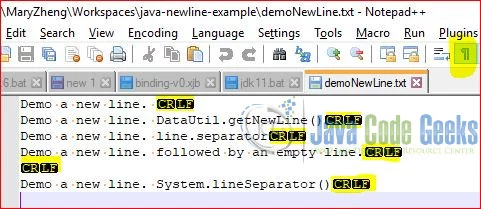
Execute it as a Java application to generate the text file – demoNewLine.txt
Launch Notepad++ for the generated file and click “Show All Characters” icon.
5. Summary
In this example, I demonstrated how to add a new line character to a String object and a text file in several ways:
- JDK 7
System.lineSeparator()method - JDK 6
line.separatorsystem property - JDK escape characters based on OS
BufferedWriter.newLine()method
6. Download the Source Code
This example consists of a Maven project to add a new line character to a String object or a text file.
You can download the full source code of this example here: Java New Line Character Example
Last updated on Sept. 02, 2019