In this post, we feature a comprehensive article on Java String contains() method with Example.
1. Introduction
The java.lang.String class represents character strings. It has provided a contains method since version 5 to return true if and only if this string contains the specified sequence of char values.
Here is the method syntax:
boolean contains(CharSequence s)
A CharSequence interface represents a readable sequence of char values. It has five implementation classes: java.nio.CharBuffer, javax.swing.text.Segment, java.lang.String, java.lang.StringBuffer, and java.lang.StringBuilder.
In this example, I will demonstrate how to use the contains method to check if a non-null String object contains the specified CharSequence.
2. Technologies Used
The example code in this article was built and run using:
- Java 1.11
- Eclipse Oxygen
- Junit 4.12
- Apache commons-Lang 3.9
3. Application
In this step, I will create a stand-alone Java application which reads a string value from the program arguments and then outputs a message to show the usages of contains method.
main– reads the arguments value. Creates aPredicateto check if it contains “MARY”, then outputs the messages.contains_CharBuffer– creates aCharBufferobject and outputs thecontains (CharBuffer)result.contains_Segment– creates aSegmentobject and outputs thecontains(Segment)result.contains_String– creates aStringobject and displays thecontains(String)result.contains_StringBuffer– creates aStringBufferobject and displays thecontains(StringBuffer)result.contains_StringBuilder– creates aStringBuilderobject and outputs thecontains(StringBuilder)result.
DemoApp.java
package jcg.zheng.demo;

import java.nio.CharBuffer;
import java.util.function.Predicate;

import javax.swing.text.Segment;

public class DemoApp {

    private static final String MARY = "MARY";
    private static final String MSG = "\"%s\".contains( %s \"MARY\" ) returns %s";

    public static void main(String[] args) {
        if (args.length < 1) {
            System.out.println("Please enter one argument!");
        } else {
            String testString = args[0];

            Predicate<String> containsMary = s -> s.toUpperCase().contains(MARY);
            System.out.println(
                    String.format(MSG, testString, "String", containsMary.test(testString)));

            contains_CharBuffer(testString);
            contains_Segment(testString);
            contains_String(testString);
            contains_StringBuffer(testString);
            contains_StringBuilder(testString);

        }
    }

    private static void contains_CharBuffer(String value) {
        CharBuffer mary = CharBuffer.allocate(4);
        mary.append(MARY);
        mary.rewind();

        System.out.println(
                String.format(MSG, value, mary.getClass().getSimpleName(), value.contains(mary)));
    }

    private static void contains_Segment(String value) {
        Segment mary = new Segment(MARY.toCharArray(), 0, 4);

        System.out.println(
                String.format(MSG, value, mary.getClass().getSimpleName(), value.contains(mary)));

    }

    private static void contains_String(String value) {
        System.out.println(
                String.format(MSG, value, MARY.getClass().getSimpleName(), value.contains(MARY)));

    }

    private static void contains_StringBuffer(String value) {
        StringBuffer mary = new StringBuffer();
        mary.append(MARY);

        System.out.println(
                String.format(MSG, value, mary.getClass().getSimpleName(), value.contains(mary)));

    }

    private static void contains_StringBuilder(String value) {
        StringBuilder mary = new StringBuilder();
        mary.append(MARY);

        System.out.println(
                String.format(MSG, value, mary.getClass().getSimpleName(), value.contains(mary)));

    }

}
4. Demo
In Eclipse, right-click DemoApplication, select Run As->Run Configurations.... Click the Arguments tab and enter “NA Test” for the program arguments.
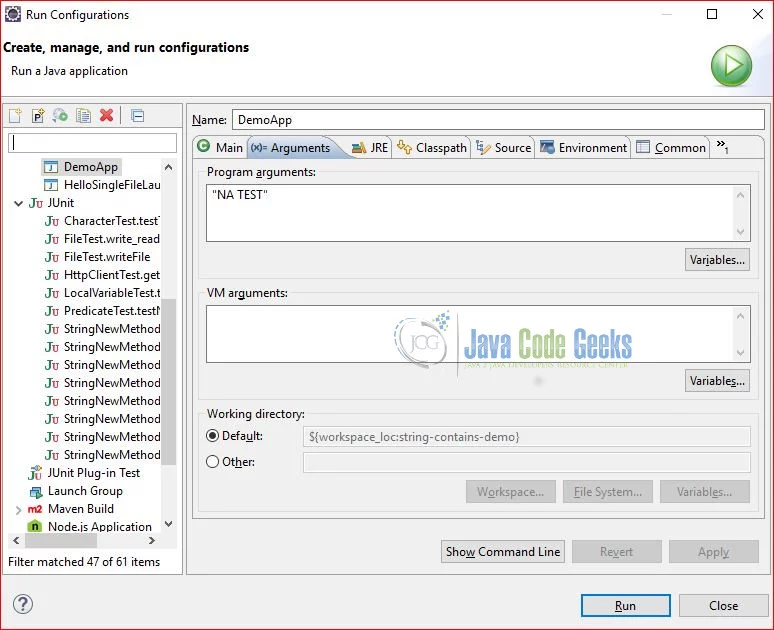
Click Apply and Run. Capture the output here.
Output
"NA TEST".contains( String "MARY" ) returns false
"NA TEST".contains( HeapCharBuffer "MARY" ) returns false
"NA TEST".contains( Segment "MARY" ) returns false
"NA TEST".contains( String "MARY" ) returns false
"NA TEST".contains( StringBuffer "MARY" ) returns false
"NA TEST".contains( StringBuilder "MARY" ) returns false
Repeat these steps for a different program arguments value – “Mary Test”.
5. StringUtils
Apache org.apache.commons.lang3.StringUtils provides several static methods to check if CharSequence contains a search CharSequence.
static boolean contains(CharSequence seq, CharSequence searchSeq)– returnstrueifseqcontainssearchSeq.static boolean containsAny(CharSequence seq, char… searchChars)– returnstrueifseqcontains anysearchChars.static boolean containsIgnoreCase(CharSequence seq, CharSequence searchSeq)– returnstrueifseqcontainssearchSeqregardless of case.static boolean containsNone(CharSequence seq, char… searchSeq) – returnstrueifseqdoes not containssearchSeqstatic boolean containsOnly(CharSequence seq, char… searchSeq)– returnstrueifseqcontains onlysearchSeq.
In this step, I will create an ApacheStringUtilsTest to demonstrate.
ApacheStringUtilsTest.java
package jcg.zheng.demo;

import static org.junit.Assert.assertFalse;
import static org.junit.Assert.assertTrue;

import org.apache.commons.lang3.StringUtils;
import org.junit.Test;

public class ApacheStringUtilsTest {

	private static final String MARY = "Mary";
	private static final String MARY_SENTENCE = "Mary is a developer";
	private static final String MARY_UPPER = "MARY";

	@Test
	public void contains() {
		assertTrue(StringUtils.contains(MARY_SENTENCE, MARY));
		assertFalse(StringUtils.contains(MARY_SENTENCE, MARY_UPPER));
	}

	@Test
	public void containsAny() {
		assertTrue(StringUtils.containsAny(MARY_SENTENCE, MARY));
	}

	@Test
	public void containsIgnoreCase() {
		assertTrue(StringUtils.containsIgnoreCase(MARY_SENTENCE, MARY));
		assertTrue(StringUtils.containsIgnoreCase(MARY_SENTENCE, MARY_UPPER));
	}

	@Test
	public void containsNone() {
		assertTrue(StringUtils.containsNone(MARY_SENTENCE, "T"));
	}

	@Test
	public void containsOnly() {
		assertTrue(StringUtils.containsOnly(MARY_SENTENCE, MARY_SENTENCE));
	}

	@Test
	public void containsWhitespace() {
		assertTrue(StringUtils.containsWhitespace(MARY_SENTENCE));
	}

}
Execute mvn test -Dtest=ApacheStringUtilsTest and capture the output here.
Output
-------------------------------------------------------
 T E S T S
-------------------------------------------------------
Running jcg.zheng.demo.ApacheStringUtilsTest
Tests run: 6, Failures: 0, Errors: 0, Skipped: 0, Time elapsed: 0.306 sec

Results :

Tests run: 6, Failures: 0, Errors: 0, Skipped: 0

[INFO] ------------------------------------------------------------------------
[INFO] BUILD SUCCESS
[INFO] ------------------------------------------------------------------------
[INFO] Total time:  9.919 s
[INFO] Finished at: 2019-09-04T20:38:05-05:00
6. Java String contains() method – Summary
In this example, I demonstrated how to check if a string contains a specified char sequence with five classes via core Java String.contains():
- java.nio.CharBuffer
- javax.swing.text.Segment
- java.lang.String
- java.lang.StringBuffer
- java.lang.StringBuilder
I also showed that Apache common-lang3 library provides richer methods for contains check, including containsAny, containsOnly, containsIgnoreCase, and containsNone.
7. Download the Source Code
This example consists of a Maven project which uses the contains method to check if it contains a specified char sequence.
You can download the full source code of this example here: Java String contains() method with Example
Last updated on Sept. 05, 2019