This is an in-depth article related to the Spring Batch Classifier with ClassifierCompositeItemWriter.
1. Introduction
Spring Batch is a processing framework designed for the robust execution of jobs. Spring Batch Framework is an open-source library for batch processing. Batch Processing is the execution of a series of jobs. Spring Batch has classes and APIs to read/write resources, job creation, job metadata storage, job data persistence, transaction management, job processing statistics, job restart, and partitioning techniques to process high-volume of data. It has a job repository that takes care of scheduling and job interaction. A job consists of multiple steps. Each step has the sequence of reading job metadata and processing the input to write the output.
Spring batch is based on the traditional batch architecture. In the traditional batch framework, a job repository performs the work of scheduling and interacting with the job. The framework handles the low-level storage work of handling the jobs.
2. Spring Batch ClassifierCompositeItemWriter
2.1 Prerequisites
Java 8 or 9 is required on the Linux, windows, or mac operating system. Maven 3.6.1 is required for building the spring batch application.
2.2 Download
You can download Java 8 can be downloaded from the Oracle web site . Apache Maven 3.6.1 can be downloaded from Apache site. Spring framework latest releases are available from the spring website.
2.3 Setup
You can set the environment variables for JAVA_HOME and PATH. They can be set as shown below:
Environment Setup for Java
JAVA_HOME="/desktop/jdk1.8.0_73"
export JAVA_HOME
PATH=$JAVA_HOME/bin:$PATH
export PATH
The environment variables for maven are set as below:Environment Setup for Maven
Run Command
JAVA_HOME="/jboss/jdk1.8.0_73″
export M2_HOME=/users/bhagvan.kommadi/Desktop/apache-maven-3.6.1
export M2=$M2_HOME/bin
export PATH=$M2:$PATH
2.4 Building the application
2.4.1 Spring
You can start building Spring applications using the Spring Boot framework. Spring Boot has a minimal configuration of Spring. Spring Boot has features related to security, tracing, application health management, and runtime support for webservers. Spring configuration is done through maven pom.xml. The XML configuration is shown as below:
Spring Configuration
<?xml version="1.0" encoding="UTF-8"?>
<project xmlns="http://maven.apache.org/POM/4.0.0" xmlns:xsi="http://www.w3.org/2001/XMLSchema-instance"
    xsi:schemaLocation="http://maven.apache.org/POM/4.0.0 https://maven.apache.org/xsd/maven-4.0.0.xsd">
    <modelVersion>4.0.0</modelVersion>

    <groupId>org.springframework</groupId>
    <artifactId>spring-helloworld</artifactId>
    <version>0.1.0</version>

    <parent>
        <groupId>org.springframework.boot</groupId>
        <artifactId>spring-boot-starter-parent</artifactId>
        <version>2.1.4.RELEASE</version>
    </parent>

    <dependencies>
        <dependency>
            <groupId>org.springframework.boot</groupId>
            <artifactId>spring-boot-starter-web</artifactId>
        </dependency>
        <dependency>
            <groupId>org.springframework.boot</groupId>
            <artifactId>spring-boot-starter-test</artifactId>
            <scope>test</scope>
        </dependency>
    </dependencies>

    <properties>
        <java.version>1.8</java.version>
    </properties>


    <build>
        <plugins>
            <plugin>
                <groupId>org.springframework.boot</groupId>
                <artifactId>spring-boot-maven-plugin</artifactId>
            </plugin>
        </plugins>
    </build>

</project>
You can create a HelloWorldController class as the web controller. The class is annotated using @RestController. Rest Controller is used to handling requests in Spring Model View Controller framework. Annotation @RequestMapping is used to annotate the index() method. The code for the HelloWorldController class is shown below:
HelloWorld Controller
package helloworld;
import org.springframework.web.bind.annotation.RestController;
import org.springframework.web.bind.annotation.RequestMapping;

@RestController
public class HelloWorldController {

    @RequestMapping("/")
    public String index() {
        return "Hello World\n";
    }

}
HelloWorldApp is created as the Spring Boot web application. When the application starts, beans, and settings are wired up dynamically. They are applied to the application context. The code for HelloWorldApp class is shown below:
HelloWorld App
package helloworld;
import java.util.Arrays;

import org.springframework.boot.SpringApplication;
import org.springframework.boot.autoconfigure.SpringBootApplication;
import org.springframework.context.ApplicationContext;

@SpringBootApplication
public class HelloWorldApp {

    public static void main(String[] args) {
        ApplicationContext ctx = SpringApplication.run(HelloWorldApp.class, args);

        System.out.println("Inspecting the beans");

        String[] beans = ctx.getBeanDefinitionNames();
        Arrays.sort(beans);
        for (String name : beans) {
            System.out.println("Bean Name" +name);
        }
    }

}
Maven is used for building the application. The command below builds the application.
Maven Build Command
mvn package
The output of the executed command is shown below.
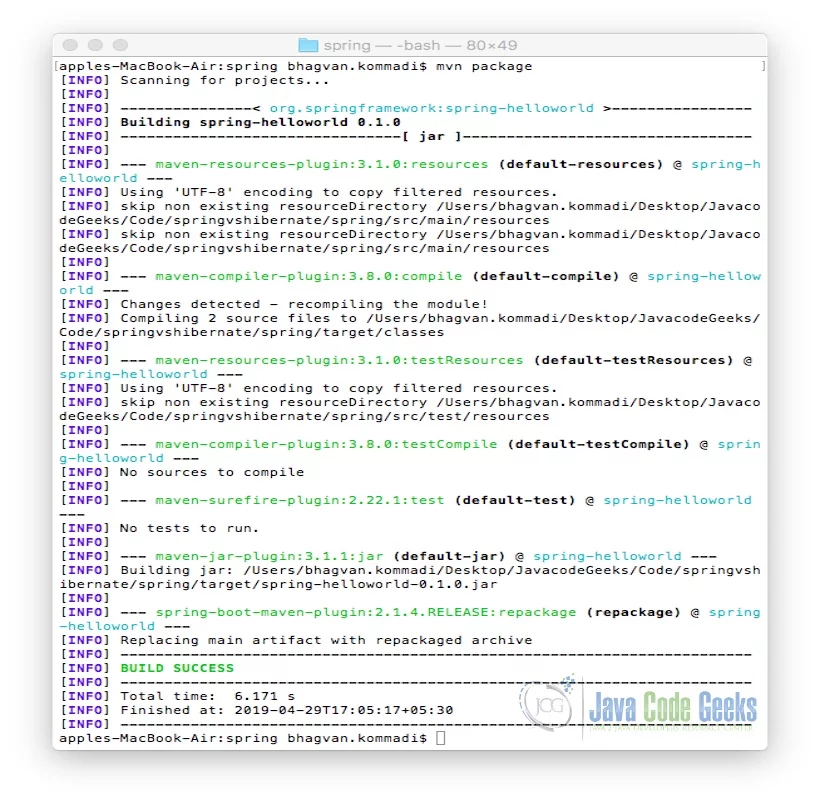
The jar file spring-helloworld-0.1.0.jar is created. The following command is used for executing the jar file.
Run Command
java -jar target/spring-helloworld-0.1.0.jar
The output of the executed command is shown below.
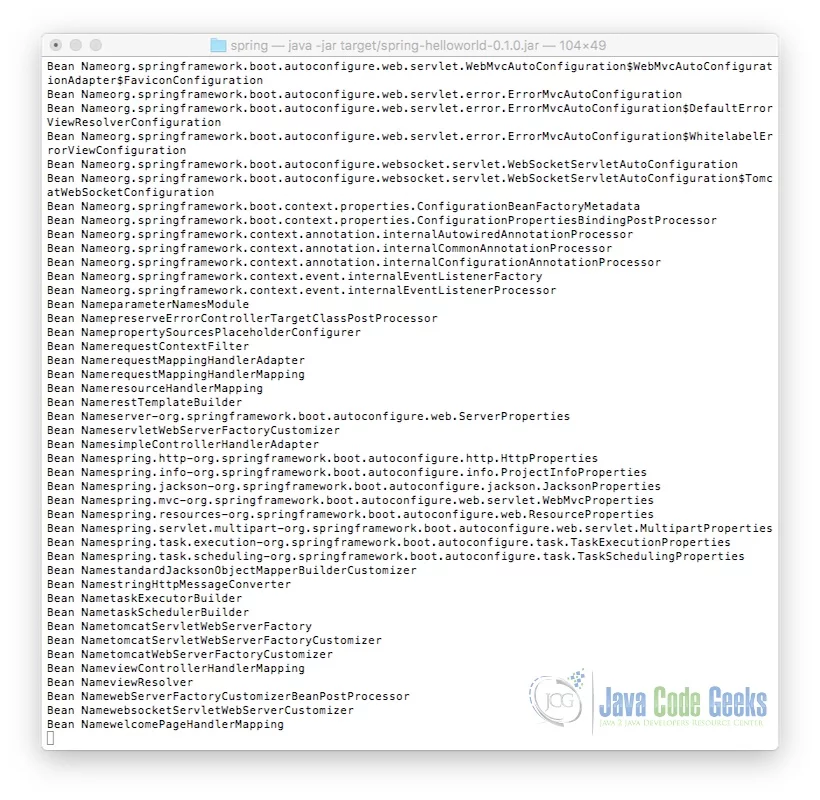
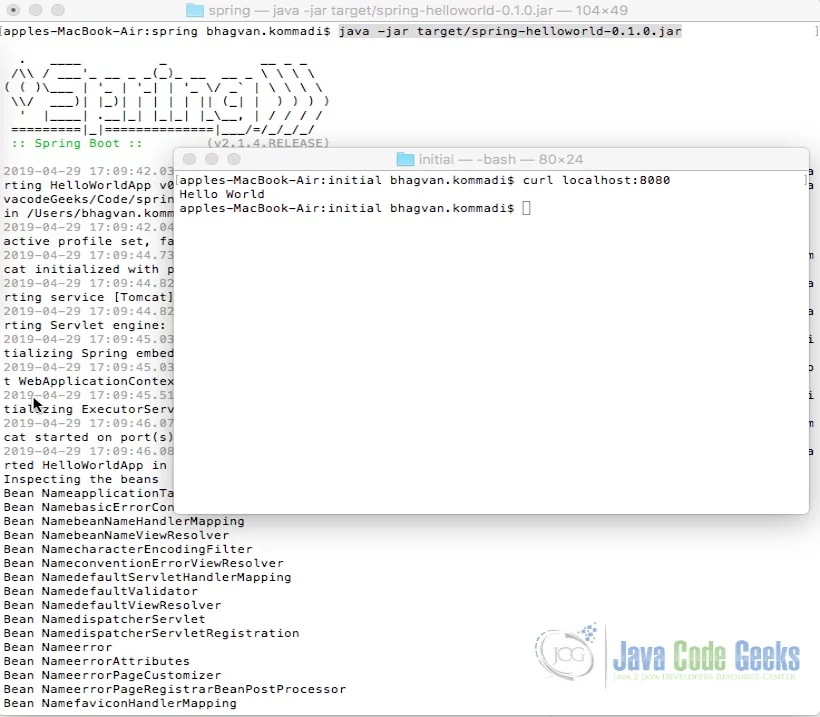
Curl command is invoked on the command line for the execution of index method. The method returns a String “Hello World” text. @RestController aggregates the two annotations @Controller and @ResponseBody. This results in returning data. The ouput is shown as below.
2.5 Spring Batch
Spring Batch is a lightweight, comprehensive batch framework. Developers can use it to create batch applications. Batch applications are designed to handle the daily and end of the daily operations of the enterprise. It has features as mentioned below:
- Large Data Processing
- Logging
- Tracing
- Resource Management
- Job Processing
- Transaction management
- Chunk based processing
- Declarative I/O
- Start/Stop/Restart
- Retry/Skip
- Web-based administration interface
Let us start looking at creation of a Spring batch job with Batch Classifier and Composite Item writer.
2.5.1 Spring Batch Classifier Composite Item Writer
Spring Batch decorators are used to classify the data to write to multiple destinations. Batch decorators are based on design patterns. Item Reader and ItemWriter are batch decorators. Additional functionality can be added to the ItemReader and ItemWriters. The data can be saved in a database, CSV, or XML file.
ClassifierCompositeItem Writer is based on a router pattern. This class is thread-safe. It helps in writing multiple items to different destinations. The code implementation of EmployeeClassifier class is shown below:
EmployeeClassifier
package org.javacodegeeks.batch.decorator.classifier;

import org.springframework.batch.item.ItemWriter;
import org.springframework.classify.Classifier;

import org.javacodegeeks.batch.decorator.model.Employee;

public class EmployeeClassifier implements Classifier<Employee, ItemWriter> {

	private static final long serialVersionUID = 1L;

	private ItemWriter evenItemWriter;
	private ItemWriter oddItemWriter;

	public EmployeeClassifier(ItemWriter evenItemWriter, ItemWriter oddItemWriter) {
		this.evenItemWriter = evenItemWriter;
		this.oddItemWriter = oddItemWriter;
	}

	@Override
	public ItemWriter classify(Employee employee) {
		return employee.getId() % 2 == 0 ? evenItemWriter : oddItemWriter;
	}
}
The code below shows the Employee class which is part of the model.
Employee Class
package org.javacodegeeks.batch.decorator.model;

import lombok.AllArgsConstructor;
import lombok.Builder;
import lombok.Data;
import lombok.NoArgsConstructor;

@Data
@AllArgsConstructor
@Builder
@NoArgsConstructor
public class Employee {

	private Long id;
	private String firstName;
	private String lastName;
	private String birthdate;
}
The database table is created for employee in employeedb. Below is the create sql for the database.
Employee sql
CREATE TABLE 'employeedb'.'employee' (
	'id' MEDIUMINT(8) UNSIGNED NOT NULL AUTO_INCREMENT,
	'firstName' VARCHAR(255) NULL,
	'lastName' VARCHAR(255) NULL,
	'birthdate' VARCHAR(255) NULL,
PRIMARY KEY ('id')
) AUTO_INCREMENT=1;
The data can be created using the sql script below.
Employee table data sql
INSERT INTO `employeedb`.`employee` (`id`, `firstName`, `lastName`,`birthdate`) VALUES ('1', 'john', 'smith','10-11-1962 10:10:10');
INSERT INTO `employeedb`.`employee` (`id`, `firstName`, `lastName`,`birthdate`) VALUES ('2', 'george', 'kinsey','11-01-1982 10:10:10');
INSERT INTO `employeedb`.`employee` (`id`, `firstName`, `lastName`,`birthdate`) VALUES ('3', 'thomas', 'durham','17-06-1953 10:10:10');
SpringJobConfiguration class code is shown below:
SpringJobConfiguration
package org.javacodegeeks.batch.decorator.config;

import java.io.File;
import java.util.HashMap;
import java.util.Map;

import javax.sql.DataSource;

import org.springframework.batch.core.Job;
import org.springframework.batch.core.Step;
import org.springframework.batch.core.configuration.annotation.JobBuilderFactory;
import org.springframework.batch.core.configuration.annotation.StepBuilderFactory;
import org.springframework.batch.item.database.JdbcPagingItemReader;
import org.springframework.batch.item.database.Order;
import org.springframework.batch.item.database.support.MySqlPagingQueryProvider;
import org.springframework.batch.item.file.FlatFileItemWriter;
import org.springframework.batch.item.support.ClassifierCompositeItemWriter;
import org.springframework.batch.item.xml.StaxEventItemWriter;
import org.springframework.beans.factory.annotation.Autowired;
import org.springframework.context.annotation.Bean;
import org.springframework.context.annotation.Configuration;
import org.springframework.core.io.FileSystemResource;
import org.springframework.oxm.xstream.XStreamMarshaller;

import org.javacodegeeks.batch.decorator.aggregator.CustomLineAggregator;
import org.javacodegeeks.batch.decorator.classifier.EmployeeClassifier;
import org.javacodegeeks.batch.decorator.mapper.EmployeeRowMapper;
import org.javacodegeeks.batch.decorator.model.Employee;

@Configuration
public class SpringJobConfiguration {

	@Autowired
	private JobBuilderFactory jobBuilderFactory;

	@Autowired
	private StepBuilderFactory stepBuilderFactory;

	@Autowired
	private DataSource dataSource;

	@Bean
	public JdbcPagingItemReader customerPagingItemReader() {


		JdbcPagingItemReader reader = new JdbcPagingItemReader();
		reader.setDataSource(this.dataSource);
		reader.setFetchSize(1000);
		reader.setRowMapper(new EmployeeRowMapper());

        Map sortKeys = new HashMap();
		sortKeys.put("id", Order.ASCENDING);


		MySqlPagingQueryProvider queryProvider = new MySqlPagingQueryProvider();
		queryProvider.setSelectClause("id, firstName, lastName, birthdate");
		queryProvider.setFromClause("from employee");
		queryProvider.setSortKeys(sortKeys);
		reader.setQueryProvider(queryProvider);
		return reader;
	}

	@Bean
	public FlatFileItemWriter jsonItemWriter() throws Exception {

		String customerOutputPath = File.createTempFile("employeeOutput", ".out").getAbsolutePath();
		System.out.println(">> Output Path = " + customerOutputPath);
		FlatFileItemWriter writer = new FlatFileItemWriter();
		writer.setLineAggregator(new CustomLineAggregator());
		writer.setResource(new FileSystemResource(customerOutputPath));
		writer.afterPropertiesSet();
		return writer;
	}

	@Bean
	public StaxEventItemWriter xmlItemWriter() throws Exception {

		String customerOutputPath = File.createTempFile("employeeOutput", ".out").getAbsolutePath();
		System.out.println(">> Output Path = " + customerOutputPath);
		Map aliases = new HashMap();
		aliases.put("employee", Employee.class);
		XStreamMarshaller marshaller = new XStreamMarshaller();
		marshaller.setAliases(aliases);


		StaxEventItemWriter writer = new StaxEventItemWriter();
		writer.setRootTagName("employees");
		writer.setMarshaller(marshaller);
		writer.setResource(new FileSystemResource(customerOutputPath));
		writer.afterPropertiesSet();
		return writer;
	}

	@Bean
	public ClassifierCompositeItemWriter classifierEmployeeCompositeItemWriter() throws Exception {
		ClassifierCompositeItemWriter compositeItemWriter = new ClassifierCompositeItemWriter();
		compositeItemWriter.setClassifier(new EmployeeClassifier(xmlItemWriter(), jsonItemWriter()));
		return compositeItemWriter;
	}

	@Bean
	public Step step1() throws Exception {
		return stepBuilderFactory.get("step1")
				.chunk(10)
				.reader(customerPagingItemReader())
				.writer(classifierEmployeeCompositeItemWriter())
				.stream(xmlItemWriter())
				.stream(jsonItemWriter())
				.build();
	}

	@Bean
	public Job job() throws Exception {
		return jobBuilderFactory.get("job")
				.start(step1())
				.build();
	}

}
SpringBatchApplication class code is shown below:
SpringBatchApplication Class
package org.javacodegeeks.batch.decorator;

import java.util.Date;
import org.springframework.batch.core.Job;
import org.springframework.batch.core.JobExecution;
import org.springframework.batch.core.JobParameters;
import org.springframework.batch.core.JobParametersBuilder;
import org.springframework.batch.core.configuration.annotation.EnableBatchProcessing;
import org.springframework.batch.core.launch.JobLauncher;
import org.springframework.beans.factory.annotation.Autowired;
import org.springframework.boot.CommandLineRunner;
import org.springframework.boot.SpringApplication;
import org.springframework.boot.autoconfigure.SpringBootApplication;

@SpringBootApplication
@EnableBatchProcessing
public class SpringBatchApplication
					implements CommandLineRunner {
	@Autowired
	private JobLauncher jobLauncher;

	@Autowired
	private Job job;

	public static void main(String[] args) {
		SpringApplication.run(SpringBatchApplication.class, args);
	}

	@Override
	public void run(String... args) throws Exception {
		JobParameters jobParameters = new JobParametersBuilder()
                .addString("JobId", String.valueOf(System.currentTimeMillis()))
				.addDate("date", new Date())
                .addLong("time",System.currentTimeMillis()).toJobParameters();

		JobExecution execution = jobLauncher.run(job, jobParameters);
		System.out.println("STATUS :: "+execution.getStatus());
	}
}
Maven pom.xml is shown below which is used for the build and execution of the project.
Maven pom.xml
<?xml version="1.0"?>
<project
	xsi:schemaLocation="http://maven.apache.org/POM/4.0.0 http://maven.apache.org/xsd/maven-4.0.0.xsd"
	xmlns="http://maven.apache.org/POM/4.0.0"
	xmlns:xsi="http://www.w3.org/2001/XMLSchema-instance">
	<modelVersion>4.0.0</modelVersion>

	<parent>
		<groupId>org.springframework.boot</groupId>
		<artifactId>spring-boot-starter-parent</artifactId>
		<version>2.2.2.RELEASE</version>
		<relativePath />
	</parent>

	<groupId>org.javacodegeeks</groupId>
	<artifactId>batch-classifier</artifactId>
	<name>batch-classifier</name>
	<packaging>jar</packaging>

	<properties>
		<project.build.sourceEncoding>UTF-8</project.build.sourceEncoding>
		<java.version>1.8</java.version>
	</properties>

	<dependencies>
		<dependency>
			<groupId>org.springframework.boot</groupId>
			<artifactId>spring-boot-starter-batch</artifactId>
		</dependency>

		<dependency>
			<groupId>org.springframework.boot</groupId>
			<artifactId>spring-boot-starter-jdbc</artifactId>
		</dependency>

		<!-- Spring OXM -->

		<dependency>
			<groupId>org.springframework</groupId>
			<artifactId>spring-oxm</artifactId>
		</dependency>

		<dependency>
			<groupId>com.h2database</groupId>
			<artifactId>h2</artifactId>
			<scope>runtime</scope>
		</dependency>

		<dependency>
			<groupId>mysql</groupId>
			<artifactId>mysql-connector-java</artifactId>
			<scope>runtime</scope>
		</dependency>

		<dependency>
			<groupId>com.thoughtworks.xstream</groupId>
			<artifactId>xstream</artifactId>
			<version>1.4.7</version>
		</dependency>

		<dependency>
			<groupId>org.projectlombok</groupId>
			<artifactId>lombok</artifactId>
			<optional>true</optional>
		</dependency>

		<dependency>
			<groupId>org.springframework.boot</groupId>
			<artifactId>spring-boot-starter-test</artifactId>
			<scope>test</scope>
		</dependency>

		<dependency>
			<groupId>org.springframework.batch</groupId>
			<artifactId>spring-batch-test</artifactId>
			<scope>test</scope>
		</dependency>

	</dependencies>
</project>
Code can be built using the below command.
Build Command
mvn package
The output of the command is shown below:
Build Command Output
apples-MacBook-Air:batchclassifier bhagvan.kommadi$ mvn package
[INFO] Scanning for projects...
[INFO]
[INFO] ----------------------------------
[INFO] Building batch-classifier 2.2.2.RELEASE
[INFO] --------------------------------[ jar ]---------------------------------
[INFO]
[INFO] --- maven-resources-plugin:3.1.0:resources (default-resources) @ batch-classifier ---
[INFO] Using 'UTF-8' encoding to copy filtered resources.
[INFO] Copying 1 resource
[INFO] Copying 2 resources
[INFO]
[INFO] --- maven-compiler-plugin:3.8.1:compile (default-compile) @ batch-classifier ---
[INFO] Changes detected - recompiling the module!
[INFO] Compiling 6 source files to /Users/bhagvan.kommadi/Desktop/JavacodeGeeks/Code/springbatchclassifier/batchclassifier/target/classes
[INFO]
[INFO] --- maven-resources-plugin:3.1.0:testResources (default-testResources) @ batch-classifier ---
[INFO] Using 'UTF-8' encoding to copy filtered resources.
[INFO] skip non existing resourceDirectory /Users/bhagvan.kommadi/Desktop/JavacodeGeeks/Code/springbatchclassifier/batchclassifier/src/test/resources
[INFO]
[INFO] --- maven-compiler-plugin:3.8.1:testCompile (default-testCompile) @ batch-classifier ---
[INFO] Changes detected - recompiling the module!
[INFO] Compiling 1 source file to /Users/bhagvan.kommadi/Desktop/JavacodeGeeks/Code/springbatchclassifier/batchclassifier/target/test-classes
[INFO]
[INFO] --- maven-surefire-plugin:2.22.2:test (default-test) @ batch-classifier ---
[INFO]
[INFO] -------------------------------------------------------
[INFO]  T E S T S
[INFO] -------------------------------------------------------
[INFO] Running org.javacodegeeks.batch.decorator.AppTest
[INFO] Tests run: 1, Failures: 0, Errors: 0, Skipped: 0, Time elapsed: 0.005 s - in org.javacodegeeks.batch.decorator.AppTest
[INFO]
[INFO] Results:
[INFO]
[INFO] Tests run: 1, Failures: 0, Errors: 0, Skipped: 0
[INFO]
[INFO]
[INFO] --- maven-jar-plugin:3.1.2:jar (default-jar) @ batch-classifier ---
[INFO] Building jar: /Users/bhagvan.kommadi/Desktop/JavacodeGeeks/Code/springbatchclassifier/batchclassifier/target/batch-classifier-2.2.2.RELEASE.jar
[INFO] ------------------------------------------------------------------------
[INFO] BUILD SUCCESS
[INFO] ------------------------------------------------------------------------
[INFO] Total time:  10.690 s
[INFO] Finished at: 2020-11-03T21:56:14+05:30
[INFO] ------------------------------------------------------------------------
apples-MacBook-Air:batchclassifier bhagvan.kommadi$
Code can be executed using the command shown below:
Run Command
mvn spring-boot:run
The output of the above command is shown below:
Run Command Output
apples-MacBook-Air:batchclassifier bhagvan.kommadi$ mvn spring-boot:run
[INFO] Scanning for projects...
[INFO]
[INFO] ----------------------------------
[INFO] Building batch-classifier 2.2.2.RELEASE
[INFO] --------------------------------[ jar ]---------------------------------
[INFO]
[INFO] >>> spring-boot-maven-plugin:2.2.2.RELEASE:run (default-cli) > test-compile @ batch-classifier >>>
[INFO]
[INFO] --- maven-resources-plugin:3.1.0:resources (default-resources) @ batch-classifier ---
[INFO] Using 'UTF-8' encoding to copy filtered resources.
[INFO] Copying 1 resource
[INFO] Copying 2 resources
[INFO]
[INFO] --- maven-compiler-plugin:3.8.1:compile (default-compile) @ batch-classifier ---
[INFO] Nothing to compile - all classes are up to date
[INFO]
[INFO] --- maven-resources-plugin:3.1.0:testResources (default-testResources) @ batch-classifier ---
[INFO] Using 'UTF-8' encoding to copy filtered resources.
[INFO] skip non existing resourceDirectory /Users/bhagvan.kommadi/Desktop/JavacodeGeeks/Code/springbatchclassifier/batchclassifier/src/test/resources
[INFO]
[INFO] --- maven-compiler-plugin:3.8.1:testCompile (default-testCompile) @ batch-classifier ---
[INFO] Nothing to compile - all classes are up to date
[INFO]
[INFO] <<< spring-boot-maven-plugin:2.2.2.RELEASE:run (default-cli) < test-compile @ batch-classifier <<> Output Path = /var/folders/cr/0y892lq14qv7r24yl0gh0_dm0000gp/T/employeeOutput8605284055436216810.out
>> Output Path = /var/folders/cr/0y892lq14qv7r24yl0gh0_dm0000gp/T/employeeOutput913271422004184523.out
2020-11-03 21:58:54.079  INFO 4105 --- [           main] o.s.b.c.r.s.JobRepositoryFactoryBean     : No database type set, using meta data indicating: MYSQL
2020-11-03 21:58:54.116  INFO 4105 --- [           main] o.s.b.c.l.support.SimpleJobLauncher      : No TaskExecutor has been set, defaulting to synchronous executor.
2020-11-03 21:58:54.246  INFO 4105 --- [           main] o.j.b.decorator.SpringBatchApplication   : Started SpringBatchApplication in 3.051 seconds (JVM running for 3.964)
2020-11-03 21:58:54.249  INFO 4105 --- [           main] o.s.b.a.b.JobLauncherCommandLineRunner   : Running default command line with: []
2020-11-03 21:58:54.431  INFO 4105 --- [           main] o.s.b.c.l.support.SimpleJobLauncher      : Job: [SimpleJob: [name=job]] launched with the following parameters: [{}]
2020-11-03 21:58:54.507  INFO 4105 --- [           main] o.s.batch.core.job.SimpleStepHandler     : Step already complete or not restartable, so no action to execute: StepExecution: id=1, version=3, name=step1, status=COMPLETED, exitStatus=COMPLETED, readCount=0, filterCount=0, writeCount=0 readSkipCount=0, writeSkipCount=0, processSkipCount=0, commitCount=1, rollbackCount=0, exitDescription=
2020-11-03 21:58:54.526  INFO 4105 --- [           main] o.s.b.c.l.support.SimpleJobLauncher      : Job: [SimpleJob: [name=job]] completed with the following parameters: [{}] and the following status: [COMPLETED] in 33ms
2020-11-03 21:58:54.572  INFO 4105 --- [           main] o.s.b.c.l.support.SimpleJobLauncher      : Job: [SimpleJob: [name=job]] launched with the following parameters: [{JobId=1604420934528, date=1604420934528, time=1604420934528}]
2020-11-03 21:58:54.595  INFO 4105 --- [           main] o.s.batch.core.job.SimpleStepHandler     : Executing step: [step1]
2020-11-03 21:58:54.741  INFO 4105 --- [           main] o.s.batch.core.step.AbstractStep         : Step: [step1] executed in 144ms
2020-11-03 21:58:54.758  INFO 4105 --- [           main] o.s.b.c.l.support.SimpleJobLauncher      : Job: [SimpleJob: [name=job]] completed with the following parameters: [{JobId=1604420934528, date=1604420934528, time=1604420934528}] and the following status: [COMPLETED] in 180ms
STATUS :: COMPLETED
2020-11-03 21:58:54.764  WARN 4105 --- [extShutdownHook] o.s.b.f.support.DisposableBeanAdapter    : Destroy method 'close' on bean with name 'xmlItemWriter' threw an exception: java.lang.NullPointerException
2020-11-03 21:58:54.765  INFO 4105 --- [extShutdownHook] com.zaxxer.hikari.HikariDataSource       : HikariPool-1 - Shutdown initiated...
2020-11-03 21:58:54.773  INFO 4105 --- [extShutdownHook] com.zaxxer.hikari.HikariDataSource       : HikariPool-1 - Shutdown completed.
[INFO] ------------------------------------------------------------------------
[INFO] BUILD SUCCESS
[INFO] ------------------------------------------------------------------------
[INFO] Total time:  8.810 s
[INFO] Finished at: 2020-11-03T21:58:54+05:30
[INFO] ------------------------------------------------------------------------
apples-MacBook-Air:batchclassifier bhagvan.kommadi$
The xml output is shown below:
XML Output
<?xml version="1.0" encoding="UTF-8"?
><employees>
<employee>
<id>2</id>
<firstName>george</firstName>
<lastName>kinsey</lastName>
<birthdate>11-01-1982 10:10:10</birthdate>
</employee>
</employees>
The json output is presented below:
JSON Output
{"id":1,"firstName":"john","lastName":"smith","birthdate":"10-11-1962 10:10:10"}
{"id":3,"firstName":"thomas","lastName":"durham","birthdate":"17-06-1953 10:10:10"}
3. Download the Source Code
That was an article related to the Spring Batch Classifier with ClassifierCompositeItemWriter.
You can download the full source code of this example here: Spring Batch ClassifierCompositeItemWriter Example