Do you know why the “const std::string&” declaration is recommended? This is a classic one
Hi all!
I would like to share this blog article from John Carmack, a legendary figure of the video game industry – with the development of DOOM, Quake... (https://en.wikipedia.org/wiki/John_Carmack)
Although this article was written ten years ago, this one is still relevant about the advantages of functional programming and the parallel with OOP. This concerns the disadvantages of “OOP programming” vs “functional programming”, mainly because it is hard to detect multithreaded and race conditions issues. Also, it delivers a beginning of solution with “how to mitigate it by doing “functional programming””.
Here is a little summary wrote in the article:
My pragmatic summary: A large fraction of the flaws in software development are due to programmers not fully understanding all the possible states their code may execute in. In a multithreaded environment, the lack of understanding and the resulting problems are greatly amplified, almost to the point of panic if you are paying attention. Programming in a functional style makes the state presented to your code explicit, which makes it much easier to reason about, and, in a completely pure system, makes thread race conditions impossible.
John Carmack
In my opinion, C++ is better and better (especially in the last versions of the standard) to execute a first set of “functional programming”, despite the OOP pragmatism and construction around C++.
Don’t hesitate to read it here: http://sevangelatos.com/john-carmack-on/
C++ - Function Objects (Functors)
In C++, a function object (or functor) is an object which implements the “operator()”. Thanks to this overload, the object call with parenthesis can be launched. With this behavior, your object looks like a function!
During this post, you will see some advantages to use functors. They are more flexible than function thanks to multiple advantages: Encapsulation, virtual functions, and arguments passing!
A simple example of functor in C++
A functor can be created by overloading the operator():
As you see here, my object is directly callable with the “objectName()” operator. It looks like a function but it is the call to the operator(). Thanks to this behavior, my multiplication looks like a function call.
The usage of functors in C++ algorithms.
Functors have a great advantage over functions: Their interactions with algorithms. In the next example, I show you how to set a simple “coefficient factor” in my multiply class. Then, this factor will be applied to an entire array smoothly!
In this example, I construct my object with a variable equal to 2. It is my coefficient factor. Combined with the function object “myMultiplicator”, I can multiply all elements in my list by my CF!
This is a simple example of functors usage. We could go further by using virtual methods. Or even templates!
Functors VS Lambda expressions.
You are certainly thinking that functors are like lambda expressions.
In fact, a lambda expression is a “nameless functor”. The only difference is about the complexity of your code: A lambda expression is simpler! Indeed, functors are taking few additional hidden data in C++.
This similitude is explained by the goal of a lambda expression: Lambdas are designed to create a “function object” capable of capturing variables in scope.
Another great advantage: You do not need C++11 specification to use functors. Indeed, functors are a great alternative to lambda expression if your job does not permit the usage of C++11. It is the case in multiple big company with huge code base.
Don't hesitate to exploit functors. It is a good alternative to lambda for multiple complex situations.

In C++, a developer could define a “const method”. This “const method” is useful to guarantee that the method will not alter your variable.
In the world of encapsulation, it helps developers to develop secure and understandable code. It guarantees that the method will not alter the concerned object. It gives a mark of confidence and improve the code cleanliness! We will see during this post how to improve your code quality with the keyword “Mutable”!
mutable – “permits modification of the class member declared mutable even if the containing object is declared const.”
In my previous post about the "const" case in C++, I quickly introduced this keyword. Let's see how to use it!
The issue
As I featured previously, C++ developers creates classes with several encapsulated variable (obviously). Sometimes, they declare a special method type, “the const method”:
This technique guarantees a method which return data and does not modify the object. It is useful for code quality and easy maintenance. A fresh developer can immediately see the purpose of the method. Overall, he can exploit it without unexpected knock-backs.
However, sometime, we can have a requirement to modify one or multiple variables. The best example is the mutex usage.
The Solution
The solution is the keyword “mutabe”.
This simple code example does not compile without the “mutable” keyword (try it!). It is due to the mutex which is acquired and released during the process.
However, should we sacrifice the code cleanliness? Should we convert the function as “no-const”? No, the “mutable” type specifier is a great solution! It specifies that your variable can be altered even in an object declared as const!
Most of the time, a mutex will be mutable. Because it is really helpful to consider a “const” as thread safe. The mutable keyword helps you to use internal mutex in const method.

It is the first post of my website for 2021. Many thanks to continue reading my blog. I wish you all the best for the New Year 2021!
Do you know why the “const std::string&” declaration is recommended? This is a classic one and one of the rare recommendations which mix performance and readability.
How works std::string
C++ - String declaration
std::string my_string = “HELLO”;
The behavior of a std::string looks simple! This is an object which points to the heap. For example, when I declare a simple std::string into the heap, my memory will look like this:

As you see, a new variable is created in the stack. This simple variable contains data like the size of the content, and the pointer to the content. Even if it looks easy to use, sometimes, a simple string can cause trouble. It is a perfect entry to introduce some issues about "const declaration"!
What happens when I use a const std::string in a function?
C++ - Const string without reference
void my_function(const std::string my_string_in_param)
{
MY_FUNCTION_IMPL;
}

int main()
{
std::string my_string;
function(my_string);
return 0;
}
Here two instructions:
The “const” declares that the variable is not altered by the program. Then, we have a string that cannot be modified.
However, there is an issue here. Your compiler does not optimize the “const” variable. Indeed, another thread could modify your variable and alter the behavior of your function. Then, you have a memory which looks like this:

Const is a great feature to certify to developers that a variable is not modified in a function. However, as you see, the value is copied in the stack. This kind of behavior is under-optimized and allocate in the stack a memory which is not modified. Fortunately, you can easily resolve this!
How to avoid this copy: The reference.
C++ - Const string with reference
void my_function(const std::string &my_string_in_param)
{
MY_FUNCTION_IMPL;
}

int main()
{
std::string my_string;
function(my_string);
return 0;
}
Note the only difference here. This is the symbol "&" in my parameter list. Thanks to this symbol, I declare now that "my_string_in_param" is passed by reference!
By using a reference, you are giving to your function the address of your parameter. You will see that my behavior in memory is simpler:

This address will point to the string contained in your stack. Thanks to the "const" plus "reference" instruction, you optimize the usage of your code AND notify other developers that your string is not modified!
To go further with “const”…
Perfect, your function is now optimized:
- No copy.
- No allocation in the heap.
- Quick behavior.
- Inform developers that the variable is not altered..
However, we combined “const” with “reference” syntax. This is named the “const reference”.
As you see, even if “const” is a simple concept in C++, this syntax is messing in multiple situations. The compiler does not systematically optimize "const" declarations. The “const reference” is only the visible part.
Another tricky case is the usage of constant method:
- By declaring const, your compiler ensures that your private variables are not altered.
- However, in multi-threading context, a “mutex” is regularly used (acquire and release… Even in RAII).
To unblock this situation, another syntax: “The Mutable”.
Do not hesitate to review https://isocpp.org/wiki/faq/const-correctness to get more information about the "const" usages!
Today, I feature to you a short tutorial about CMake. How to generate source files during a build! During this post, we will create a binary with CMake and generated files. Don’t hesitate to review my short tutorial about CMake basis here.
The issue - CMAKE returns an error on the generated source file
Sometimes, you could build an application with a generated files. Unfortunately, those files could be sources.
If those files don't exist during the CMake configuration, then it results in an error “No rule to make target 'GeneratedFile.cpp'”.
The Solution - Define a custom command, and change the file property
The solution is done in three steps:
- Create a custom command with the instruction “add_custom_command”. You will launch your file generator here.
- "Make depends" on this new custom target . CMake will be able to launch this target ONLY if those source files are not present.
- In your target, change the file property to “GENERATED”.
- EXTRA: In your custom command, you can also add a “DEPENDS” instruction. This command helps CMake to control your custom target and then apply launching rules when dependencies change.
If you apply it, your CMake can control perfectly your file generator!
The Example - A simple C++ file
CMAKE - Generate source file with custom target
cmake_minimum_required(VERSION 3.8)

project(GeneratedFileProject)

# Set generated file
set_source_files_properties(${CMAKE_CURRENT_BINARY_DIR}/GeneratedFile.cpp PROPERTIES GENERATED 1)

add_executable(GeneratedExecutable GeneratedFile.cpp)

#Generator definition - Custom Target
add_custom_command(COMMAND  ${CMAKE_CURRENT_SOURCE_DIR}/fileGenerator.sh
                  OUTPUT    ${CMAKE_CURRENT_BINARY_DIR}/GeneratedFile.cpp
                  DEPENDS   ${CMAKE_CURRENT_SOURCE_DIR}/fileGenerator.sh
                  COMMENT   "Generating GeneratedFile.cpp"
                  )

add_custom_target(gen_bar DEPENDS ${CMAKE_CURRENT_BINARY_DIR}/bar.cpp)
As you see here, I applied the instructions:
- I create a custom target to launch my fileGenerator.sh
- I make depends on this custom target to the generated file.
- I set this file as “GENERATED” in my new target.
- I make DEPENDS it directly on my file generator script to relaunch it in case of modification.
Now, I can launch my CMake configuration and build the program!

As you see, the configuration is pretty simple!
Did you already use RAII in C++?
RAII for "Resource Acquisition Is Initialization". Or SBRM for "Scope-Bound Resource Management". Or even “automatic variables”.
Behind those strange names, there is a powerful concept. It is an idiom which helps you to improve the scalability of your project. Let's review how to use it!
The problem - Memory allocation
First, let’s see one of the most famous developmental errors in C++: Not freed memory.
We can write a simple piece of code like this one:
C++ - Operation on pointer
class LargeObject
{
    // ... Other stuff ... //
private:
    std::vector<std::string> vectors;
    // ... Other stuff ... //
};

int myFunction()
{
    LargeObject *i = new LargeObject;
    int retValue = 0;
    // ... Do Some large operations ... //
    delete i;

    return retValue;
}
Here, the memory is allocated and then deleted at the end of the scope. The developer manually deletes the object.
Let’s imagine that during years, this code evolves.
Then, one day, it looks like this:
C++ - Operation on pointers - Memory leak
class LargeObject
{
    // ... Other stuff ... //
private:
    std::vector<std::string> vectors;
    // ... Other stuff ... //
};

int myFunction()
{
    LargeObject *i = new LargeObject;
    int retValue = 0;
    bool condition = false;
    // ... Do Some large operations ... //
    if (condition == false)
    {
        return retValue;
    }
    // ... Do Some large operations ... //
    delete i;

    return retValue;
}
During code maintenance, one developer forgot to delete the pointer. Then, a memory leak occurs at each call of this function.
This kind of pointers is hard to manage. Indeed, those pointers are encapsulated in classes, long functions, and depend on designs... Moreover, it can lead to multiple well-known security issues.
The fact is the lifetime of an object is not easy to manage. The declaration of the pointer, its content, and lifetime management are separated. All those concepts are the responsibility of the developer.
We are human, we make errors during development. A code review can help to detect those kinds of errors. However, what about a complex design?
RAII in C++ is a solution to this issue. What is RAII?
RAII (or “Resource Acquisition Is Initialization “) is a great process to mitigate the featured issue above.
This process guarantees an "automatic management" of the lifetime of an object. In RUST, RAII is managed by default to guarantee safe code.
In C++, the technique consists of “release” a resource on a "destructor call". This concept is present in some STL library components:
- std::lock_guard: Lock Guard is the perfect model of RAII. This wrapper will take a simple mutex as a parameter. Then, during "constructor call", the mutex is locked.
This mutex is automatically released during "destructor call"! It is a great protection against the deadlock issues! - std::fstream: Here, the file closes at the end of scope.
- std::unique_ptr and std::shared_ptr: In the "smart pointers" case, the resource is freed at the end of scope.
This is the RAII idiom. The object in the stack is responsible for a single resource. It can be a file, a mutex, or a pointer! Then, this resource is released during destruct time (End of scope, object destructor...). The lifetime of the contained object is automatically managed!
Go back to our problem. How to use RAII in C++.

As you see, RAII is perfect to manage a single resource during a single scope.
Now, let’s apply the RAII on our problematic C++ code with a simple “std::unique_ptr”!
C++ - RAII usage with unique pointers
#include <memory>

class LargeObject
{
    // ... Other stuff ... //
private:
    std::vector<std::string> vectors;
    // ... Other stuff ... //
};

int myFunction()
{
    std::unique_ptr<LargeObject> i(new LargeObject);
    int retValue = 0;
    bool condition = false;
    // ... Do Some large operations ... //
    if (condition == false)
    {
        return retValue;
    }
    // ... Do Some large operations ... //

    return retValue;
}
Now, thanks to the "unique_ptr" implementation, my allocated pointer is automatically released! A developer doesn’t need to destroy the resource manually.
You can use "unique_ptr" in C++11 with "#include <memory>".
Today I feature to you a quick review of my previous posts. I feature to you two posts I appreciated with some special experiences about them. Don’t hesitate to review and enjoy them!
WSL and IDE.
I discovered the WSL (Windows Subsystem for Linux) during the beta. First, I was surprised and mitigated. Then, I discovered a great connection with my IDEs. Finally, I work directly with it.
Each time I write a code, I am using the WSL. The reason is simplicity. I like video games, programming, and Linux systems. Unfortunately, video games are in majority on Windows. WSL avoids the installation of a dual boot or virtual machine.
Hey! Welcome to my Tutorial about WSL and how to develop Linux application with Visual Studio Code. I'll feature to you a great way to develop your Linux application with a Windows environment. This environment is configured without dual boot, virtual machine or Docker installed on your system. I'll stay
Three security errors in C:
I really appreciated writing this post. It was a great occasion to test the pure C application. C is my first programming language. Even if it looks hard to use, I appreciate so much the performance and interaction with the system.
Moreover, it was a great occasion to see some attacks. Like a simple buffer overflow modify or binary analysis.
I fixed some typo errors in my post. I hope you will enjoy it!
Photo in banner by Cookie the Pom on Unsplash
Did you experienced a case where your header depends on another one? Why in that other C++ file, it compiles correctly without the same dependencies? If you encountered this default, maybe your header is not buildable as standalone. This default is easier to detect (and to fix!) with a single condition: Respect a certain include order.
Example of problematic include order: Incomplete header file.
Let’s review this example:
C++ - IDCard.hpp - Header missing
// IDCard.hpp

#pragma once

class ID_Card
{
public:
    ID_Card(std::string id) : id(id) {};
    ~ID_Card() {};
    const std::string get_id() const {return id;};
private:
    std::string id;
};
C++ - IDCard.cpp - Header missing
// IDCard.cpp

#include <string>
#include <iostream>
#include "IDCard.hpp"

int main()
{
    ID_Card my_id_card("Toto");
    std::cout << "This is the IDCard of " << my_id_card.get_id() << std::endl;
    return 0;
}
As you see, “string” is missing in my header file. However, due to the order of includes, the code compiles smoothly!
Here is the potential issue! IIf I simply move the <string> include after my "IDCard.hpp" one, I get an error:
C++ - IDCard.cpp - Changing order
#include "IDCard.hpp"
#include <iostream>
#include <string>

To avoid this case, you can apply a policy of coding style! Of course, this error is easy to detect in a short code. But what about a large project? When you should include 6 headers, this kind of error can be terrible.
A simple rule for include order: "The related header in first".
Even if include order differs following the coding style, one rule is in common. It is “The related header file is always the first one”. This simple rule guarantees that all your headers are buildable as standalone. Pretty great if you plan to code a dummy version of your class!
The advantage with this simple rule is you can detect early this inclusion error. Then, you can fix quickly this default to resolve some strange issues later!
Some examples of coding style.
You can obtain on the internet some great examples of coding rules like google and llvm.
Personally, I am using the following order:
- Related header.
- Local headers.
- Sub-Project headers.
- Third-Party headers.
- Systems headers.
With this one, I can easily detect where come my different headers.
This is one of the potential issues due to include system. Later, maybe the module system is another alternative to resolve this!
Did you already put a large file on git?
Do you know it can decrease your performance? Unluckily, a large file stored on git is not a good practice. Many developers don't recommend this and propose alternatives.
A binary under control is useless on GIT
Git is a powerful version control system. Thanks to commit and patch files, git has several advantages:
- Usage of “patches” to avoid “macro-management” between files.
- Powerful comparison.
- Branch management and conflict management.
Those advantages are true by using text files. It can be sources, headers, configuration files...
But, what about the binary ones? Git is unable to create diff files and cannot manage correctly those.
Consequences: Your git repository will upload/download your complete file. When you request for a pull, change branches, clone…
I think you got the point. This kind of storage has those defaults:
- You cannot check the version used… You should use “workaround” like a text file to describe the version. Or use a single commit exclusive to your binary.
- A binary file can be large. Over 1MBytes. It will add bandwidth for each clone, checkout, or pull request.
- Concerning conflicts, how to resolve it if two developers push two different versions?
Even if you have unlimited bandwidth, a binary slow would down your git performances. It is too bad to use Git as a basic binary manager!
One or two binary files will not specially modify your repository performance… However, what about 50 files?
Fortunately, you have great alternatives to manage those files
GIT LFS
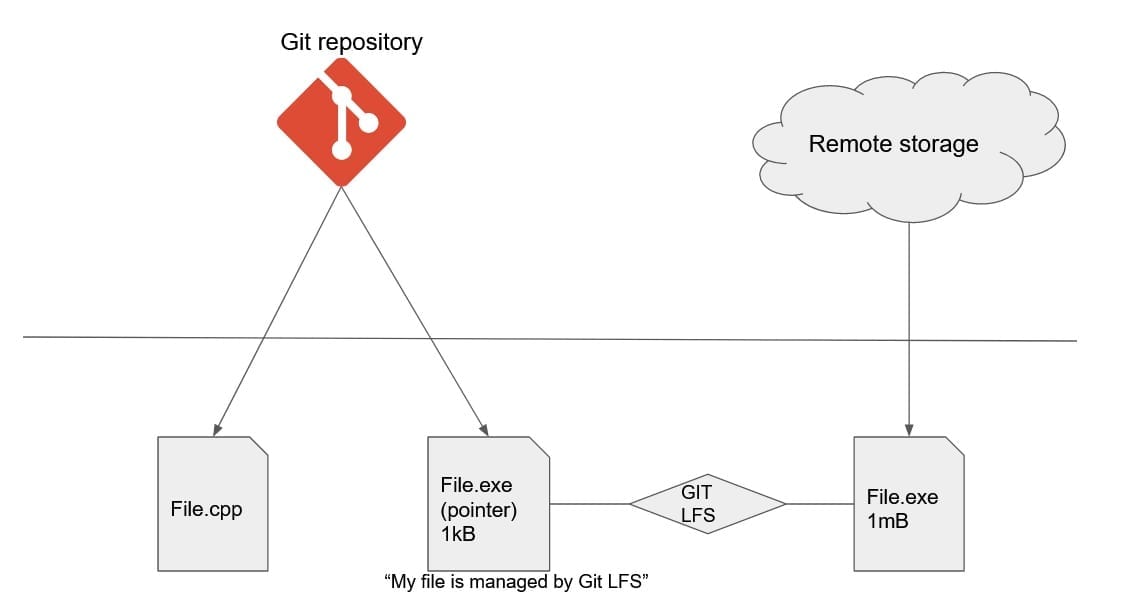
Git LFS (for Git “Large File Storage”) is a tool to store your binaries, images, or archives.
Git LFS will simply store your files on a remote server. It will optimize your data transfer and avoid some strange behavior that could occur with a simple Git.
Instead, Git LFS will store on git a text “pointer of file” to download the correct file remotely. Thanks to that, your Git repository didn't get polluted by large binaries and images.
Use a package manager
To manage your external libraries or modules, there is a cool solution: Package managers.
For some languages, a package manager goes with your programming language. For instance:
- Crate for Rust.
- Nuget for C#.
- pip for Python.
- And others...
Sadly, C++ doesn’t support easily those package managers. This specificity is due to the divergences between developers during the 30 last years. It concerns library usage, includes, or build systems. But, some package managers are in development for C++: Conan and vcpkg. And it works pretty well!
The big advantage of those package managers is to maintain a dependency tree. This is one of the best suitable solutions to manage third party libraries and binaries.
As you saw, you have multiple tools to track those big files. Git LFS is great to store large files as images and binaries. Concerning the package manager, it is a suitable solution for all binaries and third-party libraries.
Do you know how to create a thread in C++11? During this post, we will review together the different manner to use the class thread.
We will concentrate on the first purpose: The thread creation!
The Thread library - Create a thread in C++11.
The thread creation is cooked by the constructor of std::thread. To use this library, you should gather two conditions:
1 - The inclusion of the “thread” header.
C++ - Thread requirement
#include <thread>
2 - "std::thread" uses directly the POSIX thread implementation. Then, you must link "pthread".
Bash - How to build with thread - GCC example
g++ -lpthread myCode.cpp
To create a single thread C++11, the “std::thread” object constructor needs two parameters:
- fn - A callable object. It can be a pointer to a function or class member. The return value of this callable object is ignored.
- args… (optional) - The list of arguments.
If you remember my post about “invoke and apply in C++17”, the callable object is similar to invoke!
Now, let's review the different manners to use the thread class!
Function without arguments.
In C++11, the creation of a thread is pretty simple. You just need a function that returns "void". Unfortunately, You cannot get the returned value. Let's see this basic example below:
C++ - Thread creation with a function
#include <iostream>
#include <thread>

void function_threaded()
{
    std::cout << "(THREAD) Hey, I am thread!" << std::endl;
}

int main()
{
    std::cout << "(MAIN) Hey, I am main!" << std::endl;
    std::thread thread_object(function_threaded);
    // Join the thread. Then, we will wait for the thread termination
    thread_object.join();
    std::cout << "(MAIN) Thread ended!" << std::endl;
    return 0;
}
Here, the object "std::thread" immediately creates and initializes the thread. Here, the thread calls the function "function_threaded".
Output
(MAIN) Hey, I am main!
(THREAD) Hey, I am thread!
(MAIN) Thread ended!
Function with arguments.
Sometimes, the passage of arguments is necessary.
C++ - Thread creation with a function plus arguments
#include <iostream>
#include <thread>

void function_threaded(int a)
{
    std::cout << "(THREAD) Hey, I am thread!" << std::endl;
    std::cout <<"(THREAD) a = " << a << std::endl;
}

int main()
{
    std::cout << "(MAIN) Hey, I am main!" << std::endl;
    std::thread thread_object(function_threaded, 42);
    // Join the thread. Then, we will wait for the thread termination
    thread_object.join();
    std::cout << "(MAIN) Thread ended!" << std::endl;
    return 0;
}
As you see, the example is pretty similar to an initialization without arguments. Compared to the "pthread" implementation, the usage of std::thread simplifies this kind of scenario!
Output
(MAIN) Hey, I am main!
(THREAD) Hey, I am thread!
(THREAD) a = 42
(MAIN) Thread ended!
Class members.
You can initialize a thread by calling a class member:
C++ - Thread creation with a class member
#include <iostream>
#include <thread>

class rectangle
{
    public:
        rectangle(unsigned int height, unsigned int width)
            : height(height), width(width)
            {};
        virtual ~rectangle() {};
        void print_area();
    private:
        unsigned int height;
        unsigned int width;
};

void rectangle::print_area()
{
    unsigned long area = height * width;
    std::cout << "(THREAD) My area is equal to " << area << std::endl;
}

int main()
{
    std::cout << "(MAIN) Hey, I am main!" << std::endl;
    rectangle golden_rectangle(16, 9);
    std::thread thread_object(&rectangle::print_area, golden_rectangle);

    thread_object.join();
    std::cout << "(MAIN) Thread ended!" << std::endl;
    return 0;
}
Here a bit more complex. You should at first define the member called. Then, you pass the class object to use. Here, the rectangle area is calculated in a separate thread.
Output
(MAIN) Hey, I am main!
(THREAD) My area is equal to 144
(MAIN) Thread ended!
Lambda expressions.
The lambda expressions can be used for your initialization.
C++ - Thread creation with a lambda expression
#include <iostream>
#include <thread>

int main()
{
    std::cout << "(MAIN) Hey, I am main!" << std::endl;

    std::thread thread_object([](){
        std::cout << "(THREAD) I am the thread!" << std::endl;
    };

    thread_object.join();
    std::cout << "(MAIN) Thread ended!" << std::endl;

    return 0;
}
Output
(MAIN) Hey, I am main!
(THREAD) I am the thread!
(MAIN) Thread ended!
The Thread library - Synchronization and ID.
The object "std::thread" contains two useful members for debug and synchronization:
"join" - Synchronize your thread termination.
Join is a public member of the Thread class. The goal of "join" is to stop your caller until that the thread contained in the object is terminated. You can see the usage of "join" in all my examples.
Remember, as I explained before in this post, "join" is extremely important to terminate properly your thread!
"get_id" - Get your thread ID.
As join, get_id is a public member of the Thread class. Pretty useful for debug, get_id retrieves the thread number.
C++ - Thread ID
#include <iostream>
#include <thread>

void function_threaded()
{
    int j = 0;

    for (int i = 0; i < 10000000; ++i)
    {
        j = j + i;
    }
    std::cout << "(THREAD) I am a thread with the ID: " << std::this_thread::get_id() << std::endl;

}

int main()
{
    std::cout << "(MAIN) Hey, I am main!" << std::endl;
    std::thread thread_object(function_threaded);
    std::cout << "(MAIN) I created a thread with the ID: " << thread_object.get_id() << std::endl;
    // Join the thread. Then, we will wait for the thread termination
    thread_object.join();
    std::cout << "(MAIN) Thread ended!" << std::endl;
    return 0;
}
In this example, I create a thread with the function "function_threaded". With "thread_object.get_id()", the "thread creator" can retrieve the "Thread ID".
To get the "Thread ID" inside my thread, I can use "std::this_thread::get_id()".
Output
(MAIN) Hey, I am main!
(MAIN) I created a thread with the ID: 139815045957376
(THREAD) I am a thread with the ID: 139815045957376
(MAIN) Thread ended!
Advanced usage - Create multiple workers in an array.
Sometimes, you need to create a cluster of workers (placed in vector, map, or array!). You will see with C++11, the creation of those kinds of arrays are pretty simple and powerful. Let's review together two manners to create those workers:
Workers inside a vector with lambda.
C++ - Multiple thread creation with a vector, lambda used
#include <iostream>
#include <vector>
#include <thread>

void threaded_function(int i)
{
    std::cout << "(THREAD) I am thread number " << i << std::endl;
    int j = 1;
    for (int i = 0; i < 100000; ++i)
    {
        j = i*j;
    }
    std::cout << "(THREAD) thread number " << i << " terminated" << std::endl;
}

int main()
{
    std::cout << "(MAIN) Hey, I am main!" << std::endl;
    std::vector<std::thread> vector_of_threads;

    for (int i = 0; i < 5; ++i) {
        vector_of_threads.push_back(std::thread([i](){
            threaded_function(i);
       }));
    }

    // Wait for all thread termination
    for (auto& x: vector_of_threads)
    {
        x.join();
    }

    std::cout << "(MAIN) Exiting" << std::endl;

    return 0;
}
It is a simple extension of my example with lambda expressions and argument usage! I created 5 workers with a different identifier for each one.
Then, the "std::thread" object is directly pushed in my vector. Thanks to this vector, I can "join" those workers.
Output
(MAIN) Hey, I am main!
(THREAD) I am thread number 0
(THREAD) I am thread number 1
(THREAD) I am thread number 2
(THREAD) I am thread number 3
(THREAD) thread number 0 terminated
(THREAD) I am thread number 4
(THREAD) thread number 1 terminated
(THREAD) thread number 2 terminated
(THREAD) thread number 3 terminated
(THREAD) thread number 4 terminated
(MAIN) Exiting
Workers inside a vector without lambda.
Of course, you can also create multiple threads without lambda.
Here, a similar example based the method "emplace_back" from "std::vector" to create your cluster.
C++ - Multiple thread creation with a vector
#include <iostream>
#include <vector>
#include <thread>

void multiplication_threaded(int a, int b)
{
    long multiplication_result = a * b;
    std::cout << "(THREAD) Hey, I am thread! My Result is = " << multiplication_result << std::endl;
}

int main()
{
    std::cout << "(MAIN) Hey, I am main!" << std::endl;
    std::vector<std::thread> thread_list;

    for (int i = 0; i < 5; ++i)
    {
        thread_list.emplace_back(multiplication_threaded, i, 2);
    }

    // Wait for all thread termination
    for (auto& x: thread_list)
    {
        x.join();
    }

    return 0;
}
Output
(MAIN) Hey, I am main!
(THREAD) Hey, I am thread! My Result is = 0
(THREAD) Hey, I am thread! My Result is = 2
(THREAD) Hey, I am thread! My Result is = 4
(THREAD) Hey, I am thread! My Result is = 6
(THREAD) Hey, I am thread! My Result is = 8