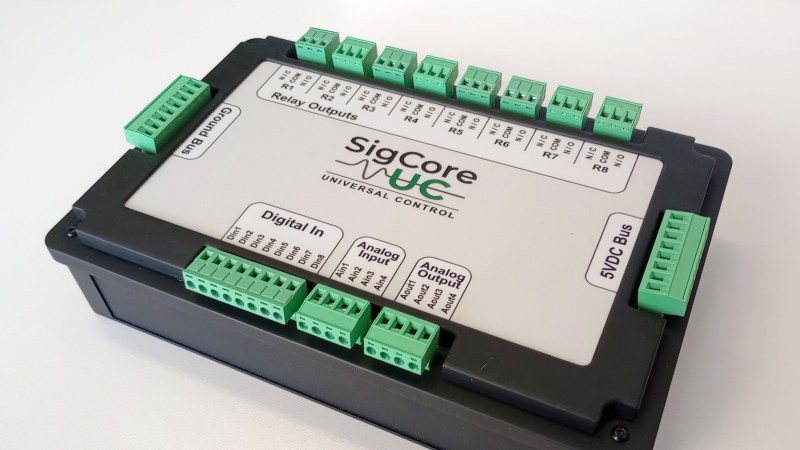
A photo of the SigCoreUC

SigCore UC: An Open-Source Universal I/O Controller For The Raspberry Pi

Recently, [Edward Schmitz] wrote in to let us know about his Hackaday.io project: SigCore UC: An Open-Source Universal I/O Controller With Relays, Analog I/O, and Modbus for the Raspberry Pi.

In the video embedded below, [Edward] runs us through some of the features which he explains are a complete industrial control and data collection system. Features include Ethernet, WiFi, and Modbus TCP connectivity, regulated 5 V bus, eight relays, eight digital inputs, four analog inputs, and four analog outputs. All packaged in rugged housing and ready for installation/deployment.

[Edward] says he wanted something which went beyond development boards and expansion modules that provided a complete and ready-to-deploy solution. If you’re interested in the hardware, firmware, or software, everything is available on the project’s GitHub page. Beyond the Hackaday.io article, the GitHub repo, the YouTube explainer video, there is even an entire website devoted to the project: sigcoreuc.com. Our hats off to [Edward], he really put a lot of polish on this project.

If you’re interested in using the Raspberry Pi for input/output you might also like to read about Raspberry Pi Pico Makes For Expeditious Input Device and Smart Power Strip Revived With Raspberry Pi.

Continue reading “SigCore UC: An Open-Source Universal I/O Controller For The Raspberry Pi”
Image

What’s The Cheapest Way To Scan Lots Of Buttons?

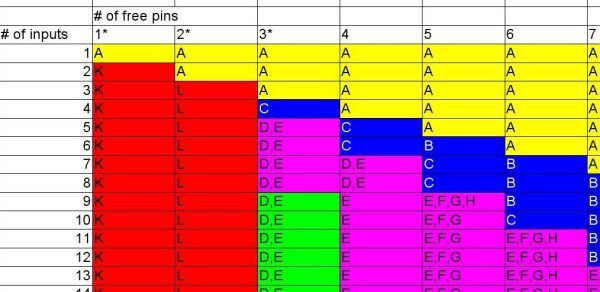
ImageSo you’re building a new mechanical keyboard. Or attaching a few buttons to a Raspberry Pi. Or making the biggest MIDI grid controller the world has ever know. Great! The first and most important engineering question is; how do you read all those buttons? A few buttons on a ‘Pi can probably be directly connected, one for one, to GPIO pins. A mechanical keyboard is going to require a few more pins and probably some sort of matrix scanner. But the grid controller is less clear. Maybe external I/O expanders or a even bigger matrix? Does it still need diodes at each button? To help answer these questions the folks at [openmusiclabs] generated a frankly astounding map which shows, given the number of inputs to scan and pins available, which topology makes sense and roughly how much might it cost. And to top it off they link into very readable descriptions of how each might be accomplished. The data may have been gathered in 2011 but none of the fundamentals here have changed.

How do you read this chart? The X axis is the number of free pins on your controller and the Y is the number of I/Os to scan. So looking at the yellow band across the top, if you need to scan one input it always makes the most sense to directly use a single pin (pretty intuitive, right?). Scrolling down, if you need to read 110 inputs but the micro only has eight pins free there are a couple choices, keys E and F. Checking the legend at the top E is “Parallel out shift register muxed with uC” and F is “Parallel in shift register muxed with uC“. What do those mean? Checking the table in the original post or following the link takes us to a handy descriptive page. It looks like a “parallel out shift register” refers to using a shift register to drive one side of the scan matrix, and “parallel in shift register” refers to the opposite.

Continue reading “What’s The Cheapest Way To Scan Lots Of Buttons?”

1Sheeld Uses Your SmartPhone As An Arduino Accessory

1sheeld

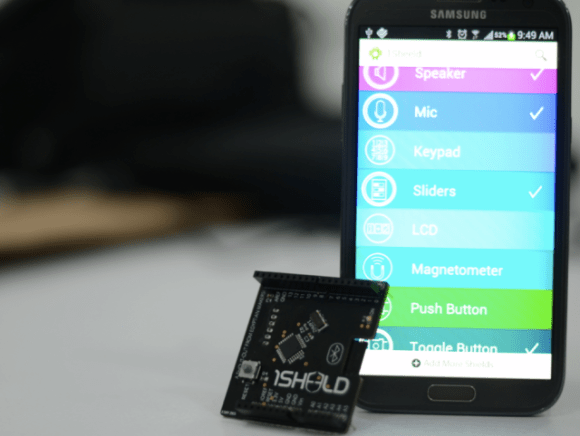
The Arduino can be a bit of a gateway board. You start with an Uno, then a shield, then another. Before you know it, you have an entire collection of shields. This is the problem 1Sheeld wants to solve. 1Sheeld allows a you to use your cell phone as a sensor and I/O suite for your Arduino, replacing many existing shields. We think this will be a great idea, especially with all the older phones coming off contract these days. The sensor capabilities of the average smartphone, as well as the LCD and touchscreen I/O capabilities could make for an interesting pairing.

Currently the 1Sheeld page is just a sign up for an upcoming kickstarter, which leaves many details to the imagination. It appears that the 1Sheeld will be a bluetooth based board. A few questions do remain to be answered though – will the 1Sheeld use the Android ADK? The software is what we’re waiting to see. The software running in the 1Sheeld module bluetooth chip will be important, but the software running phone side will be the real make or break of this module. We would love to see more smartphones being used for hardware hacking rather than collecting dust once they’ve been replaced.

[Via TechCrunch]