Illustrated Kristina with an IBM Model M keyboard floating between her hands.

Keebin’ With Kristina: The One With The Ultimate Portable Split

What do you look for in a travel keyboard? For me, it has to be split, though this condition most immediately demands a carrying solution of some kind. Wirelessness I can take or leave, so it’s nice to have both options available. And of course, bonus points if it looks so good that people interrupt me to ask questions.

A pair of hands poised above a blue split keyboard that packs easily for travel in a 3D-printed case. The case doubles as a laptop stand.
Image by [kleshwong] via YouTube
Depending on your own personal answers to this burning question, the PSKEEB 5 just may be your endgame. And, lucky for you, [kleshwong] plans to open source it soon. All he asks for is your support by watching the video below and doing the usual YouTube-related things.

You’ll see a couple of really neat features, like swing-out tenting feet, a trackpoint, rotary encoders, and the best part of all — a carrying case that doubles as a laptop stand. Sweet!

Eight years in the making, this is the fifth in a series, thus the name: the P stands for Portability; the S for Split. [kleshwong] believes that 36 keys is just right, as long as you have what you need on various layers.

So, do what you can in the like/share/subscribe realm so we can all see the GitHub come to pass, would you? Here’s the spot to watch, and  you can enjoy looking through the previous versions while you wait with your forks and stars.

Continue reading “Keebin’ With Kristina: The One With The Ultimate Portable Split”

Illustrated Kristina with an IBM Model M keyboard floating between her hands.

Keebin’ With Kristina: The One With The Tile-Based Macropad

Prolific Hackaday.io member [Michael Gardi] has hit upon the biggest problem with making reprogrammable macro pads — the legend situation. What do you do when the whole point is that the keys can so easily be changed?

ImageThere are a couple of options: blank keycaps and memorization, re-legendable keycaps, and little screens instead of keycaps. Surely there has to be another way, and [Michael] has discovered one: a tile-based system of descriptors.

As you can see, the labels are removable 3D-printed tiles that swap out with ease thanks to tiny magnets. But these aren’t just tidy labels. Inserting a new label automatically changes the macro! Each tile holds a “simple numeric value” which maps it to a macro when inserted and detected by a Hall effect sensor. I can’t wait to hear these tiles click in action during a demo video, which I can only hope is forthcoming.

Continue reading “Keebin’ With Kristina: The One With The Tile-Based Macropad”

Image

Input Device Gets New Input Device

One of the nicest things about a trackpoint is that you don’t have to take your hands off the keyboard. One of the worst things about a trackpoint is its usual placement, which can force a weird hand position that can cause repetitive stress injury.

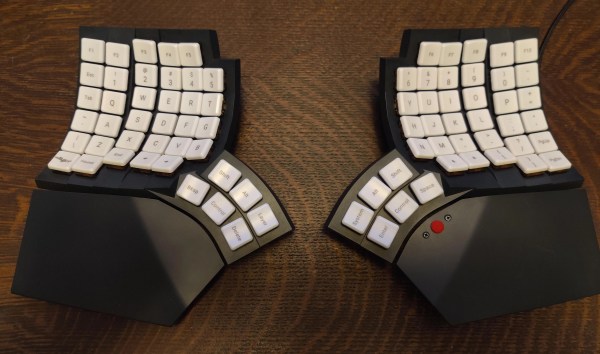
Image[notshitashi] has done an incredible job of adding a trackpoint to the Glove80 wireless split keyboard. It must have been really scary to drill holes in the palm rests of such a nice and not-cheap keyboard, but [notshitashi] soldiered on nonetheless, and the end result looks great.

Starting with a trackpoint module from Ali, [notshitashi] found that it didn’t fit the palm rest without being trimmed down, so they desoldered the business part from the main PCB and reattached it with wires. They had to go through a few of them to get it just right, but that’s the way it goes sometimes.

[notshitashi] calls this “a bit of a cheat and dirty hack” because the trackpoint module is wired and, therefore, a separate USB HID. Yes, the Glove80 has GPIO connectors in both halves, but the problem is that stock ZMK has yet to support pointing devices. We don’t care; this is quite the elegant hack anyway.

Want to jazz up your mechanical keyboard with a trackpoint? Here’s a handy guide. Or, you can perform a transplant.