This week Jonathan chats with Konstantinos Margaritis about SIMD programming. Why do these wide data instructions matter? What’s the state of Hyperscan, the project from Intel to power regex with SIMD? And what is Konstantinos’ connection to ARM’s SIMD approach? Watch to find out!
In the world of showing off, there is alongside ‘Does it play Doom?’ that other classic of ‘Does it play Bad Apple?’. Whereas either would be quaint in the context of the Vim editor, this didn’t deter [Nolen Royalty] from making Vim play the Bad Apple video. As this is a purely black and white video, this means that it’s possible to convert each frame into a collection of pixels, with regular expression based search and custom highlighting allowing each frame to be rendered in the Vim window.
The fun part about this hack is that it doesn’t require any hacking or patching of Vim, but leans on its insane levels of built-in search features by line and column, adjusting the default highlight features and using a square font to get proper pixels rather than rectangles. The font is (unsurprisingly) called Square and targets roguelike games with a specific aesthetic.
First 6,500 frames are fed through ffmpeg to get PNGs, which are converted these into pixel arrays using scripts on the GitHub project. Then the regex search combined with Vim macros allowed the video to be played at real-time speed, albeit at 120 x 90 resolution to give the PC a fighting chance. The highlighting provides the contrast with the unlit pixels, creating a rather nice result as can be seen in the embedded video.
“Please say it wasn’t a regex, please say it wasn’t a regex; aww, crap, it was a regex!” That seems to be the conclusion now that Crowdstrike has released a full root-cause analysis of its now-infamous Windows outage that took down 8 million machines with knock-on effects that reverberated through everything from healthcare to airlines. We’ve got to be honest and say that the twelve-page RCA was a little hard to get through, stuffed as it was with enough obfuscatory jargon to turn off even jargon lovers such as us. The gist, though, is that there was a “lack of a specific test for non-wildcard matching criteria,” which pretty much means someone screwed up a regular expression. Outside observers in the developer community have latched onto something more dire, though, as it appears the change that brought down so many machines was never tested on a single machine. That’s a little — OK, a lot — hard to believe, but it seems to be what Crowdstrike is saying. So go ahead and blame the regex, but it sure seems like there were deeper, darker forces at work here.
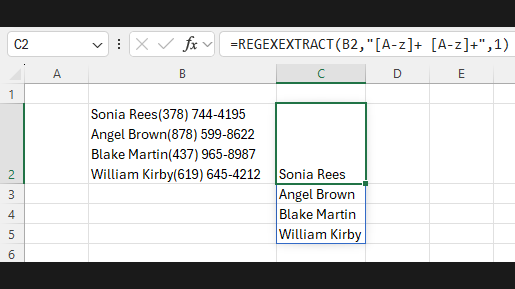
There are two types of people in the world: those who have no idea what a regular expression is, and those who not only know what they are but can compose them on the fly and tend to use them in situations where they’re clearly not called for. And it’s that latter camp, of which we consider ourself a proud member, that is rejoicing with the announcement that Microsoft is adding regular expression support to Excel.
Or perhaps not rejoicing so much as wondering what took so long. Yes, regular expressions have been part of VBA for a while now, but the new functions allow you to use regexes right in the spreadsheet grid. There are plenty of caveats, of course. The big one is that this is still in beta at this time, so you have to do some gymnastics to enable it, if you’re even allowed to in the first place. Second, support appears limited to three functions at the moment: REGEXTEST, which provides a logical test of pattern matching; REGEXEXTRACT, which returns a substring that matches a pattern; and REGEXREPLACE, which substitutes a string for a pattern. The video below walks through how to use these functions within spreadsheets.
What’s also unclear now is what flavor of regular expressions is supported. There are a bewildering number of entities in the regex bestiary — character classes, positional indicators, quantifiers, subexpressions, lazy and greedy matches, and a range of grouping constructs that perplex even regex pros. One hopes these new functions will support one of the existing regex standards, but Microsoft is famous for “extending and enhancing.” Then again, regex support has been in the .NET Framework for years and is pretty close to the Perl standard, so our guess is that it’ll be close to that.
If you fall into the “What’s a regex?” camp but want to change that, why not get your grep on?
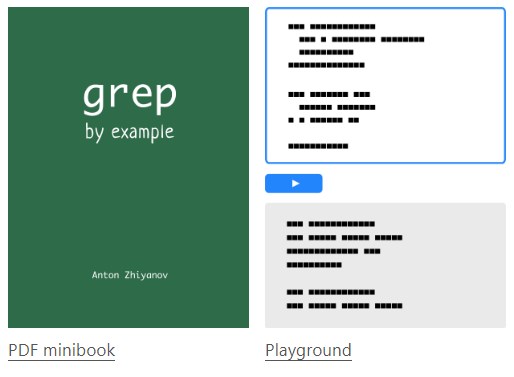
These days, you can’t throw a USB stick without hitting something that’s running Linux. It might be a phone, an embedded device, or your TV. Either way, it’s running Linux, and somewhere along the line of the development of whatever your USB stick smacked into, somebody used the Global Regular Expression Print utility- better known as Grep. But what is Grep, and why do you need it? [Anton Zhiyanov] not only answers those questions but provides Grep by example: Interactive Guide to help you along.
Grep By Example is also available as a PDF Minibook, and a Grep playground helps you learn quickly.
To understand Linux, one must understand its commercial predecessor, Unix. One of the things that made Unix (and then Linux) unique was its philosophy: Write programs that work together, do one thing well, and handle text streams. This philosophy describes a huge number of programs, and one of these programs is Grep. It’s installed everywhere there’s a *nix installed, and once one becomes familiar with it, their command-line-fu reaches an all new level.
At its core, Grep is simply a bloodhound. It’s scent? A magical incantation called Regular Expressions. Regular Expressions (aka Regex) are simply a way of describing what a stream of text should look like. So when you feed Grep a bit of Regular Expression, it Prints only the text that matches that expression. Neat, right?
The trouble is that Regex can be kind of hard, and Grep has various versions and capabilities that need to be learned. And this is where the article shines- it covers both in an excellent interactive tutorial that’ll help you become a Grep Guru in no time. And if you want to do a deeper dive, check out what it takes to make your own Regex Engine from scratch!
Sad news for kids and adults alike as Lego announces the end of the Mindstorms line. The much-wish-listed line of robotics construction toys will be discontinued by the end of this year, nearly a quarter-century after its 1998 introduction, while support for the mobile apps will continue for another couple of years. It’s probably fair to say that Mindstorms launched an entire generation of engineering careers, as it provided a way to quickly prototype ideas that would have been difficult to realize without the snap-fit parts and easily programmed controllers. For our money, that ability to rapidly move from idea to working model was perhaps the strongest argument for using Mindstorms, since it prevented that loss of momentum that so often kills projects. That was before the maker movement, though, and now that servos and microcontrollers are only an Amazon order away and custom plastic structural elements can pop off a 3D printer in a couple of hours, we can see how Mindstorms might no longer be profitable. So maybe it’s a good day to drag out the Mindstorms, or even just that big box of Lego parts, and just sit on the carpet and make something.
Being an editor is a job that seems deceptively easy until you are hauled over the coals for letting a textual howler go to print (or website). Most publications have style guides to ensure that their individual voice is preserved, but even the most eagle-eyed will sometimes slip up in their application. At the Guardian newspaper in the UK they have been struggling with this against an ever-evolving style guide that must adapt to fast-moving world events, to the extent that they had a set of regular expressions to deal with commonly-occurring problems. A lot of regular expressions, in fact around 13,000 of them.
Clearly some form of management was required, and a team of developers set about taming this monster. The result is Typerighter, their server-side document-checker, which can be found in a GitHub repository. Surprisingly for rule management they started with a Google Sheet, a choice which proved unexpectedly robust when working with such a long list even though they later replaced it. The back end doing the job of text matching was written in Scala, and for the front end a plugin was created for their Prosemirror text editor.
For a publication of course this is extremely interesting, but where’s the interest for hackers? The answer lies in any text-processing engine that uses a lot of regular expressions; those of you who have dabbled in this space will know how unwieldy this work can become. Any user of computational linguistic techniques in the pursuit of language processing could probably find much of interest here.
If you’re a bit hazy on regular expressions, how about the episode on them from our long-running Linux-fu series?