Image

Tackling Tremors With DIY Technology

[It’s Triggy!] had a problem to solve. His grandma was having issues with hand tremors, which made the basic tasks of daily life difficult to perform. He decided to explore whether a high-tech solution could help best the tremors and make life easier.

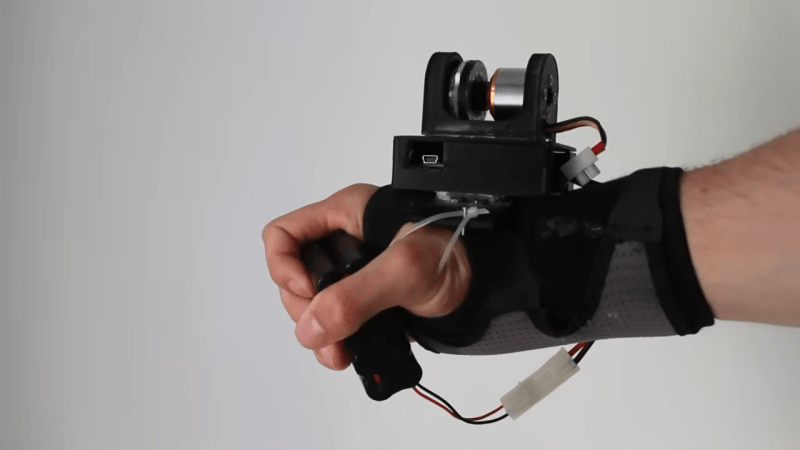
The video covers multiple ideas on how to stabilize a hand suffering involuntary tremors. The first build involved a gyroscope, which proved unsuccessful, but led to the idea of building a reaction wheel. The concept is simple — get the reaction wheel to counteract the forces from tremors to stabilize the hand. To achieve this, an accelerometer was employed to track the movements of the arm and the hand. The magnitude of the movement was then used to control a powerful brushless motor mounted on the wrist. If the tremor was driving a hard tilt to the left, the motor would spin up to create a counter-torque, cancelling out the involuntary movement. This worked to a degree, but the resulting device was large and noisy, which made it impractical.

This thus inspired a return to earlier work involving the use of a tuned mass damper to settle tremors. The combination of some 3D printed wrist mounts along with various spring and cantilever designs… ultimately didn’t work that well. By this point, [It’s Triggy!] had noticed the tremor was mostly in the hands, while the wrist stayed steady. Thus was inspired a wrist-mounted handle for the wearer to wrap their hand around. This allowed the use of simple handheld objects like kitchen utensils, with the wearer’s own grip suppressing the tremor successfully.

As this project demonstrates, sometimes high-tech solutions are the way to go, and other times… a more passive design will actually serve you better.

Continue reading “Tackling Tremors With DIY Technology”

Image

Glues You Can Use: Adhesives For The Home Shop

A while back I looked at lubricants for the home shop, with an eye to the physics and chemistry behind lubrication. Talking about how to keep parts moving got me thinking about the other side of the equation – what’s the science behind sticking stuff together? Home shops have a lot of applications for adhesives, so it probably pays to know how they work so you can choose the right glue for the job. We’ll also take a look at a couple of broad classes of adhesives that are handy to have around the home shop. Continue reading “Glues You Can Use: Adhesives For The Home Shop”

Image

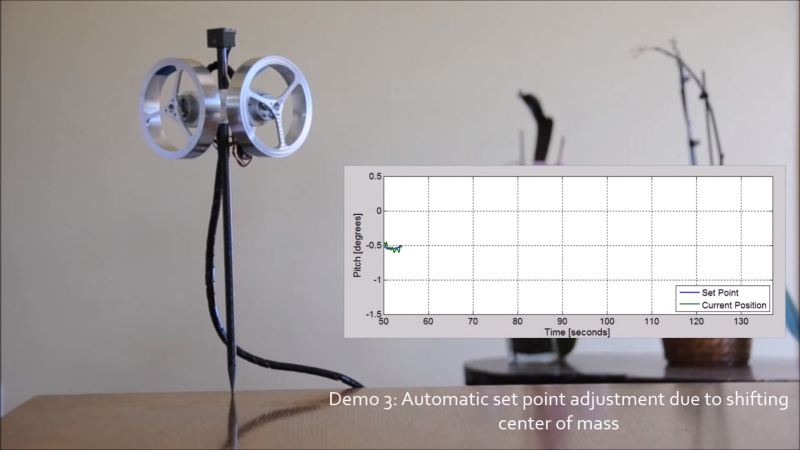
Stick Balances Itself With Reaction Wheels

The inverted pendulum is a pretty classic dynamics problem and reaction wheels are cool. That’s why we like [Mike Rouleau]’s self-balancing stick.

The video, viewable after the break, was fairly sparse on details, but he furnished some in the comments. The little black box on the top is a GY-521 Gyroscope module. It sends its data to an Arduino attached to the black cord which trails off the screen. The Arduino does its mathemagic and then uses a motor controller to drive the reaction wheels at the correct speeds.
Continue reading “Stick Balances Itself With Reaction Wheels”

USB Cap

Never Forget Your USB Stick Again

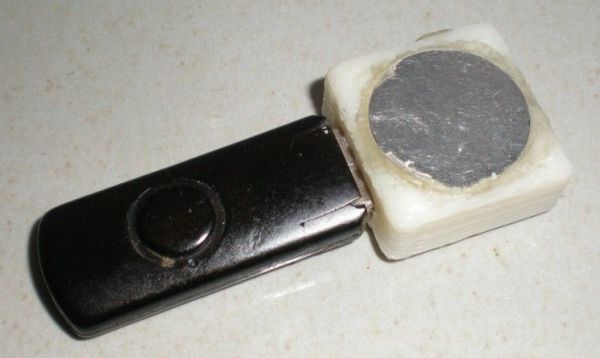
USB sticks are very handy. They are a very portable and relatively inexpensive means of storing data. Possibly the most annoying part about using one of these devices is when you inevitable leave it behind somewhere by accident. This is especially true if it contains sensitive information. [Eurekaguy] feels your pain, and he’s developed a solution to the problem.

[Eurekaguy] designed a custom cap for USB sticks that beeps approximately every minute after the USB stick has been plugged in for five minutes. The cap is 3D printed and then slightly modified with four 1mm holes. Two wires are routed between these holes to make contact points for the VCC and GND pins of the USB stick.

The beep circuit is comprised of a tiny PIC12F629 microcontroller along with a couple of other supporting components. The circuit is wired together dead bug style to conserve space. Three AG5 batteries power the circuit. A small piezo speaker provides the repeating beep to remind you to grab your USB stick before you walk away from the computer.

[Thanks Irish]

Image

Make Your Own Custom Hot Glue Sticks

Hot glue guns can be very handy tools for bonding all sorts of surfaces, while getting you accustomed to plastic burns. The one thing they lack though is color, and while yes, you can on occasion find colored glue sticks, there is usually only a limited selection and they cost way more than the normal amber or clear sticks.

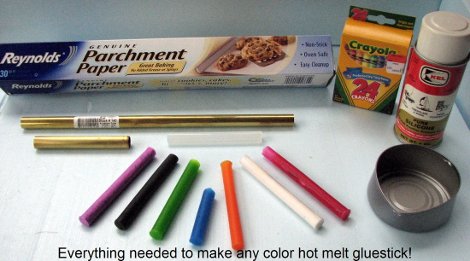
[Ken] solves the blandness problem of hot glue sticks in his kitchen, as shown in this cool slideshow. In a melt and recast process, glue sticks and crayons in a 3:1 ratio are slowly heated on an electric stove in a old can. Metal tubing is lined with silicone parchment paper to act as a release agent. The now vivid and scalding hot glue is poured into the tube and left to cool.

You might be wondering how mixing colored wax into ethylene-vinyl acetate effects the glue’s strength . According to the author if you need  decrease the mix viscosity, you can add up to 10% paraffin wax by weight without effecting the bond strength. Color and viscosity control? Hot glue just keeps getting better!

Replace An N64’s Worn Out Joystick

Image

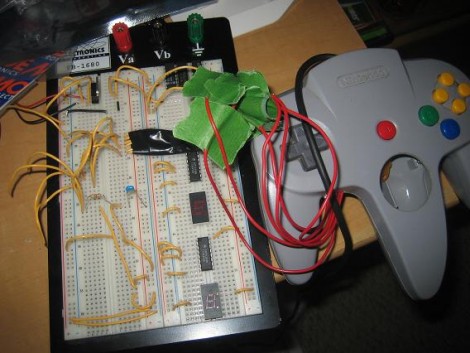
As gaming consoles age the controllers will inevitably show some wear, and sadly may give out all together. [Kyle] couldn’t bear to watch his Nintendo 64 controller bite the dust so he replaced the thumb stick with one from a PlayStation. This is a bigger job than you might imagine because the two parts are fundamentally different. The original N64 stick uses a rotary encoder to output data to the control chip, while the PlayStation stick is an analog device. [Kyle’s] solution was to read the analog values using a PIC, but lower in the thread you can read about another user who pulled off a similar hack using an AVR. Both convert the signals into the rotary encoder format that the N64 chip is listening for. From the looks of the clip embedded after the break, this couldn’t work any better!

Continue reading “Replace An N64’s Worn Out Joystick”

Virtual Pool, Real-world Interface

[youtube=http://www.youtube.com/watch?v=2Wc_DXGe2fQ]

Sunday we saw robots playing pool and an augmented reality pool game. Today we’ll complete the pool trifecta: virtual pool using a real cue stick and ball in another vintage video from Hack a Day’s secret underground vault. The video is noteworthy for a couple of reasons:

First is the year it was made: 1990. There’s been much buzz lately over real-world gaming interfaces like the Nintendo Wii motion controller or Microsoft’s Project Natal. Here we’re seeing a much simpler but very effective physical interface nearly twenty years prior.

Second: the middle section of the video reveals the trick behind it all, and it turns out to be surprisingly simple. No complex sensors or computer vision algorithms; the ball’s speed and direction are calculated by an 8-bit processor and a clever arrangement of four infrared emitter/detector pairs.

The visuals may be dated, but the interface itself is ingenious and impressive even today, and the approach is easily within reach of the casual garage tinkerer. What could you make of this? Is it just a matter of time before we see a reader’s Mini-Golf Hero III game here?