Image

Libxml2 Narrowly Avoids Becoming Unmaintained

In an excellent example of one of the most overused XKCD images, the libxml2 library has for a little while lost its only maintainer, with [Nick Wellnhofer] making good on his plan to step down by the end of the year.

XKCD's dependency model
Modern-day infrastructure, as visualized by XKCD. (Credit: Randall Munroe)

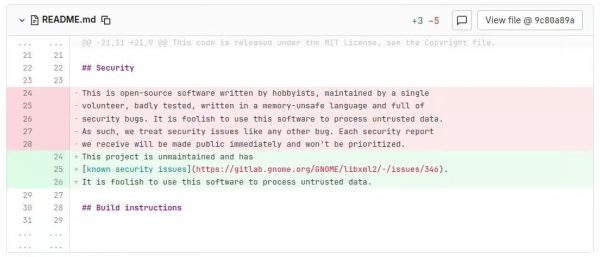
While this might not sound like a big deal, the real scope of this problem is rather profound. Not only is libxml2 part of GNOME, it’s also used as dependency by a huge number of projects, including web browsers and just about anything that processes XML or XSLT. Not having a maintainer in the event that a fresh, high-risk CVE pops up would obviously be less than desirable.

As for why [Nick] stepped down, it’s a long story. It starts in the early 2000s when the original author [Daniel Veillard] decided he no longer had time for the project and left [Nick] in charge. It should be said here that both of them worked as volunteers on the project, for no financial compensation. This when large companies began to use projects like libxml2 in their software, and were happy to send bug reports. Beyond a single Google donation it was effectively unpaid work that required a lot of time spent on researching and processing potential security flaws sent in.

Of note is that when such a security report comes in, the expectation is that you as a volunteer software developer drop everything you’re working on and figure out the cause, fix and patched-by-date alongside filing a CVE. This rather than you getting sent a merge request or similar with an accompanying test case. Obviously these kind of cases seems to have played a major role in making [Nick] burn out on maintaining both libxml2 and libxslt.

Fortunately for the project two new developers have stepped up to take over as maintainers, but it should be obvious that such churn is not a good sign. It also highlights the central problem with the conflicting expectations of open source software being both totally free in a monetary fashion and unburdened with critical bugs. This is unfortunately an issue that doesn’t seem to have an easy solution, with e.g. software bounties resulting in mostly a headache.
Image

XML Is A Quarter Century Old

For those of us who have spent entire careers working with structured data, it comes as something of a surprise to be reminded that XML is now 25 years old. You probably missed the XML standard on the 10th of February 1998, but it’s almost certain that XML has touched your life in many ways even if you remain unaware of it.

The idea of one strictly compliant universal markup language to rule them all was extremely interesting in an era when the Internet was becoming the standard means to interchange information and when the walled gardens dating back to the mini- and mainframe era were being replaced with open standards-based interchange. In the electronic publishing industry, it allowed encyclopedia and dictionary-sized data sets to be defined to a standard format and easily exchanged.  At a much smaller level, it promised a standard way to structure more mundane transactions. Acronyms and initialisms such as WAP, SOAP, and XHTML were designed to revolutionize the Web of the 21st century, but chances are that those are familiar only to the more grizzled developers.

In practice the one-size-fits-all approach of XML left it unwieldy, giving the likes of JSON and HTML4 the opening to be the standards we used. That’s not to say XML isn’t hiding in plain sight though, it’s the container for the SVG graphics format. Go on — tell us where else XML can be found, in the comments!

So, XML. When used to standardise large structured datasets it can sometimes be enough to bring the most hardened of developers to tears, but it remains far better than what went before. When hammered to fit into lightweight protocols though, it’s a pain in the backside and is best forgotten. It’s 25 years old, and here to stay!

Header: [Jh20], GFDL v1.2.

Image

Procedurally Generated Retrocomputer Emulators

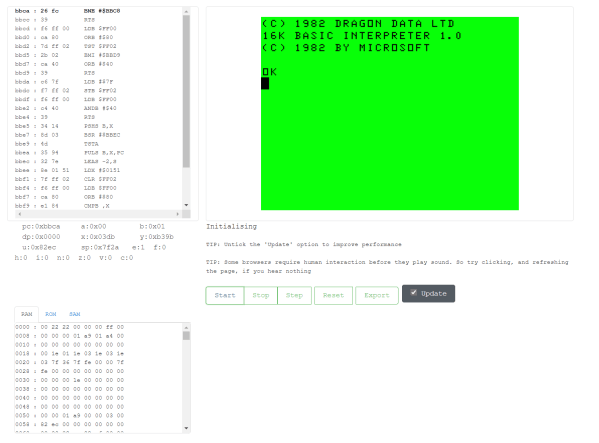
[Marquis de Geek] has a profound love of old systems. Tired of writing new emulators from scratch for each project, his newest project EMF generates the emulator for him. An XML document describes the layout of the memory, CPU description, and screen handler. The output is currently a single-page Javascript emulator application with an assembly and a dissembler. However, but that backend can easily be swapped to another language such as Rust or C++.

Since EMF is a framework that provides a common way to describe the emulated machine, you get a common emulator user interface for free. There’s a lot of flexibility offered here as well. Opcodes can be implemented as a large switch statement or individual functions, depending on the target language’s performance. Self-modifying code can be detected and handled separately. Custom features or hardware can be injected easily by writing a module in the target language.

While the source code for the EMF hasn’t been released yet, several of the machines that [Marquis de Geek] has built with EMF are open-source on GitHub. So far the list includes Dragon32, Sinclair ZX80, Sinclair ZX81, Sinclair ZX Spectrum, Elliott 903, Chip8, Cosmac VIP, and the MegaProcessor. Each has a live emulator that runs in your browser.

While [Marquis de Geek] hopes to release a binary version of the EMF soon, we’re very much looking forward to the EMF source coming out once the code has been cleaned up. We love the trend towards creating easier and more accessible emulators, such as this Twitter bot that runs Atari programs.

Continue reading “Procedurally Generated Retrocomputer Emulators”

Image

Samsung’s Leap Month Bug Teaches Not To Skimp On Testing

Date and time handling is hard, that’s an ugly truth about software development we’ll all learn the hard way one day. Sure, it might seem like some trivial everyday thing that you can easily implement yourself without relying on a third-party library. I mean, it’s basically just adding seconds on top of one another, roll them over to minutes, and from there keep rolling to hours, days, months, up until you hit the years. Throw in the occasional extra day every fourth February, and you’re good to go, right?

Well, obviously not. Assuming you thought about leap years in the first place — which sadly isn’t a given — there are a few exceptions that for instance cause the years 1900 and 2100 to be regular years, while the year 2000 was still a leap year. And then there’s leap seconds, which occur irregularly. But there are still more gotchas lying in wait. Case in point: back in May, a faulty lunar leap month handling in the Chinese calendar turned Samsung phones all over China into bricks. And while you may not plan to ever add support for non-Gregorian calendars to your own project, it’s just one more example of unanticipated peculiarities gone wild. Except, Samsung did everything right here.

So what happened?

Continue reading “Samsung’s Leap Month Bug Teaches Not To Skimp On Testing”

Image

Day Clock Monitors Air Quality Of The Great Indoors

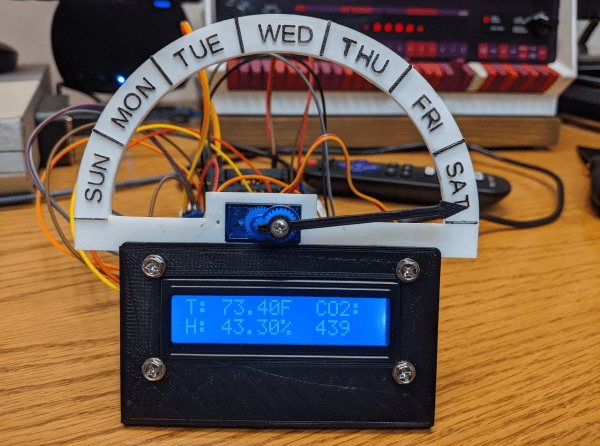
As the world settles into this pandemic, some things are still difficult to mentally reckon, such as the day of the week. We featured a printed day clock a few months ago that used a large pointer to provide this basic psyche-grounding information. In the years since then, [Jeff Thieleke] whipped up a feature-rich remix that adds indoor air quality readings and a lot more.

Like [phreakmonkey]’s original day tripper, an ESP32 takes care of figuring out what day it is and moves a 9 g servo accordingly. [Jeff] wanted a little more visual action, so the pointer moves a tad bit every hour. A temperature/humidity sensor and a separate CO₂ sensor output their readings to an LCD screen mounted under the pointer. Since [Jeff] is keeping this across the basement workshop from the bench, the data is also available from a web server running on the ESP32 via XML and JSON, and the day clock can get OTA updates.

Need a little more specificity than just eyeballing a pointer? Here’s a New Times clock that gives slightly more detail.

Image

MessagePack Is A More Efficient JSON

It is an age-old problem, that of having some data you want to store somewhere, and later bring it back. How do you format the data? Custom file formats are not that hard, but if you use an existing format you can probably steal code from a library to help you. Common choices include XML or the simpler JSON. However, neither of these are very concise. That’s where MessagePack comes in.

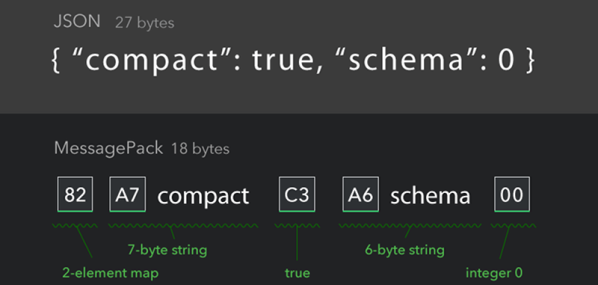
For example, consider this simple JSON stanza:

{"compact":true, "schema":0}

This is easy to understand and weighs in at 27 bytes. Using MessagePack, you’d signal some special binary fields by using bytes >80 hex. Here’s the same thing using the MessagePack format:

 
0x82 0xA7 c o m p a c t 0xC3 0xA6 s c h e m a 0x00

Of course, the spaces are there for readability; they would not be in the actual data stream which is now 18 bytes. The 0x82 indicates a two-byte map. The 0xA7 introduces a 7-byte string. The “true” part of the map is the 0xC3. Then there’s a six-byte string (0xA6). Finally, there’s a zero byte indicating a zero.

Continue reading “MessagePack Is A More Efficient JSON”

Renaming Parts In Eagle CAD By Editing The XML Directly

eagle-xml-find-and-replace-script

There’s a lot of ways to burn up your time when designing PCBs, but renaming components can be one of the most frustrating. [Joe Pinzone] wrote in with his solution to the problem. Instead of hunting for each part on the schematic to change them one at a time, he makes a list of the substitutions and then uses a script to make all the changes in the XML files. He didn’t publish a post about his work, but you’ll find the source code he wrote embedded after the break.

The straw that finally broke the camel’s back was a project that included about two hundred components which didn’t seem to have a naming order that made any sense with the actual values of the components. The script is written in C++ (for Windows but [Joe] says this should be easily ported to other systems as well). To use it he creates a CSV file with the current component names in the first column. He then goes through and types what he wants for the new name in the second column. This CSV, along with the BRD and SCH files are then given as inputs for the script (through selecting them all and dragging to the script or as CLI arguments) and it automatically makes the changes.

Of course this is only possible because Cadsoft transitioned to using XML files in Eagle 6.

Continue reading “Renaming Parts In Eagle CAD By Editing The XML Directly”