The leetcode web coding IDE has a premium debugger feature – however this is not enabled during the contest. Recently I found out that you can actually print to STDOUT and then when you run your solution – you will see the output – this is an easy yet powerful method to debug when you don’t have other better solutions.

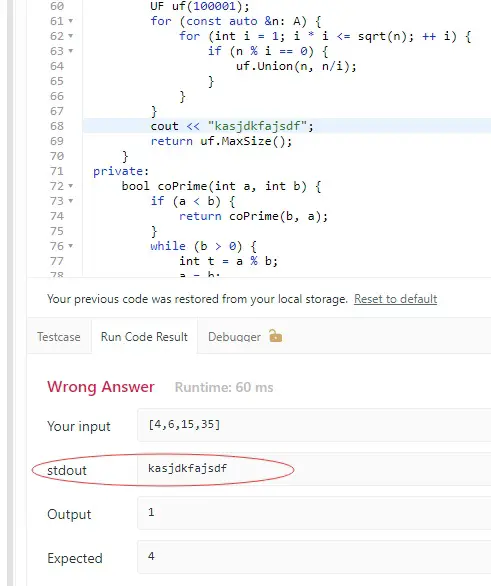
leetcode-stdout-debugging-trick
This is a great way to debug your code when you don’t have a IDE at hand – sometimes I participated the weekly contests on iPad where I don’t have IDE and I don’t have access to the inbuilt leetcode debugger as well – in this case, the printing to stdout is the only practical way of debugging printing the variables. Prior to this, I can only change the code and return the variable as a debugging technique – which is very inefficient.

leetcode
Debugging Code on Leetcode
Using stdout (standard output) to debug and print solutions during a Leetcode contest can be a valuable technique for identifying issues in your code quickly. Since Leetcode provides an online coding environment with limited debugging tools, printing intermediate values to stdout can help track variable states, function calls, and logic flow. By strategically placing print() statements in Python (or cout in C++), you can verify how your algorithm processes input and detect unexpected behaviors. However, excessive printing can slow down execution, so it’s best to output only the most relevant information, such as key variables at crucial steps or results from important computations.
When using stdout for debugging during a contest, it’s crucial to remember that printed outputs do not affect the final result, as Leetcode evaluates solutions based on return values, not printed logs. To avoid unnecessary distractions, ensure that debug prints are removed before submitting your final solution. Additionally, some contests may have strict runtime constraints, so excessive logging could cause time limit exceeded (TLE) errors. A good practice is to wrap debug prints in a conditional statement, enabling or disabling them as needed. By leveraging stdout effectively, you can gain insights into your code’s behavior and quickly refine your solution to improve performance and correctness.
Leetcode Coding
- How to do Leetcoding on LG OLED Smart TV (65 inch)?
- Leetcode Online Judge Does Not Support Boost Library for C++ Solutions
- Leetcode's Online Code Debugger and Intelligent Code Completion
- How to use the Leetcode's Mock Interview Overview to Nail Your Interview?
- Using the stdout to debug print the solution in the leetcode contest
- ChatGPT Gives a Correct Leetcode Solution (Rust: Binary Search Algorithm) after Several Attempts
- Leetcode DCC Winner T-shirt
- Leetcode's Coding Room - Real time Coding Collaboration (Coding Interview)
–EOF (The Ultimate Computing & Technology Blog) —
Last Post: Tutorial: How to Set Up a API Load Balancer by Using CloudFlare Worker?
Next Post: Algorithms to Detect Pattern of Length M Repeated K or More Times in a String
