
The loop structure is one of the key components of every programming language including Bash. They are used to repeat the specified instructions against a condition. Frequently employed loop structures in Bash scripting are for, while, and do-while.
In Bash scripting, the while loop functions by repeating a set of instructions as long as the specified condition is true. Typically, the while loop is preferred where the number of iterations is uncertain or variable.
In this guide, I will explore the Bash while loop, its syntax, and usage through various examples.
Table of Contents:
- Bash while Loop Syntax
- Bash while Loop in One Line
- Bash Infinite while Loop
- Bash while Loop with sleep Command
- Bash while Loop Continue Statement
- Bash while Loop Break Statement
- Bash while Loop Iterate through an Array
- Bash while Loop String Comparison
- Bash while Loop Increment and Decrement
- Bash Nested while Loop
- Reading File Line by Line with Bash while Loop
- Bash while Loop Count Number of Lines in a File
- Looking at the Number of Items in a Directory using Bash while Loop
- Bash while Loop Stop on a Key Press
- Bash while Loop to Iterate through 2 Files
- Bash while Loop Until Command Succeeds
- Conclusion
Bash while Loop Syntax
The syntax of Bash while loop is as follows:
while [condition]
do
     commands_to_execute
done
The while loop is initiated with the while, succeeded by the condition enclosed within the do and done keywords.
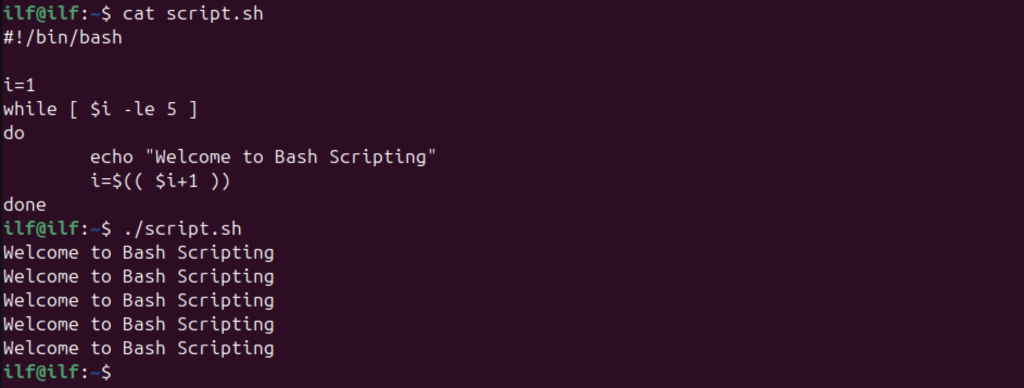
The script to print Welcome to Bash Scripting 5 times using the while loop is as follows:
#!/bin/bash

i=1
while [ $i -le 5 ]
do
        echo "Welcome to Bash Scripting"
        i=$(( $i+1 ))
done
Bash while Loop in One Line
It is always a good practice to use fewer lines of code. The while loop in Bash also offers a one-liner structure.
The syntax of Bash while loop as a one-liner is given below:
while [condition]; do commands_to_execute; done
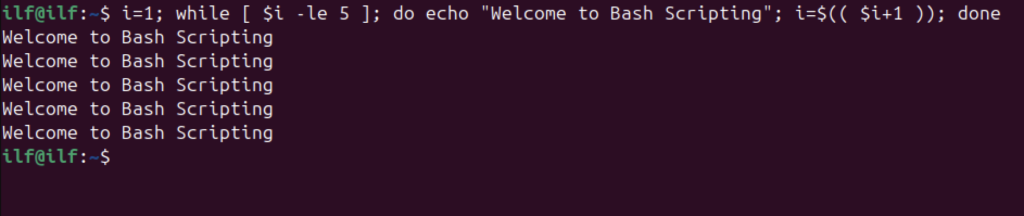
Let’s implement the above example using the single-line Bash syntax.
i=1; while [ $i -le 5 ]; do echo "Welcome to Bash Scripting"; i=$(( $i+1 )); done
Bash Infinite while Loop
The infinite loops are used for many purposes in Bash scripting, such as testing, debugging, event handling, and managing background processes. The while loop stands as one of the crucial loop structures, often employed to construct infinite loops.
The syntax of the while infinite loop is given below:
while true
do
     commands_to_execute
done
Here, the condition is replaced with the true keyword.
The alternative syntax of the infinite loop is as follows:
while :
do
     commands_to_execute
done
The colon : can also be used in place of the true keyword.
Let’s create an infinite loop that will continue to print Hello Bash every 5 seconds until stopped forcefully using ctrl+C.
#!/bin/bash

echo -e "Press Ctrl+C to Stop the Loop\n"
while true
do
        echo "Hello Bash"
        sleep 5
done
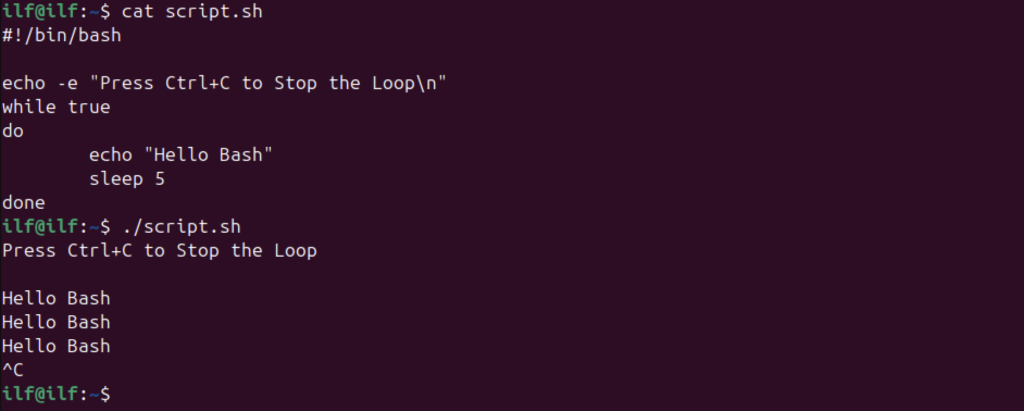
To add the delay of 5 seconds the sleep command is used.
Bash while Loop with sleep Command
The sleep command is used to add delay in the script. The delays control the execution of the instructions and create timeouts.
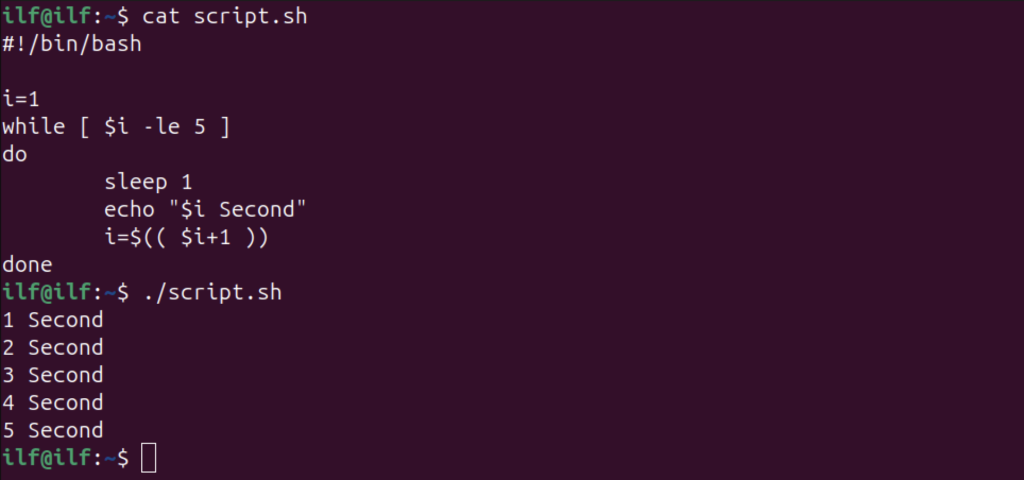
Let’s display the 5-second count to the standard output using the while loop and sleep command.
#!/bin/bash

i=1
while [ $i -le 5 ]
do
	sleep 1
	echo "$i Second"
	i=$(( $i+1 ))
done
Bash while Loop Continue Statement
The continue is a flow control statement that resets the loop on meeting a specified condition.
The syntax is as follows:
while [condition]
do
     if [condition]
     then
     continue
     fi
     Commands_to_Execute
done
Let’s create a Bash while loop that will display numbers 1 to 5 and skip number 2.
#!/bin/bash

i=0
while [ $i -lt 5 ]
do
	i=$(( $i+1 ))
	if [ $i -eq 2 ]
	then
	continue
	fi
	echo $i
done
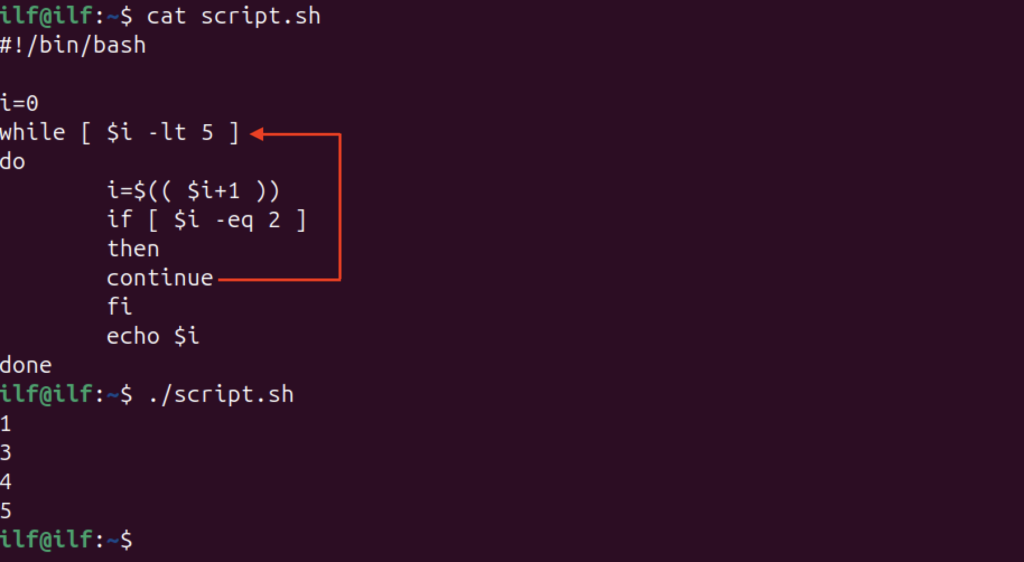
In the above script, an if condition is specified to tell the program to continue and reset the loop if variable i is equal to 2.
Bash while Loop break Statement
The break statement is also a flow control statement that exits the loop on meeting the specified condition.
The syntax is as follows.
while [condition]
do
     if [condition]
     then
     break
     fi
     Commands_to_Execute
done
For example, the below-given Bash script is printing numbers 1 to 5 to the standard output. Use the break statement to exit the loop when the counter reaches 4.
#!/bin/bash

i=0
while [ $i -lt 5 ]
do
	i=$(( $i+1 ))
	if [ $i -eq 4 ]
	then
	break
	fi
	echo $i
done
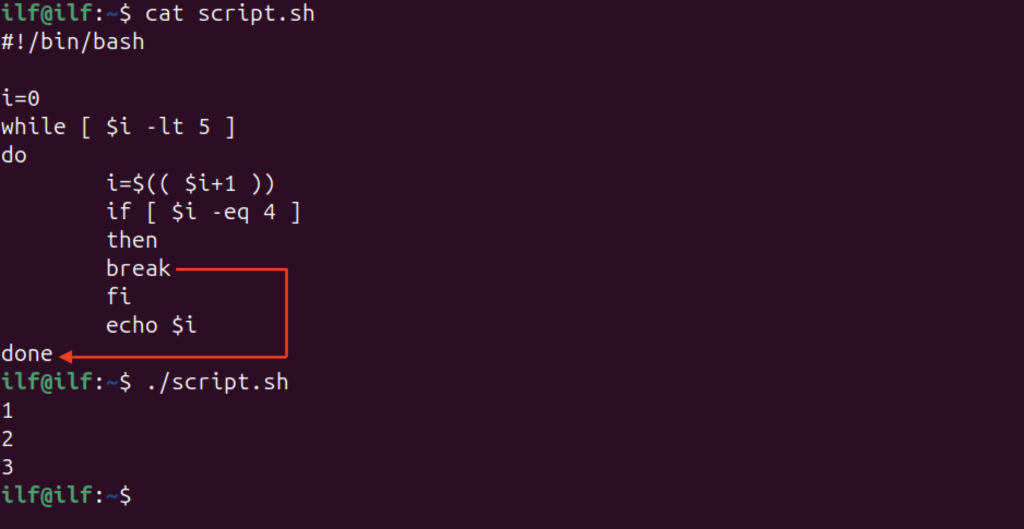
Bash while Loop Iterate through an Array
An array stores multiple elements of the same data type. Loop structures serve as a fundamental tool for iterating through arrays and performing operations on each of their elements.
For example, let’s create a Bash script that has an array of 5 elements and print each element using the while loop.
#!/bin/bash

city=("Washington" "New_York" "Texas" "Chicago" "Austin")
i=0
while [ $i -lt ${#city[@]} ]
do
	echo ${city[i]}
	i=$(( $i+1 ))
done
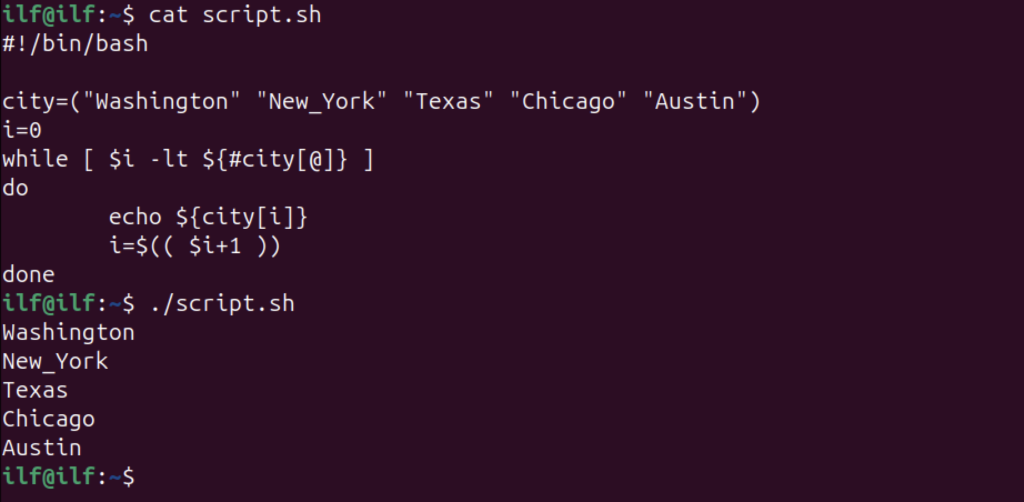
The ${#city[@]} determines the array’s size in the above code.
Bash while Loop String Comparison
The string comparison can be a little tricky using the while loop. In the context of shell scripting the -eq are called integer comparison operators. So, these operators cannot be used to compare strings.
To compare strings in the shell scripting the string comparison operators =, ==, != are used.
Let’s create a Bash script to take the username as input from the user and compare the name string with the hardcoded name.
#!/bin/bash

echo "Enter Username"
read name

while [ "$name" = "sam" ] || [ "$name" = "Sam"  ]
do
	echo "The username is correct!!"
	sleep 1
	break
done
echo "Loop Terminated"
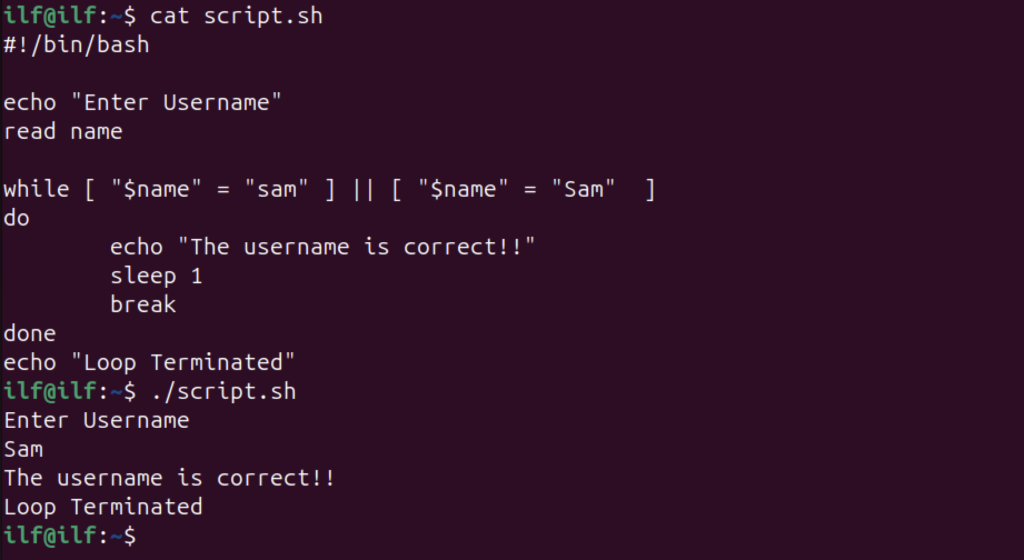
In the above code, multiple conditions are used using the OR operator. To achieve a complex behavior, multiple conditions can also be used with the while loop using logical operators that include AND (&&), OR (||), or NOT (!).
Bash while Loop Increment and Decrement
The loop structure is incomplete without the increment or decrement. There are various methods to implement increment and decrement in the while loop.
- Using Round Brackets (( ))
- Using let Command
The simplest way to add increment or decrement is using the round brackets with variable-name and ++ or — operators.
#!/bin/bash

i=1
while [ $i -le 5 ]
do
        echo "Welcome to Bash Scripting"
        ((i++))
done
Another approach to using round brackets is given below:
i=$(( $i+1 )) and i=$(( $i-1 ))
You can also use the let command with the C-style increment or decrement of the variable. The let command is primarily used to evaluate the arithmetic expression. An example of adding an increment or decrement using the let command is given below:
let i++ and let i--
Bash Nested while Loop
The nested while loop is beneficial for multi-level iteration and complex logic handling.
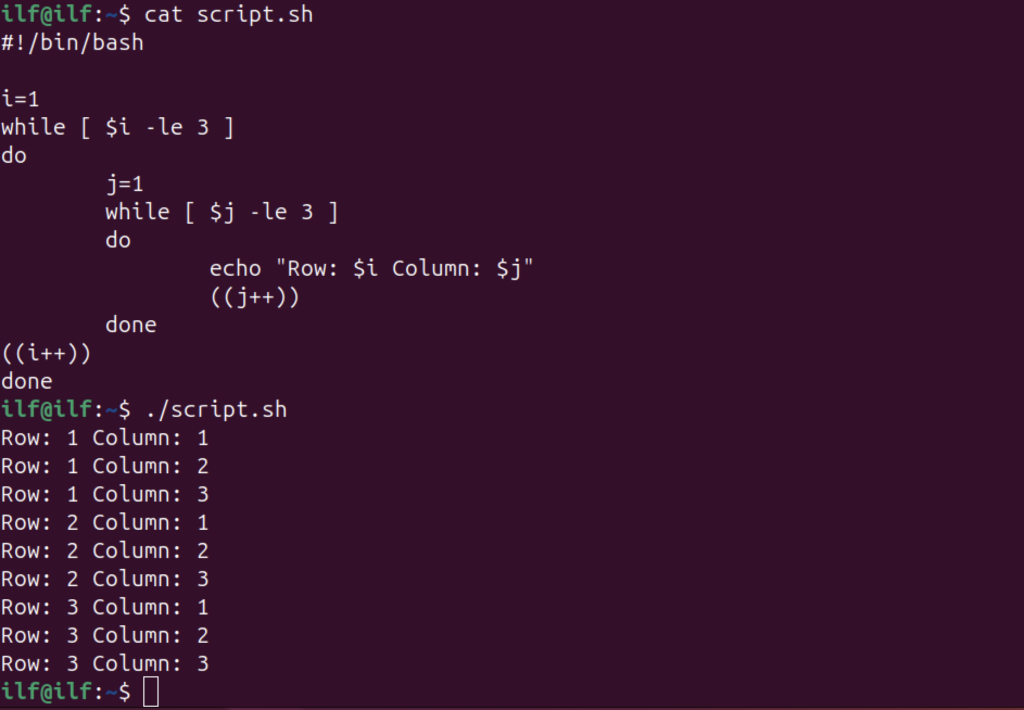
Let’s create a 3×3 2D array using nested while loop in Bash:
#!/bin/bash

i=1
while [ $i -le 3 ]
do
	j=1
	while [ $j -le 3 ]
	do
		echo "Row: $i Column: $j"
		((j++))
	done
((i++))
done
Reading File Line by Line with Bash while Loop
To read a file line by line in Bash scripting the while loop can be used. Let’s take the filename as input from the user and print it through a Bash script.
#!/bin/bash
set -e
line_number=1
echo "Enter the File Name"
read filename
while read -r line;
do
	echo "$line_number: $line"
	((line_number++))
done < "$filename"
The set -e is used to exit the code in case of a command error, then the script gets getting filename as user input.
The read -r command reads the file and stores the strings to the line variable. Next, the echo $line displays the lines to the standard output. Lastly, the filename variable is given as an input to the while loop.
In the following example, I am giving the script.sh as the file name to read.

Bash while Loop Count Number of Lines in a File
Counting several lines in a file is another practical usage of the while loop in Bash.
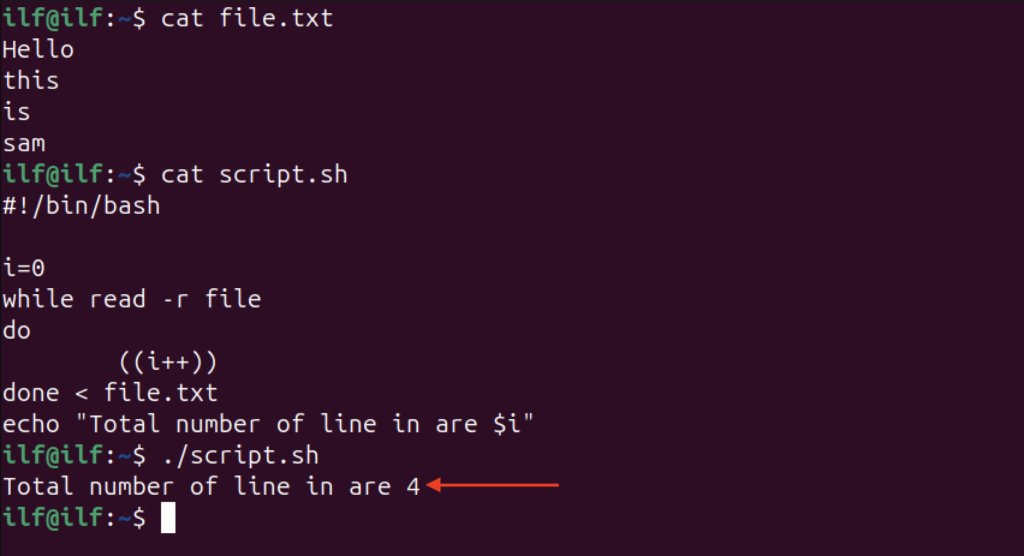
The following script counts the number of lines of a file and displays the total number.
#!/bin/bash

i=0
while read -r file
do
        ((i++))
done < file.txt
echo "Total number of lines are $i"
Looking at the Number of Items in a Directory using Bash while Loop
The counters are a crucial part of bash scripting especially to control the iterations. The example of counting the number of lines or the number of items in a directory is as follows:
#!/bin/bash

directory="/home/ilf/ILF"
f_count=0

while IFS= read -r -d '' files
do
	f_count=$(( $f_count+1 ))
done < <(find "$directory" -type f -print0)
echo $f_count
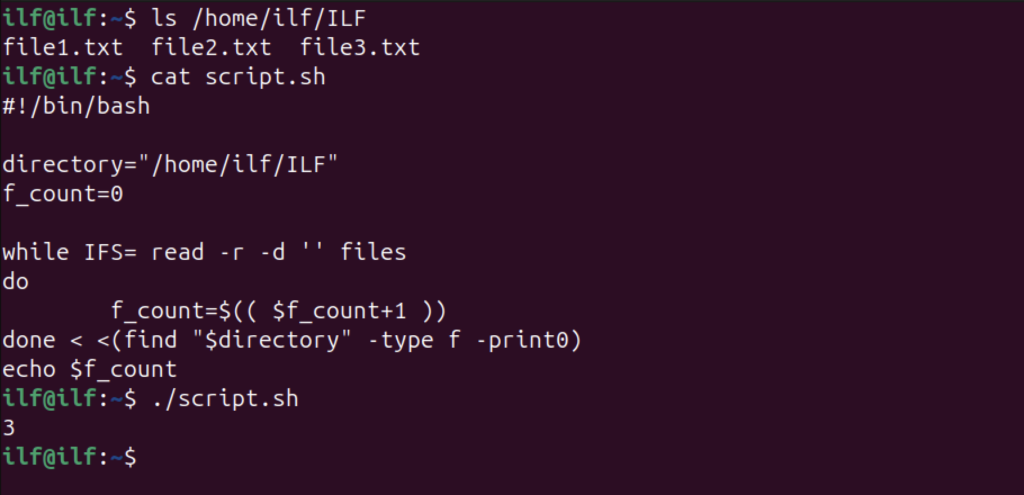
In the above code, IFS= prevents word splitting, read -r reading the input line, and -d ” defines null as a delimiter. The -r flag prevents the slashes from being treated as escape and -d is used to set the delimiter.
The find command in the above script searches the file in the specified directory and -print0 separates the file names by null character. Finally, the echo prints the number of files which is 3 as shown in the above output.
Bash while Loop Stop on a Key Press
You can also take the keyboard key as input to control the infinite while loop.
The example is as follows:
#!/bin/bash

echo "Press q/Q key to exit the loop"
get_key()
{
	read -n 1 key
	if [[ "$key" == "q" ]] || [[ "$key" == "Q" ]]; then
		echo -e "\nLoop exited!"
		exit
	else
		echo -e "\nWrong key pressed! (Press q/Q to exit)"
	fi
}
while true; do
       echo "Loop executing..."
	get_key
	sleep 2
done
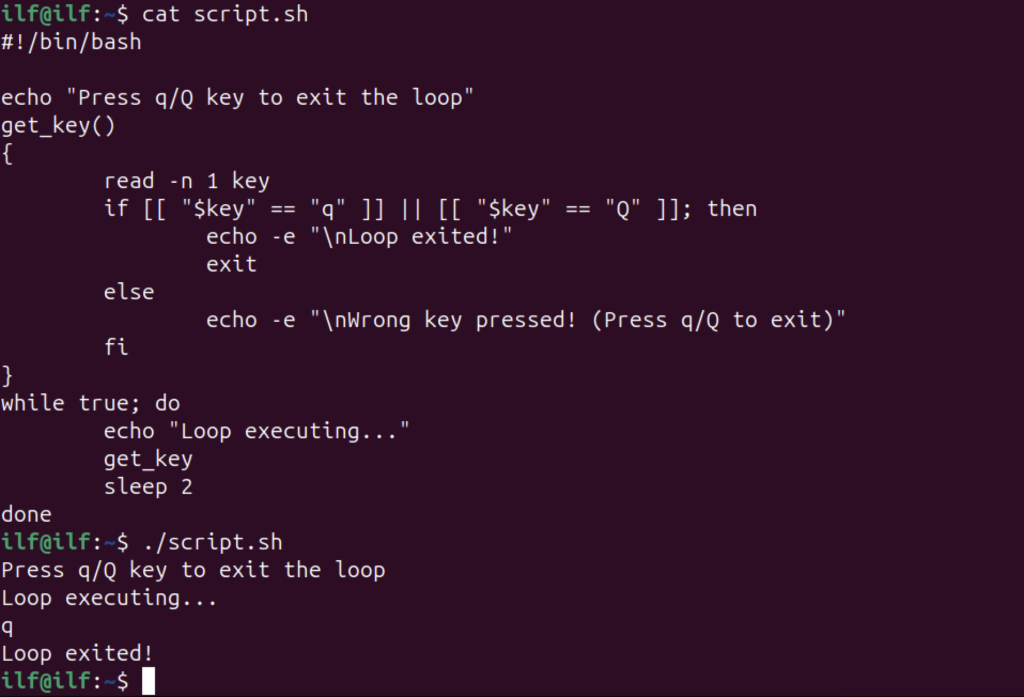
In the above script, the user is asked to press the q/Q key on the keyboard to exit the loop. The function get_key is getting the input from the user and comparing it.
In the infinite while loop, first, the echo statement will execute after that, the function is called to monitor the input every 2 seconds. If the correct key is pressed the loop will be exited otherwise it will continue to execute.
Bash while Loop to Iterate through 2 Files
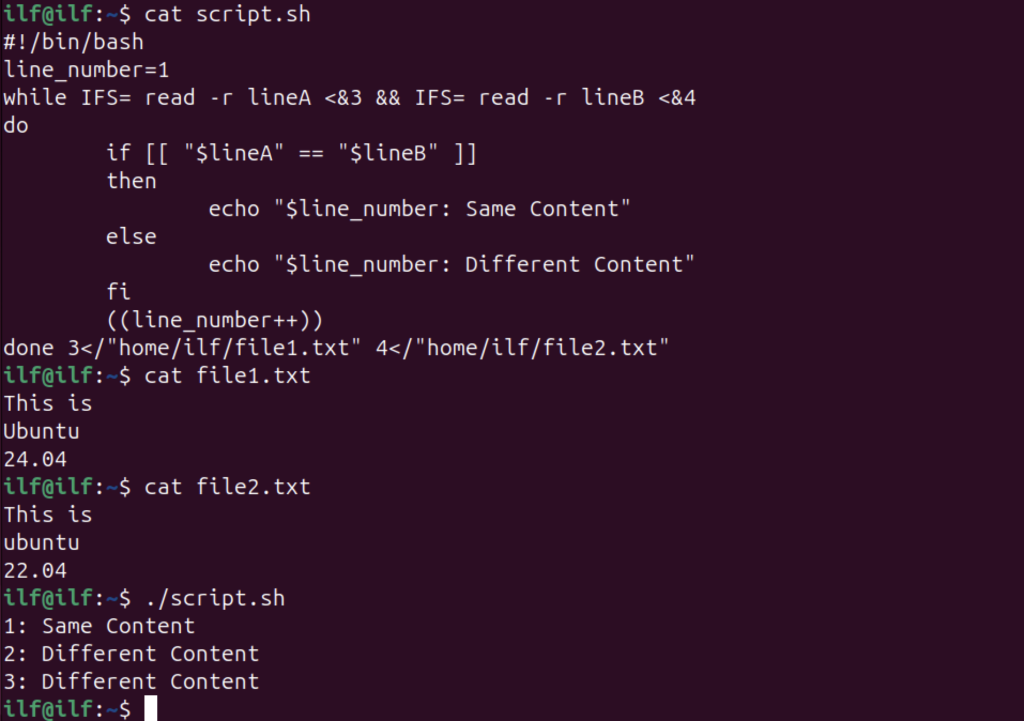
Reading two or more files is an important task to compare two files and process data. In the following example, it will be achieved using Bash while loop.
#!/bin/bash
line_number=1
while IFS= read -r lineA <&3 && IFS= read -r lineB <&4
do
	if [[ "$lineA" == "$lineB" ]]
	then
		echo "$line_number: Same Content"
	else
		echo "$line_number: Different Content"
	fi
	((line_number++))
done 3</"home/ilf/file1.txt" 4</"home/ilf/file2.txt"
Bash while Loop Until Command Succeeds
The Bash while loop can be made conditional by a command using ! operator in a while loop condition.
#!/bin/bash

command="!date +%r"
max_tries=3
attempts=1
while ! $command && [ $attempts -lt $max_tries ]
do
	echo "Command failed! (Retrying...)"
	((attempts++))
	sleep 1
done
if [ $attempts -eq $max_tries ]; then
    echo "Command failed to execute after $max_tries attempts"
else
    echo "Command executed successfully"
fi
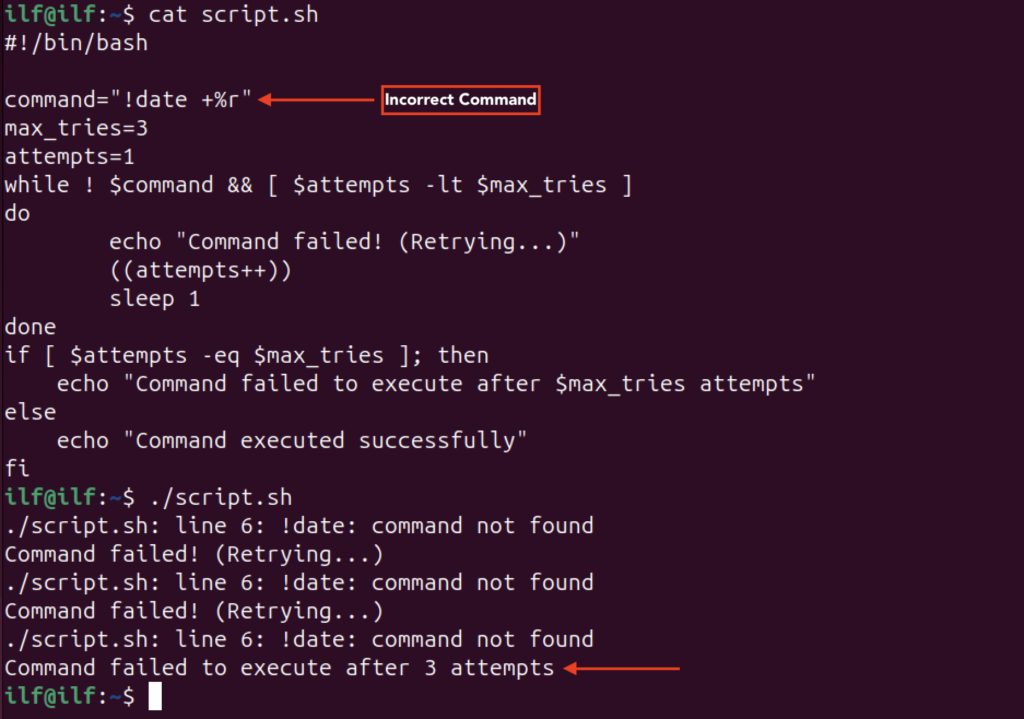
In the above script, it tries to execute the incorrect command 3 times, but upon failing it prompts that the command has failed to execute.
Conclusion
The while loop is one of the fundamental flow control components of programming. In shell scripting, the loop is used for various purposes such as finding the number of items in a directory and the number of lines in a file. Further, the infinite while loop is used for testing and debugging the system.
In this guide, we covered the basic syntax of the while loop and provided several examples demonstrating its use in shell scripting.

Check our LinkedIn company page
