Skip to content
Parallax Learn

Parallax Learn

  • Welcome
  • Tutorials
        • Tutorial Series head tag

          Tutorial Series
        • Tutorial Series

          The special, classroom-ready series pages are organized collections of tutorials for our most popular hardware and/or languages. The tutorials for each topic are conveniently accessible from a single page, shown in the order it is recommended that they be completed.
        • Robotics Series Head tag

          Robotics Series
        • Robotics Series

          • Artificial Intelligence
          • Cybersecurity: Radio Data tutorialCybersecurity
          • cyber:bot + Python
          • cyber:bot + MakeCode
          • Boe-Bot Tutorial SeriesBoe-Bot
          • Arduino Shield-Bot
          • ActivityBot with C TutorialsActivityBot + C
          • ActivityBot with BlocklyProp Tutorial SeriesActivityBot + BlocklyProp
          • Scribbler 3 Tutorial SeriesScribbler 3
        • Electronics & Programming Series Head tag

          Electronics & Programming Series
          • BS2 Board of Education Tutorial SeriesBS2 Board of Education
          • Propeller C-Language BasicsPropeller C Basics
          • FLiP Try-It Kit C Tutorial SeriesFLiP Try-It Kit + C
          • FLiP Try-It Kit BlocklyProp TutorialsFLiP Try-It Kit + BlocklyProp
          • Badge WX Tutorial SeriesBadge WX
          • Propeller BlocklyProp Basics and ProjectsPropeller BlocklyProp Basics
          • View All Tutorial Series »
        • Browse Tutorials
        • Browse Tutorials

          Individual tutorials sorted by robot or kit, and language.
        • By Robot or Kit
          • ImageActivityBot
          • ImageSumoBot WX
          • ImageBoe-Bot
          • ImageShield-Bot
          • Imagecyber:bot
          • Badge WX
          • ELEV-8
          • ARLO
        • By Language
        • By Language

          • Propeller C
          • Arduino
          • BlocklyProp
          • PBASIC
          • Python
          • MakeCode
          • View All Tutorials »
  • Educators
  • Reference
  • Downloads
  • Home
  • All Courses
  • IR Remote Controlled Shield-Bot Project

IR Remote Controlled Shield-Bot Project

Drive the Shield-Bot

Navigation Modes

  • On the remote, push Power, then push 1, 2 or 3 to select a navigation mode. 

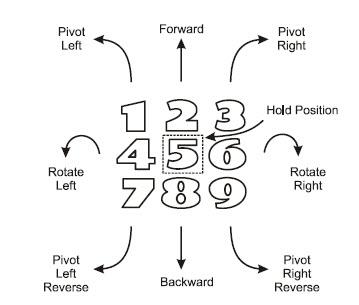
Power-1: Remote control

In this mode, use buttons 1-9 to drive the robot in different directions.  Note that the sketch still uses the IR emitter/receiver pairs to check for an obstacle in front.  If you try to drive your Shield-Bot into a wall, it won’t let you.  Smart robot!
Image


]


Power-2: Autonomous IR Roaming

In this mode, the Shield-Bot uses its IR emitter/receiver pairs to roam autonomously and avoid obstacles.

Power-3: Follow the Leader

In this mode, the Shield-Bot uses its IR emitter/receiver pairs to maintain a set distance from a stationary or moving object in front of it.  The robot will follow your hand or another robot.


Printer-friendly version
Program the Shield-Bot and Remote
Prev
How the IR Remote Works
Next

DISCUSSION FORUMS | PARALLAX INC. STORE

About | Terms of Use | Feedback: [email protected] | Copyright©Parallax Inc. 2024

Image
© 2025 Parallax Learn • Built with GeneratePress
Advertisement