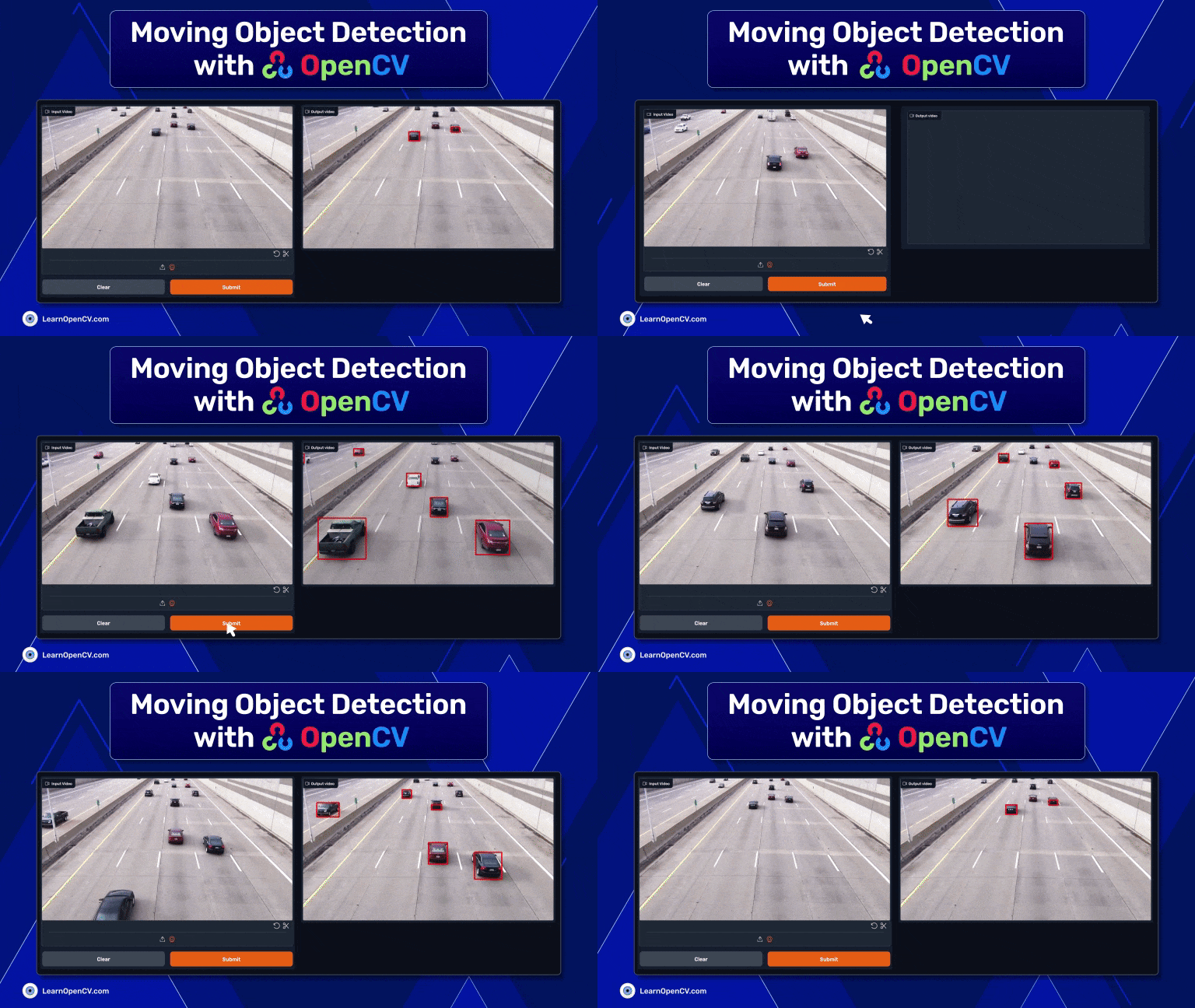
Moving object detection is used extensively for applications ranging from security surveillance to traffic monitoring. It is a crucial challenge in the ever-evolving field of computer vision. The open-source OpenCV library, known for its comprehensive set of tools for computer vision, provides robust solutions to the detection of moving objects. In this article, we examine a combination of Contour Detection and Background Subtraction that can be used to detect moving objects using OpenCV.

Contour Detection, a method used to identify and outline objects, paired with Background Subtraction, which isolates moving objects from static backgrounds, creates a powerful duo for detecting moving objects in real time. This approach is practical and computationally efficient, making it suitable for applications that require quick and accurate object detection.
We’ll explore how these two techniques can be implemented using OpenCV, providing insights into their workings, advantages, and potential applications. Whether you’re a seasoned developer or a novice in computer vision, this guide aims to equip you with the skills to harness OpenCV’s capabilities for moving object detection in video. Let’s dive into the world of dynamic object detection and uncover its possibilities.
- What is Moving Object Detection?
- Our Approach to Moving Object Detection
- What is Background Subtraction?
- Contour Detection in OpenCV
- Setting Up the Environment
- Implementing Background Subtraction
- Detecting and Drawing Contours
- Improving Contour Detection with Image Thresholding and Morphological Operations
- Gradio App Creation
- Real-World Applications
- Limitations of Moving Object Detection
- Conclusion
- References
What is Moving Object Detection?
Detecting Moving Objects in computer vision involves localizing dynamic objects in video sequences. It has advanced from basic frame differencing and background subtraction with static cameras to complex deep-learning models capable of handling dynamic scenes with moving cameras. Classical computer vision techniques like Gaussian Mixture Models were initially employed for static background modeling. In object detection, methods such as template matching, Haar cascade, feature detection and matching with SIFT or SURF, HOG Detector, and Deformable Part-based Model (DPM) were commonly used—the advent of optical-flow-based methods enabled detection against relative camera motion.

Integrating deep learning, particularly Convolutional Neural Networks (CNNs), has been pivotal in moving object detection, enhancing accuracy, and enabling real-time processing with systems like YOLO and SSD. Transformers have refined the field, excelling in handling complex scenes by capturing long-range dependencies.
We will use OpenCV to detect moving objects from a stable camera position without deep learning techniques in our specific scenario. You can also understand the capabilities of the OpenCV library itself. You can read our detailed article about Object Detection using KerasCV YOLOv8 to learn more about deep learning techniques for moving object detection.


Our Approach to Moving Object Detection
As we are doing moving object detection, our approach will be to get a perfect output containing video frames with proper detections. We will design a pipeline to make an algorithm in which we can achieve our goal.

This Moving Object detection algorithm contains multiple steps, such as Background Subtraction, Global Thresholding, Erosion and Dilation, Contour Detection, FIltering, and Bounding Box Prediction. We will go through each step below.
What is Background Subtraction?
The first step of moving object detection is Background subtraction. Using a static camera is a common and widely used technique for generating a foreground mask (namely, a binary image containing the pixels belonging to moving objects in the scene).

As the name suggests, Background Subtraction calculates the foreground mask, performing a subtraction between the current frame and a background model containing the static part of the scene or, more generally, everything that can be considered background given the characteristics of the observed scene.

Background modeling consists of two main steps:
- Background Initialization.
- Background Update.
In the first step, an initial model of the background is computed, while in the second, the model is updated to adapt to possible changes in the scene. Background Estimation can also be applied to motion-tracking applications such as traffic analysis, people detection, etc. This article on background estimation for motion tracking will undoubtedly help you gain a better understanding.
Contour Detection in OpenCV
Contours can be explained simply as a curve joining all the continuous points (along the boundary), having the same color or intensity. The contours are useful for shape analysis, object detection, and recognition. OpenCV makes it easy to find and draw contours in images.
It provides two simple functions: findContours() and drawContours()
Also, it has two different algorithms for contour detection: CHAIN_APPROX_SIMPLE and CHAIN_APPROX_NONE

To learn more about contours, you can read our detailed article about contour detection in OpenCV.
Setting Up the Environment
Before proceeding to the moving-object detection code, we must set up our environment. So you need to have Python and a preferred IDE on your computer, and that’s it. You are ready to go!

Required Software and Libraries
As we discussed previously, we need only OpenCV to install as the main driver of the code, and we will install Gradio to build a web app out of it as we always believe in practical and real-world approaches.
Installing OpenCV and Gradio
We need to install those libraries into our Python environment. We suggest you to create a virtual environment and install all the dependencies for better version control.
! pip install opencv-python gradio
Importing all the Libraries
import cv2
import gradio as gr
import numpy as np
import matplotlib.pyplot as plt
We Import all the libraries, and then proceed to the main code.
Implementing Background Subtraction
cap = cv2.VideoCapture(vid_path)
backSub = cv2.createBackgroundSubtractorMOG2()
if not cap.isOpened():
    print("Error opening video file")
    while cap.isOpened():
        # Capture frame-by-frame
          ret, frame = cap.read()
          if ret:
            # Apply background subtraction
            fg_mask = backSub.apply(frame)
First, we need to capture all the video frames and pass them to the code pipeline. Hence we created a video-capture object using cv2.VideoCapture. For background subtraction, we created another object using cv2.createBackgroundSubtractorMOG2. Further, we check whether our object cap is properly working or not. After that, we will start capturing all the video frames one by one using cap.read() method. Now, we will apply background subtraction to each video frame using backSub.apply() method.

As we can see, all the moving pixels between two consecutive frames are detected. This includes cars, shadows, and some tiny white dots. Have you wondered why these tiny white dots are also present? Nothing is moving in those places, right!
When dealing with real-world scenarios, various environmental factors can affect CCTV footage. This may include weather conditions such as high winds.
Detecting and Drawing Contours
# Find contours
contours, hierarchy = cv2.findContours(fg_mask, cv2.RETR_EXTERNAL, cv2.CHAIN_APPROX_SIMPLE)
# print(contours)
frame_ct = cv2.drawContours(frame, contours, -1, (0, 255, 0), 2)
# Display the resulting frame
cv2.imshow('Frame_final', frame_ct)
After background subtraction, we now have a clear binary mask of our ROI (Region of Interest). So, we will proceed to the contour detection. The above code block outlines the process.
For this, we must pass the foreground mask (fg_mask) as input to the cv2.findContours functions to find all the possible contour points. This will happen for all the detected objects in the current frame. After that, we will pass all the contour points to cv2.drawContours function to draw outlines for each detected contour.

As you can see, drawing all the contours also includes a lot of unnecessary ones. These small, noisy contours will affect the results adversely further on. We address this issue in the next section.
Improving Contour Detection with Image Thresholding and Morphological Operations
The noisy contours appear due to the movement of the shadows and camera. We have to remove all the noise to get a clear frame with the detected contour of our ROI (car).
We perform 3 different steps to solve the problem. They are:
- Thresholding
- Erosion and Dilation
- Contour Filtration
Thresholding
# apply global threshold to remove shadows
 retval, mask_thresh = cv2.threshold( fg_mask, 180, 255, cv2.THRESH_BINARY)
For thresholding, we will use cv2.threshold function and pass all the foreground masks as input. We set the threshold value to 180 and the max value to 255, and it will simply replace all the values under 180 with 0 and remove all the shadows. And you can see the result that we obtained after the thresholding operation.

Erosion and Dilation
After applying thresholding, now we have a binary image mask. This consists of a foreground mask of cars without any shadows. Still, the small white dots remain in the mask. The next step is removing the contours around these small dots.
# set the kernal
kernel = cv2.getStructuringElement(cv2.MORPH_ELLIPSE, (3, 3))
# Apply erosion
mask_eroded = cv2.morphologyEx(mask_thresh, cv2.MORPH_OPEN, kernel)
To remove these small white dots now we will apply erosion and will dilate the image after for a better and wider mask. To do this, we will use cv2.morphologyEx and use cv2.MORPH_OPEN as MorphType and pass the thresholded mask mask_thresh into it. Let’s check out the results after the above two operations.

We have obtained a much cleaner image now. The rest of the cleanup can be done by simply filtering the contours with small areas.
Filtering Contours
min_contour_area = 500  # Define your minimum area threshold
large_contours = [cnt for cnt in contours if cv2.contourArea(cnt) > min_contour_area]
Filtering contours can sometimes be a trial-and-error approach. We find that, for our use case, a contour area of 500 works best. The following code block will filter out any contours less than 500 pixels. This approach retains the most prominent cars while filtering out the lane line.

And you can see the final result here, we have far better detections now.
Draw Bounding Boxes
frame_out = frame.copy()
for cnt in large_contours:
    x, y, w, h = cv2.boundingRect(cnt)
    frame_out = cv2.rectangle(frame, (x, y), (x+w, y+h), (0, 0, 200), 3)

# Display the resulting frame
cv2.imshow('Frame_final', frame_out)
The next step of moving-object detection is drawing the bounding boxes around the remaining contours. This is where object detection takes place. To do this, first, we will extract all the box coordinates using the cv2.boundingRect function. Then we will draw bounding boxes for all detected objects for every video frame using cv2.rectangle. Let’s take a look at the results after drawing the bounding boxes.

Isn’t it amazing that we can achieve all of these with simple image processing and OpenCV?

Following is the output of an entire video for moving object detection with OpenCV.
Gradio App Creation
Now, our code pipeline is perfect for producing a quality output video from any input with a stable camera frame. What if we can do a little more and make a web app out of this coding journey?
Cool right? So we made this web app using Gradio and deployed it into a cloud server for you.

For this blog, we will not explain all the details about the Gradio. You can read our detailed article about Deploying a Deep Learning Model using Hugging Face Spaces and Gradio. If you want to see the code for this specific application, you can download the code below.
Real-World Applications
When it comes to real-world applications of moving-object detection, there are so many possible use cases where we can use our method of detect moving objects in video to solve real-world problems. We will discuss some of them here below.

Smart Environments:
In the realm of smart environments, such as smart homes or offices, this technology is utilized for room and parking occupancy monitoring and fall detection. It aids in automating environment control (like lighting and heating) based on occupancy and enhancing safety through fall detection systems.
Video Surveillance and Human Activity Monitoring
Moving-object detection is widely used in video surveillance to monitor human activities. It can be applied in various settings, from public spaces to private properties, for security and monitoring purposes. The technology can also be used for home care, providing a means to monitor the well-being of residents, especially the elderly or those with special needs.
Industrial Applications:
In industrial settings, this technology can be used for monitoring conveyor belts to detect and track moving objects. This application is handy in manufacturing and packaging lines, where it’s essential to track the movement and position of items for quality control and process efficiency.
Traffic Management and Vehicle Detection:
The technology is instrumental in vehicle detection, which is a critical component of intelligent traffic management systems. It helps in monitoring traffic flow, detecting traffic rule violations, and managing traffic signals effectively.
Visual Content Analysis:
Moving object detection includes applications like action detection and recognition, as well as post-event forensics in video content. It’s useful in analyzing video footage for various purposes, from sports analysis to legal investigations.
Limitations of Moving Object Detection
Traditional contour-based methods and background subtraction face limitations in moving object detection, particularly in handling dynamic scenes and variable lighting conditions. These techniques struggle with accurate object delineation and adaptation to changes in the environment, leading to reduced effectiveness in complex scenarios:
Sensitivity to Environmental Changes:
Traditional methods like background subtraction are highly sensitive to changes in lighting, weather conditions, and environmental dynamics. They often fail in outdoor settings where these factors vary significantly.
Static Background Assumption:
These methods generally assume a static background, which limits their applicability in scenes where background conditions are changing, such as moving foliage or varying shadows.
Limited Feature Representation:
Techniques like HOG capture gradient information which is useful for detecting edges and shapes, but they lack the depth and complexity required to differentiate between objects with similar textural patterns.
Poor Adaptation to Occlusions:
Traditional methods struggle with occlusions, where an object is partially or completely hidden. They lack the contextual understanding to detect objects during and after occlusion.
Inability to Handle Camera Motion:
When the camera itself is moving, distinguishing between motion due to camera movement and object movement becomes challenging for these methods.
Limited Scalability and Flexibility:
Traditional algorithms are often designed for specific scenarios and lack the flexibility to adapt to new, unseen environments or object types without extensive re-engineering or retraining.
Low Robustness in Complex Scenes:
Classical Computer Vision methods generally perform poorly in cluttered or complex scenes where multiple objects move simultaneously.
The complexities of detecting both stationary and moving objects in scenes captured by a moving camera require advanced techniques beyond the capabilities of traditional methods. CNNs and Transformers, with their robust feature extraction, contextual understanding, and adaptability, offer significant improvements in handling such challenging scenarios, paving the way for more accurate and reliable object detection systems in dynamic environments. We have a detailed article for 3D LiDAR Object Detection to give you a better understanding, make sure to give it a read.
Conclusion
We delved into the core concepts of moving object detection, background subtraction, and contour detection, offering a detailed implementation approach in OpenCV python. Challenges like noise and small contours were addressed through techniques such as image thresholding and morphological operations, enhancing the accuracy of detection.
Throughout this journey, we learned how to leverage the power of OpenCV to perform moving object detection on any stable frame without using any deep learning models or other complicated techniques. We explored moving object detection using OpenCV python, focusing on the combined use of contours and background subtraction. This method is not only efficient and accurate for real-time applications but also versatile and applicable in security, traffic management, and beyond.
We hope you have a better understanding of moving object detection and how you can use OpenCV to perform object detection. You can download all the codes from the link below.
Why don’t you play with the code, tune all the parameters according to your use case, and get your hands dirty?
Let us know in the comments about your results.
References
Moving Object Detection and Segmentation using Frame differencing and Summing Technique
Complete Scanning Application Using OpenCv
ZBS: Zero-shot Background Subtraction via Instance-level Background Modeling and Foreground Selection