In Eclipse IDE, run a Java web application with Tomcat server plugin, but the console prompts
Exception in thread "x"
	java.lang.OutOfMemoryError: Java heap space
1. Solution – Increase Heap Size in Tomcat
By default, Tomcat allocated a small amount of heap size. To solve it, you need to increase the Tomcat’s heap size manually.
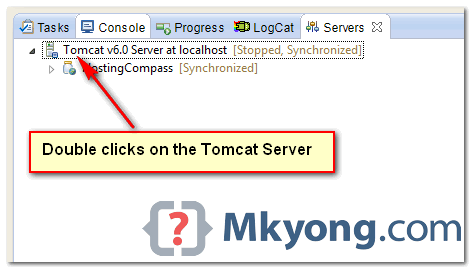
1.1 In server view, double clicks on the Tomcat Server icon.
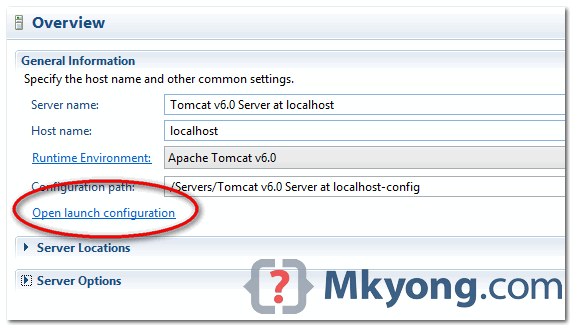
1.2 Clicks on the “Open launch configuration” link.
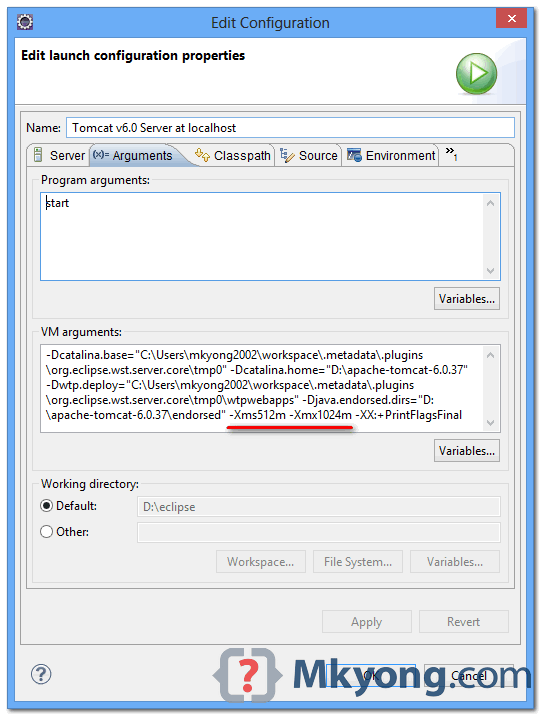
1.3 Clicks on the “Arguments” tab, and append the following VM options at the end of the VM arguments :
-Xms<size> - Set initial Java heap size
-Xmx<size> - Set maximum Java heap size
In this example, we increase the heap size to -Xms512m -Xmx1024m, it should be enough for most of the projects.
2. Know Your Heap Size
To know how much heap size is allocated in Tomcat, append this VM option -XX:+PrintFlagsFinal (refer figure 1.3). Start Tomcat, you will noticed the entire VM values are dump to the console, find following names :
- InitialHeapSize
- MaxHeapSize
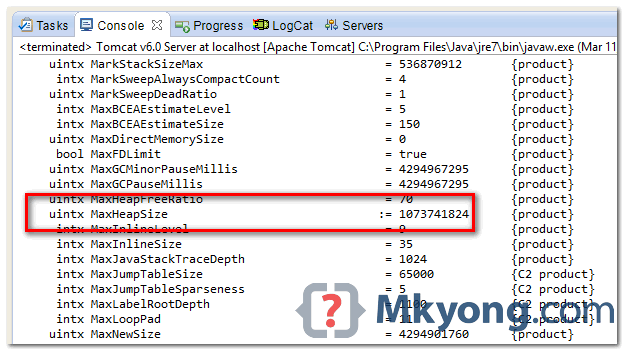
P.S The value is in bytes.


when i miss java ,i miss you too.
Gracias!
My kong we are at together good thank
i am not using eclipse,,,, how to increase heap size . pls urjent
Mykong One of the best sites, absolutely love it. Simple and to the point!!
Thanks, done it!
Mykong One of the best sites, absolutely love it. Simple and to the point!!