
Opis
Widżet obrazka to prosta wtyczka wykorzystująca natywny menedżer multimediów WordPress do dodawania widżetów graficznych do witryny.
Funkcje Widżetu obrazka
- Responsywna
- Kompatybilny z MU
- Zarządza zmianą rozmiaru i wyrównaniem obrazka
- Połącz obrazek
- Dodaj tytuł i opis
- Wszechstronna – wszystkie pola są opcjonalne
- Prześlij, połącz z obrazkiem zewnętrznym lub wybierz obrazek ze swojej kolekcji multimediów
- Dostosuj wygląd i styl za pomocą filtrów lub nadpisów motywu
Jakość, której możesz zaufać
Widżet obrazka jest rozwijany i utrzymywany przez Kalendarz wydarzeń, tę samą firmę, która stworzyła Kalendarz wydarzeń, Bilety na wydarzenie oraz pełen zestaw wtyczek Premium.
Ta wtyczka jest aktywnie wspierana przez nasz zespół i wspierana przez członków społeczności. Jeśli na forum pojawi się pytanie, w którym możesz pomóc, lub masz świetny pomysł i chcesz go zakodować lub przesłać poprawkę, byłoby wspaniale! Nie tylko obdarzymy Cię pochwałami i podziękowaniami, ale to także dobry sposób, aby nas poznać i zapoznać z możliwościami płatnej pracy, jeśli pracujesz jako freelancer.
Żądania ściągnięcia i tłumaczenia
Sprawdź nas na GitHub, aby wprowadzić zmiany w żądaniu ściągnięcia.
Tłumaczenia można przesyłać tutaj na WordPress.org.
Dokumentacja
Wbudowany szablon można zastąpić plikami zawartymi w szablonie.
Szablony domyślne kontra własne
Widżet obrazka zawiera domyślny szablon dla wyników widżetu. Jeśli chcesz zmienić kod wyświetlania widżetu, utwórz nowy katalog o nazwie „image-widget” w katalogu szablonów i skopiuj plik „views/widget.php”.
Edytuj nowy plik do woli. Nie edytuj pliku w katalogu wtyczki, ponieważ spowoduje to konflikty podczas aktualizacji wtyczki do najnowszej wersji.
Nowość w wersji 3.2: Możesz teraz również użyć filtra „sp_template_image-widget_widget.php”, aby zastąpić domyślne zachowanie szablonu dla plików szablonów .php. Np.: jeśli chcesz, aby plik widget.php znajdował się w katalogu o nazwie my-custom-templates/ i chcesz, aby nazywał się my-custom-name.php:
add_filter('sp_template_image-widget_widget.php', 'my_template_filter');
function my_template_filter($template) {
    return get_template_directory() . '/my-custom-templates/my-custom-name.php';
}
Filtry
W kodzie znajduje się szereg filtrów, które pozwalają na nadpisywanie danych według własnego uznania. Najlepszym sposobem na sprawdzenie dostępnych filtrów jest po prostu wyszukanie w kodzie frazy „apply_filters”. Niemniej jednak, oto kilka ważniejszych filtrów:
widget_title
Jest to dość typowy filtr w widżetach, który stosuje się do tytułu widżetu.
widget_text
Kolejny bardzo typowy filtr widżetu, stosowany do tekstu opisu. Ten filtr przyjmuje również 2 dodatkowe argumenty dla $args i $instance, dzięki czemu można dowiedzieć się więcej o konkretnej instancji widżetu podczas filtrowania treści.
image_widget_image_attachment_id
Filtruje identyfikator załącznika obrazka.
Akceptuje dodatkowe argumenty $args i $instance.
image_widget_image_url
Filtruje adres URL obrazka wyświetlanego w widżecie.
Akceptuje dodatkowe argumenty $args i $instance.
TO JEST PRZESTARZAŁY I ZOSTANIE USUNIĘTE
image_widget_image_width
Filtruje szerokość wyświetlania obrazka.
Akceptuje dodatkowe argumenty $args i $instance.
image_widget_image_height
Filtruje wysokość wyświetlania obrazka.
Akceptuje dodatkowe argumenty $args i $instance.
image_widget_image_maxwidth
Filtruje wbudowany styl max-width obrazka. Wskazówka: zastąp to, aby użyć tego w projektach responsywnych 🙂
Akceptuje dodatkowe argumenty $args i $instance.
Zwróć null, aby usunąć ten kod CSS z wyjścia obrazka (domyślnie „100%).
image_widget_image_maxheight
Filtruje wbudowany styl maksymalnej wysokości obrazka.
Akceptuje dodatkowe argumenty $args i $instance.
Zwróć null, aby usunąć ten kod CSS z wyjścia obrazka (domyślnie null).
image_widget_image_size
Filtruje wybrany „rozmiar” obrazka odpowiadający rozmiarom zarejestrowanym w WordPressie.
Jeśli ustawiono na „tribe_image_widget_custom”, zamiast tego używana jest szerokość i wysokość.
Akceptuje dodatkowe argumenty $args i $instance.
image_widget_image_align
Filtruje wyrównanie wyświetlania obrazka.
Akceptuje dodatkowe argumenty $args i $instance.
image_widget_image_alt
Filtruje tekst alternatywny obrazka.
Akceptuje dodatkowe argumenty $args i $instance.
image_widget_image_link
Filtruje adres URL, do którego odsyła obrazek.
Akceptuje dodatkowe argumenty $args i $instance.
image_widget_image_link_target
Filtruje cel odnośnika do obrazka.
Akceptuje dodatkowe argumenty $args i $instance.
image_widget_image_attributes
Filtruje listę atrybutów obrazka używanych w obrazku wyjściowym. Podobnie jak „wp_get_attachment_image_attributes”.
Akceptuje argumenty $instance.
image_widget_link_attributes
Filtruje listę atrybutów używanych w odnośniku do obrazka. Podobnie jak „wp_get_attachment_image_attributes”.
Akceptuje argumenty $instance.
Czy wspierałeś Widżet obrazka?
Jeśli tak, to DZIĘKUJEMY! Możesz też dodać ten wiersz do pliku wp-config.php, aby zapobiec wyświetlaniu komunikatu przez widżet obrazka po aktualizacji.
define( 'I_HAVE_SUPPORTED_THE_IMAGE_WIDGET’, true );
Więcej informacji na temat filozofii tego przedsięwzięcia znajdziesz w naszym wpisie na blogu
Zrzuty ekranu
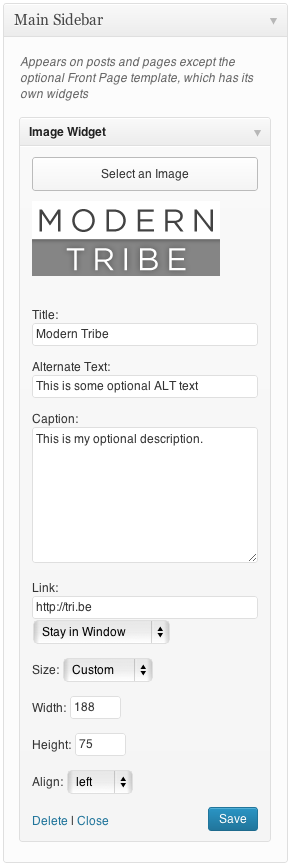
Ekran administratora Widżetu obrazka. 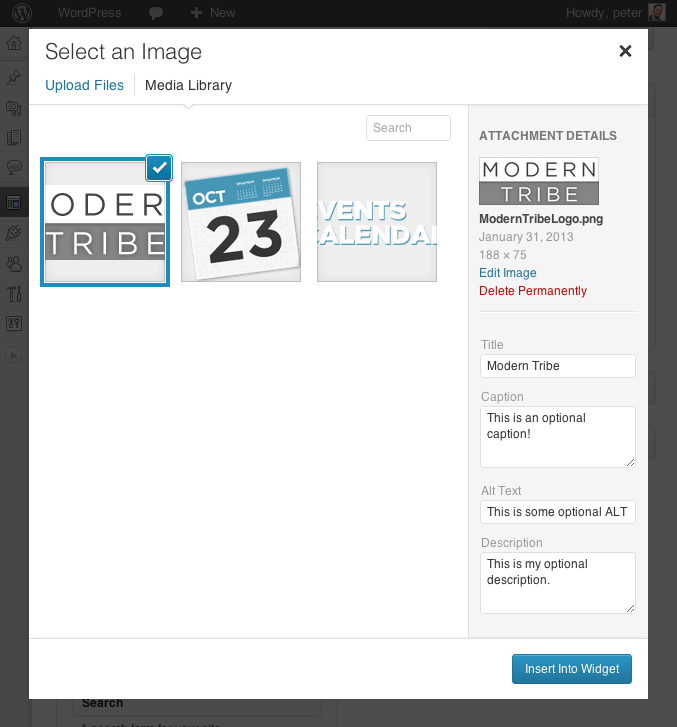
Integracja z menedżerem mediów. 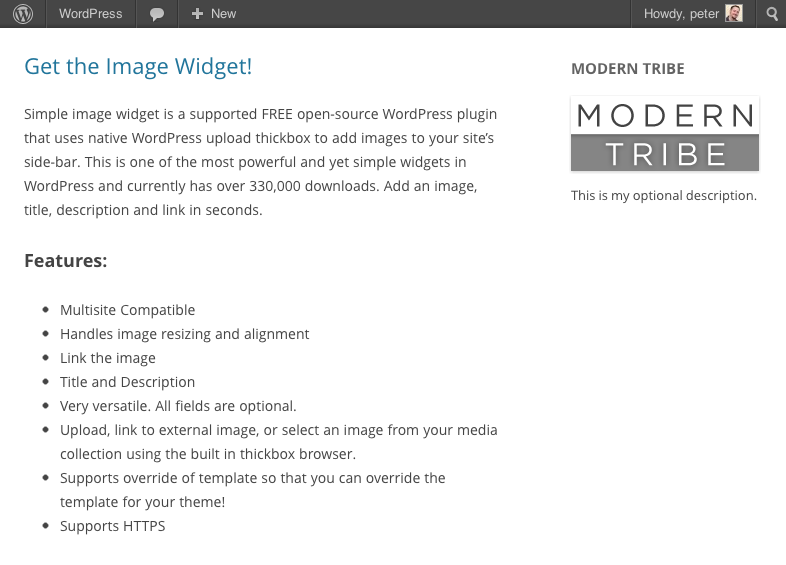
Widżet obrazka na frontowej stronie zwykłej instalacji WordPress.


Instalacja
Instaluj
Rozpoczęcie korzystania z Widżetu obrazka jest niezwykle proste!
- Pobierz i zainstaluj wtyczkę Widżet obrazka
- Na ekranie administratora WordPress wybierz opcję Wtyczki z menu
- Włącz wtyczkę Widżet obrazka
- Przejdź do Wygląd > Widżet, aby umieścić widżet na panelu bocznym w sekcji Projekt
Jeśli masz jakieś pytania lub sugestie, odwiedź forum, aby je zamieścić lub skomentować.
Wymagania
- PHP 5.2 lub nowszy
- WordPress 3.5 lub nowszy
Najczęściej zadawane pytania
-
Jak zalogować się do witryny, aby zainstalować tę wtyczkę?
-
Aby uzyskać pomoc w przypadku problemów z logowaniem, odwiedź kodeks WordPressa.
-
Czy mogę wyświetlić Widżet obrazka tylko na jednej stronie?
-
Tak, jest to możliwe, jednak nie można tego kontrolować bezpośrednio za pomocą wtyczki Widżet obrazka – zwykle odbywa się to za pośrednictwem panelu bocznego danej strony.
Istnieje kilka rozwiązań, które to umożliwiają. Szybkie wyszukiwanie hasła „Wyświetlanie panelu bocznego dla konkretnej strony WordPress” pomoże Ci znaleźć najlepszą opcję dla Twojej witryny.
-
Czy jest dostępna wersja demonstracyjna?
-
Choć nie udostępniamy wersji demonstracyjnej, zrzuty ekranu dostępne są tutaj.
-
Jak mogę dodać funkcję lightbox, pokaz slajdów lub losowy obrazek?
-
Te funkcje są częścią naszej wtyczki Widżet obrazka Plus. Więcej informacji o Widżecie obrazka Plus znajdziesz na naszej witrynie internetowej.
-
Gdzie mogę zgłosić błąd lub zadać pytanie?
-
Znalazłeś lukę w zabezpieczeniach?
-
Upewnij się, że zgłaszasz luki w zabezpieczeniach w bezpieczny i odpowiedzialny sposób. Bezpieczeństwo traktujemy bardzo poważnie. Jeśli zauważysz problem z bezpieczeństwem, prosimy o natychmiastowe zgłoszenie! Poniżej znajdziesz wszystkie sposoby zgłaszania luk w zabezpieczeniach:
- Zgłaszaj błędy bezpieczeństwa za pośrednictwem programu ujawniania luk w zabezpieczeniach Patchstack
- Sprawdź nasz Program nagród za błędy
- Skontaktuj się z nami bezpośrednio pisząc na adres
security [at] stellarwp.com.
Recenzje


Kontrybutorzy i deweloperzy
„Widżet obrazka” jest oprogramowaniem open source. Poniższe osoby miały wkład w rozwój wtyczki.
Zaangażowani


Wtyczka „Widżet obrazka” została przetłumaczona na 31 języków. Podziękuj tłumaczom za ich wkład.
Przetłumacz wtyczkę “Widżet obrazka” na swój język.
Interesuje cię rozwój wtyczki?
Przeglądaj kod, sprawdź repozytorium SVN lub czytaj dziennik rozwoju przez RSS.
Rejestr zmian
[4.4.11] 2024-11-20
- Security – Prevent old Image URL from being misused for XSS attacks.
[4.4.10] 2022-06-05
- Fix – Prevent weird bugs around
widget_titlenot having all the expected arguments. - Tweak – Add documentation for a few filters.
[4.4.9] 2023-05-30
- Tweak – Updating WordPress compatibility, tested up to 6.6.2.
- Tweak – Remove references to Image Widget Plus and Notices.
[4.4.8] 2022-05-06
- Tweak – Updating WordPress compatibility.
[4.4.7] 2017-11-02
- Feature – Added new Link Title field and filter to improve tooltip (previously used alt text) (thanks @marklcm) [89993]
- Tweak – Added new
image_widget_option_defaultshook to improve customizability (props @svandragt) [#91225]
[4.4.6] 2017-09-12
- New – Added new filter
tribe_image_widget_instance_descriptionfor more control over how the description field is handled. - Fix – Prevent broken HTML in the „description” field that sometimes arose with certain user roles. Props to users @bridgetashley and @JoshRoy spotting this one!
[4.4.5] 2017-06-14
- Fix issue with image URLs in the widget admin interface [80659]
[4.4.4] 2017-06-01
- Tweak – Improve upsell notices display logic [78676]
4.4.3
- Fix – Fixed bug where selecting an image failed to trigger a Save & Publish in the Customizer (props to dsaric-dev for the fix)
- Tweak – Roll-back to sidebar_admin_setup to enqueue resources for optimal plugin compatibility (props to megamenu for the heads up)
4.4.2
- Fix – fixed compatibility with WordPress versions prior to 4.4
- Fix – proportional scaling of image within the widget editor
- Fix – fix validation by avoiding empty attributes and only specifying sizes with srcset (thanks Zodiak1978)
4.4.1
- Fix – fixed some broken links
4.4
- Feature – Add srcset and size attribute support (props @philwp)
- Tweak – Readme adjustments
- Tweak – Additional refinements to notice code.
4.3.1
- Tweak – Upgrade admin notice code
4.3
- Translations – fixed compatibility with translate.wordpress.org
- Translations – restored the pot file for easier community translations
- Tweak – fixed a typo
- Tweak – Minor code cleanup
4.2.2
- Feature – Include registered image sizes in the list of selectable items (props to aaemnnosttv for the pull request!)
4.2.1
- Feature – Removing Freemius. Interesting experiment, but ultimately, not our cup of tea. Thanks for sticking with us!
4.2
- Security – Prevent direct access to directories (thank you @ramiy)
- Translations – Remove po/mo files, migrate to translate.wordpress.org language packs
- Feature – Add support for the rel attribute
- Feature – Adding an opt-in integration with Freemius
4.1.2
- Tweak – Added support for an id attribute on links (Props to amyh for the work on this!)
4.1.1
- Tweak – Retiring the use of PHP 4 style constructors
4.1
- Remove accidentally deployed image size update.
4.0.9
- Fix image stretching bug in admin (Thanks @kyleunzicker)
- Add polish translation (thank you @difreo)
- Add hebrew translation (thank you Ariel Klikstein)
- Add german translation (thank you Daniel Schmidt)
- Fix „Alt” text in the widget source to use actual „Alt” text (thanks @adoliver and @Degas)
4.0.8
- Responsive support in honor of Josh Broton’s WordCamp SF talk about responsive design. max-width now defaults to 100%;
4.0.7
- Add Spanish translation (thank you @mzaweb)
4.0.6
- Rename all language files and implement a couple more minor language bug fixes a la @understandard
- Added support for the constant 'I_HAVE_SUPPORTED_THE_IMAGE_WIDGET’ to turn off the message that appears after upgrading. (@crienoloog, i hope this puts a smile on your face.)
4.0.5
- Added Japanese (and fixed a minor language string bug – thank you @understandard)
- Added Arabic (thank you @modmenpc)
4.0.4
Super minor fix to enable saving of a blank caption. (thanks @crdunst)
4.0.3
Fixed javascript bug caused by log message.
4.0.2
Fix oversized screenshot.
4.0.1
Language updates:
- Brazilian Portuguese (Thank you @guhemama)
- Spanish (Thank you @javiandgo)
4.0
- Significant upgrades to support the new WordPress media manager (Thank you @kyleunzicker, @dancameron, @dudekpj, @JakePT)
- Significant improvements the administrative user interface.
- Abstracted support for older versions of WordPress so that that we don’t break old versions with this upgrade (Though there’s no reason you should up grade this widget and NOT your WP install! You should always keep WordPress core up to date!)
- Added 'image_widget_link_attributes’ filter to easily process link attributes and to default to having the link 'title’ be the 'alt’ or 'title’ content. (Thank you @ZeroGravity, @pixelyzed, and @javiandgo)
- Updated Translations
** Swedish (Tomas Lindhoff tomas@xhost.se)
** Dutch (Presis contact@presis.nl)
** Italian (@maxgx)
3.3.8
- Added italian translations courtesy of @maxgx
3.3.7
- Add filters so that people can more easily adjust the output of the widget as per @TCBarrett’s request.
3.3.6
- Czech translation courtesy of Vladislav Musilek at blogísek (http://blog.musilda.cz).
3.3.5
- Fix filtered media library inserts thanks to @miraclemaker as well as @oxyc, @BjornW and innumerable others in the support forum (https://wordpress.org/support/topic/plugin-image-widget-add-image-upload-an-image-select-insert-into-widget-no-image-is-shown)
- Adjusted HTTPS/SSL handling so that it’s only applied in the view. ( thanks @TheFluffyDoneky and @aerobrent )
- Added a filter for the image url: 'image_widget_image_url’
- Add Dutch language translation ( thank you Carsten Alsemgeest – presis.nl )
- Rename all language files to lowercase image_widget to match the localization string.
3.3.4
- Fix javascript bugs in the widget admin UI. ( thanks for filing this @joo-joo )
- Fix notices in php error log.
- Add widget description filter $args and $instance ( thanks @jeffreyzinn )
- Fixed localization and renamed key to 'image-widget’
3.3.3
- Romanian translation courtesy of Alexander Ovsov at Web Geek Science (http://webhostinggeeks.com).
3.3.2
- Remove extra esc_attr() from the $title display. (Thank you @romaspit)
3.3.1
- Add minor security updates.
- Update readme, thumbnails and other minor descriptors.
3.3
- Fix to allow the widget to work in the non-async (browser) uploader. Props Bjorn Wijers
3.2.11
- Yet another minor JS fix to hopefully address issues of lightbox not working
3.2.10
- Fix JS typo.
3.2.9
- Minor JS fix to hopefully address issues of lightbox not working
- Use new the new jQuery.fn.on method for forward compatibility.
3.2.8
- Minor bugfix courtesy of Takayuki Miyauchi (@miya0001)
- Polish translation courtesy of Łukasz Kliś
3.2.7
- Update javascript to work with the new version of WordPress (thanks Matt Wiebe!!! @mattwiebe)
- Added Japanese translation courtesy of Takayuki Miyauchi (@miya0001)
3.2.6
- Add HTTPS support courtesy of David Paul Ellenwood (DPE@SGS)
3.2.5
- Added Swedish translation courtesy of Tomas Lindhoff (@Tomas)
3.2.4
- Added javascript conflict prevention code thanks to @rcain.
3.2.3
- Added French translation courtesy of Dominique Corbex (@Domcox)
3.2.2
- Added Portuguese translation courtesy of Gustavo Machado
3.2.1
- Fix image widget public declaration bug.
3.2
- Abstract views for widget output and widget admin.
- Support theme override of the widget output! Now you can layout the widget however you’d like.
- Added filter to override template call.
3.1.6
- Fixed WordPress 3.0 bugs. (Thanks @kenvunz)
3.1.5
Fixed PHP 5 bug. Removed 'public’ declaration. https://wordpress.org/support/topic/362167 Thanks @mpwalsh8, @jleuze, @PoLaR5, @NancyA and @phoney36
3.1.4
- Added support for ALT tags. If no alt tag is entered the title is used.
3.1.3
- Added German language support (Thank you Rüdiger Weiß!!!)
3.1.2
- Fix bug: XHTML Compliance (thanks HGU for offering a patch and thanks @webmasterlistingarts for filing the bug)
- Replaced
<p>with<div>in description to also improve XHTML compliance.
3.1.1
- Fix bug: php4 reported error: PHP Parse error: syntax error, unexpected T_STRING, expecting T_OLD_FUNCTION or T_FUNCTION or T_VAR or ’}’ (thanks @natashaelaine and @massimopaolini)
3.0.10
- Fix bug: improve tab filters.
3.0.9
- Fix bug: update tabs filter to not kill tabs if upload window is for non widget uses.
3.0.8
- Remove the „From URL” tab since it isn’t supported.
- Replace „Insert into Post” with „Insert into Widget” in thickbox.
3.0.7
- Fix Dean’s Fcuk editor conflict. (Thanks for the report Laurie @L_T_G)
- Fix IE8 bug (Remove extra comma from line 66 of js – thanks for the report @reface)
- Update functions and enqueued scripts to only trigger on widget page.
3.0.6
- Fix crash on insert into post.
3.0.5
Thank you @smurkas, @squigie and @laurie!!! Special thanks to Cameron Clark from http://prolifique.com a.k.a @capnhairdo for contributing invaluable javascript debugging skills and throwing together some great code.
- PHP4 compatibility
- Tighter integration with the thickbok uploader attributes including caption, description, alignment, and link
- Tighter image resize preview
- Add Image link becomes „Change Image” once image has been added
3.0.4
- Minor description changes
3.0.3
- Fixed the broken „Add Image” link (THANK YOU @SMURKAS!!!)
3.0.2
- Added PHPDoc comments
- Temporarily fixed install bug where no image is saved if resize is not working. (thank you Paul Kaiser from Champaign, Il for your helpful QA support)
3.0.1
- Added 'sp_image_widget’ domain for language support.
3.0
- Completely remodeled the plugin to use the native WordPress uploader and be compatible with WordPress 2.8 plugin architecture.
- Removed externalized widget admin.
2.2.2
- Update
- to be $before_widget and $after_widget (Thanks again to Lois Turley)
2.2.1
- Update
<div>to be<li>(Thanks to Lois Turley)
2.2
- Fixed missing DIV close tag (Thank you Jesper Goos)
- Updated all short tags to proper php tags (Thank you Jonathan Volks from Mannix Marketing)
2.1
- Link Target
2.0
- Multi widget support
- WP 2.7.1 Compatibility
- Class encapsulation
