Data types specify the different sizes and values that can be stored in the variable. For example, Python stores numbers, strings, and a list of values using different data types.
Table of contents
Python is a dynamically typed language; therefore, we do not need to specify the variable’s type while declaring it. Whatever value we assign to the variable based on that data type will be automatically assigned. For example, name = 'Jessa' here Python will store the name variable as a str data type.
No matter what value is stored in a variable (object), a variable can be any type like int, float, str, list, set, tuple, dict, bool, etc.
There are mainly four types of basic/primitive data types available in Python
- Numeric: int, float, and complex
- Sequence: String, list, and tuple
- Set
- Dictionary (dict)
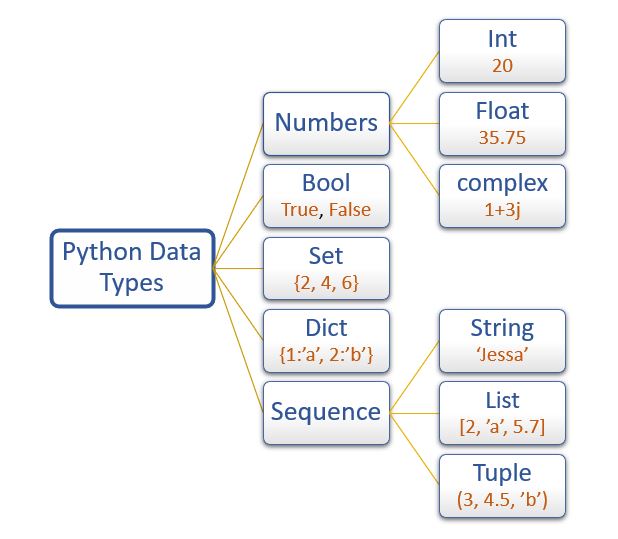
To check the data type of variable use the built-in function type() and isinstance().
- The
type()function returns the data type of the variable - The isinstance() function checks whether an object belongs to a particular class.
In this article, we will learn the following Python data types in detail.
| Data type | Description | Example |
|---|---|---|
int | To store integer values | n = 20 |
float | To store decimal values | n = 20.75 |
complex | To store complex numbers (real and imaginary part) | n = 10+20j |
| str | To store textual/string data | name = 'Jessa' |
| bool | To store boolean values | flag = True |
| list | To store a sequence of mutable data | l = [3, 'a', 2.5] |
| tuple | To store sequence immutable data | t =(2, 'b', 6.4) |
| dict | To store key: value pair | d = {1:'J', 2:'E'} |
| set | To store unorder and unindexed values | s = {1, 3, 5} |
| frozenset | To store immutable version of the set | f_set=frozenset({5,7}) |
| range | To generate a sequence of number | numbers = range(10) |
| bytes | To store bytes values | b=bytes([5,10,15,11]) |
Str data type
In Python, A string is a sequence of characters enclosed within a single quote or double quote. These characters could be anything like letters, numbers, or special symbols enclosed within double quotation marks. For example, "PYnative" is a string.
The string type in Python is represented using a str class.
To work with text or character data in Python, we use Strings. Once a string is created, we can do many operations on it, such as searching inside it, creating a substring from it, and splitting it.
Example
Note: The string is immutable, i.e., it can not be changed once defined. You need to create a copy of it if you want to modify it. This non-changeable behavior is called immutability.
Example
Int data type
Python uses the int data type to represent whole integer values. For example, we can use the int data type to store the roll number of a student. The Integer type in Python is represented using a int class.
You can store positive and negative integer numbers of any length such as 235, -758, 235689741.
We can create an integer variable using the two ways
- Directly assigning an integer value to a variable
- Using a
int()class.
Example
You can also store integer values other than base 10 such as
- Binary (base 2)
- Octal (base 8)
- Hexadecimal numbers (base 16)
Example
Float data type
To represent floating-point values or decimal values, we can use the float data type. For example, if we want to store the salary, we can use the float type.
The float type in Python is represented using a float class.
We can create a float variable using the two ways
- Directly assigning a float value to a variable
- Using a
float()class.
Example
Floating-point values can be represented using the exponential form, also called scientific notation. The benefit of using the exponential form to represent floating-point values is we can represent large values using less memory.
Example
Complex data type
A complex number is a number with a real and an imaginary component represented as a+bj where a and b contain integers or floating-point values.
The complex type is generally used in scientific applications and electrical engineering applications. If we want to declare a complex value, then we can use the a+bj form. See the following example.
Example
The real part of the complex number is represented using an integer value. The integer value can be in the form of either decimal, float, binary, or hexadecimal. But the imaginary part should be represented using the decimal form only. If we are trying to represent an imaginary part as binary, hex, or octal, we will get an error.
List data type
The Python List is an ordered collection (also known as a sequence ) of elements. List elements can be accessed, iterated, and removed according to the order they inserted at the creation time.
We use the list data type to represent groups of the element as a single entity. For example: If we want to store all student’s names, we can use list type.
- The list can contain data of all data types such as
int,float,string - Duplicates elements are allowed in the list
- The list is mutable which means we can modify the value of list elements
We can create a list using the two ways
- By enclosing elements in the square brackets
[]. - Using a
list()class.
Example list creation and manipulation
Tuple data type
Tuples are ordered collections of elements that are unchangeable. The tuple is the same as the list, except the tuple is immutable means we can’t modify the tuple once created.
In other words, we can say a tuple is a read-only version of the list.
For example: If you want to store the roll numbers of students that you don’t change, you can use the tuple data type.
Note: Tuple maintains the insertion order and also, allows us to store duplicate elements.
We can create a tuple using the two ways
- By enclosing elements in the parenthesis ()
- Using a
tuple()class.
Example Tuple creation and manipulation
Tuple is immutable
A tuple is immutable means once we create a tuple, we can’t modify it
Dict data type
In Python, dictionaries are unordered collections of unique values stored in (Key-Value) pairs. Use a dictionary data type to store data as a key-value pair.
The dictionary type is represented using a dict class. For example, If you want to store the name and roll number of all students, then you can use the dict type.
In a dictionary, duplicate keys are not allowed, but the value can be duplicated. If we try to insert a value with a duplicate key, the old value will be replaced with the new value.
Dictionary has some characteristics which are listed below:
- A heterogeneous (i.e.,
str,list,tuple) elements are allowed for both key and value in a dictionary. But An object can be a key in a dictionary if it is hashable. - The dictionary is mutable which means we can modify its items
- Dictionary is unordered so we can’t perform indexing and slicing
We can create a dictionary using the two ways
- By enclosing key and values in the curly brackets
{} - Using a
dict()class.
Example dictionary creation and manipulation
Set data type
In Python, a set is an unordered collection of data items that are unique. In other words, Python Set is a collection of elements (Or objects) that contains no duplicate elements.
In Python, the Set data type used to represent a group of unique elements as a single entity. For example, If we want to store student ID numbers, we can use the set data type.
The Set data type in Python is represented using a set class.
We can create a Set using the two ways
- By enclosing values in the curly brackets
{} - Using a
set()class.
The set data type has the following characteristics.
- It is mutable which means we can change set items
- Duplicate elements are not allowed
- Heterogeneous (values of all data types) elements are allowed
- Insertion order of elements is not preserved, so we can’t perform indexing on a Set
Example Set creation and manipulation
Frozenset
The frozenset data type is used to create the immutable Set. Once we create a frozenset, then we can’t perform any changes on it.
Use a frozenset() class to create a frozenset.
Example
Note: If we try to perform operations like add, remove on frozenset, you will get an error.
Bool data type
In Python, to represent boolean values (True and False) we use the bool data type. Boolean values are used to evaluate the value of the expression. For example, when we compare two values, the expression is evaluated, and Python returns the boolean True or False.
Example
Bytes data type
The bytes data type represents a group of byte numbers just like an array. We use the bytes() constructor to create bytes type, which also returns a bytes object. Bytes are immutable (Cannot be changed).
Use bytes data type if we want to handle binary data like images, videos, and audio files.
Example
In bytes, allowed values are 0 to 256. If we are trying to use any other values, then we will get a ValueError.
Example
bytearray
The bytearray data type same as the bytes type except bytearray mutable (we can modify its elements). The bytearray() constructor returns a bytearray object.
Example
Range data type
In Python, The built-in function range() used to generate a sequence of numbers from a start number up to the stop number. For example, If we want to represent the roll number from 1 to 20, we can use the range() type. By default, it returns an iterator object that we can iterate using a for loop.
Example
memoryview
The memoryview is used to create a view of the internal data of an object without copying it. So with the help of memoryview we can see the same data in a different view.
To do this, we need a buffer protocol. The buffer protocol provides a way to access the internal data of an object. This internal data is a memory array or a buffer.
In Python bytes and bytearray are built-in objects that support the buffer protocol. So we can create memoryview on top of those objects.
Syntax to create a memoryview
memoryview(obj)Code language: Python (python)Example 1: Creating memoryview of an object
Output
view object: <memory at 0x0000003396DC6F48>
In the above example, we create memoryview of b_array and print the object in memory view format instead of the original object. If we want an object in its original form, we need to collect the object in a container(like a list or tuple). We can also iterate over each element of the given bytes array.
Example 2: Creating and storing in a container
Output
80 89 110 97 116 105 118 101
We can also perform indexing and slicing on memoryview same like list and tuple object. So it will return ordinal value for characters at the given index
Example 3: Indexing and slicing on memoryview
Output
byte_array_view[0]: 80
Slicing of b_array_view[6:12] is: b've'


Great resources – many thanks – very professional and easy to follow.
Please fix these minor typos and delete this comment when you get a chance.
1)
Should be:
2)
Should be:
Thanks for the corrections, Vini.
In the article, it is mentioned, “A heterogeneous (i.e., str, list, tuple) elements are allowed for both key and value in a dictionary”.
we cant not mention a list as a key in the dictionary which throws an error because the list is not immutable.
> x = {[1]: 3} Traceback (most recent call last): File "", line 1, in TypeError: unhashable type: 'list'Sridevi, Thank you for your comment. we have updated the article.
None Data Type Is missing
Vinay, Thanks for the comment. We will update an article accordingly.
Vishal, in Range data type you say: “In Python, The built-in function range() used to generate a sequence of numbers from a start number up to the stop number. ” You don´t mention that the last element is not included…I think it would be better to mention that, wouldn’t be?
Hi Vishal, in complex data type you say: “The real part of the complex number is represented using an integer value. The integer value can be in the form of either decimal, float, binary, or hexadecimal. But the imaginary part should be represented using the decimal form only”. Is that correct? If it is an integer, could it be a float one?? I think you must revise that….