PYnative

Python Programming

  • Learn Python
    • Python Tutorials
    • Python Basics
    • Python Interview Q&As
  • Exercises
  • Quizzes
  • Code Editor
Home » Python Exercises » Python Pandas Exercise

Python Pandas Exercise

Updated on: March 9, 2021 | 55 Comments

Python Pandas Exercise

This Pandas exercise project will help Python developers to learn and practice pandas. Pandas is an open-source, BSD-licensed Python library. Pandas is a handy and useful data-structure tool for analyzing large and complex data.

Practice DataFrame, Data Selection, Group-By, Series, Sorting, Searching, statistics. Practice Data analysis using Pandas.

In this exercise, we are using Automobile Dataset for data analysis. This Dataset has different characteristics of an auto such as body-style, wheel-base, engine-type, price, mileage, horsepower, etc.

Automobile_data setDownload Automobile Dataset

Also Read:

  • Pandas DataFrame

What included in this Pandas exercise?

  • It contains 10 questions. The solution is provided for each question.
  • Each question includes a specific Pandas topic you need to learn.

When you complete each question, you get more familiar with data analysis using pandas.

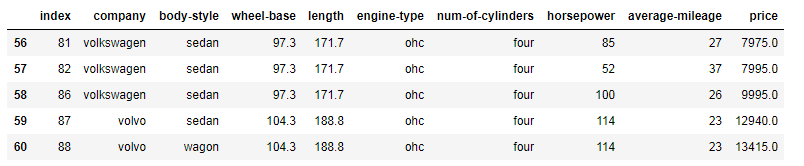
Exercise 1: From the given dataset print the first and last five rows

Expected Output:
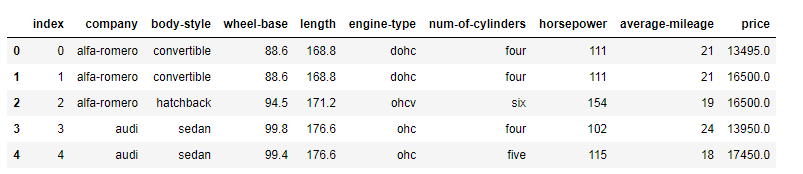
Python Pandas printing first 5 rows
Python Pandas printing last 5 rows
Show Solution

Print first five rows

import pandas as pd
df = pd.read_csv("D:\\Python\\Articles\\pandas\\automobile-dataset\\Automobile_data.csv")
df.head(5)Code language: Python (python)

Print last five rows

import pandas as pd
df = pd.read_csv("D:\\Python\\Articles\\pandas\\automobile-dataset\\Automobile_data.csv")
df.tail(5)Code language: Python (python)

Exercise 2: Clean the dataset and update the CSV file

Replace all column values which contain ?, n.a, or NaN.

Show Solution
df = pd.read_csv("D:\\Python\\Articles\\pandas\\automobile-dataset\\Automobile_data.csv", na_values={
'price':["?","n.a"],
'stroke':["?","n.a"],
'horsepower':["?","n.a"],
'peak-rpm':["?","n.a"],
'average-mileage':["?","n.a"]})
print (df)

df.to_csv("D:\\Python\\Articles\\pandas\\automobile-dataset\\Automobile_data.csv")Code language: Python (python)

Exercise 3: Find the most expensive car company name

Print most expensive car’s company name and price.

Expected Output:
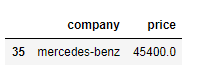
Python Pandas printing most costly car name
Show Solution
import pandas as pd
df = pd.read_csv("D:\\Python\\Articles\\pandas\\automobile-dataset\\Automobile_data.csv")
df = df [['company','price']][df.price==df['price'].max()]
dfCode language: Python (python)

Exercise 4: Print All Toyota Cars details

Expected Output:
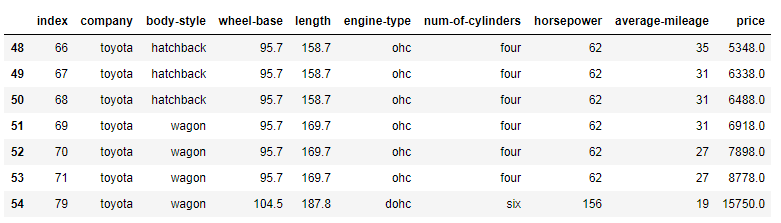
Python Pandas printing all Toyota cars data
Show Solution
import pandas as pd
df = pd.read_csv("D:\\Python\\Articles\\pandas\\automobile-dataset\\Automobile_data.csv")
car_Manufacturers = df.groupby('company')
toyotaDf = car_Manufacturers.get_group('toyota')
toyotaDfCode language: Python (python)

Exercise 5: Count total cars per company

Expected Outcome:
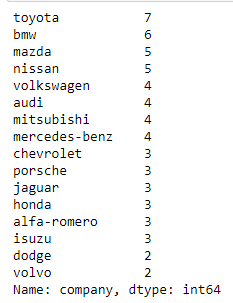
Python Pandas count total cars per company
Show Solution
import pandas as pd
df = pd.read_csv("D:\\Python\\Articles\\pandas\\automobile-dataset\\Automobile_data.csv")
df['company'].value_counts()Code language: Python (python)

Exercise 6: Find each company’s Higesht price car

Expected Outcome:
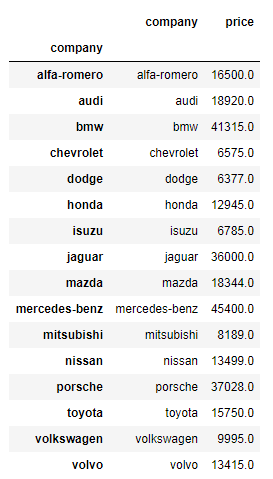
Python Pandas printing each company's highest price car
Show Solution
import pandas as pd
df = pd.read_csv("D:\\Python\\Articles\\pandas\\automobile-dataset\\Automobile_data.csv")
car_Manufacturers = df.groupby('company')
priceDf = car_Manufacturers['company','price'].max()
priceDfCode language: Python (python)

Exercise 7: Find the average mileage of each car making company

Expected Output:
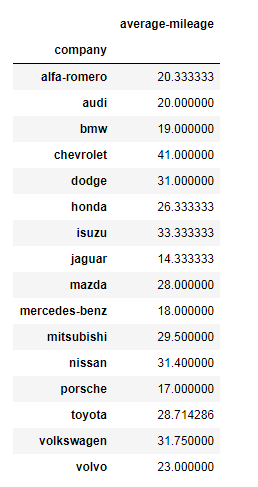
Python Pandas printing average mileage of each car making company
Show Solution
import pandas as pd
df = pd.read_csv("D:\\Python\\Articles\\pandas\\automobile-dataset\\Automobile_data.csv")
car_Manufacturers = df.groupby('company')
mileageDf = car_Manufacturers['company','average-mileage'].mean()
mileageDfCode language: Python (python)

Exercise 8: Sort all cars by Price column

Expected Output:
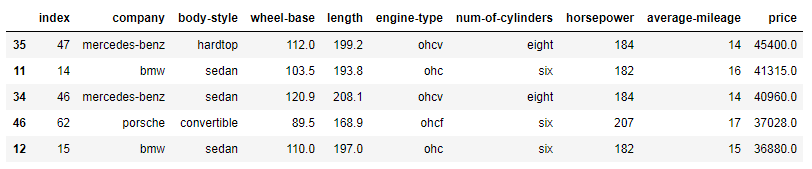
Python Pandas sort all cars by price column
Show Solution
import pandas as pd
carsDf = pd.read_csv("D:\\Python\\Articles\\pandas\\automobile-dataset\\Automobile_data.csv")
carsDf = carsDf.sort_values(by=['price', 'horsepower'], ascending=False)
carsDf.head(5)Code language: Python (python)

Exercise 9: Concatenate two data frames using the following conditions

Create two data frames using the following two dictionaries.

GermanCars = {'Company': ['Ford', 'Mercedes', 'BMV', 'Audi'], 'Price': [23845, 171995, 135925 , 71400]}
japaneseCars = {'Company': ['Toyota', 'Honda', 'Nissan', 'Mitsubishi '], 'Price': [29995, 23600, 61500 , 58900]}Code language: Python (python)

Expected Output:
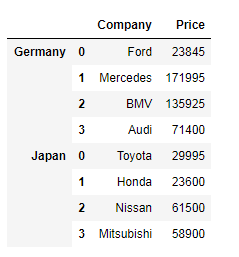
Python Pandas concatenate two data frames and create key for each data frame
Python Pandas concatenate two data frames and create a key for each data frame
Show Solution
import pandas as pd

GermanCars = {'Company': ['Ford', 'Mercedes', 'BMV', 'Audi'], 'Price': [23845, 171995, 135925 , 71400]}
carsDf1 = pd.DataFrame.from_dict(GermanCars)

japaneseCars = {'Company': ['Toyota', 'Honda', 'Nissan', 'Mitsubishi '], 'Price': [29995, 23600, 61500 , 58900]}
carsDf2 = pd.DataFrame.from_dict(japaneseCars)

carsDf = pd.concat([carsDf1, carsDf2], keys=["Germany", "Japan"])
carsDfCode language: Python (python)

Exercise 10: Merge two data frames using the following condition

Create two data frames using the following two Dicts, Merge two data frames, and append the second data frame as a new column to the first data frame.

Car_Price = {'Company': ['Toyota', 'Honda', 'BMV', 'Audi'], 'Price': [23845, 17995, 135925 , 71400]}
car_Horsepower = {'Company': ['Toyota', 'Honda', 'BMV', 'Audi'], 'horsepower': [141, 80, 182 , 160]}Code language: Python (python)

Expected Output:
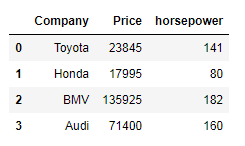
Python Pandas merge two data frames and append new data frame as new column
Python Pandas merge two data frames and append new data frame as a new column
Show Solution
import pandas as pd

Car_Price = {'Company': ['Toyota', 'Honda', 'BMV', 'Audi'], 'Price': [23845, 17995, 135925 , 71400]}
carPriceDf = pd.DataFrame.from_dict(Car_Price)

car_Horsepower = {'Company': ['Toyota', 'Honda', 'BMV', 'Audi'], 'horsepower': [141, 80, 182 , 160]}
carsHorsepowerDf = pd.DataFrame.from_dict(car_Horsepower)

carsDf = pd.merge(carPriceDf, carsHorsepowerDf, on="Company")
carsDfCode language: Python (python)

Filed Under: Pandas, Python, Python Exercises

Did you find this page helpful? Let others know about it. Sharing helps me continue to create free Python resources.

TweetF  sharein  shareP  Pin

About Vishal

Image

I’m Vishal Hule, the Founder of PYnative.com. As a Python developer, I enjoy assisting students, developers, and learners. Follow me on Twitter.

Related Tutorial Topics:

Pandas Python Python Exercises

Python Exercises and Quizzes

Free coding exercises and quizzes cover Python basics, data structure, data analytics, and more.

  • 15+ Topic-specific Exercises and Quizzes
  • Each Exercise contains 10 questions
  • Each Quiz contains 12-15 MCQ
Exercises
Quizzes

Loading comments... Please wait.

In: Pandas Python Python Exercises
TweetF  sharein  shareP  Pin

  Python Exercises

  • All Python Exercises
  • Basic Exercise for Beginners
  • Input and Output Exercise
  • Loop Exercise
  • Functions Exercise
  • String Exercise
  • Data Structure Exercise
  • List Exercise
  • Dictionary Exercise
  • Set Exercise
  • Tuple Exercise
  • Date and Time Exercise
  • OOP Exercise
  • File Handling Exercise
  • Python JSON Exercise
  • Random Data Generation Exercise
  • NumPy Exercise
  • Pandas Exercise
  • Matplotlib Exercise
  • Python Database Exercise

 Explore Python

  • Python Tutorials
  • Python Exercises
  • Python Quizzes
  • Python Interview Q&A
  • Python Programs

All Python Topics

Python Basics Python Exercises Python Quizzes Python Interview Python File Handling Python OOP Python Date and Time Python Random Python Regex Python Pandas Python Databases Python MySQL Python PostgreSQL Python SQLite Python JSON

About PYnative

PYnative.com is for Python lovers. Here, You can get Tutorials, Exercises, and Quizzes to practice and improve your Python skills.

Explore Python

  • Learn Python
  • Python Basics
  • Python Databases
  • Python Exercises
  • Python Quizzes
  • Online Python Code Editor
  • Python Tricks

Follow Us

To get New Python Tutorials, Exercises, and Quizzes

  • Twitter
  • Facebook
  • Sitemap

Legal Stuff

  • About Us
  • Contact Us

We use cookies to improve your experience. While using PYnative, you agree to have read and accepted our:

  • Terms Of Use
  • Privacy Policy
  • Cookie Policy

Copyright © 2018–2025 pynative.com

Advertisement