
Python File Manager – Say Goodbye to Messy Folders
Get ready to crack interviews of top MNCs with Placement-ready courses Learn More!
A file manager is a piece of software that helps manage different types of files on a computer. The File Explorer, which is present in all operating systems, is the most common type of file manager.
About Python File Manager
The objective of this project is to create a file manager. This is a simple application. Python Tkinter will be used to make it more interactive, which can perform operations such as opening, copying, renaming, and deleting files. We will also include options for creating and deleting folders. also listing every file in the folder that is present.
Prerequisites for File Manager using Python
- Basic knowledge of the Python programming language, how functions are defined,
- How the window is created in Tkinter GUI, as well as the frame.
- Understand OS and Shutil libraries.
Download Python File Manager Project
Please download the source code of Python File Manager Project from the following link: Python File Manager Project Code
Steps to Create File Manager using Python
Following are the steps for developing the Python File Manager Project:
Step 1: Importing the necessary modules
To use Tkinter, we need to import the Tkinter module. We are also going to import shutil, os, easygui modules.
Code:
#import packages
from tkinter import *
import shutil
import os
import easygui
from tkinter import filedialog
from tkinter import messagebox as mb
Step 2: Making a window for our project
This code sets the title of the window as ‘PythonGeeks’, and sets the dimensions ‘width x length’.
Code:
manager = Tk()
manager.geometry('300x500')
manager.title('PythonGeeks')
Step 3: Functions
Code:
def window():
   value = easygui.fileopenbox()
   return value


def file():
   w1 = window()
   try:
       os.startfile(w1)
   except:
       mb.showinfo('failed!',"File not found!")


def copy_file():
   file1 = window()
   file2 = filedialog.askdirectory()
   shutil.copy(file1, file2)
   mb.showinfo('congrats', "File Copied")


def delete_file():
   file1 = window()
   if os.path.exists(file1):
       os.remove(file1)
   else:
       mb.showinfo('failed!',"File not found !")


def rename_file():
   file1 = window()
   path1 = os.path.dirname(file1)
   ext = os.path.splitext(file1)[1]
   print("Enter new name ")
   name = input()
   path = os.path.join(path1, name + ext)
   print(path)
   os.rename(file1, path)
   mb.showinfo('congrats', "File Renamed !")


def new_folder():
   folder1 = filedialog.askdirectory()
   print("Enter name")
   name = input()
   path = os.path.join(folder1, name)
   os.mkdir(path)
   mb.showinfo('congrats', "Folder created !")


def remove_folder():
   folder1 = filedialog.askdirectory()
   os.rmdir(folder1)
   mb.showinfo('congrats', "Folder Deleted !")


def list_files():
   flist = filedialog.askdirectory()
   sorts = sorted(os.listdir(flist))
   j = 0
   print("Files in ", flist, "are-")
   while j < len(sorts):
       print(sorts[j] + '\n')
       j += 1
Explanation:
def window(): to create a new window
def file():to create a new file by using the os.startfile(w1) function
def copy_file(): To copy a file and save it at a new location using shutil.copy
def delete_file(): to delete a selected file by first checking if it exists using “if os.path.exists(file1)” and deleting it using os.remove(file1)
def rename_file(): to rename a file by getting the path of the file using “os.path.dirname(file1)”, joining it with a new name using “os.path.join(path1, name + ext)”, and renaming it using “os.rename(file1, path)”.
def new_folder(): make a new folder using os.mkdir(path)
def remove_folder(): Remove an existing folder using os.rmdir(folder1).
def list_files(): displays the list of files and folders by sorting it using sorted(os.listdir(flist))
Step 4: Making Frames and Mapping the Buttons to Their Functionalities
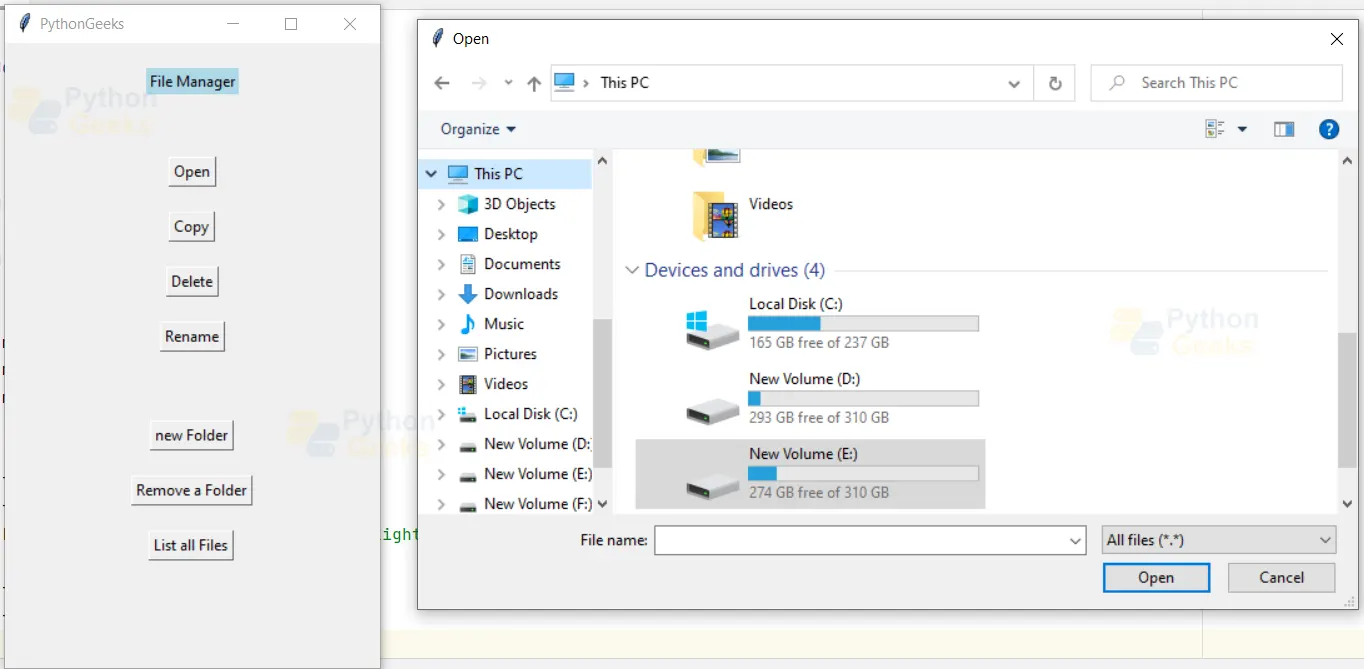
We give the title “File Manager and make buttons for all the functions defined above.
Code:
frame = Frame(manager)
frame.pack(pady=20)
Label(frame, text="File Manager",bg="lightblue").pack()


frame1 = Frame(manager)
frame1.pack(pady=20)


Button(frame1, text="Open", command=file, bd=1, cursor="hand2").pack(pady=10)


Button(frame1, text="Copy", command=copy_file, bd=1, cursor="hand2").pack(pady=10)


Button(frame1, text="Delete", command=delete_file, bd=1, cursor="hand2").pack(pady=10)


Button(frame1, text="Rename", command=rename_file, bd=1, cursor="hand2").pack(pady=10)


frame2 = Frame(manager)
frame2.pack(pady=15)


Button(frame2, text="new Folder", command=new_folder, bd=1, cursor="hand2").pack(pady=10)


Button(frame2, text="Remove a Folder", command=remove_folder, bd=1, cursor="hand2").pack(pady=10)


Button(frame2, text="List all Files", command=list_files, bd=1, cursor="hand2").pack(pady=10)


manager.mainloop()
Full Code
from tkinter import *
import shutil
import os
import easygui
from tkinter import filedialog
from tkinter import messagebox as mb


def window():
   value = easygui.fileopenbox()
   return value


def file():
   w1 = window()
   try:
       os.startfile(w1)
   except:
       mb.showinfo('failed!',"File not found!")


def copy_file():
   file1 = window()
   file2 = filedialog.askdirectory()
   shutil.copy(file1, file2)
   mb.showinfo('congrats', "File Copied")


def delete_file():
   file1 = window()
   if os.path.exists(file1):
       os.remove(file1)
   else:
       mb.showinfo('failed!',"File not found !")


def rename_file():
   file1 = window()
   path1 = os.path.dirname(file1)
   ext = os.path.splitext(file1)[1]
   print("Enter new name ")
   name = input()
   path = os.path.join(path1, name + ext)
   print(path)
   os.rename(file1, path)
   mb.showinfo('congrats', "File Renamed !")


def new_folder():
   folder1 = filedialog.askdirectory()
   print("Enter name")


   name = input()
   path = os.path.join(folder1, name)


   os.mkdir(path)
   mb.showinfo('congrats', "Folder created !")


def remove_folder():
   folder1 = filedialog.askdirectory()
   os.rmdir(folder1)
   mb.showinfo('congrats', "Folder Deleted !")


def list_files():
   flist = filedialog.askdirectory()
   sorts = sorted(os.listdir(flist))
   j = 0
   print("Files in ", flist, "are-")
   while j < len(sorts):
       print(sorts[j] + '\n')
       j += 1


manager = Tk()
manager.geometry('300x500')
manager.title('PythonGeeks')


frame = Frame(manager)
frame.pack(pady=20)
Label(frame, text="File Manager",bg="lightblue").pack()


frame1 = Frame(manager)
frame1.pack(pady=20)


Button(frame1, text="Open", command=file, bd=1, cursor="hand2").pack(pady=10)


Button(frame1, text="Copy", command=copy_file, bd=1, cursor="hand2").pack(pady=10)


Button(frame1, text="Delete", command=delete_file, bd=1, cursor="hand2").pack(pady=10)


Button(frame1, text="Rename", command=rename_file, bd=1, cursor="hand2").pack(pady=10)


frame2 = Frame(manager)
frame2.pack(pady=15)


Button(frame2, text="new Folder", command=new_folder, bd=1, cursor="hand2").pack(pady=10)


Button(frame2, text="Remove a Folder", command=remove_folder, bd=1, cursor="hand2").pack(pady=10)


Button(frame2, text="List all Files", command=list_files, bd=1, cursor="hand2").pack(pady=10)


manager.mainloop()
Python File Manager Output
Summary
You’ve now created your own File Manager Project in Python by utilizing the Tkinter, OS, and shutil modules. With the help of python file manager project, you can manage some of the files you have on your computer. You can use it to open, move, delete, rename, or copy a file, as well as to open, delete, rename, and list all the files in a folder.

