
Ready to Actually Use That Raspberry Pi?
Here’s Your Complete Guide
You bought a Raspberry Pi. Got excited. Opened the box. And then… you realized you had no idea where to start.
The online tutorials are all over the place. The explanations skip important steps. Result: your Pi’s been sitting there for weeks.
Been there, friend.
I’m Patrick, and despite years working in tech, I see this happen all the time. Most tutorials online assume you already know the basics or that you have unlimited time to figure things out on your own.
I decided to fix that.
Meet Master Raspberry Pi in 30 Days: your step-by-step guide to actually understanding and using your Raspberry Pi.
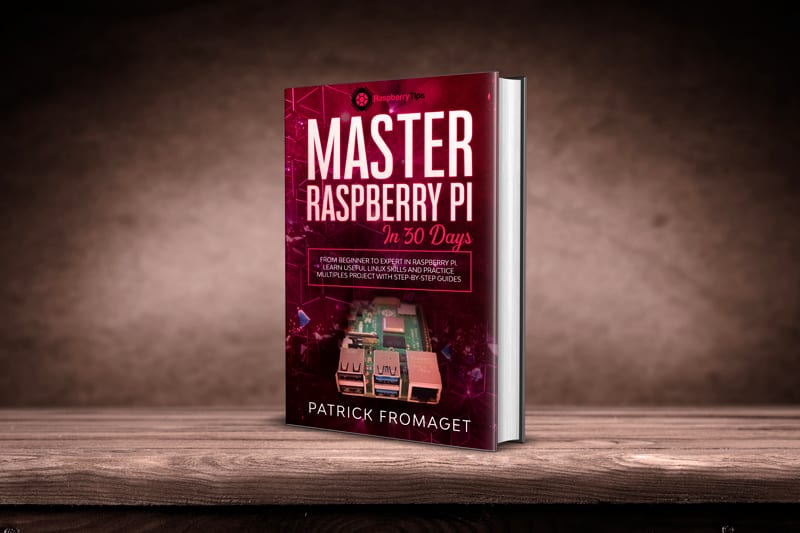
What You’ll Actually Learn
Here’s how it works: Each day for 30 days, you get one clear lesson that builds on what you learned before.
Real progress, one step at a time.
You’ll build things that actually work while learning new skills along the way.
Here are some of the topics covered in the book:
- Understand the hardware requirements and save money on your purchases.
- Install Raspberry Pi OS (Desktop or Lite) for the first time, and configure it the right way.
- The essential commands you need to know for most projects (and only those).
- How to protect your system so you don’t have to start from scratch at the first mistake (backups, security tips, etc.).
- Fun projects: retro-gaming, home servers, programming, and more.
- Lots of tips to save time and make your life easier in your daily use of a Raspberry Pi.
By the end, you’ll feel confident with your Raspberry Pi and be ready to tackle any project you have in mind.
John’s Story (Sound Familiar?)
Take John, a retired IT guy who thought Raspberry Pi would be easy.
Instead, he found himself confused by scattered tutorials that assumed knowledge he didn’t have. His Pi sat unused for months.
Then John got this book.
Within a month, John had built a smart home automation system from scratch and felt confident tackling new projects.
This isn’t just John’s story; hundreds of people have had similar results by following this step-by-step approach:
So what are you waiting for?
Isn’t it time to start so I can add your testimonial to this list 🙂
Here’s What You Get:
I’m not saying it’s magical or anything, you have to work on it a little bit every day for a month if you want to get the results I promise.
But it’s definitely worth it in the long run, especially if you’re passionate about or work in technology.
Here is how this book can help you the most:
- Save time: Do the right thing, in the right order, on your first try.
- Save cash: No more unnecessary hardware. I’ll show you exactly what’s worth buying.
- Enjoy tech again: Building cool stuff is supposed to be fun, remember?
What makes this book different from any other solution?
- Easy-to-follow lessons: Each chapter takes about 30-45 minutes to complete. No need to watch 3-hour video tutorials.
- Works for beginners: I don’t assume you know Linux commands or programming. Everything is explained from the ground up.
- Practical projects you’ll actually use: Build a media server, home automation, retro gaming setup. Real things you’ll want to keep running.
Choose Your Package:
BASIC
- Digital version of your book (PDF)
- 3 bonus chapters: Installing Windows 11, how to use an SSD and tips for installing awesome apps in a few seconds
- Get the paperback version of the book.
- Contact me at anytime to answer your questions about the book tutorials.
PLUS
- Digital version of your book (PDF)
- 3 bonus chapters: Installing Windows 11, how to use an SSD and tips for installing awesome apps in a few seconds
- Get the paperback version of the book.
- Contact me at anytime to answer your questions about the book tutorials.
ELITE
- Digital version of your book (PDF)
- 3 bonus chapters: Installing Windows 11, how to use an SSD and tips for installing awesome apps in a few seconds
- Get the paperback version of the book.
- Contact me at anytime to answer your questions about the book tutorials.
* Prices are shown excluding taxes. Taxes (if any) will be calculated at checkout.
Your Raspberry Pi Is Ready When You Are
You already have everything you need to get started. Your Pi is sitting there waiting, and this book will show you exactly how to use it.
In 30 days, you’ll have the skills and confidence to tackle any project you want to build.
The introductory price is available now, but it won’t stay this low forever.
See you inside,
Patrick Fromaget
Creator of RaspberryTips & Fellow Pi Geek
Table of contents
The file is delivered in PDF format (about 20 MB).
You can get the paperback version in the “Elite” package (see above).
It contains over 300 pages in color, on the following topics
- Foreword
- Day 1: Hardware selection
- Day 2: Prepare your Raspberry Pi Hardware
- Day 3: Going Further
- Day 4: Raspbian Desktop Installation
- Day 5: Raspbian Desktop Overview
- Day 6: Software management on Raspbian Desktop
- Day 7: Pimp your Raspberry Pi
- Day 8: Remote Access your Raspberry Pi
- Day 9: Discover Raspbian Lite
- Day 10: Raspbian Lite Configuration
- Day 11: Raspbian Lite Basic Commands
- Day 12: Nano Commands and Shortcuts
- Day 13: Secure your Raspberry Pi
- Day 14: Backup and Restore your Raspberry Pi
- Day 15: 3 servers projects to start with
- Day 16: 3 projects ideas to use your Raspberry Pi at home
- Day 17: Gaming on Raspberry Pi with Retropie
- Day 18: Gaming on Raspberry Pi: Other options
- Day 19: Programming on Raspberry Pi: Python basics
- Day 20: GPIO Introduction
- Day 21: Discover Raspberry Pi HATs
- Day 22: Advanced Python Notions
- Day 23: Raspberry Pi Zero Introduction
- Day 24: Raspberry Pi Zero Accessories
- Day 25: Raspberry Pi & Security tools
- Day 26: Other Raspberry Pi Operating systems
- Day 27: Shell scripting on Raspberry Pi
- Day 28: Minecraft Pi Coding
- Day 29: Manage your Raspberry Pi from a web interface
- Day 30: 30 Bonus Tips For Raspberry Pi
- Conclusion
Who am I?
Hi, my name is Patrick Fromaget!
I’m a graduate of a computer science school.
I then started my career as a web developer, before specializing in system administration.
I’ve always been passionate about computers and have been managing Linux servers for over 15 years.
In 2018, I launched the RaspberryTips.com website to share my passion for the Raspberry Pi and especially to help others progress.
Since that day, nearly 200 tutorials have been written on the site, in a wide variety of topics.
The site has quickly found its audience, with a growing success since the first months. I even launched a YouTube channel about it in 2020, to help those who need to see stuff visually to figure it out.
2020 also marks the publication of my first book (this one) and the launch of the site in French, my native language, on which I try to share the same things with the French community.
Frequently Asked Questions
I already know the basics, is this product for me?
Because of its step-by-step organization, it’s easy to skip a few chapters or skim through what you already know.
Whatever your current level, this book should give you exactly what you need to go further with your Raspberry Pi. The variety of topics covered allows for a complete mastery of the possibilities and their implementation.
What happens after the purchase?
You will be able to download your PDF file immediately after payment.
You will also have access to the member’s area, and you will receive an email allowing you to download the product again if needed.
How long does the download remain available?
Your purchase is available for life, or at least as long as the RaspberryTips site exists.
You can download it again if you lose it or want to read it on another device.
