16 Original Project Ideas for the Small Raspberry Pi Zero
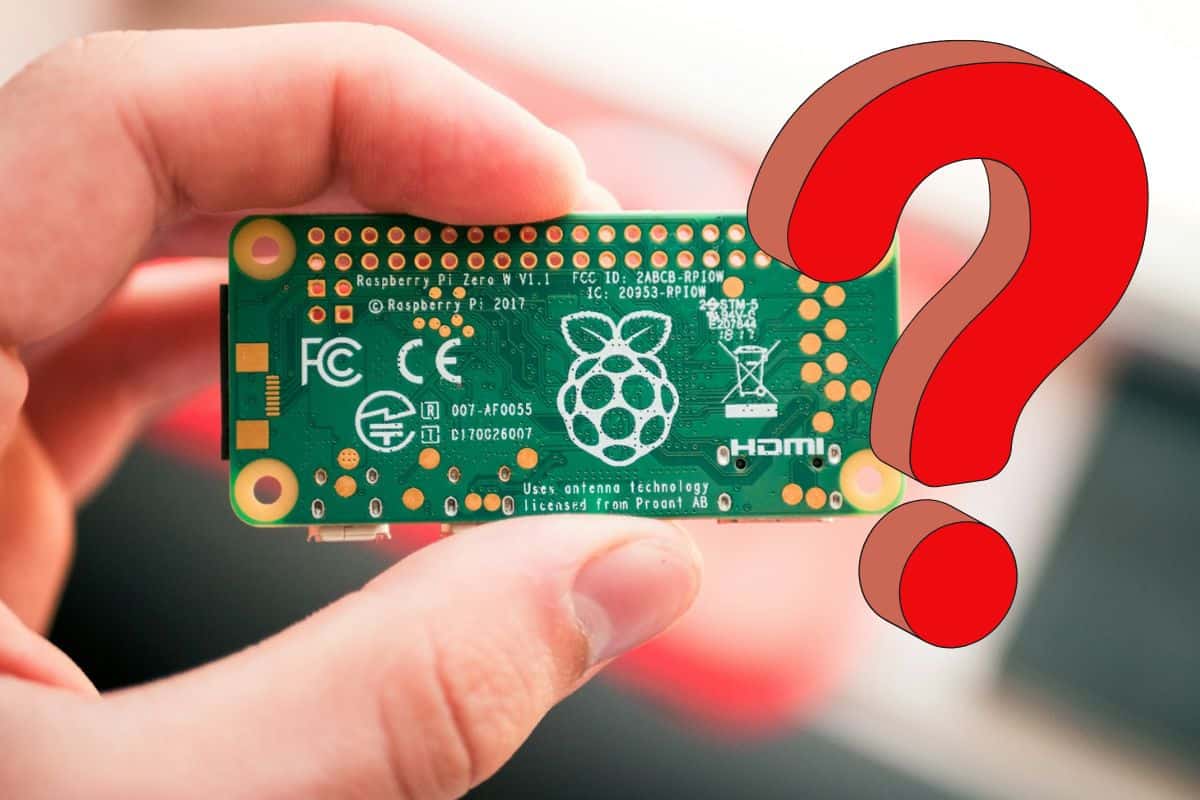
The Raspberry Pi Zero has a huge advantage: it’s tiny. You can install it anywhere and build it similar to a Raspberry Pi 3. In this post, I’ll show you a list of project ideas where the Pi Zero shines.
The Raspberry Pi Zero has a small footprint that can be put into tight spaces or used discreetly. For example, it can fit inside a game controller or be used as an almost invisible security camera. There are many situations where the Zero’s size leads to building better projects.
After all, I didn’t buy a Raspberry Pi Zero to do the same projects as any other model. So, I wanted builds where a small form factor is important and that would take advantage of its characteristics. Read on for a list of cool project ideas to follow specifically for the Raspberry Pi Zero.
If you’re looking for inspiration for your next Raspberry Pi project, I’ve put together a list of 75+ ideas with full descriptions, difficulty ratings, and links to tutorials. Whether you’re a beginner or more advanced, there’s something here for you. Grab the list for free here!
Game Boy Return
Push retro gaming to the maximum while using old controllers directly.
For example, you can insert a Raspberry Pi Zero into a Gameboy, an SNES controller, or an old Atari computer. Then, install RetroPie on it and configure it to play your favorite games using the original controller.
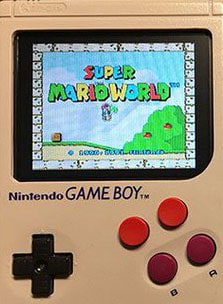
It must feel awesome to play the old games on the same Game Boy controller. And you gain quality with the color screen (the original had a bad white and black screen if you don’t remember).
To build this, you need a Game Boy (you can also use a case like this one), a Raspberry Pi zero and a 3.5″ LCD screen (it’s the one I recommend on Amazon).
It’s not the official one, it’s smaller, but is exactly the size you need for this project. You can even use the stylus to turn your classic-looking console into a modern device (not sure about stylus and modern in the same sentence, but anyway, it will help if you need to do things with the desktop interface).
You can follow this tutorial here with an explanation of what you need to do to build the hardware.
And check my step-by-step guide for Retropie if you need help with the software part.
Update: I recently tested the GPi Case 2W (the latest version of this Game Boy), you can click on the link to check the product description or read my review here.
Zero Drone
Drones are taking up more and more space in our lives. Whether as a hobby or for work, they are used more and more. Unfortunately, they are still a bit expensive for most people.
The goal of this project is to build a less costly drone, with smart abilities.
And the cheaper way to do this is to use a Raspberry Pi Zero for the drone’s brain.
Here is the result:
This project is maybe a little more complex, but all the pieces are available for buying online. So, you can order them and after that follow the tutorial on Hackster to build the same drone at home.
You might also like: 7 Surprising Uses for a Raspberry Pi
Or you can check out our guide to get the big picture: Building a Drone With Raspberry Pi – What You Need to Know
By the way, if those projects feel a bit out of reach at your current level, I created a 30-day challenge to help you go from beginner to expert. With it, you can finally complete many fun and useful projects (robots, home automation, servers, etc.). See what’s inside here.
Beekeeper Helper
The Raspberry Pi Zero can also be useful to observe tiny things, in a small confined place.
And there’s a perfect example: a bee monitoring computer inside of a hive.
I don’t know if it’s possible for you at home (even if you have bees, which is not common amongst my readers), but it’s to give you an idea of what you can build with the Raspberry Pi Zero.
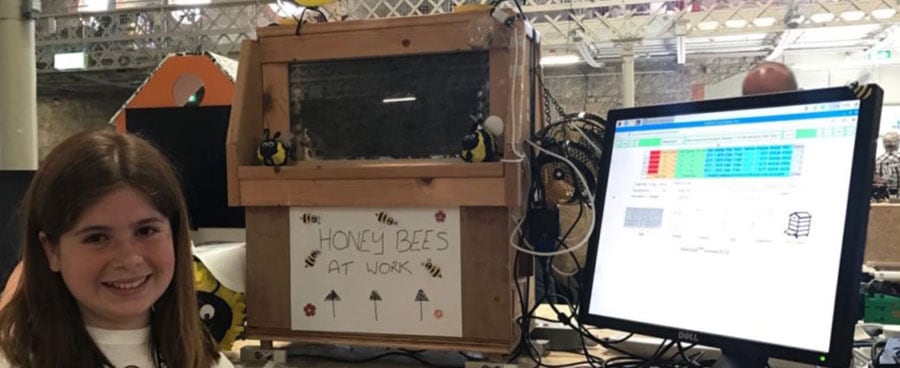
Amy’s Buzz Hive project was led by a 12-year-old girl for the Coolest Projects 2017 event.
The goal was to put a Raspberry Pi Zero inside a hive, with many sensors, to observe the bees
The number of bees in the world has been steadily declining for years. Without bees, plants can’t reproduce, and therefore many species could disappear. As a result, this can impact human lives and can result in a decrease in the available fruits and vegetables.
Some causes of this decline are known. For example, diseases or various threats coming from pesticides and varroa. But most of them are unknown.
Need some inspiration for your next Raspberry Pi project? Get access to my personal list here!
Download now
And Amy’s project was exactly to help scientists find other explanations for this issue. The idea was to live monitor the bees in their home, check various sensors, and try to find other reasons for their extinction.
The story doesn’t say if they found results, but no doubt that this will give ideas to other scientists.
The entire story is available on CoderDojo.
Old School Phone
This one is much more accessible. The goal is to use your skills to build an old school phone with a Raspberry Pi Zero.
Here is what it looks like:
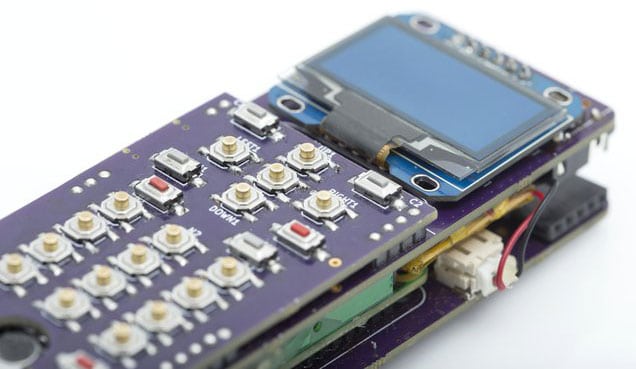
Yes, maybe you can improve the look by 3D printing a dedicated case, but it looks awesome in terms of the features they built on it.
The system base runs on Raspberry Pi Zero with Raspberry Pi OS, and they added various HATs and extensions to add more capabilities: camera, GPS, screen, keyboard, etc. You can even use it as a desktop computer if you plug it into an external screen and keyboard.
Yes, we are far from a Samsung DeX in a term of design, but it’s cheaper and homemade.
If you don’t know, a Samsung DeX Station is a way to turn your Samsung smartphone into a desktop computer, with all the ports you need (more details on Amazon).
The ZeroPhone project started crowdfunding on CrowdSupply if you want to help them. They also provide a lot of information about the parts needed, so you can try to make one on your own.
GPS Tracker
A GPS tracker is typically the kind of thing you want to keep small, and the Raspberry Pi Zero can help you with that.
For example, you can track your pet’s position with a GPS tracker and use the Raspberry Pi Zero to process it (inside the pet collar or not, depending on the pet I guess ^^).
In MagPi Issue 42, the magazine talks about a dog collar with a GPS tracker inside. This tracker communicates with the Raspberry Pi in the office.
But you can adapt this idea to a lot of other situations I think: track your car position after a theft, in the bag of your kids, or maybe in some companies to locate precisely where all the vehicles are in real-time.
I found no step-by-step tutorial on how to build this.
But there is a course on Udemy to learn how to build a GPS tracker with a Raspberry Pi zero.
Here’s the link: Build your own GPS tracking system-Raspberry Pi Zero W.
I hope it can help you if you are interested in this project.
Raspberry Pi Zero Security Camera
I already talked a little about this idea, but you can take advantage of the Raspberry Pi Zero’s size to build a discreet security camera.
A security camera project doesn’t need the power of a Raspberry Pi 4 to be effective, so the Zero might be the best option.
Check this: Pi5 vs. Pi4: I tested them, here's the result
You can insert it easily in any camera case, or even better, buy a fake camera casing. This way, the camera looks like a normal one but is inexpensive (check the price on Amazon).
Then turn it into an actual security camera by inserting your Raspberry Pi Zero inside.
You can also play spies by turning an everyday object in a spy camera (hidden in a tissue box or a fake book for example).
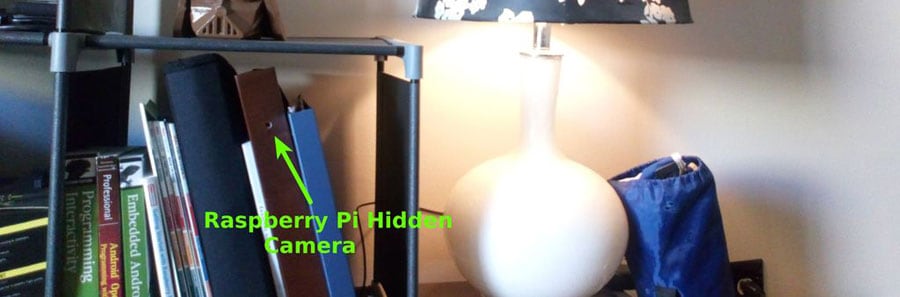
You can follow this tutorial on Instructables for the camera build to put it inside a CCTV camera.
And then use Motion or RPI-Cam for the software part (it’s easy to find help about this and configure it with a movement detector).
You can also try to plug a motion sensor to your Pi if you don’t want to use the Motion service.
Need some inspiration for your next Raspberry Pi project? Get access to my personal list here!
Download now
PiCo Projector
You’ve probably already seen these out in the wild. Pico video projectors can be held in your hand and project pretty good quality images on a screen, to watch a movie, or anything else.
They are convenient but are rather expensive for personal use (check this one on Amazon to get an idea). It depends on how intensively you’ll use it (a normal-sized video projector is almost the same price for the same quality).
Alternatively, there’s a way to build one with a Raspberry Pi Zero.
MickMake did this really well, and here’s the presentation video he made about it:
If you want to try building one, he shares the project details in this link.
You must buy a projector hat, but it seems worthy compared to the commercial projector.
As he says in the video, the image is not top quality, but it should be fine anyway (resolution is limited to 640×320 if I remember well).
FireStick Alternative
The original Fire TV stick is a bestseller from Amazon. It allows you to watch Netflix, Prime Video, and other streaming providers on any TV with an HDMI port (all details on Amazon). And it’s available at a price much lower than replacing your TV!
Does this remind you of something?
I remember a Raspberry Pi running Kodi for the same price.
If you don’t know Kodi, it’s software to use a Raspberry Pi as a media center device.
You can watch your files and add other applications to watch their content on your TV.

If you need help to install this, I have a complete guide for Kodi beginners available.
And you can also follow this post to learn how to watch Netflix, Prime Video, or YouTube on Kodi.
You don’t necessarily need a Raspberry Pi Zero for this project, any Raspberry Pi will do the job.
But if you want to fix it on your TV, or hide it inside, the Raspberry Pi Zero will take less space for the same outcome.
One last thing I want to add is that you can turn your Raspberry Pi into a classic TV by using the Raspberry Pi TV HAT. This allows you to receive classic TV channels on your Raspberry Pi, so you can turn any screen into a TV for less than $25 (check the price here).
Portable Terminal
The Raspberry Pi Zero size can also be useful if you’re interested in building a tiny laptop.
The goal is to have computer power in less than 8″ of space!
There are various forms and cases, and the only thing you need is a screen that fits in the original case. For example, you can use an old smartphone, a photo frame, or a dedicated kit (like this one for example, the best prices are on eBay).
To be more concrete, I found this video about the PuterPi project:
The PuterPi project (available on Etsy) is the perfect example of what you can make on your own.
You will need to assemble a few parts to build it and then you will have a complete computer that fits in your hand. It’s up to you to find out how useful it will be, but everything is possible.
Personally, I prefer frames like Magic Mirror or simple photo frames to display info or statistics. But maybe it can be useful with a low budget or to use as a controller for a bigger project.
If you need help finding the steps to build this, there’s a complete tutorial on Hackster. The tutorial isn’t for the same model, but the steps don’t depend too much on the case you choose.
Cheap Cluster
I have several tutorials on this website about clusters, you can check this article for example on how to build your first cluster with any Raspberry Pi model.
Often, to make a cluster, people use four Raspberry Pi 4 in a crystal case.
But we are talking about Raspberry Pi Zero today.
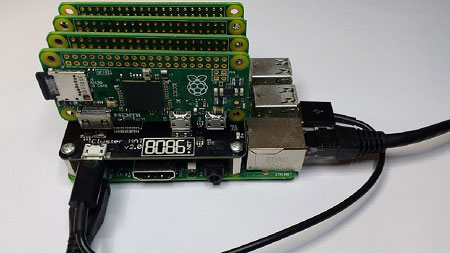
So, what could a Raspberry Pi Zero cluster look like?
Here’s your answer:
Download the free PDF, keep it open, and stop wasting time on Google.
Download now
Cluster Hat provides a HAT for a standard Raspberry Pi model (3B+ or 4 for example), allowing it to hold four Raspberry Pi Zero on its back.
This allows you to build a cluster of 5 computers in the space taken by two Raspberry Pi 3s.
All that’s missing is a well-ventilated 3D printed box to make the perfect assembly.
Plants Watering
I know you love plants at home. I know you sometimes let them die because you forget to take care of them. But from now on, it will be different!
This project automates plant watering with a Raspberry Pi Zero.
Here is an introduction video:
As you can see the idea is brilliant and the project is simple.
All you need is a Raspberry Pi Zero and a pump.
Then you can use Python scripts to schedule and send the quantity of water you want, at the frequency you want. And I’m pretty sure it would be possible to use a humidity sensor or a weather API in order to give water to the plant only when it’s necessary.
You might also like: No screen? No problem! Here's how to setup a Pi without one.
Source: Hackster
Monitor Things With a Camera
We already previously discussed security cameras that you can hide in your house.
But there’s another use where the Raspberry Pi Zero will help!
When the Raspberry Pi Zero is monitoring something, it can take a picture every hour and use code to take action if there’s been a change in states.
In the example below, these guys are monitoring the level of their remaining coffee beans and submitting an order on Amazon if the remaining quantity is getting low.
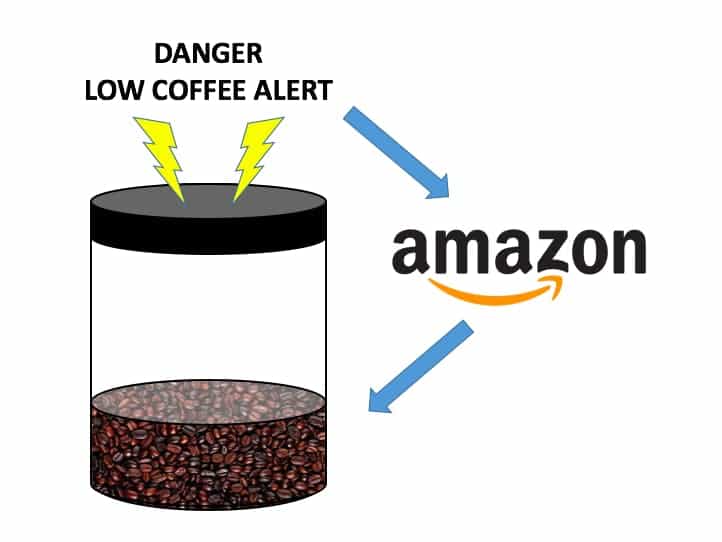
The hardware part is easy, with only a Raspberry Pi and a camera.
But the software part is harder. You need to interpret the image, estimate the remaining quantity, and use Amazon web services to order a new coffee pack.
Thanks to Terren Peterson, you have a step-by-step tutorial on how to do all of this, including the source code to use (in Java). You can use any Pi to build this project, but I think you’d prefer to save space in your kitchen by using a Raspberry Pi Zero.
Weather Station
When you buy a new weather station, you have generally at least 2 parts: a central monitor to display the data and a remote sensor to measure the temperature.
When you follow a tutorial to build a weather station, it’s similar: a Raspberry Pi connected to all accessories and a web interface to check the data. But by using a Raspberry Pi Zero, you can improve the second part, by placing the station remotely to take the temperature outside.
You can use a battery (like this one) and/or a solar panel to manage power issues (link here). I also tested the SunFounder Pi-Power (review here), that is an UPS, that can be useful for this.
I didn’t find an exact tutorial for this idea, but the video below should be close to this experience:
And with the Raspberry Pi Zero, you can build a smaller box (built-in wireless and low power consumption). This will be a good improvement if you already have a weather station somewhere.
Pen Testing
I often write about pen-testing and security projects on this blog.
Maybe I should write a tutorial about this one day, but for now, you can already install Kali Linux on your Raspberry Pi and see all the tools that are included. For example, you can use it to hack a Wi-Fi network in a few minutes from your Raspberry Pi.
But once again in this post, pen testing is the perfect project for a Raspberry Pi Zero.
Download the free PDF, keep it open, and stop wasting time on Google.
Download now
For those who don’t know, a pen test is a simulated cyberattack, allowed and financed by the target company, to check its current security level. The attacker will try by all means to enter the company network, including connecting a Raspberry Pi physically to the network.
Read next: 15 Easy Projects for Raspberry Pi Beginners
And you know the rest, the Raspberry Pi Zero is the perfect device to be discreet in this kind of test. If you watched the Mr. Robot series, you have seen Elliot install the Raspberry Pi behind a security pad in the toilet (and if not, I just spoiled it for you ^^).
Smart Car
Yes, this next idea is to bring a computer into your car.
And I don’t think you want to use your desktop computer to do this.
We need to keep it small, to hide the Raspberry Pi inside the dashboard.
AutoPi is a company that provides an all-in-one solution, based on a Raspberry Pi Zero, to add new features like GPS, temperature sensor, or even video recording.
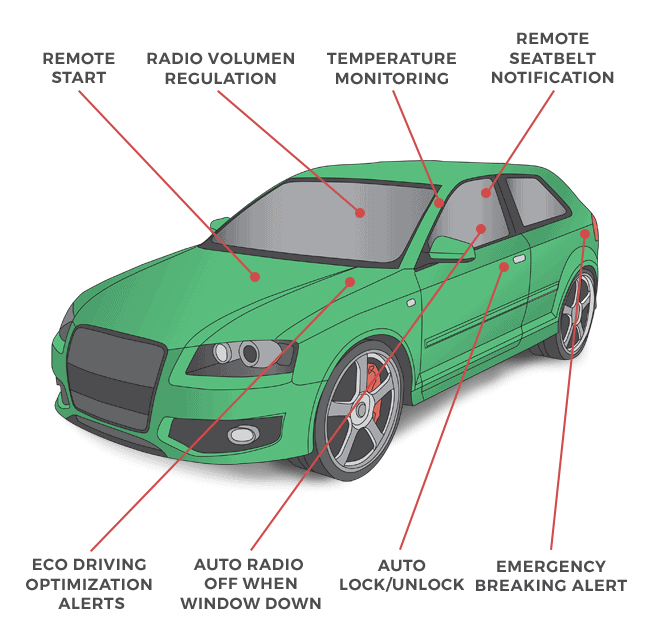
Yes, it’s a solution you need to buy, and they don’t explain how to build one yourself.
But this is an inspirational project, I’m sure you’ll find ideas on what to bring to your car to make it look like a luxurious one :).
House Alarm
And the last project I thought of is an alarm for your house.
What do you get when you buy an alarm? Security pad on a screen, sensors, maybe a camera, and a speaker to play this sweet music.
You can find all of that for your Raspberry Pi and plug it together to build your own house alarm.
Here’s what it looks like:
You can find the basic tutorial on Hackster, and I’m sure you can improve it to connect several projects you have seen in this post to this central computer.
Once again, a Raspberry Pi Zero is not mandatory for this project, but if you don’t want to use a 24″ screen to hide all components inside, a small Pi model is better.
Home Assistant is also a great project for Raspberry Pi owners, you should give it a try if you are looking to automate things at home.
That’s all! I hope you enjoy this post as much I enjoyed writing it. This should give you some good projects ideas to start now. And probably you are now thinking about other projects where the Raspberry Pi Zero will be a good choice. And that was the goal.
Bonus Project: Getting Started with Ham Radio on Raspberry Pi
If it’s not enough for you, you can also check my list of project ideas for the Raspberry Pi Zero 2 W. Most of them should work decently on the first version.
And you can also check my other inspiration posts to get even more ideas (not specific to the Pi Zero, but it should be fine in most cases):
- 15 Raspberry Pi Network Projects for Home and Office Use
- 15 Easy Projects for Raspberry Pi Beginners (With Links)
- All The Best Raspberry Pi Project Ideas (With Links)
If you have other project ideas for a Raspberry Pi Zero, feel free to share them in the community, so we can have a reference point that is as complete as possible.
You might also like: Looking for a fun challenge? Start building your first Raspberry Pi robot!
And for more general project ideas, check out my ultimate list of suggestions here: All The Best Raspberry Pi Project Ideas (with links). You can’t go wrong with these ideas.
If you prefer watching videos instead of reading tutorials, you’ll love the RaspberryTips Community. I post a new lesson every month (only for members), and you can unlock them all with a 7-day trial for $1.
FAQ
Do I really need to buy a Raspberry Pi Zero to build these projects? No. And I don’t encourage you to buy a Pi Zero if you already have another one. Choose the project that interests you, try it with your current model, and if the result doesn’t satisfy you, only then consider buying a zero. You can check my buying guide here for more details.
What’s the power difference between a Raspberry Pi Zero and others? I talk about the Raspberry Pi Zero’s advantages, but not about the cons. In fact, the Raspberry Pi Zero is something around two times slower than the Raspberry Pi 3B+. So if you need extra power, it’s not a good choice. But for all these projects, it’s absolutely not needed.
Update: Using the newer Raspberry Pi Zero 2 W will remove many limitations I discuss in this article. If you don’t have one already, I highly recommend it for all the projects listed here. For more info, read about the differences between Pi Zero and Pi Zero 2.
Whenever you’re ready, here are other ways I can help you:
Test Your Raspberry Pi Level (Free): Not sure why everything takes so long on your Raspberry Pi? Take this free 3-minute assessment and see what’s causing the problems.
The RaspberryTips Community: Need help or want to discuss your Raspberry Pi projects with others who actually get it? Join the RaspberryTips Community and get access to private forums, exclusive lessons, and direct help (try it for just $1).
Master your Raspberry Pi in 30 days: If you are looking for the best tips to become an expert on Raspberry Pi, this book is for you. Learn useful Linux skills and practice multiple projects with step-by-step guides.
Master Python on Raspberry Pi: Create, understand, and improve any Python script for your Raspberry Pi. Learn the essentials step-by-step without losing time understanding useless concepts.
You can also find all my recommendations for tools and hardware on this page.