Okay .. Hope you are clear with previous lectures.
You will some code in purple color and a some in black. All those in purple are java keywords and you cannot use those as your variables.

public static void main is the heart of your code. So if you write some code it will start executing from this block. Without public static void main, you cannot execute java codes. Now if you want to print something you can give:
System.out.println(“helo”);
This prints helo in your console . This should be written inside ‘public static void main’. You can run this by Right click on code you written – > Run As -> Java Application

Here in above picture you can see ‘helo’ printed in console. Since its string to printed, when you give directly to System.out.println(); , it should in double qoutes as given above. But suppose you want print a value stored in variable, its different. Consider you want to add 2 numbers and store it in variable and print the value. Here is how you can do it:
package pdemo;

public class MyFirstClass {

	public static void main(String[] args) {
		// TODO Auto-generated method stub

		System.out.println("helo");

		int a =2;
		int b =3;
		int Sum = a+b;
		System.out.println(Sum);
	}

}
Here you can see ‘Sum’ is variable and if you want to print it give without double qoutes.
a & b in above are accepting integer values so defined as int a and int b. If its accepting a decimal value or string you can give as float a and String a respectively.
Functions and Object Creations
If you certain set of codes to be executed for several times , you can write those set of codes inside a function and can call this function wherever you required by creating an object for the function.
package pdemo;

public class Basic2 {

	public void ValidateHeader()
	{
		System.out.println("Inside Validate Header");

	}
}

package pdemo;

public class MyFirstClass {

	public static void main(String[] args) {
		// TODO Auto-generated method stub

		System.out.println("helo");

		int a =2;
		int b =3;
		int Sum = a+b;
		System.out.println(Sum);
		Basic2 ba = new Basic2();
		ba.ValidateHeader();
	}

}
In above example I have created another class with name Basic2 and defined a funtion/method called ValidateHeader . Now i am using this function from class MyFirstClass by creating object for Basics2 as below in code Basic2 ba = new Basic2();
Here ‘ba‘ is object created which allocates memory for that function and with this object you can call any function inside that class as shown in code.
ba.ValidateHeader();
Now ValidateHeader when called from MyFirstClass is not returing any value back. Its only printing “Inside Validate Header” . If you want to return something you should specify the return type as below:
package pdemo;

public class Basic2 {

	public int ValidateHeader()
	{

		return 2;
	}
}


package pdemo;

public class MyFirstClass {

	public static void main(String[] args) {
		// TODO Auto-generated method stub

		System.out.println("helo");

		int a =2;
		int b =3;
		int Sum = a+b;
		System.out.println(Sum);
		Basic2 ba = new Basic2();
		int r=ba.ValidateHeader();
		System.out.println(r);
	}

}

OUTPUT will be::
helo
5
2
Strings In Java
You can define string variable in java in 2 ways:
String str = "I my first string";
OR
String str1 = new String("I my first string");Here String is keyword from java to define strings and str1/str is user-defined variable to store the value of string.
You can check what is position of a character in string as below. Here i want to check the position where letter ‘s’ is printed.
  String str = "I my first string";
  System.out.println(str.indexOf("s"));
Its output print 8, ie, character ‘s’ is at 8th position. But if you check there are 2 ‘s’ character in string “I my first string” . Java will only take the position of first matching character.
Now if you want to extract substring of string str1, then;
  String str = "I my first string";
  System.out.println(str.substring(8));

OUTPUT:
st string
These all where we can use strings, but still there are plenty enough methods in String , if you need just type object name created for string enter a dot and you will see all methods associated with String.
Now lets see how to print String in reverse / Pallindrome string:
public static void main(String[] args) {
    // TODO Auto-generated method stub

  String str = "madam";
  String rev ="";
  for(int i=str.length()-1;i>=0;i--)
  {
      rev = rev + str.charAt(i);
  }
  System.out.println(rev);
  if(str==rev)
  {
  System.out.println("Its pallindrome");
  }
}
ARRAY in Java
You can declare an array with any datatype. Lets see below example.
package pdemo;

public class MyFirstClass {

	public static void main(String[] args) {
		// TODO Auto-generated method stub
            int Sum=0;
            int c[] = {2,3,4,5,6};
            for(int i=0;i<c.length;i++)
            {
            	Sum = Sum+c[i];
            }

            System.out.println(Sum);
	}

}
In above example c[] is array and is declared as integer. So you can find length of array by :
c.length
You can find the nmbers in the array c by specifing index of array c in each iteration as c[i].
Now if you want to find index where number 5 is present in the array c, then:
package pdemo;

public class MyFirstClass {

	public static void main(String[] args) {
		// TODO Auto-generated method stub
            int Sum=0;
            int c[] = {2,3,4,5,6};
            for(int i=0;i<c.length;i++)
            {
            	if(c[i]==5)
            	{
            		System.out.println(i);
            		break;
            	}
            }


	}

}
Inheritance in Java
Suppose you have login and logout function common for all test case you have to write. Instead of writing the code again and again for all test cases you can write those in one class and inherit those class where you want to use it. and the use these login/logout functions.
Terms used in Inheritance
- Class: A class is a group of objects which have common properties. It is a template or blueprint from which objects are created.
- Sub Class/Child Class: Subclass is a class which inherits the other class. It is also called a derived class, extended class, or child class.
- Super Class/Parent Class: Superclass is the class from where a subclass inherits the features. It is also called a base class or a parent class.
- Reusability: As the name specifies, reusability is a mechanism which facilitates you to reuse the fields and methods of the existing class when you create a new class. You can use the same fields and methods already defined in the previous class.
The syntax of Java Inheritance
- class Subclass-name extends Superclass-name
- {
- //methods and fields
- }
The extends keyword indicates that you are making a new class that derives from an existing class. The meaning of “extends” is to increase the functionality.
In the terminology of Java, a class which is inherited is called a parent or superclass, and the new class is called child or subclass.
class Employee{
 float salary=40000;
}
class Programmer extends Employee{
 int bonus=10000;
 public static void main(String args[]){
   Programmer p=new Programmer();
   System.out.println("Programmer salary is:"+p.salary);
   System.out.println("Bonus of Programmer is:"+p.bonus);
}
}
Types of inheritance in java
On the basis of class, there can be three types of inheritance in java: single, multilevel and hierarchical.
In java programming, multiple and hybrid inheritance is supported through interface only. We will learn about interfaces later.
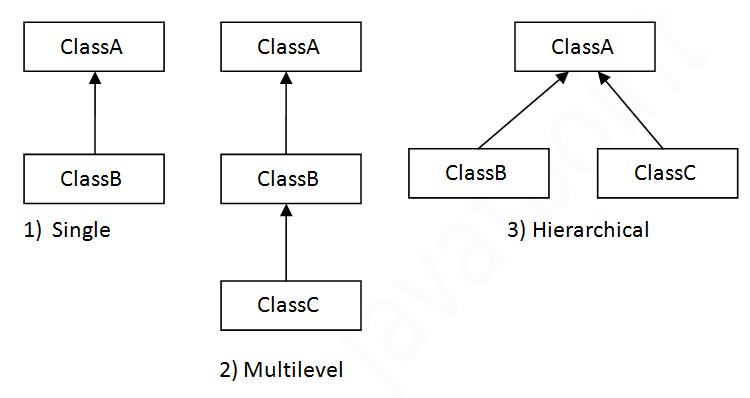
Single Inheritance Example
When a class inherits another class, it is known as a single inheritance. In the example given below, Dog class inherits the Animal class, so there is the single inheritance.
File: TestInheritance.java
class Animal{
void eat(){System.out.println("eating...");}
}
class Dog extends Animal{
void bark(){System.out.println("barking...");}
}
class TestInheritance{
public static void main(String args[]){
Dog d=new Dog();
d.bark();
d.eat();
}}

OUTPUT:
barking...
eating...
Multilevel Inheritance Example
When there is a chain of inheritance, it is known as multilevel inheritance. As you can see in the example given below, BabyDog class inherits the Dog class which again inherits the Animal class, so there is a multilevel inheritance.
File: TestInheritance2.java
class Animal{
void eat(){System.out.println("eating...");}
}
class Dog extends Animal{
void bark(){System.out.println("barking...");}
}
class BabyDog extends Dog{
void weep(){System.out.println("weeping...");}
}
class TestInheritance2{
public static void main(String args[]){
BabyDog d=new BabyDog();
d.weep();
d.bark();
d.eat();
}}

OUTPUT:
weeping...
barking...
eating...
Why multiple inheritance is not supported in java?
To reduce the complexity and simplify the language, multiple inheritance is not supported in java.
Consider a scenario where A, B, and C are three classes. The C class inherits A and B classes. If A and B classes have the same method and you call it from child class object, there will be ambiguity to call the method of A or B class.
Since compile-time errors are better than runtime errors, Java renders compile-time error if you inherit 2 classes. So whether you have same method or different, there will be compile time error.
class A{
void msg(){System.out.println("Hello");}
}
class B{
void msg(){System.out.println("Welcome");}
}
class C extends A,B{//suppose if it were

 public static void main(String args[]){
   C obj=new C();
   obj.msg();//Now which msg() method would be invoked?
}
}
The above code result in Compile Time Error.
 Automation Expertz
