Interfaces in Java
Interfaces are the client agreement between method and class implementation. Interfaces always have methods without any body. Its responsibility of class which implements the interface to define the body for the methods in interface. By default all methods in interfaces are public. A class can implement multiple interfaces.
An interface is a completely “abstract class” that is used to group related methods with empty bodies:
interface FirstInterface {
  public void myMethod(); // interface method
}

interface SecondInterface {
  public void myOtherMethod(); // interface method
}

class DemoClass implements FirstInterface, SecondInterface {
  public void myMethod() {
    System.out.println("Some text..");
  }
  public void myOtherMethod() {
    System.out.println("Some other text...");
  }
}
Here in above example you can see methods in both the interfaces are defined inside the class ‘DemoClass’ which implements the interface. In practical example ITestListeners in Selenium is an interface which is used to implement Listener classes
Polymorphism
Polymorphism means “many forms”, and it occurs when we have many classes that are related to each other by inheritance.
Like we specified in the previous chapter; Inheritance lets us inherit attributes and methods from another class. Polymorphism uses those methods to perform different tasks. This allows us to perform a single action in different ways.
For example, think of a superclass called ‘Parent’ that has a method called parentMeth().
class Parent{
  public void parentMeth() {
    System.out.println("The animal makes a sound");
  }
}

class Child1 extends Parent {
  public void parentMeth() {
    System.out.println("The pig says: wee wee");
  }
}

class Child2 extends Parent{
  public void parentMeth() {
    System.out.println("The dog says: bow wow");
  }
}
Remember from the Inheritance chapter that we use the extends keyword to inherit from a class.
Now we can create Child1and Child2objects and call the parentMeth() method on both of them:
class Parent{
  public void parentMeth() {
    System.out.println("The animal makes a sound");
  }
}

class Child1 extends Parent {
  public void parentMeth() {
    System.out.println("The pig says: wee wee");
  }
}

class Child2 extends Parent{
  public void parentMeth() {
    System.out.println("The dog says: bow wow");
  }
}
class MyMainClass {
  public static void main(String[] args) {
    Parent myParent = new Parent();  // Create a Parent object
    Parent myChild1 = new Child1();  // Create a Child1 object
    Parent myChild2 = new Child2();  // Create a Child2 object
    myParent.animalSound();
     myChild1.animalSound();
    myChild2.animalSound();
  }
}

OUTPUT:
The animal makes a sound
The pig says: wee wee
The dog says: bow wow
If you check above code you can see first you are creating an object for Parent Class. Then you are creating an object for Child1 which can access methods in Parent. This is an example of Runtime Polymorphism. Method overriding is an example of runtime polymorphism. In method overriding, a subclass overrides a method with the same signature as that of in its superclass. During compile time, the check is made on the reference type. However, in the runtime, JVM figures out the object type and would run the method that belongs to that particular object.
Method Overloading
If a class has multiple methods having same name but different in parameters, it is known as Method Overloading.
If we have to perform only one operation, having same name of the methods increases the readability of the program.
Suppose you have to perform addition of the given numbers but there can be any number of arguments, if you write the method such as a(int,int) for two parameters, and b(int,int,int) for three parameters then it may be difficult for you as well as other programmers to understand the behavior of the method because its name differs.
class Adder{
static int add(int a,int b){return a+b;}
static int add(int a,int b,int c){return a+b+c;}
}
class TestOverloading1{
public static void main(String[] args){
System.out.println(Adder.add(11,11));
System.out.println(Adder.add(11,11,11));
}}

OUTPUT:
22
33
Can we overload java main() method?
Yes, by method overloading. You can have any number of main methods in a class by method overloading. But JVM calls main() method which receives string array as arguments only. Let’s see the simple example:
class TestOverloading4{
public static void main(String[] args){System.out.println("main with String[]");}
public static void main(String args){System.out.println("main with String");}
public static void main(){System.out.println("main without args");}
}

OUTPUT::
main with String[]
Single-Dimensional And Multi-Dimensional Arrays
NOTE: Please refer Array section which is previously covered before you continue to this.
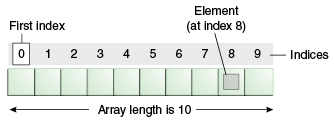
Unlike C/C++, we can get the length of the array using the length member. In C/C++, we need to use the sizeof operator.
In Java, array is an object of a dynamically generated class. Java array inherits the Object class, and implements the Serializable as well as Cloneable interfaces. We can store primitive values or objects in an array in Java. Like C/C++, we can also create single dimentional or multidimentional arrays in Java.
Moreover, Java provides the feature of anonymous arrays which is not available in C/C++.
Advantages
- Code Optimization: It makes the code optimized, we can retrieve or sort the data efficiently.
- Random access: We can get any data located at an index position.
Disadvantages
- Size Limit: We can store only the fixed size of elements in the array. It doesn’t grow its size at runtime. To solve this problem, collection framework is used in Java which grows automatically.
Example of Java Array
Let’s see the simple example of java array, where we are going to declare, instantiate, initialize and traverse an array.
//Java Program to illustrate how to declare, instantiate, initialize
//and traverse the Java array.
class Testarray{
public static void main(String args[]){
int a[]=new int[5];//declaration and instantiation
a[0]=10;//initialization
a[1]=20;
a[2]=70;
a[3]=40;
a[4]=50;
//traversing array
for(int i=0;i<a.length;i++)//length is the property of array
System.out.println(a[i]);
}}

OUTPUT::
10
20
70
40
50
Now if you are asked to findout minimum number of an array how you will do it? Lets see:
//Java Program to demonstrate the way of passing an array
//to method.
class Testarray2{
//creating a method which receives an array as a parameter
static void min(int arr[]){
int min=arr[0];
for(int i=1;i<arr.length;i++)
 if(min>arr[i])
  min=arr[i];

System.out.println(min);
}

public static void main(String args[]){
int a[]={33,3,4,5};//declaring and initializing an array
min(a);//passing array to method
}}
ArrayIndexOutOfBoundsException
The Java Virtual Machine (JVM) throws an ArrayIndexOutOfBoundsException if length of the array in negative, equal to the array size or greater than the array size while traversing the array.
//Java Program to demonstrate the case of
//ArrayIndexOutOfBoundsException in a Java Array.
public class TestArrayException{
public static void main(String args[]){
int arr[]={50,60,70,80};
for(int i=0;i<=arr.length;i++){
System.out.println(arr[i]);
}
}}

OUTPUT::
Exception in thread "main" java.lang.ArrayIndexOutOfBoundsException: 4
	at TestArrayException.main(TestArrayException.java:5)
50
60
70
80
Multidimensional Array in Java
In such case, data is stored in row and column based index (also known as matrix form).
Syntax to Declare Multidimensional Array in Java
- dataType[][] arrayRefVar; (or)
- dataType [][]arrayRefVar; (or)
- dataType arrayRefVar[][]; (or)
- dataType []arrayRefVar[];
Example to instantiate Multidimensional Array in Java
- int[][] arr=new int[3][3];//3 row and 3 column
ie, this forms a format of matrix when filled.
Example of Multidimensional Java Array
Let’s see the simple example to declare, instantiate, initialize and print the 2Dimensional array.
//Java Program to illustrate the use of multidimensional array
class Testarray3{
public static void main(String args[]){
//declaring and initializing 2D array
int arr[][]={{1,2,3},{2,4,5},{4,4,5}};
//printing 2D array
for(int i=0;i<3;i++){
 for(int j=0;j<3;j++){
   System.out.print(arr[i][j]+" ");
 }
 System.out.println();
}
}}

OUTPUT:
1 2 3
2 4 5
4 4 5
You may think how the array was declared in such a manner, for that each array cell will be intialised like below:
- arr[0][0]=1;
- arr[0][1]=2;
- arr[0][2]=3;
- arr[1][0]=4;
- arr[1][1]=5;
- arr[1][2]=6;
- arr[2][0]=7;
- arr[2][1]=8;
- arr[2][2]=9;
ie, we have declared the array will be of size 3*3. You can also declare array like:
int arr[][]= new int[3][3]; instead of
int arr[][]={{1,2,3},{2,4,5},{4,4,5}};
ArrayList in Java
The ArrayList class is a resizable array, which can be found in the java.util package.
The difference between a built-in array and an ArrayList in Java, is that the size of an array cannot be modified (if you want to add or remove elements to/from an array, you have to create a new one). While elements can be added and removed from an ArrayList whenever you want. The syntax is also slightly different:
Create an ArrayList object called cars that will store strings:
import java.util.ArrayList; // import the ArrayList class

ArrayList<String> cars = new ArrayList<String>(); // Create an ArrayList object
Add Items
The ArrayList class has many useful methods. For example, to add elements to the ArrayList, use the add() method:
Example:
import java.util.ArrayList;

public class MyClass {
  public static void main(String[] args) {
    ArrayList<String> cars = new ArrayList<String>();
    cars.add("Volvo");
    cars.add("BMW");
    cars.add("Ford");
    cars.add("Mazda");
    System.out.println(cars);
  }
}
Access an Item
To access an element in the ArrayList, use the get() method and refer to the index number:
Example:
cars.get(0);
Loop Through an ArrayList
Loop through the elements of an ArrayList with a for loop, and use the size() method to specify how many times the loop should run:
Example:
public class MyClass {
  public static void main(String[] args) {
    ArrayList<String> cars = new ArrayList<String>();
    cars.add("Volvo");
    cars.add("BMW");
    cars.add("Ford");
    cars.add("Mazda");
    for (int i = 0; i < cars.size(); i++) {
      System.out.println(cars.get(i));
    }
  }
}
Sort an ArrayList
Another useful class in the java.util package is the Collections class, which include the sort() method for sorting lists alphabetically or numerically:
Example:
Sort an ArrayList of Strings:
import java.util.ArrayList;
import java.util.Collections;  // Import the Collections class

public class MyClass {
  public static void main(String[] args) {
    ArrayList<String> cars = new ArrayList<String>();
    cars.add("Volvo");
    cars.add("BMW");
    cars.add("Ford");
    cars.add("Mazda");
    Collections.sort(cars);  // Sort cars
    for (String i : cars) {
      System.out.println(i);
    }
  }
}
Date Class in Java
The class Date represents a specific instant in time, with millisecond precision. The Date class of java.util package implements Serializable, Cloneable and Comparable interface. It provides constructors and methods to deal with date and time with java.
Constructors
- Date() : Creates date object representing current date and time.
- Date(long milliseconds) : Creates a date object for the given milliseconds since January 1, 1970, 00:00:00 GMT.
- Date(int year, int month, int date)
- Date(int year, int month, int date, int hrs, int min)
- Date(int year, int month, int date, int hrs, int min, int sec)
- Date(String s)
Note : The last 4 constructors of the Date class are Deprecated.
// Java program to demonstrate constuctors of Date
import java.util.*;
// Java program to demonstrate constuctors of Date
import java.util.*;

public class Main
{
	public static void main(String[] args)
	{
		Date d1 = new Date();
		System.out.println("Current date is " + d1);
		Date d2 = new Date(2323223232L);
		System.out.println("Date represented is "+ d2 );
	}
}

OUTPUT::
Current date is Tue Jul 12 18:35:37 IST 2016
Date represented is Wed Jan 28 02:50:23 IST 1970- boolean after(Date date) : Tests if current date is after the given date.
- boolean before(Date date) : Tests if current date is before the given date.
- int compareTo(Date date) : Compares current date with given date. Returns 0 if the argument Date is equal to the Date; a value less than 0 if the Date is before the Date argument; and a value greater than 0 if the Date is after the Date argument.
- long getTime() : Returns the number of milliseconds since January 1, 1970, 00:00:00 GMT represented by this Date object.
- void setTime(long time) : Changes the current date and time to given time.
// Program to demonstrate methods of Date class
import java.util.*;

public class Main
{
	public static void main(String[] args)
	{
		// Creating date
		Date d1 = new Date(2000, 11, 21);
		Date d2 = new Date(); // Current date
		Date d3 = new Date(2010, 1, 3);

		boolean a = d3.after(d1);
		System.out.println("Date d3 comes after " +
						"date d2: " + a);

		boolean b = d3.before(d2);
		System.out.println("Date d3 comes before "+
						"date d2: " + b);

		int c = d1.compareTo(d2);
		System.out.println(c);

		System.out.println("Miliseconds from Jan 1 "+
				"1970 to date d1 is " + d1.getTime());

		System.out.println("Before setting "+d2);
		d2.setTime(204587433443L);
		System.out.println("After setting "+d2);
	}
}


OUTPUT::
Date d3 comes after date d2: true
Date d3 comes before date d2: false
1
Miliseconds from Jan 1 1970 to date d1 is 60935500800000
Before setting Tue Jul 12 13:13:16 UTC 2016
After setting Fri Jun 25 21:50:33 UTC 1976
Now if you want date in format mm//dd/yyyy. Now to get this we have another class SimpleDateFormat.
package pdemo;

import java.text.SimpleDateFormat;
import java.util.Date;

public class MyFirstClass {

	public static void main(String[] args) {
		// TODO Auto-generated method stub

		Date d = new Date();

		SimpleDateFormat sdf = new SimpleDateFormat("MM/d/yyyy");
		System.out.println(sdf.format(d));


	}

}
OUTPUT:
04/17/2020
Date and Time Patterns
Date and time formats are specified by date and time pattern strings. Within date and time pattern strings, unquoted letters from 'A' to 'Z' and from 'a' to 'z' are interpreted as pattern letters representing the components of a date or time string. Text can be quoted using single quotes (') to avoid interpretation. "''" represents a single quote. All other characters are not interpreted; they’re simply copied into the output string during formatting or matched against the input string during parsing.
The following pattern letters are defined (all other characters from 'A' to 'Z' and from 'a' to 'z' are reserved):
| Letter | Date or Time Component | Presentation | Examples |
|---|---|---|---|
G | Era designator | Text | AD |
y | Year | Year | 1996; 96 |
Y | Week year | Year | 2009; 09 |
M | Month in year | Month | July; Jul; 07 |
w | Week in year | Number | 27 |
W | Week in month | Number | 2 |
D | Day in year | Number | 189 |
d | Day in month | Number | 10 |
F | Day of week in month | Number | 2 |
E | Day name in week | Text | Tuesday; Tue |
u | Day number of week (1 = Monday, …, 7 = Sunday) | Number | 1 |
a | Am/pm marker | Text | PM |
H | Hour in day (0-23) | Number | 0 |
k | Hour in day (1-24) | Number | 24 |
K | Hour in am/pm (0-11) | Number | 0 |
h | Hour in am/pm (1-12) | Number | 12 |
m | Minute in hour | Number | 30 |
s | Second in minute | Number | 55 |
S | Millisecond | Number | 978 |
z | Time zone | General time zone | Pacific Standard Time; PST; GMT-08:00 |
Z | Time zone | RFC 822 time zone | -0800 |
X | Time zone | ISO 8601 time zone | -08; -0800; -08:00 |
Lets see another format example too:
package pdemo;

import java.text.SimpleDateFormat;
import java.util.Date;

public class MyFirstClass {

	public static void main(String[] args) {
		// TODO Auto-generated method stub

		Date d = new Date();

		SimpleDateFormat sdf = new SimpleDateFormat("MM/d/yyyy");
		SimpleDateFormat sd = new SimpleDateFormat("MM/d/yyyy hh:mm:ss");
		System.out.println(sdf.format(d));
		System.out.println(sd.format(d));


	}

}

OUTPUT:
04/17/2020
04/17/2020 11:28:40 Automation Expertz
