Calendar Objects in Java
Here we can create an instance of calendar to find the date, month and many other formats not available in SimpleDateFormat.
package pdemo;

import java.text.SimpleDateFormat;
import java.util.Calendar;
import java.util.Date;

public class MyFirstClass {

	public static void main(String[] args) {
		// TODO Auto-generated method stub


            Calendar cal = Calendar.getInstance();
            SimpleDateFormat sdf = new SimpleDateFormat("MM/d/yyyy hh:mm:ss");
           System.out.println(sdf.format(cal.getTime()));
           System.out.println(cal.get(Calendar.DAY_OF_MONTH));

	}

}


OUTPUT::
04/17/2020 11:35:10
17
Constructors in Java
A constructor in Java is a special method that is used to initialize objects. The constructor is called when an object of a class is created. It can be used to set initial values for object attributes:
public class MyClass {
  int x;  // Create a class attribute


  public MyClass() {
    x = 5;  // Set the initial value for the class attribute x
  }

  public static void main(String[] args) {
    MyClass myObj = new MyClass(); // Create an object of class MyClass (This will call the constructor)
    System.out.println(myObj.x); // Print the value of x
  }
}

Outputs::
 5
Types Of Constructor:
Parameterised Constructor::
public class MyClass {
  int x;

  public MyClass(int y) {
    x = y;
  }

  public static void main(String[] args) {
    MyClass myObj = new MyClass(5);
    System.out.println(myObj.x);
  }
}

Outputs::
 5
Here constructor accepts the value given while creating an object and do actions as given in constructor.
Super Keyword in Java
The super keyword in Java is a reference variable which is used to refer immediate parent class object.
Whenever you create the instance of subclass, an instance of parent class is created implicitly which is referred by super reference variable.
Usage of Java super Keyword
- super can be used to refer immediate parent class instance variable.
- super can be used to invoke immediate parent class method.
- super() can be used to invoke immediate parent class constructor.
class Parent{
String color="white";
}

class Base extends Parent{
String color="black";
void printColor(){
System.out.println(color);//prints color of Dog class
System.out.println(super.color);//prints color of Animal class
}
}
class TestSuper1{
public static void main(String args[]){
Base d=new Base();
d.printColor();
}}


OUTPUT::
black
white
In the above example, Parent and Base both classes have a common property color. If we print color property, it will print the color of current class by default. To access the parent property, we need to use super keyword.
super can be used to invoke parent class method
The super keyword can also be used to invoke parent class method. It should be used if subclass contains the same method as parent class. In other words, it is used if method is overridden.
class Parent{
void eat(){System.out.println("eating...");}
}
class Base extends Parent{
void eat(){System.out.println("eating bread...");}
void bark(){System.out.println("barking...");}
void work(){
super.eat();
bark();
}
}
class TestSuper2{
public static void main(String args[]){
Base d=new Base();
d.work();
}}

OUTPUT:
eating...
barking...
this Keyword in Java
The this keyword refers to the current object in a method or constructor.
The most common use of the this keyword is to eliminate the confusion between class attributes and parameters with the same name (because a class attribute is shadowed by a method or constructor parameter). If you omit the keyword in the example below, the output would be “0” instead of “5”.
this can also be used to:
- Invoke current class constructor
- Invoke current class method
- Return the current class object
- Pass an argument in the method call
- Pass an argument in the constructor call
public class MyClass {
  int x;

  // Constructor with a parameter
  public MyClass(int x) {
    this.x = x;
  }

  // Call the constructor
  public static void main(String[] args) {
    MyClass myObj = new MyClass(5);
    System.out.println("Value of x = " + myObj.x);
  }
}
package coreJava;public class thisDemo {
int a= 2;
public void getData()
{
int a= 3;
int b=a+this.a;
System.out.println(a);
System.out.println(this.a);
System.out.println(b);
// this refers to curent object- object scope lies in class level
}
//
public static void main(String[] args) {
// TODO Auto-generated method stub
thisDemo td=new thisDemo();
td.getData();
}
}
OUTPUT:
3
2
5final Keyword in java
The final keyword in java is used to restrict the user. The java final keyword can be used in many context. Final can be:
- variable
- method
- class
The final keyword can be applied with the variables, a final variable that have no value it is called blank final variable or uninitialized final variable. It can be initialized in the constructor only. The blank final variable can be static also which will be initialized in the static block only. We will have detailed learning of these. Let’s first learn the basics of final keyword.
There is a final variable speedlimit, we are going to change the value of this variable, but It can’t be changed because final variable once assigned a value can never be changed.
class Bike9{
 final int speedlimit=90;//final variable
 void run(){
  speedlimit=400;
 }
 public static void main(String args[]){
 Bike9 obj=new  Bike9();
 obj.run();
 }
}//end of class

OUTPUT:
ERORR!!!!!!
A final method cannot be overridden by any subclasses. As mentioned previously, the final modifier prevents a method from being modified in a subclass.
The main intention of making a method final would be that the content of the method should not be changed by any outsider.
Final Classes
The main purpose of using a class being declared as final is to prevent the class from being subclassed. If a class is marked as final then no class can inherit any feature from the final class.
Example
public final class Test {
   // body of class
}
Access Modifiers in Java
By now, you are quite familiar with the public keyword that appears in almost all of our examples:
public class MyClass
The public keyword is an access modifier, meaning that it is used to set the access level for classes, attributes, methods and constructors.
We divide modifiers into two groups:
- Access Modifiers – controls the access level
- Non-Access Modifiers – do not control access level, but provides other functionality
Access Modifiers
For classes, you can use either public or default:
For all below explained modifiers you can practise the same by clicking on Try it link .
| Modifier | Description | Try it |
|---|---|---|
public | The class is accessible by any other class | Try it » |
| default | The class is only accessible by classes in the same package. This is used when you don’t specify a modifier. You will learn more about packages in the Packages chapter | Try it » |
For attributes, methods and constructors, you can use the one of the following:
| Modifier | Description | Try it |
|---|---|---|
public | The code is accessible for all classes | Try it » |
private | The code is only accessible within the declared class | Try it » |
| default | The code is only accessible in the same package. This is used when you don’t specify a modifier. You will learn more about packages in the Packages chapter | Try it » |
protected | The code is accessible in the same package and subclasses. You will learn more about subclasses and superclasses in the Inheritance chapter | Try it » |
Non-Access Modifiers
For classes, you can use either final or abstract:
| Modifier | Description | Try it |
|---|---|---|
final | The class cannot be inherited by other classes (You will learn more about inheritance in the Inheritance chapter) | Try it » |
abstract | The class cannot be used to create objects (To access an abstract class, it must be inherited from another class. You will learn more about inheritance and abstraction in the Inheritance and Abstraction chapters) | Try it » |
For attributes and methods, you can use the one of the following:
| Modifier | Description |
|---|---|
final | Attributes and methods cannot be overridden/modified |
static | Attributes and methods belongs to the class, rather than an object |
abstract | Can only be used in an abstract class, and can only be used on methods. The method does not have a body, for example abstract void run();. The body is provided by the subclass (inherited from). You will learn more about inheritance and abstraction in the Inheritance and Abstraction chapters |
transient | Attributes and methods are skipped when serializing the object containing them |
synchronized | Methods can only be accessed by one thread at a time |
volatile | The value of an attribute is not cached thread-locally, and is always read from the “main memory” |
Final
If you don’t want the ability to override existing attribute values, declare attributes as final:
Hash Table in Java
Java Hashtable class implements a hashtable, which maps keys to values. It inherits Dictionary class and implements the Map interface.
Points to remember
- A Hashtable is an array of a list. Each list is known as a bucket. The position of the bucket is identified by calling the hashcode() method. A Hashtable contains values based on the key.
- Java Hashtable class contains unique elements.
- Java Hashtable class doesn’t allow null key or value.
- Java Hashtable class is synchronized.
- The initial default capacity of Hashtable class is 11 whereas loadFactor is 0.75.
Hashtable class declaration
Let’s see the declaration for java.util.Hashtable class.
- public class Hashtable<K,V> extends Dictionary<K,V> implements Map<K,V>, Cloneable, Serializable
Hashtable class Parameters
Let’s see the Parameters for java.util.Hashtable class.
import java.util.*;
class Hashtable1{
 public static void main(String args[]){
  Hashtable<Integer,String> hm=new Hashtable<Integer,String>();

  hm.put(100,"Amit");
  hm.put(102,"Ravi");
  hm.put(101,"Vijay");
  hm.put(103,"Rahul");

  for(Map.Entry m:hm.entrySet()){
   System.out.println(m.getKey()+" "+m.getValue());
  }
 }
}

OUTPUT::
103 Rahul
102 Ravi
101 Vijay
100 Amit
Exceptions in Java
An exception (or exceptional event) is a problem that arises during the execution of a program. When an Exception occurs the normal flow of the program is disrupted and the program/Application terminates abnormally, which is not recommended, therefore, these exceptions are to be handled.
An exception can occur for many different reasons. Following are some scenarios where an exception occurs.
- A user has entered an invalid data.
- A file that needs to be opened cannot be found.
- A network connection has been lost in the middle of communications or the JVM has run out of memory.
Some of these exceptions are caused by user error, others by programmer error, and others by physical resources that have failed in some manner.
Based on these, we have three categories of Exceptions. You need to understand them to know how exception handling works in Java.
- Checked exceptions − A checked exception is an exception that is checked (notified) by the compiler at compilation-time, these are also called as compile time exceptions. These exceptions cannot simply be ignored, the programmer should take care of (handle) these exceptions.
For example, if you use FileReader class in your program to read data from a file, if the file specified in its constructor doesn’t exist, then a FileNotFoundException occurs, and the compiler prompts the programmer to handle the exception.
Example
import java.io.File;
import java.io.FileReader;

public class FilenotFound_Demo {

   public static void main(String args[]) {
      File file = new File("E://file.txt");
      FileReader fr = new FileReader(file);
   }
}
If you try to compile the above program, you will get the following exceptions.
Output
C:\>javac FilenotFound_Demo.java
FilenotFound_Demo.java:8: error: unreported exception FileNotFoundException; must be caught or declared to be thrown
      FileReader fr = new FileReader(file);
                      ^
1 error
Note − Since the methods read() and close() of FileReader class throws IOException, you can observe that the compiler notifies to handle IOException, along with FileNotFoundException.
- Unchecked exceptions − An unchecked exception is an exception that occurs at the time of execution. These are also called as Runtime Exceptions. These include programming bugs, such as logic errors or improper use of an API. Runtime exceptions are ignored at the time of compilation.
For example, if you have declared an array of size 5 in your program, and trying to call the 6th element of the array then an ArrayIndexOutOfBoundsExceptionexception occurs.
Example
public class Unchecked_Demo {

   public static void main(String args[]) {
      int num[] = {1, 2, 3, 4};
      System.out.println(num[5]);
   }
}
If you compile and execute the above program, you will get the following exception.
Output
Exception in thread "main" java.lang.ArrayIndexOutOfBoundsException: 5
	at Exceptions.Unchecked_Demo.main(Unchecked_Demo.java:8)
- Errors − These are not exceptions at all, but problems that arise beyond the control of the user or the programmer. Errors are typically ignored in your code because you can rarely do anything about an error. For example, if a stack overflow occurs, an error will arise. They are also ignored at the time of compilation.
Exception Hierarchy
All exception classes are subtypes of the java.lang.Exception class. The exception class is a subclass of the Throwable class. Other than the exception class there is another subclass called Error which is derived from the Throwable class.
Errors are abnormal conditions that happen in case of severe failures, these are not handled by the Java programs. Errors are generated to indicate errors generated by the runtime environment. Example: JVM is out of memory. Normally, programs cannot recover from errors.
The Exception class has two main subclasses: IOException class and RuntimeException Class.
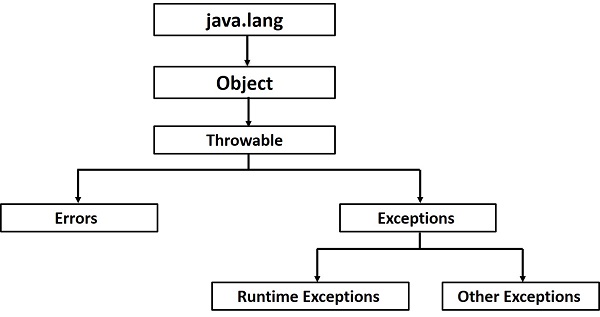
Following is a list of most common checked and unchecked Java’s Built-in Exceptions.
Exceptions Methods
Following is the list of important methods available in the Throwable class.
| Sr.No. | Method & Description |
|---|---|
| 1 | public String getMessage()Returns a detailed message about the exception that has occurred. This message is initialized in the Throwable constructor. |
| 2 | public Throwable getCause()Returns the cause of the exception as represented by a Throwable object. |
| 3 | public String toString()Returns the name of the class concatenated with the result of getMessage(). |
| 4 | public void printStackTrace()Prints the result of toString() along with the stack trace to System.err, the error output stream. |
| 5 | public StackTraceElement [] getStackTrace()Returns an array containing each element on the stack trace. The element at index 0 represents the top of the call stack, and the last element in the array represents the method at the bottom of the call stack. |
| 6 | public Throwable fillInStackTrace()Fills the stack trace of this Throwable object with the current stack trace, adding to any previous information in the stack trace. |
Try – Catch Mechanism to Handle Exceptions
The try statement allows you to define a block of code to be tested for errors while it is being executed.
The catch statement allows you to define a block of code to be executed, if an error occurs in the try block.
The try and catch keywords come in pairs:
try {
  //  Block of code to try
}
catch(Exception e) {
  //  Block of code to handle errors
}
public class MyClass {
  public static void main(String[ ] args) {
    try {
      int[] myNumbers = {1, 2, 3};
      System.out.println(myNumbers[10]);
    } catch (Exception e) {
      System.out.println("Something went wrong.");
    }
  }
}

OUTPUT::
Something went wrong.
The throw keyword
The throw statement allows you to create a custom error.
The throw statement is used together with an exception type. There are many exception types available in Java: ArithmeticException, FileNotFoundException, ArrayIndexOutOfBoundsException, SecurityException, etc:
Example::
Throw an exception if age is below 18 (print “Access denied”). If age is 18 or older, print “Access granted”:
public class MyClass {
  static void checkAge(int age) {
    if (age < 18) {
      throw new ArithmeticException("Access denied - You must be at least 18 years old.");
    }
    else {
      System.out.println("Access granted - You are old enough!");
    }
  }

  public static void main(String[] args) {
    checkAge(15); // Set age to 15 (which is below 18...)
  }
}
The output will be:
Exception in thread "main" java.lang.ArithmeticException: Access denied - You must be at least 18 years old.
        at MyClass.checkAge(MyClass.java:4)
        at MyClass.main(MyClass.java:12)
Java finally block
Java finally block is a block that is used to execute important code such as closing connection, stream etc.
Java finally block is always executed whether exception is handled or not.
Java finally block follows try or catch block.
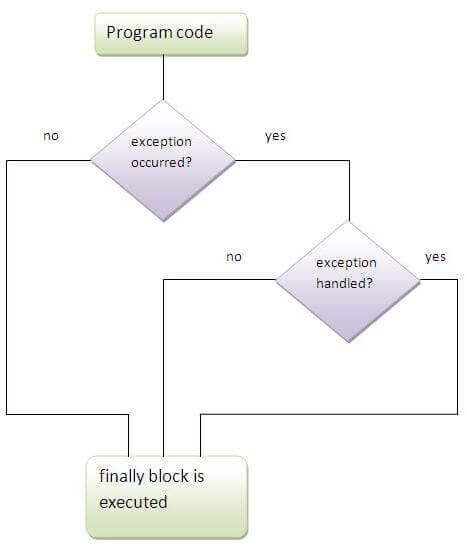
class TestFinallyBlock{
  public static void main(String args[]){
  try{
   int data=25/5;
   System.out.println(data);
  }
  catch(NullPointerException e){System.out.println(e);}
  finally{System.out.println("finally block is always executed");}
  System.out.println("rest of the code...");
  }
}

Output:
5
finally block is always executed
rest of the code...
I am wrapping up the Java basic code lectures with this. Yes there many more to be covered. But to start with Selenium this all are pretty enough. If you have any doubts please comment.
Happy Coding……………………………………
Click on link below
 Automation Expertz
