CoverageBook updates
www.coveragebook.com

✨ Ready to shake off repetitive reporting? New Templates spark ideas and save time along the way ✨


New


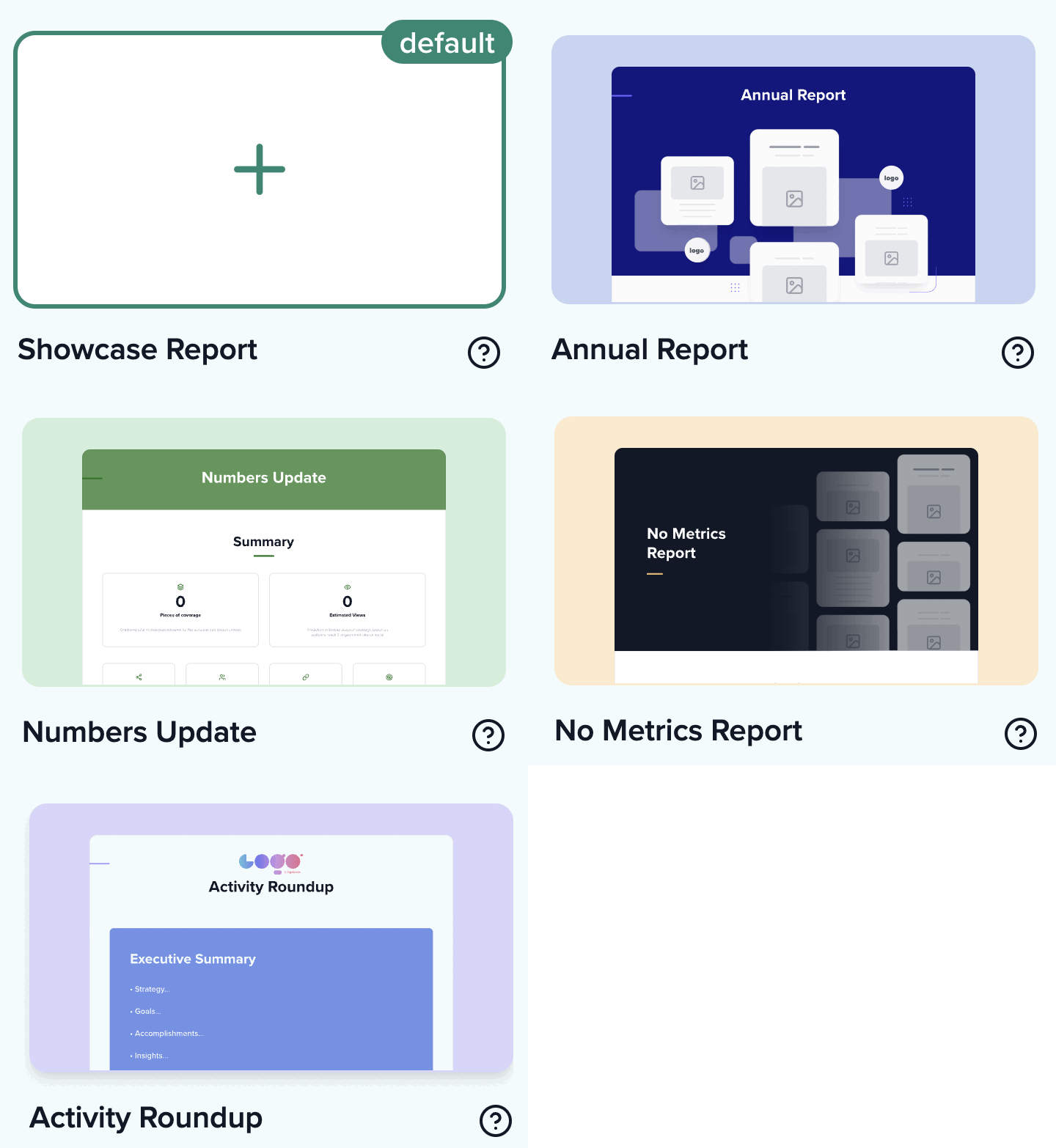
When you log in, you’ll notice a new section above your reports - Quick Start Templates!

Your original layout is still there (now called the Showcase Report), but you can now pick from a menu of new styles designed to spark ideas and save you heaps of time.

  • Annual Report: Yearly report laid out with individual coverage sections for each month of the year, ready to add your coverage into

  • Numbers Update: Key metrics and KPIs take centre stage with a coverage index for easy reference and scanning—you control which exact metrics to feature

  • No Metrics Report: Showcase impactful coverage and trending topics—all metrics are hidden to put the spotlights on your visuals and content

  • Activity Roundup: Status update featuring summary slides for objectives & goals with coverage laid out in a grid

This little collection will help you make different reports easily…and it’s only the start of what’s coming next 👀
templates.gif

Here's more info on using these templates: Template FAQ
TikTok photos get a glow-up 💅


Improvement


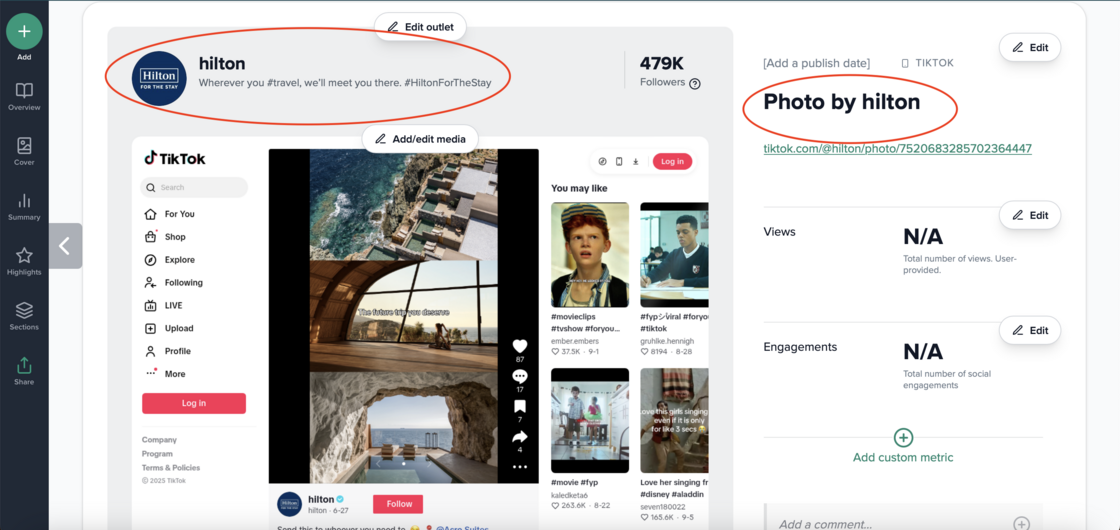
We’ve improved how TikTok photo posts are collected. You’ll now see full outlet data — including the correct avatar, outlet name, and follower count — instead of just www.tiktok.com with no audience info.

We’ve also added a photo title based on the outlet data to give a bit more context (which you can edit it if you’d rather use your own wording)

Tiktok photo after (1).png

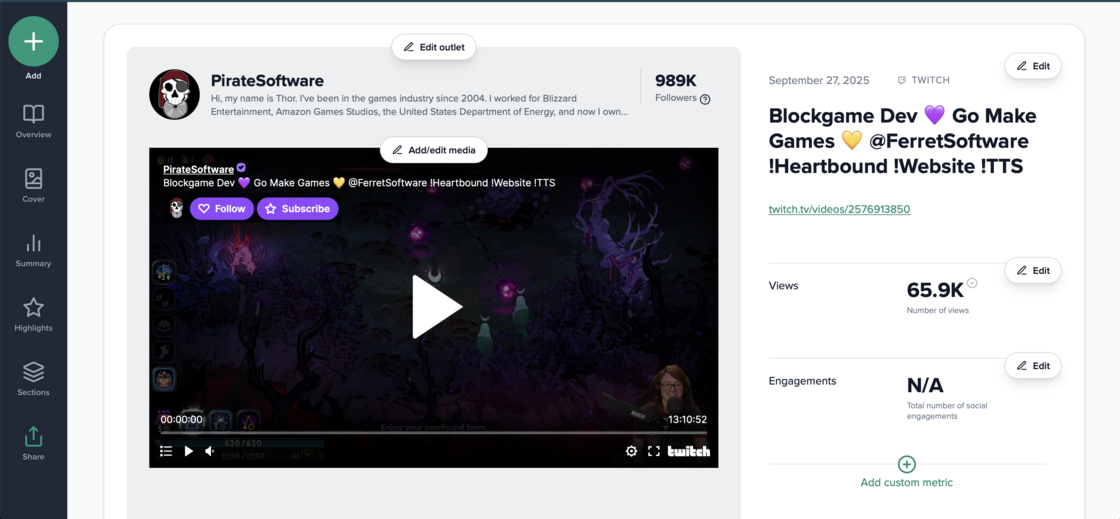
You can now watch Twitch clips directly in your reports 🎬


Improvement


We’ve upgraded how Twitch coverage appears in your reports. For clips and videos, instead of a static screenshot, videos are now embedded so readers can watch them directly from your report.

We have also been able to remove the cookie pop-ups that appear for clips, videos and channels, so your coverage is much clearer. As before, we’ll still collect profile data (name, logo and description) along with followers, clip views and engagements.

Twitch video after.png

Now supporting Spotify Episodes 🎶


Improvement


You’ve been able to add Spotify playlists to CoverageBook for a while now, complete with follower and engagement data. But we now also support Spotify episodes! CoverageBook will recognise when a clip is an episode and embed it right in your report, so readers can listen directly from your book. You can also add your own listener figures if you have the data.

Better support for age-restricted X posts


Improvement


If you’re working with a brand that regularly creates content marked as “adult”—for example, drinks brands or video games—you’ll be pleased to hear we’ve improved support for these posts on X (or Twitter, for those of us still stuck on the old name!).

While we still can’t embed the posts directly (you’ll need to upload your own images), we can now collect metrics both at profile level and for individual posts.

LinkedIn Post Data


New


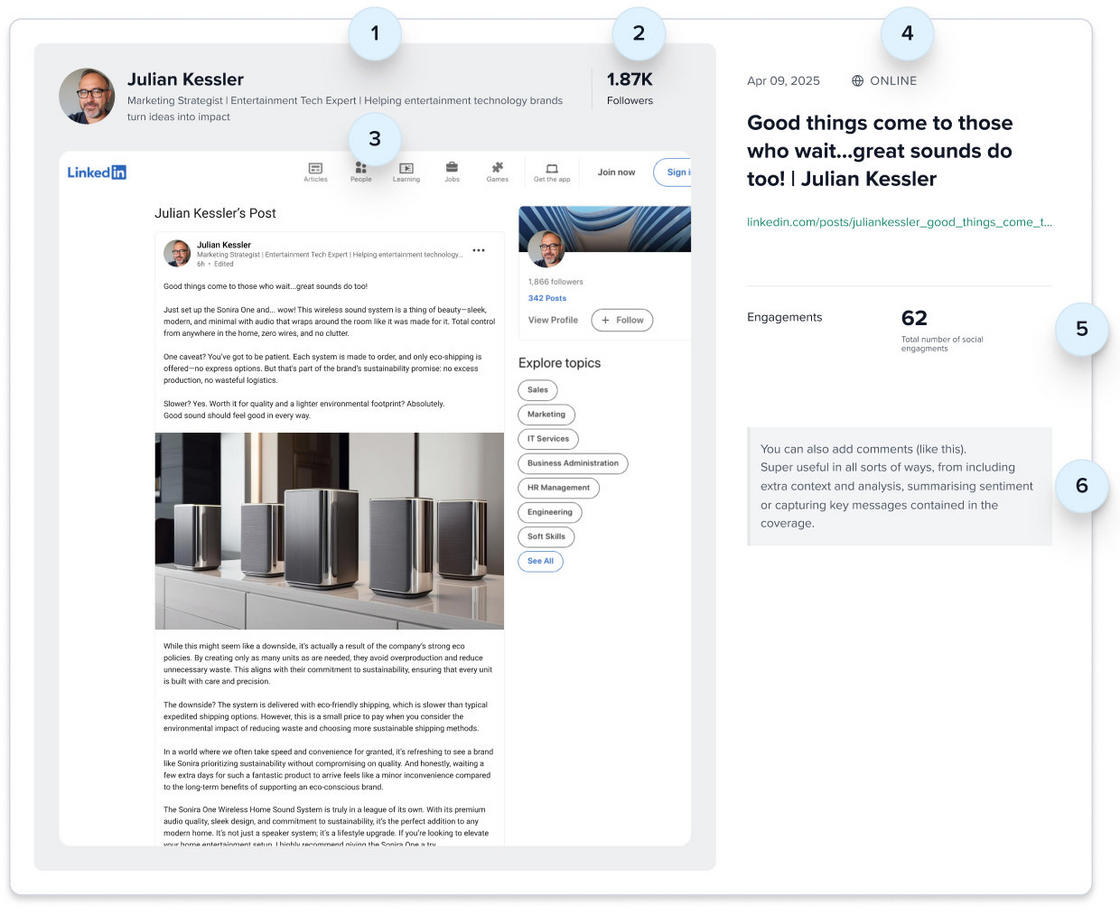
You can now showcase LinkedIn posts in your CoverageBook reports — with full data automatically pulled in.

Simply paste a LinkedIn post URL into your report and you’ll get:

  • Profile data: name, logo and a short description

  • Follower count

  • Screenshot of the post

  • Date posted and post title

  • Engagement metrics: number of comments and reactions

All of this rolls up neatly into your overall metrics summary, so LinkedIn activity can now be reported consistently alongside your press social coverage.

Here’s what it looks like in action 👇

image.png

More info in the FAQ here

Saved Branding for All Your Reports


New


You can now save branding preferences in your account settings to save time and keep every report consistent ✨

From your My Account → Branding tab, you can:

  • Add your organisation’s logo to appear in the banner of your report (if you want, you can also add a separate client logo on the report cover when making your book)
  • Choose your accent colour
  • Set a branded share link (so your brandname is added to every share URL for every report, clip or folder you share)
  • Update your workspace name

Once saved, these settings will apply automatically to every new report. You can still customise branding on individual reports or clients when needed.

Where possible, we'll even try and grab this automatically for you - just hit 'fetch my branding'

image.png

More info in the FAQ

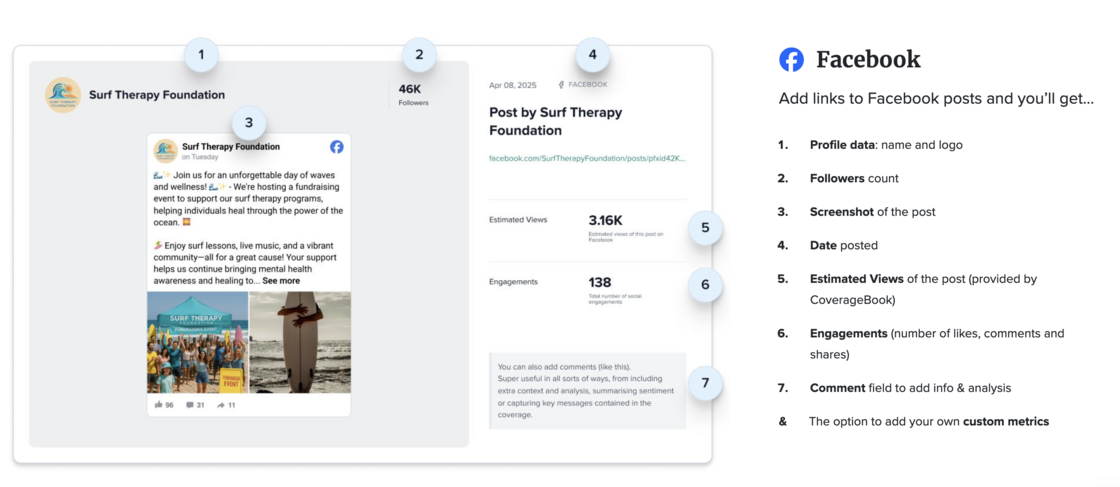
Facebook posts now have automated data when you add as coverage.


New


Excited that we once again have metrics and data for Facebook posts. When you add a post URL we'll collect profile data, follower counts, estimated views and engagements. Ready to be displayed and exported in your coverage reports. You can see all the social platforms we support as coverage here.

Screenshot 2025-08-20 at 17.29.37.png

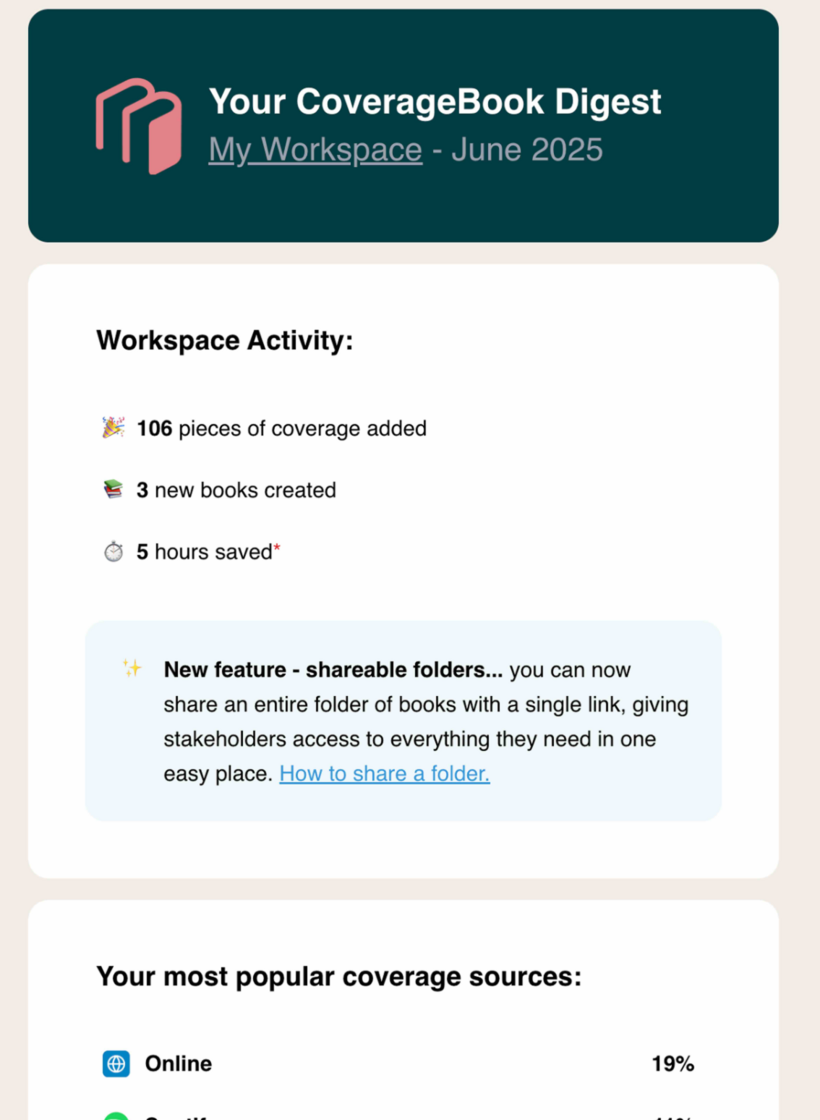
📬 Introducing Email Digests for Account Activity


New


We’ve introduced a brand new email digest designed to keep you in the loop with what’s happening in your account.

It gives you a quick overview of the key activity across your workspace — including how much coverage has been added recently, an estimate of the time you’ve saved and pulls out some of your best-performing pieces.

The digest also points you towards features you may not have tried yet — helping you get even more out of CoverageBook.

If you’re an account admin, you should have received your first digest email this week, so check your inbox!

digest 2.png

Share entire folders of coverage


New


You can now share a single live link to all the books inside a folder with your clients or stakeholders!

  • Any books you add or create in a shared folder will be instantly accessible.
  • Updates and edits to books inside the folder will refresh in real time, just like our single book live share links.
  • Your clients will always see the latest version—no need to resend links!
  • And if you need to, you can disable the link at a press of a button.

This makes it even easier to keep everyone in the loop with up-to-date reports 🥳

folders.jpg