

Description
Grid Gallery helps you showcase your images in a clean, organized grid layout. Unlike traditional lightbox galleries, this one presents images in a slider-style preview while keeping the familiar gallery appearance. It’s a fresh approach that works well for photographers, artists, and anyone who wants their images to stand out.
View Pro Demo: Grid Gallery Premium
More About Pro: Grid Gallery Premium Features
Where To buy: Buy Grid Gallery Premium
Why Choose Grid Gallery?
When visitors click on a thumbnail, the image opens smoothly within the gallery area – no popup windows or separate lightbox overlays. This keeps users engaged on your page while they browse through your photos.
The gallery adapts to any screen size using CSS3 hardware acceleration, so it looks crisp and performs smoothly on phones, tablets, and desktops alike.
What You Can Do
- Build unlimited galleries with as many images as you need
- Display galleries anywhere using simple shortcodes
- Add titles and descriptions to your images
- Choose from multiple hover animation effects
- Customize column layouts to match your design
- Adjust animation speed and transition styles
Perfect For
- Photography portfolios
- Art and design showcases
- Product catalogs
- Event photo collections
- Travel blogs
- Personal photo albums
Free Features
- Responsive grid layout
- 3 hover animation effects
- Shortcode support for pages and posts
- Image titles with show/hide option
- Navigation controls
- Mobile-friendly touch support
- Unlimited galleries
Pro Features
The premium version adds more customization options for professional use:
- 6 column layout options
- 25 animation easing effects
- 20 hover effects
- 5 navigation button positions
- 5 title and description positions
- Title on image preview
- Description on image preview
- Custom thumbnail border settings
- Custom image spacing controls
- Link images to external URLs
- Auto scroll functionality
- Load more button
- Custom CSS support
- Gallery ordering (ascending, descending, shuffle)
- Priority support
More Pro Demo Examples
Screenshots

Colorful grid gallery display 
Opened image preview 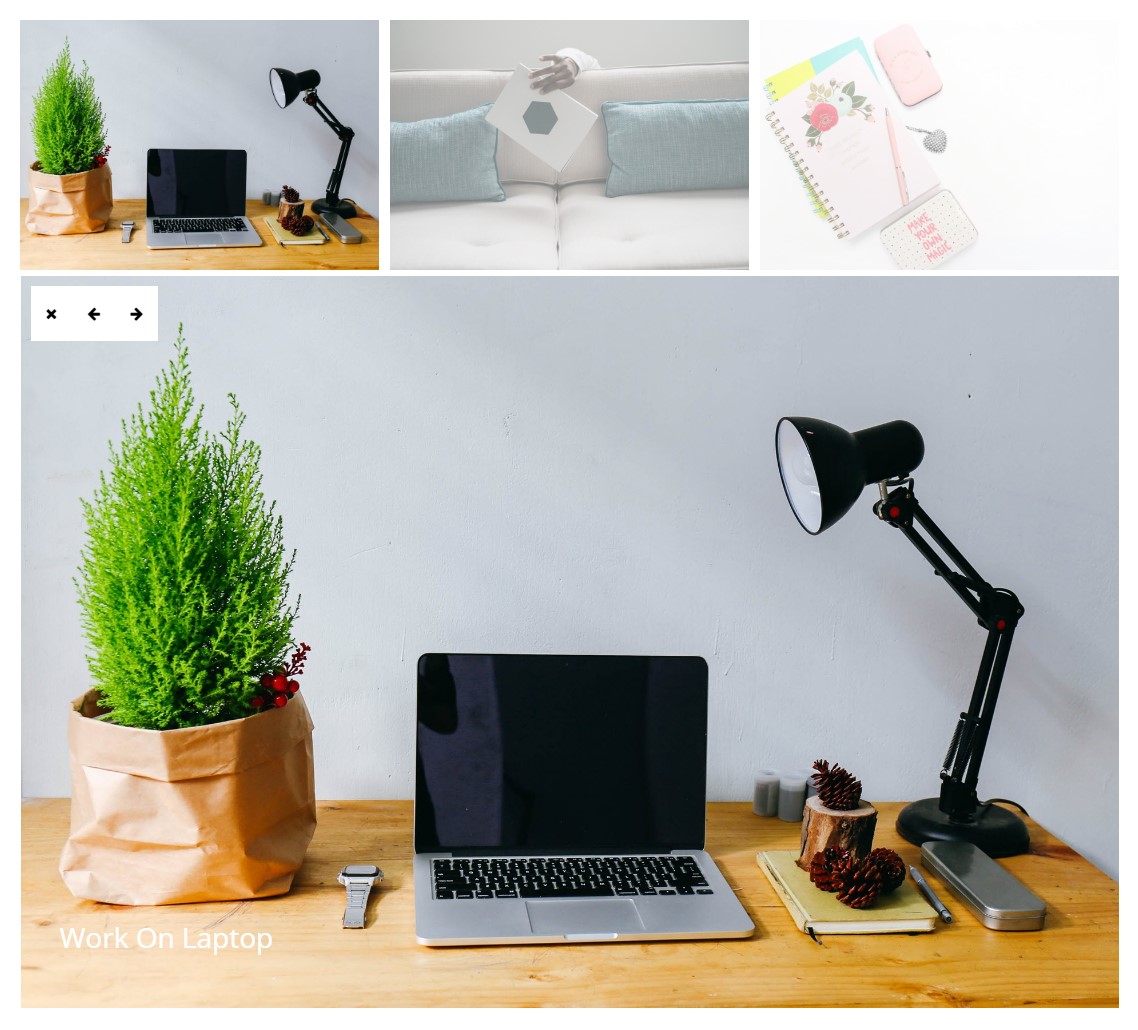
Gallery with multiple images 
Single image preview mode 
Grid styling with custom border 
Gallery without titles 
Hover effect on mouse over


Installation
- Upload the plugin files to
/wp-content/plugins/new-grid-gallery/directory, or install through the WordPress plugins screen. - Activate the plugin through the ‘Plugins’ screen in WordPress.
- Go to Grid Gallery menu in your admin panel.
- Click ‘Add New Gallery’ and upload your images.
- Configure your gallery settings.
- Copy the shortcode and paste it into any page or post.
FAQ
-
How do I create a new gallery?
-
Go to Grid Gallery in your WordPress admin, click “Add New Gallery,” upload your images, adjust the settings, and save. Copy the generated shortcode to any page or post.
-
Is Grid Gallery mobile responsive?
-
Yes. The gallery automatically adjusts to fit any screen size, from large desktop monitors to mobile phones. It uses CSS3 transitions for smooth performance.
-
Can I add captions to my images?
-
Yes. You can add titles and descriptions to each image. The free version lets you show or hide titles, while the pro version offers more positioning options.
-
How many galleries can I create?
-
There’s no limit. You can create as many galleries as you need, each with its own settings and shortcode.
-
Does Grid Gallery work with page builders?
-
Yes. Since galleries use shortcodes, they work with most page builders including Elementor, Beaver Builder, and the default WordPress block editor.
-
How do I customize hover effects?
-
In the gallery settings, you’ll find options for hover effects. The free version includes 3 effects, and the pro version offers 20 different hover styles.
-
Can I link images to external URLs?
-
This feature is available in the pro version. You can set custom links for each image to open external pages or files.
-
Does the gallery have a lightbox?
-
Grid Gallery uses a slider-style preview instead of a traditional lightbox. When you click an image, it opens within the gallery area with navigation controls to browse other images.
-
Can I change the number of columns?
-
The free version uses a standard grid layout. The pro version offers 6 different column layouts to choose from.
-
Where can I get support?
-
For questions or issues, visit our support forum or contact us directly.
Reviews


Contributors & Developers
“Grid Gallery for Images” is open source software. The following people have contributed to this plugin.
Contributors


Translate “Grid Gallery for Images” into your language.
Interested in development?
Browse the code, check out the SVN repository, or subscribe to the development log by RSS.
Changelog
1.5.4
- Tested with WordPress 6.9
1.5.3
- Tested with WordPress 6.8.3
1.5.2
- Fixed text domain error
- Tested with WordPress 6.8.2
1.5.1
- Bug fixes
- Tested with WordPress 6.8.1
1.5.0
- Bug fixes
- Tested with WordPress 6.7.2
