Description
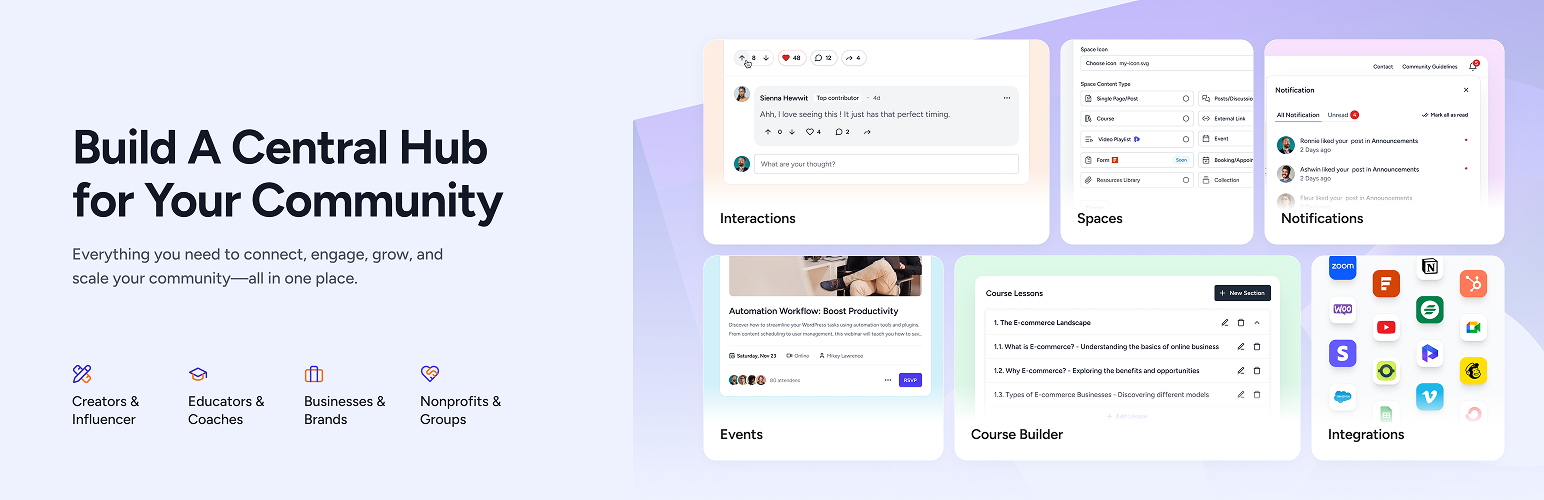
SureDash transforms your WordPress site into a vibrant community hub. Create a unified login and dashboard experience to boost user engagement—all within your WordPress environment.
Unlike standalone platforms like Circle, SureDash integrates seamlessly with your existing WordPress setup. Keep full control over your data and customize the experience to fit your brand.
Try the live demo of SureDash.
Key Benefits
- Seamless Integration: Enhance your WordPress site with community features.
- Customizable Design: Tailor the dashboard and features to match your brand’s look and feel.
- Scalable Solution: Add new spaces as needed.
Free Features
- Custom login and registration forms
- Visual customizer for dashboard layout
- User profiles
- Activity feeds for updates and engagement
- Discussion forums with threaded replies (only site admin can post, but all members can comment)
- Multiple discussions for focused sub-communities
- Giphy integration for animated GIFs
SureDash Premium
- Learning management system course builder
- Enable users to post in discussion feeds
- Private discussion feeds
- Resource library
- Events
- Support from our team
Perfect For
- Membership sites
- Online courses
- Customer support hubs
- Niche communities
Links
- Visit SureDash
- Get Support
- Try Test Drive
Blocks
This plugin provides 11 blocks.
- Portal: Color Switcher Switch between light and dark color palettes.
- Portal: Home Display entire community portal.
- Portal: Dynamic Icons Display customizable dynamic icons for portal navigation.
- Portal: Profile Display portal profile.
- Portal: Content Display portal content.
- Portal: Notification Display portal notification.
- Portal: Search Display portal search.
- Portal: Navigation Display aside portal navigation.
- Portal: Space Title Display portal title.
- Portal: Identity Display portal identity.
- Portal: Dynamic Icon Display an icon linking to a social profile or site.
Installation
- Upload the plugin files to the
/wp-content/plugins/suredashdirectory, or install the plugin through the WordPress plugins screen directly. - Activate the plugin through the ‘Plugins’ screen in WordPress.
- Navigate to SureDash > Settings to configure your dashboard.
FAQ
-
How can I report a security bug?
-
We take plugin security extremely seriously. If you discover a security vulnerability, please report it in a safe and responsible manner.
You can report the issue through our Bug Bounty Program.
Reviews


Contributors & Developers
“SureDash” is open source software. The following people have contributed to this plugin.
Contributors
“SureDash” has been translated into 1 locale. Thank you to the translators for their contributions.
Translate “SureDash” into your language.
Interested in development?
Browse the code, check out the SVN repository, or subscribe to the development log by RSS.
Changelog
1.5.3 – 1st December 2025
- Fix: Added compatibility for WordPress 6.9.
- Fix: Updated Portal ‘Remember Me’ to store cookies for 14 days instead of session-only.
- Fix: Fixed issue where email notification status was not updating.
- Fix: Resolved missing first/last name in Portal Google registration and login flow clearing user names.
- Fix: Fixed Quick View modal content height issue in Zen Browser.
- Fix: Improved Breakdance compatibility for the Space Editor.
1.5.2 – 24th November 2025
- New: Added “Preserve HTML in Excerpts” option in Community Settings to maintain formatting (bold, italic, links, line breaks) in post excerpts. Enabled by default for new installations. ( https://suredash.com/docs/preserve-html-formatting-in-excerpts/ )
- Improvement: Post likes available with tooltip support in Quick View post modal.
- Fix: Post author badges displaying twice in the Quick View post modal.
- Fix: SureMembers Compatibility – The protected media URL from SureMembers was redirecting to a discussion space in some edge cases.
1.5.1 – 19th November 2025
- Fix: Quick View post modal was not working for SureDash User role users.
- Fix: Duplicated More options menu visible on single post view.
- Fix: Reverted back “Preserve HTML in Excerpts” option due to compatibility issues, until next update.
1.5.0 – 19th November 2025
- New: Introducing Notifications for portal users for various purposes. ( https://suredash.com/docs/notifications-system-in-suredash/ )
- New: Introduced the Badges system for community gamification.
- New: Administrator users can also be listed from Users > User Roles filter, for assigning badges to admin portal managers.
- New: Introducing emoji support for space icons to enhance visual communication and express emotions more effectively.
- New: Introducing “Reset” ability for Light-Dark color palettes to get back to the default configuration.
- New: Added “Preserve HTML in Excerpts” option in Community Settings to maintain formatting (bold, italic, links, line breaks) in post excerpts. Enabled by default for new installations. ( https://suredash.com/docs/preserve-html-formatting-in-excerpts/ )
- New: Introduced “Website” & “Headline” fields under user profile settings.
- New: Introducing Social links for the user profile to showcase on the user view page. ( https://suredash.com/docs/add-social-links-to-your-profile/ )
- New: Introduced a “Thumbnail Image” option for link space for showcasing on the home page view.
- Improvement: Improved the design UI for like-comment-share trigger buttons under spaces and posts for better responsive handling and user interaction.
- Fix: Private community now redirects users back to the originally requested portal space URL after login.
- Fix: Log out from the portal now redirects to the portal login page instead of the main site URL.
- Fix: Flushing rewrite rule after post type registration, causing 404 for portal posts.
- Tweak: The Comment box with a big-sized image now has a scroll to reach the end.
- Tweak: The Quick View post modal no longer has a fixed height.
- Tweak: Allowed all space types to be selected in SureCart integration.
- Tweak: Previously, a large-sized image upload in the comment box was causing a scrolling UI glitch.
- Tweak: When navigating from a space edit screen back to the spaces list, the view now automatically scrolls to the recently edited space instead of staying at the top.
- Tweak: All portal templates adjusted for better mobile responsiveness. ( https://suredash.com/docs/suredash-portal-template-patterns/ )
1.4.3 – 04th November 2025
- New: Introducing integration with OttoKit to manage your portal with automation. ( https://suredash.com/docs/integrate-ottokit-with-suredash/ )
- Improvement: Introducing some helpful developer hooks to extend SureDash functionality by custom or third-party app owners. ( https://suredash.com/docs/ottokit-hooks-reference/#suredash-core-hooks )
- Improvement: Introduced ‘suredash_customize_portal_link’ filter to allow customization of the portal link.
- Improvement: SureForms compatibility has improved.
- Fix: The Thumbnail Image option for the space setting was not synced properly with the post featured image option.
1.4.2 – 15th October 2025
- Fix: Fatal error when for settings page if Bypass WordPress Interactions option is disabled.
- Fix: Login-Register page misaligned with Kadence theme after 1.4.0 update.
1.4.1 – 14th October 2025
- Fix: Authors unable to edit posts if “Allow Members to Post” option disabled from Discussions space.
1.4.0 – 14th October 2025
- New: The “Enable Like & Share” option has been separated into two individual settings: “Enable Like Button” and “Enable Share Button”.
- New: Introduced 2-column layout patterns for Login and Registration form blocks.
- New: SureCart Integration – You can now select a space in SureDash settings to link with SureCart’s Customer Area page. Customers will be automatically redirected to this selected space after their purchase.
- New: Portal Identity Block – Added dark mode logo support with separate logo upload options for light and dark themes.
- New: Blank avatar gets replaced with the user’s initials for users without avatars, for a more personalized experience.
- New: Introducing “Edit” functionality for posts, allowing authors to edit the post.
- New: Introducing “Delete” functionality for posts, allowing authors to delete their own post.
- New: Administrator users can also be listed from the Users > User Roles filter, for better filtering.
- Improvement: Hardened the security of the plugin.
- Improvement: Added support for the profile block under the responsive navigation flyout, if it’s being used on the desktop portal-sidebar version.
- Improvement: Improvised the SureDash post editing flow from the space editor to make it more user-friendly.
- Improvement: Private community space links now redirect users back to the originally requested space URL once they log in.
- Fix: Resolved blank screen issue on Portal login & registration pages caused by a conflict with Breakdance.
- Fix: Spectra block editor icons conflict with SureDash, and block-level icons are not visible in the editor.
- Fix: Fixed incorrect post count in admin users list after post type change to ‘community-post’.
- Fix: Logging out from the portal now redirects to the portal-login page instead of the main site URL.
- Tweak: Link space single view now automatically redirects to the assigned custom URL.
- Tweak: Lesson name gets encoded from SureDash Pro.
- Tweak: Corrected singular-plural like(s) message text for instant likes on a community post.
- Tweak: Added “Premium” badge for “Allow Members to Post” setting from the free version for clear visibility.
1.3.2 – 16th September 2025
- New: Login Block – Added a centralized Form Texts section in the block for easier customization of all text options, including new texts for lost password and reset forms.
- New: Added Breakdance page builder compatibility for SureDash Spaces.
- New: Introduced an option to remove the uploaded profile photo.
- Improvement: Portal managers’ validation now only allows users with administrator or editor roles.
- Improvement: Refined the space creation modal for better user experience.
- Improvement: Commenting options dropdown UI updated for better user experience.
- Improvement: Displaying all user comments in the user detail view. Previously, only a limited number of comments were shown.
- Improvement: Introduced ‘suredash_community_post_slug’ and ‘suredash_community_content_slug’ filters fo updating URL slug for SureDash Posts and Community Content respectively.
- Fix: When a SureDash user role user tags someone, the mentioned user’s name is not getting highlighted.
- Fix: Fixed Breakdance conflicts with SureDash portal routes.
- Fix: Browser tab title now shows correct page names for Profile and Bookmarks pages instead of “Portal Space – SureDash”.
- Fix: Portal Identity Block – When elements’ visibility set to both as “Title + Logo”, then the title is not visible on the frontend.
- Tweak: Mentioned user tag highlight color was not linked to the global color palette.
