

.jpg.c0bd30d363824fcf57bfd42f2b986382.jpg)
samibb
-
Posts
90 -
Joined
-
Last visited
Content Type
Forums
Downloads
Forum Articles
Events
Everything posted by samibb
-
Really thank you🤩
-
Yes "C:\Program Files\Google\Chrome\Application\chrome.exe" --remote-debugging-port=9222
-
Dear @Danp2 i am facing this error and i could not get connect to exist session. Func SetupChrome() ConsoleWrite('@@ (1881) :(' & @MIN & ':' & @SEC & ') SetupChrome()' & @CR) ;### Trace Function ;Local $IPORT = _WD_GETFREEPORT(9515,5600) ProcessClose("chromedriver.exe") _WD_Shutdown() If Number(StringLeft(_WD_GetBrowserVersion('CHROME'),3)) < 126 Then _WD_Option('Driver', 'chromedriver.exe') Local $IPORT = _WD_GETFREEPORT(9515,5600) ;MsgBox(0,$IPORT,Number(StringLeft(_WD_GetBrowserVersion('CHROME'),3)) ) _WD_Option('Port',$IPORT); _WD_Option('DriverParams', '--verbose --log-path="' & @ScriptDir & '\chrome.log"') $sDesiredCapabilities = '{"capabilities": {"alwaysMatch": {"goog:chromeOptions": {"debuggerAddress": "localhost:9222"}}}}' EndIf If Number(StringLeft(_WD_GetBrowserVersion('CHROME'),3)) > 125 Then _WD_Option('Driver', 'chromedriver.exe') Local $iPort = _WD_GetFreePort(5000, 5600) ; ;MsgBox(0,$iPort,Number(StringLeft(_WD_GetBrowserVersion('CHROME'),3))) _WD_Option('Port', $iPort) _WD_Option('DriverParams', '--port=' & $iPort & ' --verbose --log-path="' & "C:\Users\HP\Desktop\AutoIt" & '\chrome.log') ;_WD_Option('DriverParams', '--verbose --log-path="' & @ScriptDir & '\chrome.log"') $sDesiredCapabilities = '{"capabilities": {"alwaysMatch": {"goog:chromeOptions": {"debuggerAddress": "localhost:9222"}}}}' ;MsgBox(0,'',$sDesiredCapabilities) EndIf _WD_Startup() $sSession = _WD_CreateSession($sDesiredCapabilities) EndFunc ********************************************************************************************************************************************** >"C:\Program Files (x86)\AutoIt3\SciTE\..\AutoIt3.exe" "C:\Program Files (x86)\AutoIt3\SciTE\AutoIt3Wrapper\AutoIt3Wrapper.au3" /run /prod /ErrorStdOut /in "C:\Users\11003813\Desktop\AutoIT\test99.au3" /UserParams +>09:46:38 Starting AutoIt3Wrapper (21.316.1639.1) from:SciTE.exe (4.4.6.0) Keyboard:00000409 OS:WIN_10/2009 CPU:X64 OS:X64 Environment(Language:0409) CodePage:0 utf8.auto.check:4 +> SciTEDir => C:\Program Files (x86)\AutoIt3\SciTE UserDir => C:\Users\11003813\AppData\Local\AutoIt v3\SciTE\AutoIt3Wrapper SCITE_USERHOME => C:\Users\11003813\AppData\Local\AutoIt v3\SciTE >Running AU3Check (3.3.16.1) from:C:\Program Files (x86)\AutoIt3 input:C:\Users\11003813\Desktop\AutoIT\test99.au3 +>09:46:39 AU3Check ended.rc:0 >Running:(3.3.16.1):C:\Program Files (x86)\AutoIt3\autoit3_x64.exe "C:\Users\11003813\Desktop\AutoIT\test99.au3" +>Setting Hotkeys...--> Press Ctrl+Alt+Break to Restart or Ctrl+BREAK to Stop. @@ (1881) :(46:39) SetupChrome() _WD_GetBrowserPath ==> Success [0 / 0] : Parameters: Browser=CHROME _WD_GetBrowserVersion ==> Success [0 / 0] : Parameters: Browser=CHROME _WD_GetBrowserPath ==> Success [0 / 0] : Parameters: Browser=CHROME _WD_GetBrowserVersion ==> Success [0 / 0] : Parameters: Browser=CHROME _WD_Option ==> Success [0] : Parameters: Option=Driver Value=chromedriver.exe _WD_GetFreePort ==> Success [0 / 5000] : Parameters: MinPort=5000 MaxPort=5600 _WD_Option ==> Success [0] : Parameters: Option=Port Value=5000 _WD_Option ==> Success [0] : Parameters: Option=DriverParams Value=--port=5000 --verbose --log-path="C:\Users\HP\Desktop\AutoIt\chrome.log _WD_GetFreePort ==> Success [0 / 5000] : Parameters: MinPort=5000 MaxPort=Default _WD_IsLatestRelease ==> General Error [1] _WD_Startup: OS: WIN_10 X64 19045 _WD_Startup: AutoIt: 3.3.16.1 _WD_Startup: Webdriver UDF: 1.4.0 (Update status unknown [1]) _WD_Startup: WinHTTP: 1.6.4.2 _WD_Startup: Driver: chromedriver.exe (64 Bit) _WD_Startup: Params: --port=5000 --verbose --log-path="C:\Users\HP\Desktop\AutoIt\chrome.log _WD_Startup: Port: 5000 _WD_Startup: Command: "chromedriver.exe" --port=5000 --verbose --log-path="C:\Users\HP\Desktop\AutoIt\chrome.log _WD_Startup ==> General Error [1] : Error launching WebDriver! __WD_Post ==> Send / Recv error [6] : HTTP status = 0 _WD_CreateSession ==> Webdriver Exception [10] +>09:46:44 AutoIt3.exe ended.rc:0 +>09:46:44 AutoIt3Wrapper Finished. >Exit code: 0 Time: 6.198 test99.au3
-
.thumb.jpg.f5440e8a74cb3f3b87d3b23d0412f30e.jpg) when i make compile and make executable file the MS Defenders delete it immediately. How to stop or avoid this action. Thanks
when i make compile and make executable file the MS Defenders delete it immediately. How to stop or avoid this action. Thanks -
Dear @DANP2 THANK YOU VERY MUTCH IT WORKS KNOW. I WANT TO SHARE MY SETUP CHROME CODE FOR ALL . Func SetupChrome() If Number(StringLeft(_WD_GetBrowserVersion('CHROME'),3)) < 126 Then _WD_Option('Driver', 'chromedriver.exe') Local $IPORT = _WD_GETFREEPORT(9515,5600) _WD_Option('Port',$IPORT) _WD_Option('DriverParams', '--verbose --log-path="' & @ScriptDir & '\chrome.log"') $sDesiredCapabilities = '{"capabilities": {"alwaysMatch": {"goog:chromeOptions": {"debuggerAddress": "localhost:9222"}}}}' EndIf If Number(StringLeft(_WD_GetBrowserVersion('CHROME'),3)) > 125 Then _WD_Option('Driver', 'chromedriver.exe') Local $iPort = _WD_GetFreePort(9515, 5600) _WD_Option('Port', $iPort) _WD_Option('DriverParams', '--port=' & $iPort & ' --verbose --log-path="' & "C:\Users\HP\Desktop\AutoIt" & '\chrome.log') $sDesiredCapabilities = '{"capabilities": {"alwaysMatch": {"goog:chromeOptions": {"debuggerAddress": "localhost:9222"}}}}' ;MsgBox(0,'',$sDesiredCapabilities) EndIf EndFunc
-
i have an older UDF, but it works with version chrome 124 32&64 bit. when i insert this line _WD_CapabilitiesAdd("debuggerAddress","localhost:9222") I've empty session ID. this is my previous code: Func SetupChrome() _WD_Option('Driver', 'chromedriver.exe') _WD_Option('Port', 9515) _WD_Option('DriverParams', '--verbose --log-path="' & @ScriptDir & '\chrome.log"') $sDesiredCapabilities = '{"capabilities": {"alwaysMatch": {"goog:chromeOptions": {"debuggerAddress": "localhost:9222"}}}}' ;MsgBox(0,'',$sDesiredCapabilities) EndFunc the probleme is with not with chrome 130 . nwd_helper.au3 Copyright (c) 2023 Dan Pollak (@Danp2) wd_capabilities.au3 v3.3.14.5 wd_code.au3 Copyright (c) 2023 Dan Pollak (@Danp2) wd_cdp.au3 Copyright (c) 2023 Dan Pollak WinHttpConstants.au3 Copyright 2013 Dragana R. <trancexx at yahoo dot com> Licensed under the Apache License, Version 2.0 (the "License"); WinHttp.au3: File Version.........: 1.6.4.2 ; Min. AutoIt Version..: v3.3.7.20 ; Description .........: AutoIt wrapper for WinHTTP functions ; Author... ...........: trancexx, ProgAndy ; Dll .................: winhttp.dll, kernel32.dll Json.au3 (2021.11.20)
-
WebDriver UDF (W3C compliant version) - 2025/09/01
samibb replied to Danp2's topic in AutoIt Example Scripts
Thanks for you both -
@Danp2 good day i am using #Region wd_capabilities.au3 - UDF Header ; #INDEX# ======================================================================== ; Title .........: wd_capabilities.au3 ; AutoIt Version : v3.3.14.5 ; Language ......: English ; Description ...: A collection of functions used to dynamically build the Capabilities string (JSON formatted) required to create a WebDriver session ; Author ........: mLipok ; Modified ......: Danp2 ; URL ...........: https://www.autoitscript.com/wiki/WebDriver_Capabilities ; Date ..........: 2022/07/27 ; ================================================================================
-
WebDriver UDF (W3C compliant version) - 2025/09/01
samibb replied to Danp2's topic in AutoIt Example Scripts
Dear @Danp2 Relay i don not know how to open separate thread, and i do not want make any mistake . so please i need your help. i have solve a part of the case I've got the session id , but i could not connect to web page. I've update WinHTTP. the problem is could not add: _WD_CapabilitiesAdd("debuggerAddress","localhost:9222"). Thanks Func SetupChrome($bHeadless = False, $bUseLocalhostDebugging = False) ; Set up the ChromeDriver and options _WD_Option('Driver', 'chromedriver.exe') ; Get a free port between 5555 and 5600 Local $iPort = _WD_GetFreePort(5555, 5600) ; Handle errors If @error Then Return SetError(@error, @extended, 0) ; Set ChromeDriver port and parameters _WD_Option('Port', $iPort) _WD_Option('DriverParams', '--port=' & $iPort & ' --verbose --log-path="' & "C:\Users\HP\Desktop\AutoIt" & '\chrome.log') ; Initialize WebDriver capabilities _WD_CapabilitiesStartup() ;" --remote-debugging-port=9222 ; Regular Chrome startup _WD_CapabilitiesAdd('alwaysMatch', 'chrome') _WD_CapabilitiesAdd('w3c', True) ; Enable W3C protocol _WD_CapabilitiesAdd('args', '--headless') ;**************************************************************************** ;_WD_CapabilitiesAdd("debuggerAddress","localhost:9222") ??????????? not wogrkin ;***************************************************************************** ; Print out the capabilities to the console (for debugging) _WD_CapabilitiesDump(@ScriptLineNumber) ; Get the capabilities as a JSON string to pass to WebDriver $sCapabilities = _WD_CapabilitiesGet() ; Return the capabilities to use for the WebDriver session Return $sCapabilities EndFunc ;==>SetupChrome ;************************************************************************************************** _WD_Option ==> Success [0] : Parameters: Option=Driver Value=chromedriver.exe _WD_GetFreePort ==> Success [0 / 5555] : Parameters: MinPort=5555 MaxPort=5600 _WD_Option ==> Success [0] : Parameters: Option=Port Value=5555 _WD_Option ==> Success [0] : Parameters: Option=DriverParams Value=--port=5555 --verbose --log-path="C:\Users\HP\Desktop\AutoIt\chrome.log _WD_CapabilitiesAdd ==> Browser or feature not supported [21] : Not supported KEY parameter ( must be defined in $_WD_KEYS__*** ). $key = goog:chromeOptions $value1 = debuggerAddress $value2 = _WD_CapabilitiesAdd ==> Success [0] : Successfully used [alwaysMatch] with specified browser: chrome _WD_CapabilitiesDump: JSON structure starts below: 363 { "capabilities":{} } _WD_CapabilitiesDump: JSON structure ends above. _WD_GetFreePort ==> Success [0 / 5555] : Parameters: MinPort=5555 MaxPort=Default _WD_IsLatestRelease ==> Success [0] : True _WD_Startup: OS: WIN_11 X64 22631 _WD_Startup: AutoIt: 3.3.16.1 _WD_Startup: Webdriver UDF: 1.4.0 (Up to date) _WD_Startup: WinHTTP: 1.6.4.2 _WD_Startup: Driver: chromedriver.exe (64 Bit) _WD_Startup: Params: --port=5555 --verbose --log-path="C:\Users\HP\Desktop\AutoIt\chrome.log _WD_Startup: Port: 5555 _WD_Startup: Command: "chromedriver.exe" --port=5555 --verbose --log-path="C:\Users\HP\Desktop\AutoIt\chrome.log _WD_Startup ==> Success [0] __WD_Post ==> Success [0] : HTTP status = 200 _WD_CreateSession ==> Success [0] : 197bbede6f948a50f6856eac905bdb1f __WD_Get ==> Success [0] : HTTP status = 200 _WD_Action ==> Success [0] : Parameters: Command=url Option=Default __WD_Get ==> Success [0] : HTTP status = 200 _WD_Window ==> Success [0] : Parameters: Command=handles Option=Default __WD_Get ==> Success [0] : HTTP status = 200 _WD_Window ==> Success [0] : Parameters: Command=window Option=Default __WD_Post ==> Success [0] : HTTP status = 200 _WD_Window ==> Success [0] : Parameters: Command=Switch Option={"handle":"5EDB7BC890065422E77FEC49DA5E6217"} __WD_Get ==> Success [0] : HTTP status = 200 _WD_Action ==> Success [0] : Parameters: Command=title Option=Default __WD_Post ==> Success [0] : HTTP status = 200 _WD_Window ==> Success [0] : Parameters: Command=Switch Option={"handle":"5EDB7BC890065422E77FEC49DA5E6217"} _WD_Attach ==> No match [8] : Parameters: Search=Alt顠Reservation Desktop Mode=Default __WD_Get ==> Success [0] : HTTP status = 200 _WD_Window ==> Success [0] : Parameters: Command=HANDLES Option=Default __WD_Get ==> Success [0] : HTTP status = 200 _WD_Window ==> Success [0] : Parameters: Command=handles Option=Default __WD_Get ==> Success [0] : HTTP status = 200 _WD_Window ==> Success [0] : Parameters: Command=window Option=Default __WD_Post ==> Success [0] : HTTP status = 200 _WD_Window ==> Success [0] : Parameters: Command=Switch Option={"handle":"5EDB7BC890065422E77FEC49DA5E6217"} __WD_Get ==> Success [0] : HTTP status = 200 _WD_Action ==> Success [0] : Parameters: Command=title Option=Default __WD_Post ==> Success [0] : HTTP status = 200 _WD_Window ==> Success [0] : Parameters: Command=Switch Option={"handle":"5EDB7BC890065422E77FEC49DA5E6217"} _WD_Attach ==> No match [8] : Parameters: Search=Alt顠Reservation Desktop Mode=Default __WD_Get ==> Success [0] : HTTP status = 200 _WD_Window ==> Success [0] : Parameters: Command=HANDLES Option=Default __WD_Post ==> Success [0] : HTTP status = 200 _WD_Window ==> Success [0] : Parameters: Command=MAXIMIZE Option=Alt顠Reservation Desktop __WD_Post ==> No match [8] : HTTP status = 404 _WD_FindElement ==> No match [8] : Parameters: Strategy=xpath Selector=/html/body/div[1]/div[5]/div/div/div/div[3]/div[3]/div/div[2]/div/div[3]/div/div[4]/div[2]/div/div/span/span/div/div[1]/div/div[2]/div/div/div[2]/span[2]/div/textarea StartNodeID=Default Multiple=Default ShadowRoot=Default __WD_Post ==> No match [8] : HTTP status = 404 -
WebDriver UDF (W3C compliant version) - 2025/09/01
samibb replied to Danp2's topic in AutoIt Example Scripts
i did: i have run with and with out --remote-debugging-port=9222 in google chrome icon what i missed ? Func SetupChrome($bHeadless = True, $bUseLocalhostDebugging = False) ; Set up the ChromeDriver and options ;--remote-debugging-port=9222 _WD_Option('Driver', 'chromedriver.exe') ; Get a free port between 5555 and 5600 Local $iPort = _WD_GetFreePort(5555, 5600) _WD_Option('Port', $iPort) ; Handle errors If @error Then Return SetError(@error, @extended, 0) ; Set ChromeDriver port and parameters _WD_Option('DriverParams', '--port=' & $iPort & ' --verbose --log-path="' & @ScriptDir & '\chrome.log"') ; Initialize WebDriver capabilities _WD_CapabilitiesStartup() ; Chrome-specific capabilities ; If $bUseLocalhostDebugging Then ; Attach to existing Chrome instance using debuggerAddress (localhost:9222 or another free port) ; _WD_CapabilitiesAdd('goog:chromeOptions', '{"debuggerAddress": "localhost:' & $iPort & '"}') ; Else ; Regular Chrome startup ; Regular Chrome startup _WD_CapabilitiesAdd('alwaysMatch', 'chrome') ;_WD_CapabilitiesAdd('w3c', True) ; Enable W3C protocol _WD_CapabilitiesAdd('excludeSwitches', 'enable-automation') ; Remove automation flag _WD_CapabilitiesAdd('args', '--headless') _WD_CapabilitiesAdd('debuggerAddress', 'localhost:'&$iPort) ;If $bHeadless Then _WD_CapabilitiesAdd('args', '--headless') ; Add headless argument if needed ; If $bHeadless Then ; _WD_CapabilitiesAdd('goog:chromeOptions.args', '--headless') ; EndIf ; EndIf ; Print out the capabilities to the console (for debugging) _WD_CapabilitiesDump(@ScriptLineNumber) ; Get the capabilities as a JSON string to pass to WebDriver $sCapabilities = _WD_CapabilitiesGet() ;MsgBox(0,555,$sCapabilities) ; Return the capabilities to use for the WebDriver session Return $sCapabilities EndFunc ;==>SetupChrome ;*********************************************************************** WD_CapabilitiesDump: JSON structure ends above. _WD_GetFreePort ==> Success [0 / 5555] : Parameters: MinPort=5555 MaxPort=Default _WD_IsLatestRelease ==> Success [0] : True _WD_Startup: OS: WIN_11 X64 22631 _WD_Startup: AutoIt: 3.3.16.1 _WD_Startup: Webdriver UDF: 1.4.0 (Up to date) _WD_Startup: WinHTTP: 1.6.4.1 (Download latest source at <https://raw.githubusercontent.com/dragana-r/autoit-winhttp/master/WinHttp.au3>) _WD_Startup: Driver: chromedriver.exe (64 Bit) _WD_Startup: Params: --port=5555 --verbose --log-path="C:\Users\HP\Desktop\AutoIt\chrome.log" _WD_Startup: Port: 5555 _WD_Startup: Command: "chromedriver.exe" --port=5555 --verbose --log-path="C:\Users\HP\Desktop\AutoIt\chrome.log" _WD_Startup ==> Success [0] $atrtUp PID: 2332 __WD_Post ==> Invalid argument [5] : HTTP status = 400 _WD_CreateSession ==> Webdriver Exception [10] $sSession : -
WebDriver UDF (W3C compliant version) - 2025/09/01
samibb replied to Danp2's topic in AutoIt Example Scripts
I did not know that . sorry -
WebDriver UDF (W3C compliant version) - 2025/09/01
samibb replied to Danp2's topic in AutoIt Example Scripts
#include <ButtonConstants.au3> #include <DateTimeConstants.au3> #include <EditConstants.au3> #include <GUIConstantsEx.au3> #include <StaticConstants.au3> #include <WindowsConstants.au3> #include <winAPIFiles.au3> #include <WinAPIvkeysConstants.au3> #include <MsgBoxConstants.au3> #include <Date.au3> #include <IE.au3> #include <Array.au3> #include <GuiListView.au3> #include <ListViewConstants.au3> #include <TabConstants.au3> #include <Clipboard.au3> #include <Excel.au3> #include <File.au3> #include <ColorConstants.au3> #include <AutoItConstants.au3> #include <WinAPIEx.au3> #include <Constants.au3> #include <SendMessage.au3> #include <WinAPI.au3> #include "wd_helper.au3" #include "wd_capabilities.au3" Func Start_Chrome() ProcessClose("chromedriver.exe") _WD_Shutdown() ;$_WD_DEBUG = $_WD_DEBUG_None SetupChrome() MsgBox(0,'sCapabilities',$sCapabilities) Local $SatrtUp = _WD_Startup() ; OK ConsoleWrite('$atrtUp PID: ' & $atrtUp &@CRLF) MsgBox(0,'$atrtUp PID: ',$SatrtUp ) ;ConsoleWrite('$sCapabilities : ' & $sCapabilities &@CRLF) ;connectWeb_Chrome() ;Global $attach = _WD_Attach($hWnd,"Altéa Reservation Desktop",Default) ;MsgBox(1,'$attach' ,$sCapabilities) $sSession = _WD_CreateSession($sCapabilities) ConsoleWrite('$sSession : '& $sSession &@CRLF) MsgBox(0,'$sSession',$sSession) EndFunc ;************************************************************************ Func SetupChrome($bHeadless = False, $bUseLocalhostDebugging = True) ; Set up the ChromeDriver and options _WD_Option('Driver', 'chromedriver.exe') ; Get a free port between 5555 and 5600 Local $iPort = _WD_GetFreePort(5555, 5600) ; Handle errors If @error Then Return SetError(@error, @extended, 0) ; Set ChromeDriver port and parameters _WD_Option('DriverParams', '--port=' & $iPort & ' --verbose --log-path="' & @ScriptDir & '\chrome.log"') ; Initialize WebDriver capabilities _WD_CapabilitiesStartup() ; Chrome-specific capabilities ; If $bUseLocalhostDebugging Then ; Attach to existing Chrome instance using debuggerAddress (localhost:9222 or another free port) ; _WD_CapabilitiesAdd('goog:chromeOptions', '{"debuggerAddress": "localhost:' & $iPort & '"}') ; Else ; Regular Chrome startup ; Regular Chrome startup _WD_CapabilitiesAdd('alwaysMatch', 'chrome') _WD_CapabilitiesAdd('w3c', True) ; Enable W3C protocol ;_WD_CapabilitiesAdd('excludeSwitches', 'enable-automation') ; Remove automation flag _WD_CapabilitiesAdd('debuggerAddress', 'localhost:'&$iPort) ; Add headless argument if needed ; If $bHeadless Then ; _WD_CapabilitiesAdd('goog:chromeOptions.args', '--headless') ; EndIf ; EndIf ; Print out the capabilities to the console (for debugging) _WD_CapabilitiesDump(@ScriptLineNumber) ; Get the capabilities as a JSON string to pass to WebDriver $sCapabilities = _WD_CapabilitiesGet() ;MsgBox(0,555,$sCapabilities) ; Return the capabilities to use for the WebDriver session Return $sCapabilities EndFunc ;==>SetupChrome ;**************************************************************************** I NEVER SHOUT, Especially TO you AS YOU SEE IN CONSOL RESULT: "C:\Program Files (x86)\AutoIt3\SciTE\..\AutoIt3.exe" /ErrorStdOut "C:\Users\HP\Desktop\AutoIt\chrom_driver.au3" _WD_Option ==> Success [0] : Parameters: Option=Driver Value=chromedriver.exe _WD_GetFreePort ==> Success [0 / 5555] : Parameters: MinPort=5555 MaxPort=5600 _WD_Option ==> Success [0] : Parameters: Option=DriverParams Value=--port=5555 --verbose --log-path="C:\Users\HP\Desktop\AutoIt\chrome.log" _WD_CapabilitiesAdd ==> Success [0] : Successfully used [alwaysMatch] with specified browser: chrome _WD_CapabilitiesAdd ==> Success [0] : Successfully added capability _WD_CapabilitiesAdd ==> Success [0] : Successfully added capability _WD_CapabilitiesDump: JSON structure starts below: 217 { "capabilities":{ "alwaysMatch":{ "goog:chromeOptions":{ "w3c":true, "debuggerAddress":"localhost:5555" } } } } _WD_CapabilitiesDump: JSON structure ends above. _WD_GetFreePort ==> Success [0 / 0] : Parameters: MinPort=0 MaxPort=Default _WD_IsLatestRelease ==> Success [0] : True _WD_Startup: OS: WIN_11 X64 22631 _WD_Startup: AutoIt: 3.3.16.1 _WD_Startup: Webdriver UDF: 1.4.0 (Up to date) _WD_Startup: WinHTTP: 1.6.4.1 (Download latest source at <https://raw.githubusercontent.com/dragana-r/autoit-winhttp/master/WinHttp.au3>) _WD_Startup: Driver: chromedriver.exe (64 Bit) _WD_Startup: Params: --port=5555 --verbose --log-path="C:\Users\HP\Desktop\AutoIt\chrome.log" _WD_Startup: Port: 0 _WD_Startup: Command: "chromedriver.exe" --port=5555 --verbose --log-path="C:\Users\HP\Desktop\AutoIt\chrome.log" _WD_Startup ==> Success [0] $atrtUp PID: 12344 __WD_Post ==> Send / Recv error [6] : HTTP status = 0 _WD_CreateSession ==> Webdriver Exception [10] $sSession : -
WebDriver UDF (W3C compliant version) - 2025/09/01
samibb replied to Danp2's topic in AutoIt Example Scripts
IT IS CORRET XPATH. AND IT WAS WORKING B4 GOOGLE CHROME 129 THANKS -
WebDriver UDF (W3C compliant version) - 2025/09/01
samibb replied to Danp2's topic in AutoIt Example Scripts
@Danp2 google chrome version 129 ......71 64bit i have got $sCapabilities No. but i could not find the element. how to solve ? Thanks Func SetupChrome();$bHeadless) $bHeadless = True _WD_Option('Driver', 'chromedriver.exe') Local $iPort = _WD_GetFreePort(5555, 5600) If @error Then Return SetError(@error, @extended, 0) _WD_Option('Port', $iPort) _WD_Option('DriverParams', '--port=' & $iPort & ' --verbose --log-path="' & @ScriptDir & '\chrome.log"') 'i was using" ; $sDesiredCapabilities = '{"capabilities": {"alwaysMatch": {"goog:chromeOptions": {"debuggerAddress": "localhost:9222"}}}}' Local $sCapabilities = '{"capabilities": {"alwaysMatch": {"goog:chromeOptions": {"w3c": true, "excludeSwitches": [ "enable-automation"]}}}}' _WD_CapabilitiesStartup() _WD_CapabilitiesAdd('alwaysMatch', 'chrome') _WD_CapabilitiesAdd('w3c', True) _WD_CapabilitiesAdd('excludeSwitches', 'enable-automation') If $bHeadless Then _WD_CapabilitiesAdd('args', '--headless') _WD_CapabilitiesDump(@ScriptLineNumber) ; dump current Capabilities setting to console - only for testing in this demo Local $sCapabilities = _WD_CapabilitiesGet() Return $sCapabilities EndFunc ;==>SetupChrome "C:\Program Files (x86)\AutoIt3\SciTE\..\AutoIt3.exe" /ErrorStdOut "C:\Users\HP\Desktop\AutoIt\chrom_driver.au3" _WD_Option ==> Success [0] : Parameters: Option=Driver Value=chromedriver.exe _WD_GetFreePort ==> Success [0 / 5555] : Parameters: MinPort=5555 MaxPort=5600 _WD_Option ==> Success [0] : Parameters: Option=Port Value=5555 _WD_Option ==> Success [0] : Parameters: Option=DriverParams Value=--port=5555 --verbose --log-path="C:\Users\HP\Desktop\AutoIt\chrome.log" _WD_CapabilitiesAdd ==> Success [0] : Successfully used [alwaysMatch] with specified browser: chrome _WD_CapabilitiesAdd ==> Success [0] : Successfully added capability _WD_CapabilitiesAdd ==> Success [0] : Successfully added capability _WD_CapabilitiesAdd ==> Success [0] : Successfully added capability _WD_CapabilitiesDump: JSON structure starts below: 174 { "capabilities":{ "alwaysMatch":{ "goog:chromeOptions":{ "w3c":true, "excludeSwitches":[ "enable-automation" ], "args":[ "--headless" ] } } } } _WD_CapabilitiesDump: JSON structure ends above. _WD_GetFreePort ==> Success [0 / 5555] : Parameters: MinPort=5555 MaxPort=Default _WD_IsLatestRelease ==> Success [0] : True _WD_Startup: OS: WIN_11 X64 22631 _WD_Startup: AutoIt: 3.3.16.1 _WD_Startup: Webdriver UDF: 1.4.0 (Up to date) _WD_Startup: WinHTTP: 1.6.4.1 (Download latest source at <https://raw.githubusercontent.com/dragana-r/autoit-winhttp/master/WinHttp.au3>) _WD_Startup: Driver: chromedriver.exe (64 Bit) _WD_Startup: Params: --port=5555 --verbose --log-path="C:\Users\HP\Desktop\AutoIt\chrome.log" _WD_Startup: Port: 5555 _WD_Startup: Command: "chromedriver.exe" --port=5555 --verbose --log-path="C:\Users\HP\Desktop\AutoIt\chrome.log" _WD_Startup ==> Success [0] $sCapabilities : { "capabilities":{ "alwaysMatch":{ "goog:chromeOptions":{ "w3c":true, "excludeSwitches":[ "enable-automation" ], "args":[ "--headless" ] } } } } __WD_Post ==> Success [0] : HTTP status = 200 _WD_CreateSession ==> Success [0] : 5743c66263da0eb9945afd29d060d2ff $sSession : 5743c66263da0eb9945afd29d060d2ff *********************************************************************************************************** Starting ChromeDriver 129.0.6668.70 (df87d5cf12b1397be7495a04cab2db6239b227a8-refs/branch-heads/6668@{#1420}) on port 5555 Only local connections are allowed. Please see https://chromedriver.chromium.org/security-considerations for suggestions on keeping ChromeDriver safe. ChromeDriver was started successfully on port 5555. DevTools listening on ws://127.0.0.1:61114/devtools/browser/be3b99c3-f5c0-4d0f-93f2-ebbc66c8b025 Created TensorFlow Lite XNNPACK delegate for CPU. -
WebDriver UDF (W3C compliant version) - 2025/09/01
samibb replied to Danp2's topic in AutoIt Example Scripts
Dear Danp2 i was using $sCapabilities = '{"capabilities": {"alwaysMatch": {"goog:chromeOptions": {"debuggerAddress": "localhost:9222"}}}}' i changed to: Func SetupChrome();$bHeadless) $bHeadless = True _WD_Option('Driver', 'chromedriver.exe') Local $iPort = _WD_GetFreePort(5555, 5600) If @error Then Return SetError(@error, @extended, 0) _WD_Option('Port', $iPort) _WD_Option('DriverParams', '--port=' & $iPort & ' --verbose --log-path="' & @ScriptDir & '\chrome.log"') ;;$sDesiredCapabilities = '{"capabilities": {"alwaysMatch": {"goog:chromeOptions": {"debuggerAddress": "localhost:9222"}}}}' _WD_CapabilitiesStartup() _WD_CapabilitiesAdd('alwaysMatch', 'chrome') _WD_CapabilitiesAdd('w3c', True) _WD_CapabilitiesAdd('excludeSwitches', 'enable-automation') If $bHeadless Then _WD_CapabilitiesAdd('args', '--headless') _WD_CapabilitiesDump(@ScriptLineNumber) ; dump current Capabilities setting to console - only for testing in this demo Local $sCapabilities = _WD_CapabilitiesGet() Return $sCapabilities EndFunc ;==>SetupChrome -
dear @Danp2 How can find processor css or object in any web page in DOCTYPY HTML ? Thanks in advince
-
WebDriver UDF - Help & Support (IV)
samibb replied to Danp2's topic in AutoIt General Help and Support
Dear @Danp2 is there a function send a massage to whatsapp ? -
WebDriver UDF - Help & Support (IV)
samibb replied to Danp2's topic in AutoIt General Help and Support
Local $sDesiredCapabilities = '{"capabilities": {"alwaysMatch": {"browserName": "chrome"}}}' ;SetupChrome() ;_WD_Startup() Local $sessionId = _WD_CreateSession($sDesiredCapabilities) MsgBox(0,0,$sessionId) _WD_Navigate($sessionId, "https://saudiairlines-my.sharepoint.com/:f:/g/personal/sbahwal_saudia_com/EnsNv1MZOuhPgNznypp1IpMBmHGCcC6JEdlhF1TgyOm09g?e=JfVVjK") Local $fileInput = _WD_FindElement($sessionId, $_WD_LOCATOR_ByXPath, "//input[@type='file']") MsgBox(0,0,$fileInput) _WD_ElementAction($sessionId, $fileInput, 'sendKeys', 'C:\Users\11003813\Desktop\REFUND\LIST.txt') ====================================================================================================== __WD_Post ==> Success [0] : HTTP status = 404 _WD_CreateSession ==> Webdriver Exception [10] __WD_Post ==> Success [0] : HTTP status = 404 _WD_Navigate ==> Success [0] : Parameters: URL=https://saudiairlines-my.sharepoint.com/:f:/g/personal/sami_com/EnsNv1MZOuhPgNznypp1IpMBmHGCcC6JEdlhF1TgyOm09g?e=JfVVjK __WD_Post ==> Success [0] : HTTP status = 404 _WD_FindElement ==> Success [0] : Parameters: Strategy=xpath Selector=//input[@type='file'] StartNodeID=Default Multiple=Default ShadowRoot=Default _WD_ElementAction ==> Invalid data type [3] : (Active|Attribute|ComputedRole|ComputedLabel|Clear|Click|CSS|Displayed|Enabled|Name|Property|Rect|Selected|Shadow|Screenshot|Text|Value) $sCommand=>sendkeys This code for copy file from pc. to share folder in OneDrive last step not valid. need your help as usual Thanks -
WebDriver UDF - Help & Support (IV)
samibb replied to Danp2's topic in AutoIt General Help and Support
Dear "Cryptic Window" is similar to "command promp" Screen . i am using send("{enter}") and it works. the function _WD_ElementAction dose not have 'ENTER' as Command 'CLICK'. -
WebDriver UDF - Help & Support (IV)
samibb replied to Danp2's topic in AutoIt General Help and Support
@Danp2 I am using Cryptic Window so i need after i send the command press 'ENTER' to prosed it. Thanks -
WebDriver UDF - Help & Support (IV)
samibb replied to Danp2's topic in AutoIt General Help and Support
IT DOSE NOT WORK EMPTY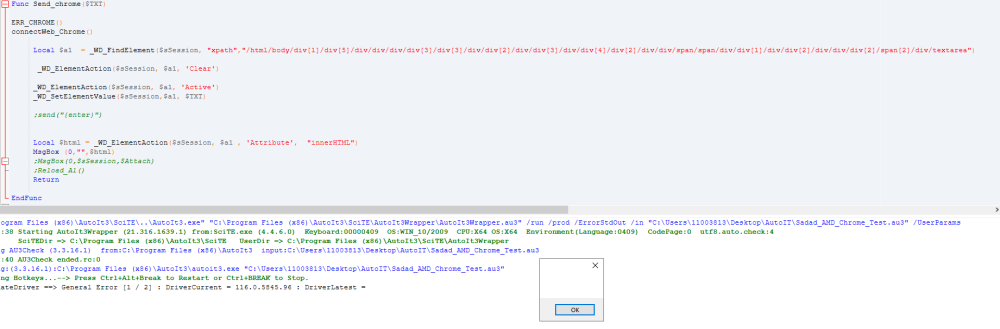
-
WebDriver UDF - Help & Support (IV)
samibb replied to Danp2's topic in AutoIt General Help and Support
How can I press 'ENTER' IN CHROME Local $a1 = _WD_FindElement($sSession,"xpath","/html/body/div[1]/div[5]/div/div/div/div[3]/div[3]/div/div[2]/div/div[3]/div/div[4]/div[2]/div/div/span/span/div/div[1]/div/div[2]/div/div/div[2]/span[2]/div/textarea") _WD_ElementActionEx($sSession, $a1, 'Clear') _WD_ElementActionEx($sSession, $a1, 'Active') _WD_SetElementValue($sSession,$a1, $TXT)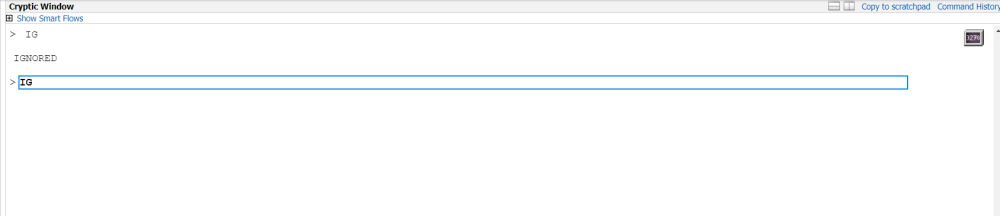
-
How can I save/add/read a file from/to OneDrive shared folder by using Access link through script?
-
Sorry for that. Thanks
-
Dear all is there any way to save text file in OneDrive shared folder, not my account, the folder shared with me. i have used links but thy did not works. FileWrite ("https://saudiairlines-my.sharepoint.com/:t:/g/personal/sbahwal_saudia_com/EQnrrPwDObBCo3wfD1qrlv8Bvob-vqxoyW7iRzdXCuCOZA?e=5amnxf"& "\"& "TEST.txt",$Sarray ) Thanks


