How to Customize Toast Position for Specific Use Cases with ngx-toastr in Angular 18?
Last Updated :
25 Jul, 2024
ngx-toastr is a popular npm package that allows the developers to show and configure toast messages easily in an angular web application. In this article, we will learn how to position a specific toast message in angular 18.
Steps to Change the Position of a Specific Toast
Step 1: Setting up the Angular Project
First, we will set up an angular project, and install the ngx-toastr dependencies.
ng new angular-toastr --standalone
cd angular-toastr
npm install ngx-toastr
npm install @angular/animations
Project structure
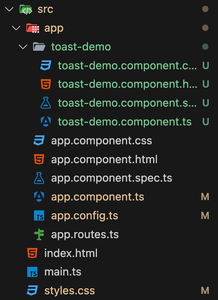 Folder Structure
Dependencies
"dependencies": {
    "@angular/animations": "^18.1.1",
    "@angular/common": "^18.0.0",
    "@angular/compiler": "^18.0.0",
    "@angular/core": "^18.0.0",
    "@angular/forms": "^18.0.0",
    "@angular/platform-browser": "^18.0.0",
    "@angular/platform-browser-dynamic": "^18.0.0",
    "@angular/router": "^18.0.0",
    "ngx-toastr": "^19.0.0",
    "rxjs": "~7.8.0",
    "tslib": "^2.3.0",
    "zone.js": "~0.14.3"
  },
  "devDependencies": {
    "@angular-devkit/build-angular": "^18.0.7",
    "@angular/cli": "^18.0.7",
    "@angular/compiler-cli": "^18.0.0",
    "@types/jasmine": "~5.1.0",
    "jasmine-core": "~5.1.0",
    "karma": "~6.4.0",
    "karma-chrome-launcher": "~3.2.0",
    "karma-coverage": "~2.2.0",
    "karma-jasmine": "~5.1.0",
    "karma-jasmine-html-reporter": "~2.1.0",
    "typescript": "~5.4.2"
  }
Step 2: Configuring ngx-toastr
In this step, we will add the ngx-toastr and browser animations to our app config file.
JavaScript
// Filename: app.config.ts
import {
    ApplicationConfig,
    provideZoneChangeDetection
} from "@angular/core";
import {
    provideAnimations
} from "@angular/platform-browser/animations";
import {provideRouter} from "@angular/router";
import {provideToastr} from "ngx-toastr";

import {routes} from "./app.routes";

export const appConfig: ApplicationConfig = {
    providers : [
        provideZoneChangeDetection(
            {eventCoalescing : true}),
        provideRouter(routes), provideAnimations(),
        provideToastr()
    ]
};
Step 3: Create a standalone toastr notifications component
Create a standalone toastr notifications components that we will use in our main app component to render the notifications. Use the below command to create a standalone component.
ng generate component toast-demo --standalone
Now, update the toast-demo.component.ts file to include the toast notifications.
JavaScript
// Filename: toast-demo.component.ts
import {Component} from "@angular/core";
import {ToastrService} from "ngx-toastr";

@Component({
    selector : "app-toast-demo",
    standalone : true,
    styleUrl : "./toast-demo.component.css",
    imports : [],
    template : `
    <div>
      <button (click)="showTopRightToast()">Show Top Right Toast</button>
      <button (click)="showTopLeftToast()">Show Top Left Toast</button>
    </div>
  `,
    providers : [ ToastrService ]
})
export class ToastDemoComponent {
    constructor(private toastr: ToastrService) {}

    showTopRightToast()
    {
        this.toastr.show(
            "This is a top-right toast", "Toast Title", {
                positionClass : "toast-top-right",
            });
    }

    showTopLeftToast()
    {
        this.toastr.show(
            "This is a top-left toast", "Toast Title",
            {positionClass : "toast-top-left"});
    }
}
Step 4: Add the toast-demo component inside the app component
Use the newly created toast-demo component inside the app component.
JavaScript
// Filename: app.component.ts
import {Component} from "@angular/core";
import {RouterOutlet} from "@angular/router";
import {
    ToastDemoComponent
} from "./toast-demo/toast-demo.component";

@Component({
    selector : "app-root",
    standalone : true,
    imports : [ RouterOutlet, ToastDemoComponent ],
    template : `
    <app-toast-demo></app-toast-demo>
  `,
    styleUrl : "./app.component.css"
})
export class AppComponent {
    title = "angular-toast";
}
Step 5: Add CSS for toastr notifications
Add the below CSS for showing the toastr notifications animations.
CSS
/* styles.css */

.toast-center-center {
    top: 50%;
    left: 50%;
    transform: translate(-50%, -50%);
}

.toast-top-center {
    top: 0;
    right: 0;
    width: 100%;
}

.toast-bottom-center {
    bottom: 0;
    right: 0;
    width: 100%;
}

.toast-top-full-width {
    top: 0;
    right: 0;
    width: 100%;
}

.toast-bottom-full-width {
    bottom: 0;
    right: 0;
    width: 100%;
}

.toast-top-left {
    top: 12px;
    left: 12px;
}

.toast-top-right {
    top: 12px;
    right: 12px;
}

.toast-bottom-right {
    right: 12px;
    bottom: 12px;
}

.toast-bottom-left {
    bottom: 12px;
    left: 12px;
}

/* toast styles */
.toast-title {
    font-weight: bold;
}

.toast-message {
    word-wrap: break-word;
}

.toast-message a,
.toast-message label {
    color: #FFFFFF;
}

.toast-message a:hover {
    color: #CCCCCC;
    text-decoration: none;
}

.toast-close-button {
    position: relative;
    right: -0.3em;
    top: -0.3em;
    float: right;
    font-size: 20px;
    font-weight: bold;
    color: #FFFFFF;
    text-shadow: 0 1px 0 #ffffff;
    /* opacity: 0.8; */
}

.toast-close-button:hover,
.toast-close-button:focus {
    color: #000000;
    text-decoration: none;
    cursor: pointer;
    opacity: 0.4;
}

button.toast-close-button {
    padding: 0;
    cursor: pointer;
    background: transparent;
    border: 0;
}

.toast-container {
    pointer-events: none;
    position: fixed;
    z-index: 999999;
}

.toast-container * {
    box-sizing: border-box;
}

.toast-container .ngx-toastr {
    position: relative;
    overflow: hidden;
    margin: 0 0 6px;
    padding: 15px 15px 15px 50px;
    width: 300px;
    border-radius: 3px 3px 3px 3px;
    background-position: 15px center;
    background-repeat: no-repeat;
    background-size: 24px;
    box-shadow: 0 0 12px #999999;
    color: #FFFFFF;
}

.toast-container .ngx-toastr:hover {
    box-shadow: 0 0 12px #000000;
    opacity: 1;
    cursor: pointer;
}

.toast-info {
    background-image: url("data:image/svg+xml;base64,PHN2ZyB4bWxucz0naHR0cDovL3d3dy53My5vcmcvMjAwMC9zdmcnIHZpZXdCb3g9JzAgMCA1MTIgNTEyJyB3aWR0aD0nNTEyJyBoZWlnaHQ9JzUxMic+PHBhdGggZmlsbD0ncmdiKDI1NSwyNTUsMjU1KScgZD0nTTI1NiA4QzExOS4wNDMgOCA4IDExOS4wODMgOCAyNTZjMCAxMzYuOTk3IDExMS4wNDMgMjQ4IDI0OCAyNDhzMjQ4LTExMS4wMDMgMjQ4LTI0OEM1MDQgMTE5LjA4MyAzOTIuOTU3IDggMjU2IDh6bTAgMTEwYzIzLjE5NiAwIDQyIDE4LjgwNCA0MiA0MnMtMTguODA0IDQyLTQyIDQyLTQyLTE4LjgwNC00Mi00MiAxOC44MDQtNDIgNDItNDJ6bTU2IDI1NGMwIDYuNjI3LTUuMzczIDEyLTEyIDEyaC04OGMtNi42MjcgMC0xMi01LjM3My0xMi0xMnYtMjRjMC02LjYyNyA1LjM3My0xMiAxMi0xMmgxMnYtNjRoLTEyYy02LjYyNyAwLTEyLTUuMzczLTEyLTEydi0yNGMwLTYuNjI3IDUuMzczLTEyIDEyLTEyaDY0YzYuNjI3IDAgMTIgNS4zNzMgMTIgMTJ2MTAwaDEyYzYuNjI3IDAgMTIgNS4zNzMgMTIgMTJ2MjR6Jy8+PC9zdmc+");
}

.toast-error {
    background-image: url("data:image/svg+xml;base64,PHN2ZyB4bWxucz0naHR0cDovL3d3dy53My5vcmcvMjAwMC9zdmcnIHZpZXdCb3g9JzAgMCA1MTIgNTEyJyB3aWR0aD0nNTEyJyBoZWlnaHQ9JzUxMic+PHBhdGggZmlsbD0ncmdiKDI1NSwyNTUsMjU1KScgZD0nTTI1NiA4QzExOSA4IDggMTE5IDggMjU2czExMSAyNDggMjQ4IDI0OCAyNDgtMTExIDI0OC0yNDhTMzkzIDggMjU2IDh6bTEyMS42IDMxMy4xYzQuNyA0LjcgNC43IDEyLjMgMCAxN0wzMzggMzc3LjZjLTQuNyA0LjctMTIuMyA0LjctMTcgMEwyNTYgMzEybC02NS4xIDY1LjZjLTQuNyA0LjctMTIuMyA0LjctMTcgMEwxMzQuNCAzMzhjLTQuNy00LjctNC43LTEyLjMgMC0xN2w2NS42LTY1LTY1LjYtNjUuMWMtNC43LTQuNy00LjctMTIuMyAwLTE3bDM5LjYtMzkuNmM0LjctNC43IDEyLjMtNC43IDE3IDBsNjUgNjUuNyA2NS4xLTY1LjZjNC43LTQuNyAxMi4zLTQuNyAxNyAwbDM5LjYgMzkuNmM0LjcgNC43IDQuNyAxMi4zIDAgMTdMMzEyIDI1Nmw2NS42IDY1LjF6Jy8+PC9zdmc+");
}

.toast-success {
    background-image: url("data:image/svg+xml;base64,PHN2ZyB4bWxucz0naHR0cDovL3d3dy53My5vcmcvMjAwMC9zdmcnIHZpZXdCb3g9JzAgMCA1MTIgNTEyJyB3aWR0aD0nNTEyJyBoZWlnaHQ9JzUxMic+PHBhdGggZmlsbD0ncmdiKDI1NSwyNTUsMjU1KScgZD0nTTE3My44OTggNDM5LjQwNGwtMTY2LjQtMTY2LjRjLTkuOTk3LTkuOTk3LTkuOTk3LTI2LjIwNiAwLTM2LjIwNGwzNi4yMDMtMzYuMjA0YzkuOTk3LTkuOTk4IDI2LjIwNy05Ljk5OCAzNi4yMDQgMEwxOTIgMzEyLjY5IDQzMi4wOTUgNzIuNTk2YzkuOTk3LTkuOTk3IDI2LjIwNy05Ljk5NyAzNi4yMDQgMGwzNi4yMDMgMzYuMjA0YzkuOTk3IDkuOTk3IDkuOTk3IDI2LjIwNiAwIDM2LjIwNGwtMjk0LjQgMjk0LjQwMWMtOS45OTggOS45OTctMjYuMjA3IDkuOTk3LTM2LjIwNC0uMDAxeicvPjwvc3ZnPg==");
}

.toast-warning {
    background-image: url("data:image/svg+xml;base64,PHN2ZyB4bWxucz0naHR0cDovL3d3dy53My5vcmcvMjAwMC9zdmcnIHZpZXdCb3g9JzAgMCA1NzYgNTEyJyB3aWR0aD0nNTc2JyBoZWlnaHQ9JzUxMic+PHBhdGggZmlsbD0ncmdiKDI1NSwyNTUsMjU1KScgZD0nTTU2OS41MTcgNDQwLjAxM0M1ODcuOTc1IDQ3Mi4wMDcgNTY0LjgwNiA1MTIgNTI3Ljk0IDUxMkg0OC4wNTRjLTM2LjkzNyAwLTU5Ljk5OS00MC4wNTUtNDEuNTc3LTcxLjk4N0wyNDYuNDIzIDIzLjk4NWMxOC40NjctMzIuMDA5IDY0LjcyLTMxLjk1MSA4My4xNTQgMGwyMzkuOTQgNDE2LjAyOHpNMjg4IDM1NGMtMjUuNDA1IDAtNDYgMjAuNTk1LTQ2IDQ2czIwLjU5NSA0NiA0NiA0NiA0Ni0yMC41OTUgNDYtNDYtMjAuNTk1LTQ2LTQ2LTQ2em0tNDMuNjczLTE2NS4zNDZsNy40MTggMTM2Yy4zNDcgNi4zNjQgNS42MDkgMTEuMzQ2IDExLjk4MiAxMS4zNDZoNDguNTQ2YzYuMzczIDAgMTEuNjM1LTQuOTgyIDExLjk4Mi0xMS4zNDZsNy40MTgtMTM2Yy4zNzUtNi44NzQtNS4wOTgtMTIuNjU0LTExLjk4Mi0xMi42NTRoLTYzLjM4M2MtNi44ODQgMC0xMi4zNTYgNS43OC0xMS45ODEgMTIuNjU0eicvPjwvc3ZnPg==");
}

.toast-container.toast-top-center .ngx-toastr,
.toast-container.toast-bottom-center .ngx-toastr {
    width: 300px;
    margin-left: auto;
    margin-right: auto;
}

.toast-container.toast-top-full-width .ngx-toastr,
.toast-container.toast-bottom-full-width .ngx-toastr {
    width: 96%;
    margin-left: auto;
    margin-right: auto;
}

.ngx-toastr {
    background-color: #030303;
    pointer-events: auto;
}

.toast-success {
    background-color: #51A351;
}

.toast-error {
    background-color: #BD362F;
}

.toast-info {
    background-color: #2F96B4;
}

.toast-warning {
    background-color: #F89406;
}

.toast-progress {
    position: absolute;
    left: 0;
    bottom: 0;
    height: 4px;
    background-color: #000000;
    opacity: 0.4;
}

/* Responsive Design */
@media all and (max-width: 240px) {
    .toast-container .ngx-toastr.div {
        padding: 8px 8px 8px 50px;
        width: 11em;
    }

    .toast-container .toast-close-button {
        right: -0.2em;
        top: -0.2em;
    }
}

@media all and (min-width: 241px) and (max-width: 480px) {
    .toast-container .ngx-toastr.div {
        padding: 8px 8px 8px 50px;
        width: 18em;
    }

    .toast-container .toast-close-button {
        right: -0.2em;
        top: -0.2em;
    }
}

@media all and (min-width: 481px) and (max-width: 768px) {
    .toast-container .ngx-toastr.div {
        padding: 15px 15px 15px 50px;
        width: 25em;
    }
}
Step 6: Run the application
Start the application using the below command:
ng serve
Output
Explore
AngularJS Basics
AngularJS Directives
AngularJS Filters
AngularJS Converting Functions
AngularJS Comparing Functions
AngularJS Questions
AngularJS Examples
2 min read