We will be creating a Movie Search Engine using Angular. This application allows users to search for movies by entering keywords and fetching and displaying a list of movie results in card format.
The search engine initially loads a default set of movies to showcase the functionality. Through this project, you'll see how to build a responsive and interactive movie search feature using Angular.
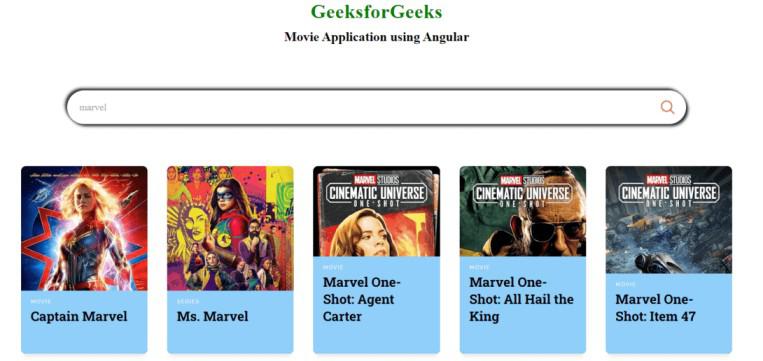 Project Preview
Prerequisites
Approach
- For Movie App using Angular, we will be working on Angular 16.
- We will add Angular Material for better UI components.
- In this, as we search for a movie name, movie names relevant to the name searched gets appeared.
- If the Movie Name searched does not match any name in Database, it returns No movie Found.
Steps to Create Quiz App using Angular
Step 1: Install Angular CLI
If you haven’t installed Angular CLI yet, install it using the following command
npm install -g @angular/cli
Step 2: Create a New Angular Project
ng new movie-app
cd movie-app
Step 3: Install Angular Material
Install Angular Material for better UI components:
ng add @angular/material
Dependencies
"dependencies": {
    "@angular/animations": "^16.2.0",
    "@angular/cdk": "^16.2.14",
    "@angular/common": "^16.2.0",
    "@angular/compiler": "^16.2.0",
    "@angular/core": "^16.2.0",
    "@angular/forms": "^16.2.0",
    "@angular/material": "^16.2.14",
    "@angular/platform-browser": "^16.2.0",
    "@angular/platform-browser-dynamic": "^16.2.0",
    "@angular/router": "^16.2.0",
    "rxjs": "~7.8.0",
    "tslib": "^2.3.0",
    "zone.js": "~0.13.0"
}
Project Structure
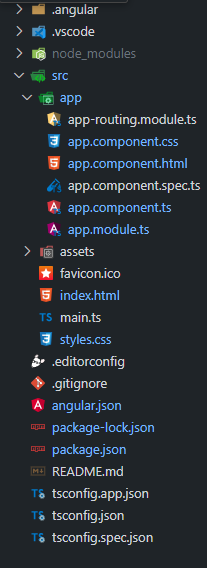 Folder Structure
Example: Create the required files as seen in the Folder Structure and add the following codes. We will be using Open Movie Database Api for generating the list of movies.
HTML
<!--app.component.html-->

<div class="app">
    <h1>GeeksforGeeks</h1>
    <h3>Movie Application using Angular</h3>

    <div class="search">
        <input type="text" placeholder="Search for Movies" [(ngModel)]="searchTerm"
               (keyup.enter)="onSearch()" />
        <img src="
          https://media.geeksforgeeks.org/wp-content/uploads/20230626112934/search.png"
             alt="search icon"
            (click)="onSearch()" />
    </div>

    <div *ngIf="movies.length > 0; else noMovies" class="container">
        <div *ngFor="let movie of movies" class="movie">
            <div>
                <p>{{ movie.Title }}</p>
            </div>
            <div>
                <img [src]="movie.Poster !== 'N/A' ? movie.Poster :
                            'https://via.placeholder.com/400'" [alt]="movie.Title" />
            </div>
            <div>
                <span>{{ movie.Type }}</span>
                <h3>{{ movie.Title }}</h3>
            </div>
        </div>
    </div>

    <ng-template #noMovies>
        <div class="empty">
            <h2>No Movies found</h2>
        </div>
    </ng-template>
</div>
/*app.component.css*/

@import url("https://fonts.googleapis.com/css?family=Roboto+Slab:100,300,400,700");
@import url("https://fonts.googleapis.com/css?family=Raleway:300,300i,400,400i,500,500i,
  600,600i,700,700i,800,800i,900,900i");

* {
    margin: 0;
    border: 0;
    box-sizing: border-box;
}

:root {
    --font-roboto: "Roboto Slab", serif;
    --font-raleway: "Raleway", sans-serif;
    --primary-green: #2ecc71;
    --secondary-orange: #f39c12;
    --dark-bg: #212426;
    --light-bg: #1f2123;
    --accent-color: #f9d3b4;
}

body {
    font-family: var(--font-roboto);
    background-color: var(--dark-bg);
    color: #f0f0f0;
}

.app {
    padding: 4rem;
    display: flex;
    justify-content: center;
    align-items: center;
    flex-direction: column;
}

h1 {
    font-size: 3rem;
    letter-spacing: 0.9px;
    color: green;
    margin-bottom: 1rem;
}

h3 {
    font-size: 2rem;
    color: black;
    margin-bottom: 3rem;
}

.search {
    width: 71%;
    margin: 4rem 0 2rem;
    display: flex;
    align-items: center;
    justify-content: center;
    padding: 1.5rem 1.75rem;
    border-radius: 3rem;
    background: var(--light-bg);
    box-shadow: 5px 5px 7px #1c1d1f, -5px -5px 7px #222527;
}

.search input {
    flex: 1;
    border: none;
    font-size: 1.5rem;
    font-family: var(--font-raleway);
    font-weight: 500;
    padding-right: 1rem;
    outline: none;
    color: #a1a1a1;
    background: var(--light-bg);
}

.search img {
    width: 35px;
    height: 35px;
    cursor: pointer;
}

.empty {
    width: 100%;
    margin-top: 3rem;
    display: flex;
    justify-content: center;
    align-items: center;
}

.empty h2 {
    font-size: 1.25rem;
    color: var(--accent-color);
    font-family: var(--font-raleway);
}

.container {
    width: 100%;
    margin-top: 3rem;
    display: flex;
    justify-content: center;
    align-items: center;
    flex-wrap: wrap;
}

.movie {
    width: 310px;
    height: 460px;
    margin: 1.5rem;
    position: relative;
    border-radius: 12px;
    overflow: hidden;
    border: none;
    transition: all 0.4s cubic-bezier(0.175, 0.885, 0, 1);
    box-shadow: 0px 13px 10px -7px rgba(0, 0, 0, 0.1);
}

.movie div:nth-of-type(1) {
    position: absolute;
    padding: 16px;
    width: 100%;
    opacity: 0;
    top: 0;
    color: var(--accent-color);
}

.movie:hover {
    box-shadow: 0px 30px 18px -8px rgba(0, 0, 0, 0.1);
    transform: scale(1.05, 1.05);
}

.movie div:nth-of-type(2) {
    width: 100%;
    height: 100%;
}

.movie div:nth-of-type(2) img {
    height: 100%;
    width: 100%;
    object-fit: cover;
}

.movie div:nth-of-type(3) {
    z-index: 2;
    background-color: #8fcff9;
    padding: 16px 24px 24px 24px;
    position: absolute;
    bottom: 0;
    right: 0;
    left: 0;
}

.movie div:nth-of-type(3) span {
    font-family: "Raleway", sans-serif;
    text-transform: uppercase;
    font-size: 13px;
    letter-spacing: 2px;
    font-weight: 500;
    color: #f0f0f0;
}

.movie div:nth-of-type(3) h3 {
    margin-top: 5px;
    font-family: "Roboto Slab", serif;
    color: var(--accent-color);
}

.movie:hover div:nth-of-type(2) {
    height: 100%;
    opacity: 0.3;
}

.movie:hover div:nth-of-type(3) {
    background-color: transparent;
}

.movie:hover div:nth-of-type(1) {
    opacity: 1;
}


@media screen and (max-width: 600px) {
    .app {
        padding: 4rem 2rem;
    }

    .search {
        padding: 1rem 1.75rem;
        width: 100%;
    }

    .search input {
        font-size: 1rem;
    }

    .search img {
        width: 20px;
        height: 20px;
    }
}

@media screen and (max-width: 400px) {
    .app {
        padding: 4rem 1rem;
    }

    h1 {
        font-size: 2rem;
        color: green;
    }

    .container {
        margin-top: 2rem;
    }

    .movie {
        width: 100%;
        margin: 1rem;
    }
}
// app.module.ts
import { BrowserModule } from '@angular/platform-browser';
import { NgModule } from '@angular/core';
import { HttpClientModule } from '@angular/common/http';
import { FormsModule } from '@angular/forms';
import { AppComponent } from './app.component';

@NgModule({
    declarations: [
        AppComponent
    ],
    imports: [
        BrowserModule,
        HttpClientModule,
        FormsModule
    ],
    providers: [],
    bootstrap: [AppComponent]
})
export class AppModule { }
// app.component.ts

import { Component } from '@angular/core';
import { HttpClient } from '@angular/common/http';

@Component({
    selector: 'app-root',
    templateUrl: './app.component.html',
    styleUrls: ['./app.component.css']
})
export class AppComponent {
    title = "GeeksforGeeks's Movie Center";
    searchTerm: string = '';
    movies: any[] = [];

    private API_URL = 'https://omdbapi.com/?apikey=fe2f6c44';

    constructor(private http: HttpClient) {
        this.searchMovies('SpiderMan');
    }

    searchMovies(title: string): void {
        this.http.get<any>(`${this.API_URL}&s=${title}`).subscribe(response => {
            this.movies = response.Search || [];
        });
    }

    onSearch(): void {
        if (this.searchTerm.trim()) {
            this.searchMovies(this.searchTerm);
        }
    }
}
To start the application run the following command
Open the terminal, run this command from your root directory to start the application
ng serve --open
Open your browser and navigate to http://localhost:4200
Output
Explore
AngularJS Basics
AngularJS Directives
AngularJS Filters
AngularJS Converting Functions
AngularJS Comparing Functions
AngularJS Questions
AngularJS Examples
2 min read