The TCP/IP model is a framework that is used to model the communication in a network. It is mainly a collection of network protocols and organization of these protocols in different layers for modeling the network.
- The original TCP/IP standard (defined in RFC 1122) consists of four layers: Application, Transport, Internet, and Network Access.
- In practice and teaching, it is often shown as a 5-layer model by separating the Physical layer from the Network Access layer. This helps clearly distinguish physical hardware (cables, signals) from data framing and MAC addressing.
- While the OSI model has seven layers, the 5 layer TCP/IP model is simpler and commonly used in today's Internet and networking systems.
Role of TCP/IP
One of its main goals is to make sure that the data sent by the sender arrives safely and correctly at the receiver’s end. To do this, the data is broken down into smaller parts called packets before being sent. These packets travel separately and are reassembled in the correct order when they reach the destination.
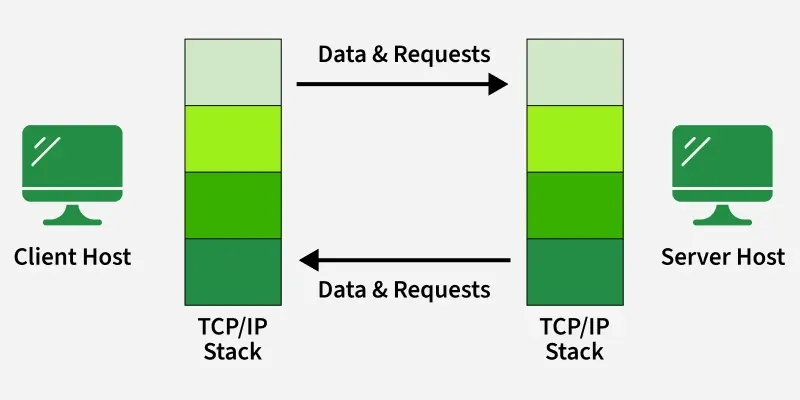 TCP/IP Connection
Note: This helps prevent errors and makes sure the message is complete and accurate.
Layers of TCP/IP Model
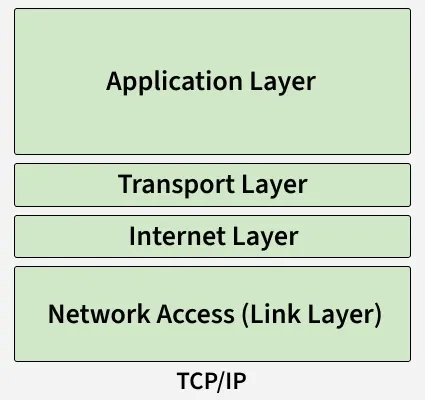 TCP/IP Layers
1. Application Layer
The Application Layer is the top layer of the TCP/IP model and the one closest to the user. This is where all the apps you use like web browsers, email clients, or file sharing tools connect to the network.
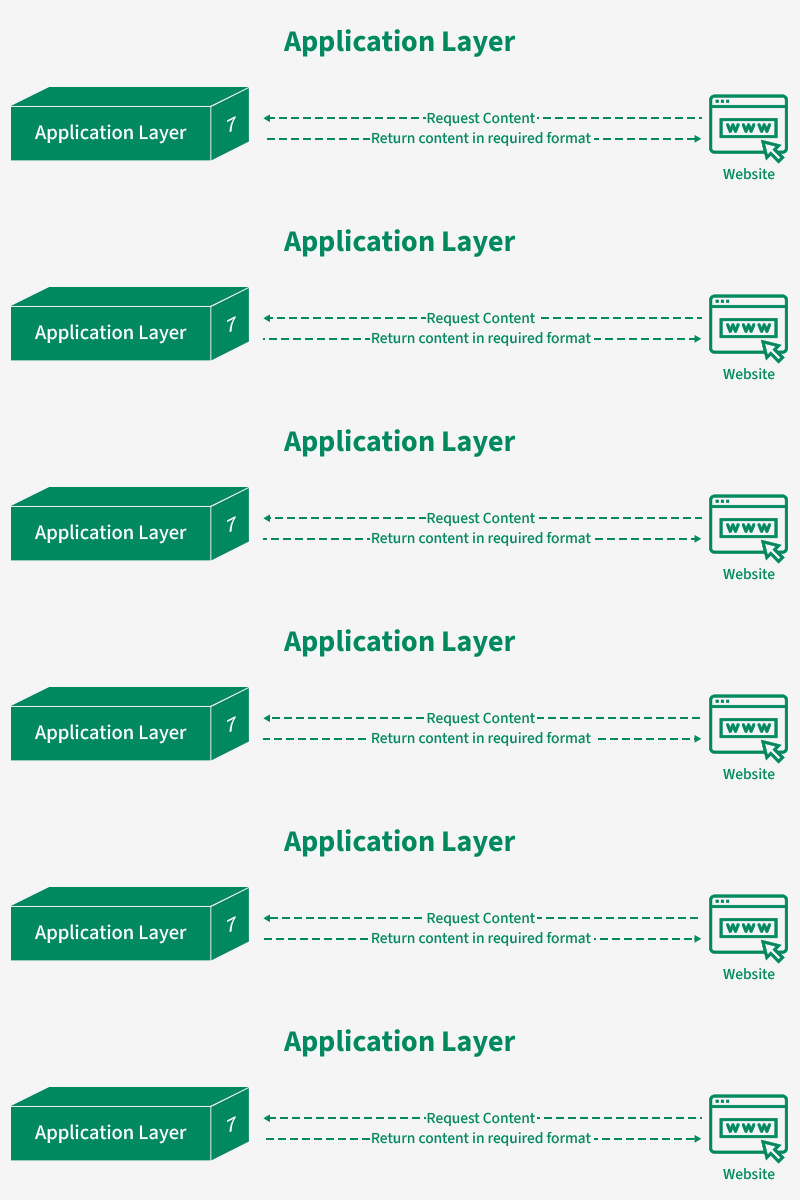 Application Layer
- It acts like a bridge between your software (like Chrome, Gmail, or WhatsApp) and the lower layers of the network that actually send and receive data.
- It supports different protocols like HTTP (for websites), FTP (for file transfers), SMTP (for emails), and DNS (for finding website addresses).
- It also manages things like data formatting, so both sender and receiver understand the data, encryption to keep data safe, and session management to keep track of ongoing connections.
2. Transport Layer
The Transport Layer is responsible for making sure that data is sent reliably and in the correct order between devices. It checks that the data you send like a message, file, or video arrives safely and completely.
This layer mainly uses two protocols: TCP and UDP, depending on whether the communication needs to be more reliable or faster.
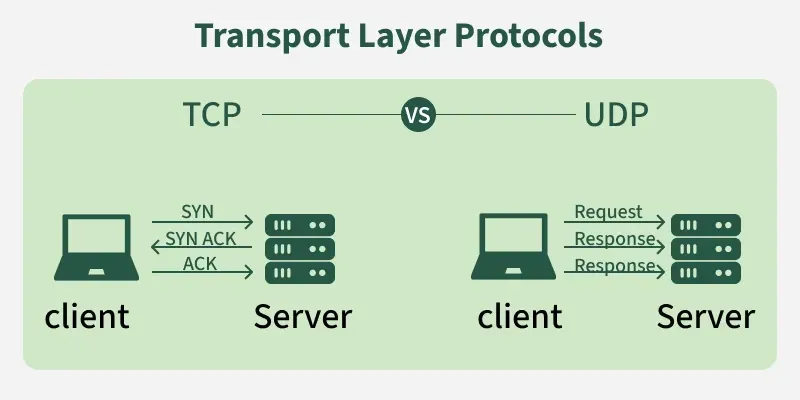 Transport Layers
TCP (Transmission Control Protocol): TCP is used when data must be error-free, complete, and in order. Examples: loading websites, downloading files, sending emails. It's features are:
- Checks for errors in data
- Resends lost or damaged data
- Ensures everything arrives in the right order
- Provides reliable, connection-oriented communication
UDP (User Datagram Protocol): UDP is used when speed is more important than perfect accuracy. Examples: live streaming, online gaming, VoIP calls. It's features are:
- No error checking
- No retransmission of lost data
- No guarantee of order
- Fast and lightweight
3. Internet Layer
The Internet Layer (also known as the Network Layer) is responsible for routing data across different networks to ensure it reaches the correct destination. While the Transport Layer handles "how" data is sent, the Internet Layer handles "where" it goes.
It acts like the postal service of the network, taking segments from the Transport Layer and placing them into "envelopes" called packets with a destination address.
- IP Addressing: Assigns unique IP addresses (like 192.168.1.1) to identify every device on the network.
- Routing: Calculates the most efficient path for packets to travel across the internet to reach their destination.
- Main Protocols: IP, ICMP and ARP.
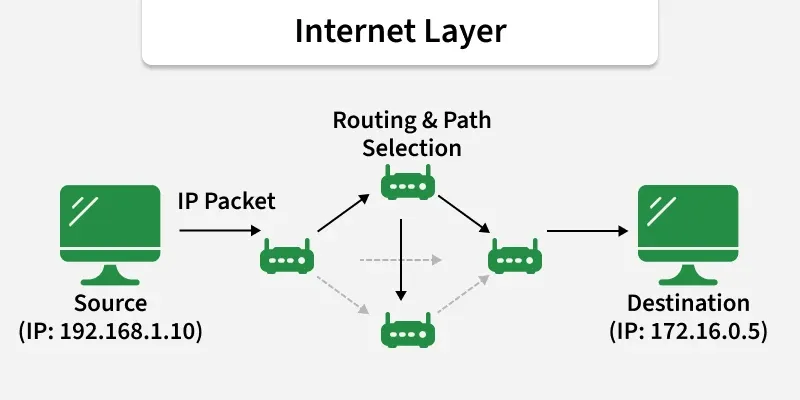 Internet Layer
4. Network Access (Link Layer)
The Internet Layer is used for finding the best path for data to travel across different networks so it can reach the right destination. It works like a traffic controller, helping data packets move from one network to another until they reach the correct device.
- Framing: Wraps IP packets into Frames and adds physical MAC addresses for local delivery.
- Physical Delivery: Converts digital bits (1s and 0s) into electrical signals, light pulses (fiber), or radio waves (Wi-Fi).
- Hardware Interaction: Manages the actual Network Interface Cards (NIC), Ethernet cables, and wireless drivers.
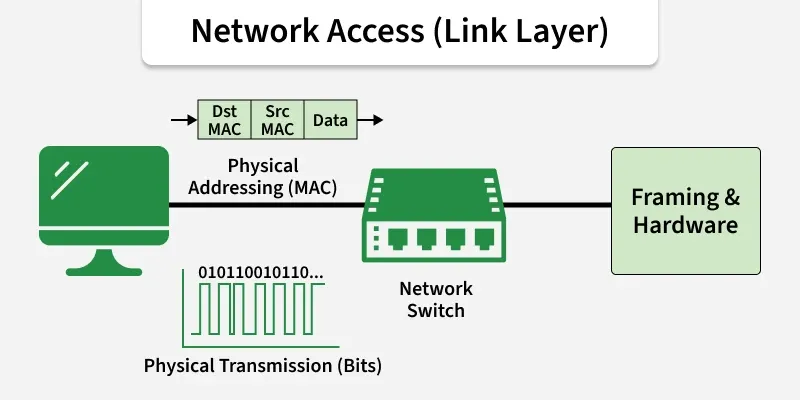 Network Access (Link Layer)
Working of TCP/IP Model
The working of TCP/IP can be explained with the help of the diagram given below and explained:
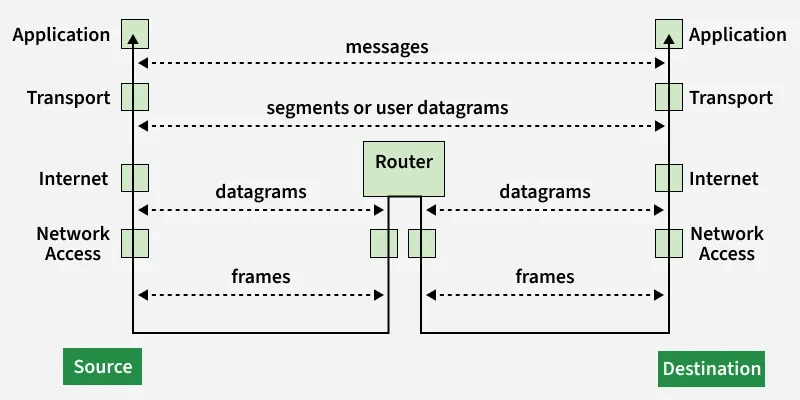 Working of TCP/IP Model
When Sending Data (From Sender to Receiver)
- Application Layer: Prepares user data using protocols like HTTP, FTP, or SMTP.
- Transport Layer (TCP/UDP): Breaks data into segments and ensures reliable (TCP) or fast (UDP) delivery.
- Internet Layer (IP): Adds IP addresses and decides the best route for each packet.
- Link Layer (Network Access Layer): Converts packets into frames and sends them over the physical network.
When Receiving Data (At the Destination)
- Link Layer: Receives bits from the network and rebuilds frames to pass to the next layer.
- Internet Layer: Checks the IP address, removes the IP header, and forwards data to the Transport Layer.
- Transport Layer: Reassembles segments, checks for errors, and ensures data is complete.
- Application Layer: Delivers the final data to the correct application (e.g., displays a web page in the browser).
Why TCP/IP is Used Over the OSI Model
TCP/IP is used over the OSI model because it is simpler, practical, and widely adopted for real-world networking and the internet. The diagram below shows the comparison of OSI layer with the TCP:
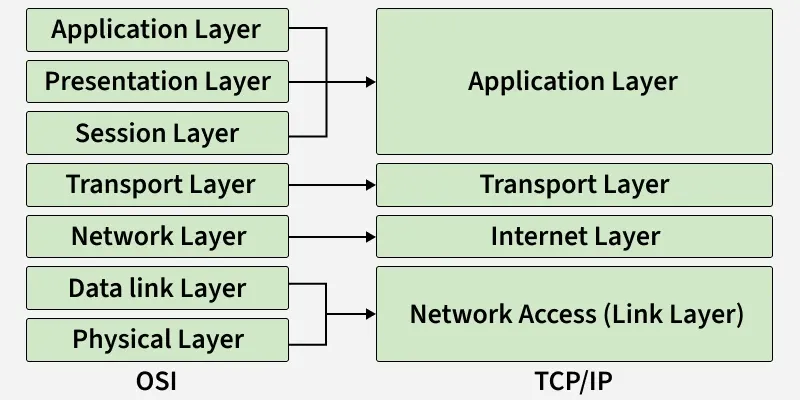 Illustration of Relationship between OSI and TCP/IP Protocol
| Reason | Explanation |
|---|
| Simpler Structure | TCP/IP has only 5 layers, compared to 7 in OSI, making it easier to implement and understand in real systems. |
|---|
| Protocol-Driven Design | TCP/IP was designed based on working protocols, while the OSI model is more of a theoretical framework. |
|---|
| Flexibility and Robustness | TCP/IP adapts well to different hardware and networks and includes error handling, routing, and congestion control. |
|---|
| Open Standard | TCP/IP is open, free to use, and not controlled by any single organization, helping it gain universal acceptance. |
|---|
| Actual Use vs Conceptual Model | The OSI model is great for education and design principles, but TCP/IP is the one actually used in real-world networking. |
|---|
Advantages of TCP/IP Model
- Interoperability: The TCP/IP model allows different types of computers and networks to communicate with each other, promoting compatibility and cooperation among diverse systems.
- Scalability: TCP/IP is highly scalable, making it suitable for both small and large networks, from local area networks (LANs) to wide area networks (WANs) like the internet.
- Standardization: It is based on open standards and protocols, ensuring that different devices and software can work together without compatibility issues.
- Flexibility: The model supports various routing protocols, data types, and communication methods, making it adaptable to different networking needs.
- Reliability: TCP/IP includes error-checking and retransmission features that ensure reliable data transfer, even over long distances and through various network conditions.
Disadvantages of TCP/IP Model
- Security Concerns: TCP/IP was not originally designed with security in mind. While there are now many security protocols available (such as SSL/TLS), they have been added on top of the basic TCP/IP model, which can lead to vulnerabilities.
- Inefficiency for Small Networks: For very small networks, the overhead and complexity of the TCP/IP model may be unnecessary and inefficient compared to simpler networking protocols.
- Limited by Address Space: Although IPv6 addresses this issue, the older IPv4 system has a limited address space, which can lead to issues with address exhaustion in larger networks.
- Data Overhead: TCP the transport protocol, includes a significant amount of overhead to ensure reliable transmission.
OSI and TCP IP Model (Part 1)
OSI and TCP IP Model (Part 2)
What is TCP/IP Model and How it Works? | Computer Network
Explore
Computer Network Basics
Physical Layer
Data Link Layer
Network Layer
Transport Layer
Session Layer & Presentation Layer
Application Layer
Advanced Topics
Practice