Deploy an AI Model using Streamlit Library
Last Updated :
30 Oct, 2025
Streamlit is an open-source Python library designed to make it easy for developers and data scientists to turn Python scripts into fully functional web applications without requiring any front-end development skills. It allows us to quickly prototype and deploy interactive AI-powered apps directly from our local machine or the cloud.
Implementation
Let's implement our model:
Step 1: Install dependencies
We will install the required dependencies for our model such as streamlit, google-generativeai.
bash
pip install streamlit python-dotenv google-genai
Step 2: Set Up API Key
We need to create a environment file named .env in project directory to store our API Key.
Python
GEMINI_API_KEY="your_api_key_here"
Step 3: Build the Model
Now we will build our model:
- Environment Setup: The .env file stores the API key securely, loaded with dotenv.
- Model Initialization: The Gemini model "models/gemini-2.5-flash" is loaded using Google’s GenAI SDK.
- Session Management: st.session_state ensures chat history persists during interaction.
- Real-Time Interaction: Users type queries and responses are fetched dynamically from Gemini.
- Auto Refresh: st.rerun() refreshes the app interface after each user message.
Python
import streamlit as st
from google import genai
from dotenv import load_dotenv
import os

load_dotenv()
API_KEY = os.getenv("GEMINI_API_KEY")

if not API_KEY:
    st.error("Missing GEMINI_API_KEY in .env file. Please add it and restart the app.")
    st.stop()

client = genai.Client(api_key=API_KEY)
MODEL_NAME = "models/gemini-2.5-flash"

st.set_page_config(page_title="PersonalBot", layout="centered")
st.title("🤖 PersonalBot")
st.markdown("An intelligent assistant powered by **Gemini** and **Streamlit**.")

if "history" not in st.session_state:
    st.session_state.history = []


def get_gemini_response(prompt):
    response = client.models.generate_content(
        model=MODEL_NAME,
        contents=prompt
    )
    return response.text


for role, msg in st.session_state.history:
    if role == "user":
        st.markdown(f"**🧑 You:** {msg}")
    else:
        st.markdown(f"**🤖 PersonalBot:** {msg}")

user_input = st.text_input("Type your message here...")

if st.button("Send"):
    if user_input.strip():
        st.session_state.history.append(("user", user_input))
        with st.spinner("PersonalBot is thinking..."):
            try:
                reply = get_gemini_response(user_input)
            except Exception as e:
                reply = f" Error: {e}"

        st.session_state.history.append(("bot", reply))
        st.rerun()
    else:
        st.warning("Please enter a message before sending.")
Step 4: Run the Streamlit App
We will start the Streamlit server and it will open our chatbot model in browser. The default URL is usually http://localhost:8501.
bash
python -m streamlit run app.py
Output:
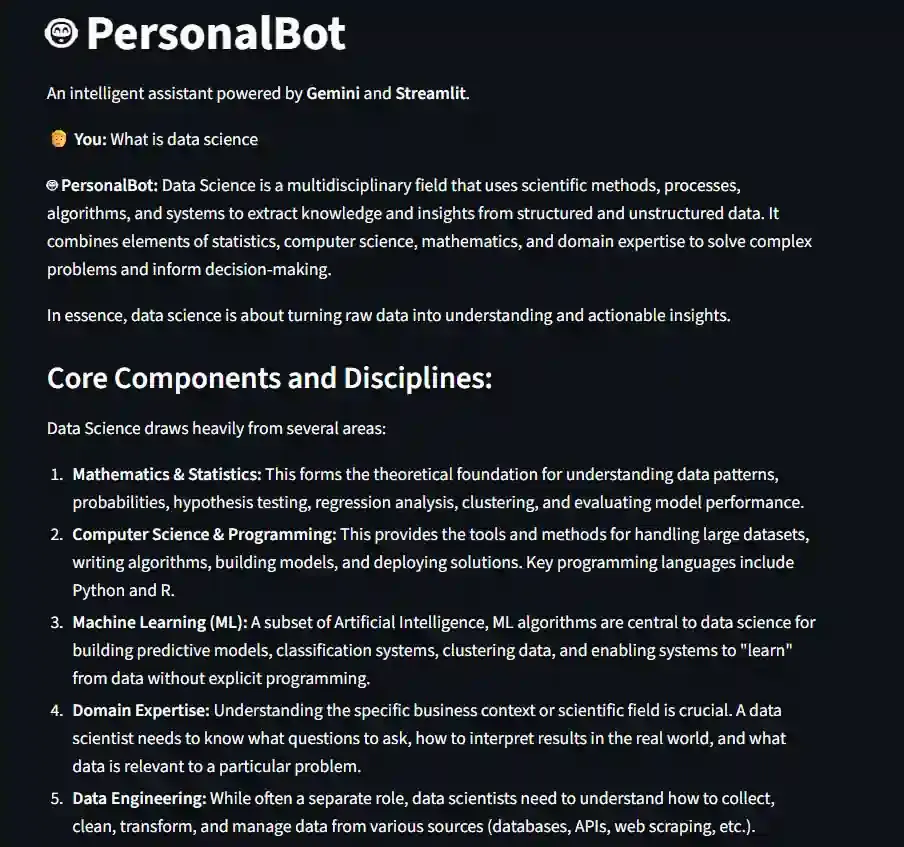 Result
The source code can be downloaded from here.
Advantages
- Rapid Deployment: Streamlit makes it effortless to transform simple Python scripts into interactive web apps which is perfect for quick AI demos or prototypes.
- Intelligent AI Responses: Integrating Google Gemini ensures the model provides human-like, context-aware answers with exceptional reasoning and creativity.
- Interactive User Interface: Streamlit offers dynamic UI components like text inputs, buttons and markdowns to build engaging, chat-style AI interfaces.
- Easy Integration & Scalability: The architecture can be easily extended, allowing developers to connect databases, APIs or even train custom models for specialized tasks.
Which command is used to run a Streamlit application?
-
-
-
-
python -m streamlit app.py
Explanation:
The command streamlit run app.py is used to launch Streamlit applications from the terminal.
Which Streamlit function is used to display user inputs through text boxes?
Explanation:
The st.text_input() function creates a text box where users can input text data in the app.
Which method is used in Streamlit to display predictions on the web interface?
Explanation:
The st.write() function is used to display text, numbers and predictions on the Streamlit web interface.
Which method is commonly used to upload files in a Streamlit application?
Explanation:
The st.file_uploader() method allows users to upload files like CSV or images in the Streamlit app.
Which feature of Streamlit automatically reloads the app when code changes are detected?
Explanation:
Streamlit's Hot Reload feature automatically reloads the app whenever code changes are detected making development faster
Quiz Completed Successfully
Your Score : 2/5
Accuracy : 0%
Login to View Explanation
1/5
1/5
< Previous
Next >
Explore
Machine Learning Basics
Python for Machine Learning
Feature Engineering
Supervised Learning
Unsupervised Learning
Model Evaluation and Tuning
Advanced Techniques
Machine Learning Practice