The MongoDB $cmp operator is a powerful tool for comparing two values within documents, commonly used in aggregation pipelines for sorting or conditional operations. It plays a crucial role in sorting, conditional operations, and advanced comparisons inside MongoDB queries
In this article, We will learn about the MongoDB $cmp Operator, its syntax, use cases, and detailed examples to help us leverage its full potential in our MongoDB applications.
What is the MongoDB $cmp Operator?
The MongoDB $cmp operator is used to compare two values and return. It is commonly used in aggregation pipelines for sorting and evaluating conditions within documents. This operator is often utilized in $project, $sort, and conditional expressions within aggregation queries. The comparison follows MongoDB’s BSON type ordering when dealing with values of different types.
- 0 : If both values are equal
- 1 : If the first value is greater than the second
- -1 : If the first value is less than the second
Syntax:
{ $cmp: [ <expression1>, <expression2> ] }
Key Terms
<expression1> – The first value or field to compare.<expression2> – The second value or field to compare.
Key Features of the MongoDB $cmp Operator
- Compares Two Values: Returns
0, 1, or -1 based on the comparison result. - Supports Nested Fields: Can compare fields within embedded documents.
- Handles Different Data Types: Uses MongoDB BSON type ordering when comparing different types.
- Works in Aggregation Pipelines: Used with
$project, $sort, and other stages in aggregation.
MongoDB $cmp Operator Examples
Let's explore some real-world examples of the $cmp operator in MongoDB. In the following examples, we are working with:
- Database: GeeksforGeeks
- Collection: example
- Document: two documents that contain the details of the shapes in the form of field-value pairs.
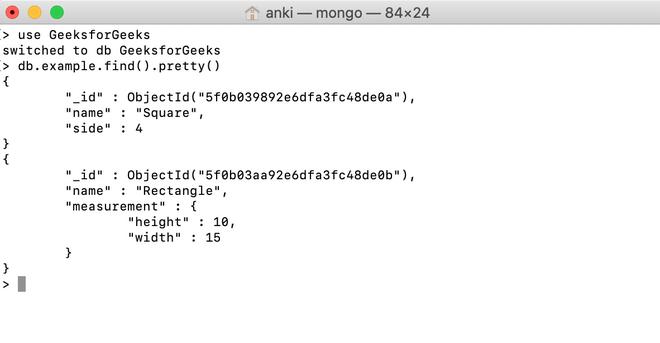
Example 1: Using $cmp to Compare a Field with a Statis Value
In this example, we are comparing the value of the side field with 4 and $cmp operator return 0 which means both values are equal.
Query:
db.example.aggregate([{$match: {name: "Square"}},
... {$project: {result: {$cmp:["$side", 4]}}}])
Output:
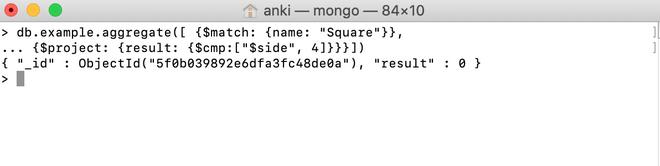
Explanation: Since the side field is 4, $cmp returns 0 as both values are equal
Example 2: Using $cmp Operator in the Embedded Document:
In this example, we are comparing the value of the measurement.height field with the value of the measurement.width field and $cmp operator return -1 which means both values of measurement.height field is less than the value of the measurement.width field.
Query:
db.example.aggregate([{$match: {name: "Rectangle"}},
... {$project: {result:
... {$cmp:["$measurement.height", "$measurement.width"]}}}])
Output:
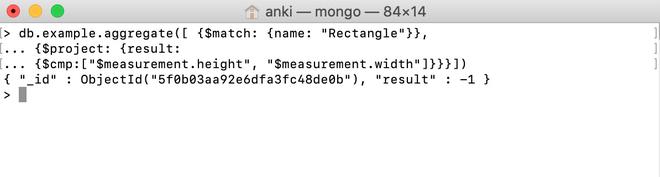
Explanation: Since measurement.height is less than measurement.width, $cmp returns -1
Important Points About MongoDB $cmp Operator
- The $cmp operator is used to compare two values or types and returns the result. It returns -1 if the first value is less than the second, 1 if the first value is greater than the second, and 0 if both values are equal.
- The $cmp operator compares both value and type, using the specified BSON comparison order for values of different types.
- The $cmp operator is used in the aggregation pipeline stages.
Conclusion
The MongoDB $cmp operator offers a straightforward way to compare values within documents, facilitating sorting and conditional operations in aggregation pipelines. Its ability to handle different types and return a numeric result makes it a versatile tool for various comparison needs in MongoDB queries. By mastering $cmp, we can optimize MongoDB queries for data analysis, sorting, and dynamic computations in our applications.
Explore
Introduction
Installation
Basics of MongoDB
MongoDB Methods
Comparison Operators
Logical Operators
Arithmetic Operators
Field Update Operators
Array Expression Operators
Array Update Operators