Simple Contact Form using HTML CSS and PHP
Last Updated :
13 Sep, 2025
A simple contact form is an essential feature for many websites, allowing users to easily reach out. In this guide, we will walk you through creating a contact form using HTML for structure, CSS for styling, and PHP to handle form submissions and send emails, providing an effective communication tool.
What We're Going to Create
- A contact form using HTML to collect the user's name, email, and message.
- CSS styling to make the form visually appealing and user-friendly.
- A PHP script to process the form data, send it via email to the website owner, and display a confirmation.
- A redirect feature to guide the user to another page (e.g.,
last.html) after submitting the form successfully. - Email handling that sends the user input as a formatted message to the specified email address.
Project Preview:
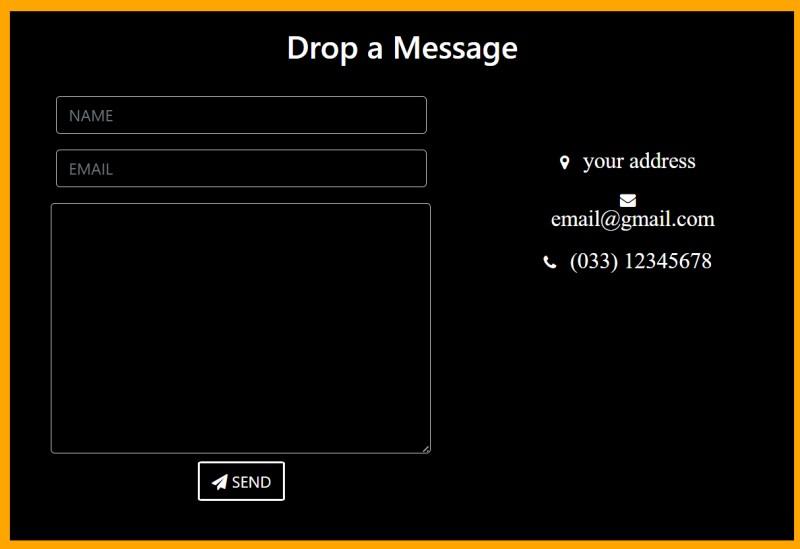 Simple Contact Form using HTML CSS and PHP
index.html
Simple Contact Form using HTML CSS and PHP
index.html
<!DOCTYPE html>
<html>

<head>
    <link rel="stylesheet"
          href=
"https://maxcdn.bootstrapcdn.com/bootstrap/4.4.1/css/bootstrap.min.css" />
    <link rel="stylesheet"
          href=
"https://cdnjs.cloudflare.com/ajax/libs/font-awesome/4.7.0/css/font-awesome.min.css" />
    <link rel="stylesheet"
          href=
"style.css" />
</head>

<body>
    <section id="last">
        <!-- heading -->
        <div class="full">
            <h3>Drop a Message</h3>

            <div class="lt">

                <!-- form starting  -->
                <form class="form-horizontal" method="post"
                      action="contact.php">
                    <div class="form-group">
                        <div class="col-sm-12">
                            <!-- name  -->
                            <input type="text" class="form-control"
                                   id="name" placeholder="NAME"
                                   name="name" value="" />
                        </div>
                    </div>

                    <div class="form-group">
                        <div class="col-sm-12">
                            <!-- email  -->
                            <input type="email" class="form-control"
                                   id="email" placeholder="EMAIL"
                                   name="email"
                                value="" />
                        </div>
                    </div>

                    <!-- message  -->
                    <textarea class="form-control" rows="10"
                              placeholder="MESSAGE" name="message">
            </textarea>

                    <button class="btn btn-primary send-button"
                            id="submit" type="submit" value="SEND">
                        <i class="fa fa-paper-plane"></i>
                        <span class="send-text">SEND</span>
                    </button>
                </form>
                <!-- end of form -->
            </div>

            <!-- Contact information -->
            <div class="rt">
                <ul class="contact-list">
                    <li class="list-item">
                        <i class="fa fa-map-marker fa-1x">
                            <span class="contact-text place">
                                your address
                            </span>
                        </i>
                    </li>

                    <li class="list-item">
                        <i class="fa fa-envelope fa-1x">
                            <span class="contact-text gmail">
                                <a href="mailto:[email protected]"
                                   title="Send me an email">
                                    [email protected]</a>
                            </span>
                        </i>
                    </li>

                    <li class="list-item">
                        <i class="fa fa-phone fa-1x">
                            <span class="contact-text phone">
                                (033) 12345678
                            </span>
                        </i>
                    </li>
                </ul>
            </div>
        </div>
    </section>
</body>
</html>
#last {
    width: 100%;
    height: auto;
    display: flex; /* Corrected for centering content */
    justify-content: center;
    background-color: #ffb3b3;
}

.full {
    width: 80%;
    display: inline-block;
    margin: 2%;
    margin-left: 10%;
    text-align: center;
    background-color: black;
    color: white;
    border: 15px solid orange;
    border-radius: 5px;
    margin-bottom: 8%;
    margin-top: 8%;
}

.full h3 {
    font-size: 2rem;
    display: block;
    margin: 2%;
    margin-bottom: 0;
}

.lt {
    padding: 2%;
    margin: 2%;
}

.rt {
    padding: 2%;
    margin: 2%;
}

.lt textarea {
    width: 94%;
    margin-left: 2.8%;
}

button {
    margin: 2%;
}

.btn-primary {
    background-color: black;
    border: 2px solid white;
    border-radius: 5%; /* Adjusted for a cleaner appearance */
}

.list-item {
    margin-bottom: 2%;
    list-style-type: none;
}

.list-item span {
    margin-left: 10px;
    font-size: 1.4rem;
}

.list-item a {
    color: white;
    display: inline-block;
}

.list-item a:hover {
    text-decoration: underline;
}

.form-control {
    background-color: black;
}

@media screen and (min-width: 770px) {
    .full {
        width: 70%;
        margin-left: 15%;
    }

    .lt textarea {
        width: 95%;
        margin-left: 2.4%;
    }
}

@media screen and (min-width: 1100px) {
    .full {
        width: 65%;
        margin-left: 17%;
        margin-top: 5%;
    }

    .lt {
        width: 55%;
        display: inline-block;
        float: left;
        margin-right: 0;
    }

    .rt {
        width: 35%;
        display: inline-block;
        margin-left: 0;
    }

    .list-item {
        margin-bottom: 10%;
    }

    .contact-list {
        margin-top: 22%;
        padding-right: 8%;
    }

    .fa-envelope, .gmail {
        display: inline-block;
        width: auto;
    }
}
In this code:
To add functionality to the form, we are using php. A separate php file "contact.php" is created and the name of the file is added in the HTML file in the form action field.
<form class="form-horizontal" method="post" action="contact.php">
contact.php
<?php
// Get data from form
$name = $_POST['name'];
$email= $_POST['email'];
$message= $_POST['message'];

$to = "[email protected]";
$subject = "This is the subject line";

// The following text will be sent
// Name = user entered name
// Email = user entered email
// Message = user entered message
$txt ="Name = ". $name . "\r\n  Email = "
    . $email . "\r\n Message =" . $message;

$headers = "From: [email protected]" . "\r\n" .
            "CC: [email protected]";
if($email != NULL) {
    mail($to, $subject, $txt, $headers);
}

// Redirect to
header("Location:last.html");
?>
In this code:
- The script retrieves the
name, email, and message values from the form submission using $_POST. - The recipient's email address (
$to), subject line ($subject), and message content ($txt) are defined. - The message is constructed by concatenating the user's name, email, and message, with line breaks for better readability.
- The
From and CC headers are set to define the sender’s and additional recipients' email addresses. - If the email is not null, the
mail() function sends the email, and then the user is redirected to last.html.
Output:
Explore
Basics
Array
OOPs & Interfaces
MySQL Database
PHP Advance