Appointment Management System using React
Last Updated :
23 Jul, 2025
The Appointment Management System is a web application that allows users to schedule, manage, and view appointments. It provides an easy-to-use interface for clients to book and keep track of appointments. Below is a simplified outline for creating an Appointment Management System using React JS.
Preview of final output: Let us have a look at how the final output will look like.
Prerequisites / Technologies used
Approach to Creating an Appointment Management System
Users can book an appointment and view a list of all appointments. Ability to add, edit, and delete appointments. In this project, I have a state that stores appointment variables like name, date, etc., and when we update the name and date it is responsible for state management.
Steps to create the project
Step 1: Setting Up the React App:
npm create vite@latest appointment-management-system --template react
Step 2: Navigate to the project folder using:
cd appointment-management-system
Step 3: Install dependencies:
npm install
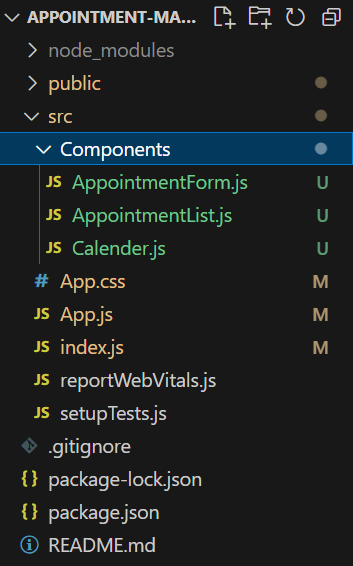
Step 4: Create a folder “Components” and add three new files in it namely AppointmentForm.js, AppointmentList.js and Calender.js.
Project Structure:
Example code:
Write the following code in respective files:
- AppointmentForm.js: Component for adding appointments. Updated to include a calendar for choosing appointment dates.
- AppointmentList.js: Component for displaying a list of appointments.
- App.js: This file imports the appointment components and exports it.
CSS
/*App.css*/

* {
	box-sizing: border-box;
}

input[type=text],
input[type=date],
select,
textarea {
	width: 100%;
	padding: 12px;
	border: 1px solid #ccc;
	border-radius: 4px;
	resize: vertical;
}

label {
	padding: 12px 12px 12px 0;
	display: inline-block;
}

input[type=submit] {
	background-color: #04AA6D;
	color: white;
	padding: 12px 20px;
	border: none;
	border-radius: 4px;
	cursor: pointer;
	float: right;
	margin-top: 2rem;
}

button {
	background-color: #04AA6D;
	color: white;
	padding: 12px 20px;
	border: none;
	border-radius: 4px;
	cursor: pointer;
	margin-top: 1rem;
	margin-right: 1rem;
}

button:hover,
[type=submit]:hover {
	background-color: #45a049;
}

.container {
	width: 60%;
	margin: auto;
	border-radius: 5px;
	background-color: #f2f2f2;
	padding: 20px;
}

h1 {
	text-align: center;
	color: green;
}

.col-25 {
	float: left;
	width: 25%;
	margin-top: 6px;
}

.col-75 {
	float: left;
	width: 75%;
	margin-top: 6px;
}

.row::after {
	content: "";
	display: table;
	clear: both;
}

#list {
	font-family: Arial, Helvetica, sans-serif;
	border-collapse: collapse;
	width: 100%;
}

#list td,
#list th {
	border: 1px solid #ddd;
	padding: 8px;
}

#list tr:nth-child(even) {
	background-color: #f2f2f2;
}

#list tr:hover {
	background-color: #ddd;
}

#list th {
	padding-top: 12px;
	padding-bottom: 12px;
	text-align: left;
	background-color: #04AA6D;
	color: white;
}

@media screen and (max-width: 600px) {

	.col-25,
	.col-75,
	input[type=submit] {
		width: 100%;
		margin-top: 0;
	}
}
// AppointmentForm.js

import React, { useState } from "react";

const AppointmentForm = ({ addAppointment }) => {
	const [name, setName] = useState("");
	const [date, setDate] = useState("");

	const handleSubmit = (e) => {
		e.preventDefault();
		addAppointment({ name, date });
		setName("");
		setDate("");
	};

	return (
		<div class="container">
			<form onSubmit={handleSubmit}>
				<div class="row">
					<div class="col-25">
						<label for="fname">Full Name</label>
					</div>
					<div class="col-75">
						<input
							type="text"
							id="fname"
							name="firstname"
							placeholder="Your name.."
							value={name}
							onChange={(e) => setName(e.target.value)}
						/>
					</div>
				</div>
				<div class="row">
					<div class="col-25">
						<label for="fname">Appointment Date: </label>
					</div>
					<div class="col-75">
						<input
							id="fname"
							name="firstname"
							placeholder="Your name.."
							type="date"
							value={date}
							onChange={(e) => setDate(e.target.value)}
						/>
					</div>
				</div>
				<div class="row">
					<input type="submit" value="Add Appointment" />
				</div>
			</form>
		</div>
	);
};

export default AppointmentForm;
// AppointmentList.js

import React, { useState } from "react";

const AppointmentList = ({
	appointments,
	deleteAppointment,
	editAppointment,
	clearAppointments,
}) => {
	const [editedIndex, setEditedIndex] = useState(null);
	const [editedName, setEditedName] = useState("");
	const [editedDate, setEditedDate] = useState("");

	const handleEdit = (index) => {
		setEditedIndex(index);
		setEditedName(appointments[index].name);
		setEditedDate(appointments[index].date);
	};

	const handleSaveEdit = (index) => {
		editAppointment(index, editedName, editedDate);
		setEditedIndex(null);
		setEditedName("");
	};

	const handleCancelEdit = () => {
		setEditedIndex(null);
		setEditedName("");
	};

	return (
		<div className="container">
			<h1>Appointment List</h1>
			<table id="list">
				<thead>
					<tr>
						<th>ID</th>
						<th>Name</th>
						<th>Date</th>
						<th>Action</th>
					</tr>
				</thead>
				<tbody>
					{appointments.map((appointment, index) => (
						<tr key={index}>
							<td>{index + 1}</td>
							<td>
								{editedIndex === index ? (
									<input
										type="text"
										value={editedName}
										onChange={(e) =>
											setEditedName(e.target.value)
										}
									/>
								) : (
									appointment.name
								)}
							</td>
							<td>
								{editedIndex === index ? (
									<input
										type="date"
										value={editedDate}
										onChange={(e) =>
											setEditedDate(e.target.value)
										}
									/>
								) : (
									appointment.date
								)}
							</td>
							<td>
								{editedIndex === index ? (
									<>
										<button
											onClick={() =>
												handleSaveEdit(index)
											}
										>
											Save
										</button>
										<button onClick={handleCancelEdit}>
											Cancel
										</button>
									</>
								) : (
									<>
										<button
											onClick={() => handleEdit(index)}
										>
											Edit
										</button>
										<button
											onClick={() =>
												deleteAppointment(index)
											}
										>
											Delete
										</button>
									</>
								)}
							</td>
						</tr>
					))}
				</tbody>
			</table>
			<button onClick={clearAppointments}>Clear All Appointments</button>
		</div>
	);
};

export default AppointmentList;
// App.js

import React, { useState } from "react";
import "./App.css";
import AppointmentForm from "./Components/AppointmentForm";
import AppointmentList from "./Components/AppointmentList";

const App = () => {
	const [appointments, setAppointments] = useState([]);

	const addAppointment = (appointment) => {
		setAppointments([...appointments, appointment]);
	};

	const deleteAppointment = (index) => {
		const deletedAppointments = [...appointments];
		deletedAppointments.splice(index, 1);
		setAppointments(deletedAppointments);
	};

	const editAppointment = (index, editedName, editedDate) => {
		const updatedAppointments = [...appointments];
		updatedAppointments[index] = {
			name: editedName,
			date: editedDate,
		};
		setAppointments(updatedAppointments);
	};

	const clearAppointments = () => {
		setAppointments([]);
	};

	return (
		<div>
			<h1>Appointment Management System</h1>
			<AppointmentForm addAppointment={addAppointment} />
			<AppointmentList
				appointments={appointments}
				deleteAppointment={deleteAppointment}
				clearAppointments={clearAppointments}
				editAppointment={editAppointment}
			/>
		</div>
	);
};

export default App;
Steps to run the application:
Step 1: Type the following command in terminal.
npm run dev
Step 2: Open web-browser and type the following URL
http://localhost:5173/
Output:
Appointment Management System using React
Explore
React Fundamentals
Components in React
React Hooks
Routing in React
Advanced React Concepts
React Projects