News App using React JS uses React's basic principles to fetch the latest news from a News API and show them to users based on their interests. It's a simple project to create an interactive and personalized news-viewing experience.
Preview of final output: Let us have a look at how the final output will look like.
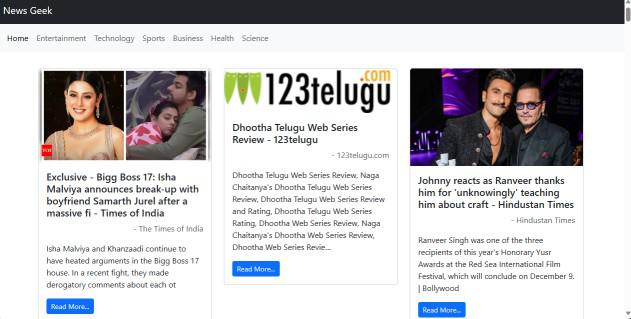 Preview Image
Prerequisites:
Approach:
- Integrate a free third-party news API (e.g., NewsAPI) into the News App to access up-to-date news content. Obtain an API key for authentication.
- Fetch news data from the API using fetch or a similar method. Log the data to the console to ensure successful retrieval.
- Create React components (e.g., NewsList, NewsItem) to organize the display of news content within the app.
- Implment rendering logic in the components to display relevant information from the API response, such as headlines, descriptions, and publication details.
- Enable a filter functionality to allow users to customize their news feed based on interests. Query the API with user preferences to fetch filtered news.
- Implement an infinite scroll feature to enhance user experience. Load additional news content as the user scrolls down, providing a seamless and continuous browsing experience.
Steps to Create the News App:
Step 1: Set up React Project using the Command:
npm create vite@latest <name-of-project> --template react
Step 2: Navigate to the Project folder using:
cd <name of project>
Step 3: Install dependencies:
npm install
Project Structure:
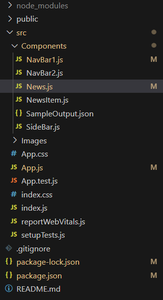 Project Structure
The updated dependencies in package.json file will look like:
"dependencies": {
  "react": "^18.2.0",
  "react-dom": "^18.2.0",
  "vite": "^4.0.0",
  "axios": "^0.27.2"
}
Example: Create folders "Components" and paste the given code in respective files
JavaScript
// App.js
import React from "react";
import NavBar2 from "./Components/NavBar2";
import NavBar1 from "./Components/NavBar1";
import News from "./Components/News";
import { BrowserRouter, Route, Routes }
	from "react-router-dom";

function App() {
	return (
		<>
			<div className="App">
				<BrowserRouter>
					<NavBar1 />
					<NavBar2 />

					<div className="container">
						<div className="row">
							<div className="col-md">
								<Routes>
									<Route
										path="/"
										element={
											<News key="general"
											category="general" />}
									/>
									<Route
										path="/Entertainment"
										element={
											<News key="entertainment"
											category="entertainment" />
										}
									/>
									<Route
										path="/Technology"
										element={
											<News key="technology"
											category="technology" />}
									/>
									<Route
										path="/Sports"
										element={
											<News key="sports"
											category="sports" />}
									/>
									<Route
										path="/Business"
										element={
											<News key="business"
											category="business" />}
									/>
									<Route
										path="/Health"
										element={
											<News key="health"
											category="health" />}
									/>
									<Route
										path="/Science"
										element={
											<News key="science"
											category="science" />}
									/>
								</Routes>
							</div>
						</div>
					</div>
				</BrowserRouter>
			</div>
		</>
	);
}

export default App;
// Components/NavBar1.js
import React from "react";

function NavBar1() {
	return (
		<div>
			<nav className="navbar navbar-dark bg-dark">
				<div className="container-fluid">
					<a className="navbar-brand " href="/">
						News Geek
					</a>
				</div>
			</nav>
		</div>
	);
}

export default NavBar1;
// Components/NavBar2.js

import React from "react";
import { Link } from "react-router-dom";

function NavBar2() {
	return (
		<div>
			<nav className="navbar navbar-expand-lg
				bg-body-tertiary">
				<div className="container-fluid ">
					<button
						className="navbar-toggler"
						type="button"
						data-bs-toggle="collapse"
						data-bs-target="#navbarNav"
						aria-controls="navbarNav"
						aria-expanded="false"
						aria-label="Toggle navigation"
					>
						<span className="navbar-toggler-icon"></span>
					</button>
					<div className="collapse navbar-collapse"
						id="navbarNav">
						<ul className="navbar-nav">
							<li className="nav-item">
								<Link className="nav-link active"
									aria-current="page" to={`/`}>
									Home
								</Link>
							</li>
							<li className="nav-item">
								<Link className="nav-link" to={`/Entertainment`}>
									Entertainment
								</Link>
							</li>
							<li className="nav-item">
								<Link className="nav-link" to={`/Technology`}>
									Technology
								</Link>
							</li>
							<li className="nav-item">
								<Link className="nav-link" to={`/Sports`}>
									Sports
								</Link>
							</li>
							<li className="nav-item">
								<Link className="nav-link" to={`/Business`}>
									Business
								</Link>
							</li>
							<li className="nav-item">
								<Link className="nav-link" to={`/Health`}>
									Health
								</Link>
							</li>
							<li className="nav-item">
								<Link className="nav-link" to={`/Science`}>
									Science
								</Link>
							</li>
						</ul>
					</div>
				</div>
			</nav>
		</div>
	);
}

export default NavBar2;
// Components/News.js

import { React, useState, useEffect } from "react";
import NewsItem from "./NewsItem";
import Image from "../Images/News1.jpg";
import InfiniteScroll
	from "react-infinite-scroll-component";

function News(props) {
	let category = props.category;
	let [articles, setArticles] = useState([]);
	let [totalResults, setTotalResults] = useState(0);
	let [page, setPage] = useState(1);

	let resultNews = async () => {
		const url =
`https://newsapi.org/v2/top-headlines?country=in&category=$%7Bcategory%7D&page=$%7Bpage%7D&apiKey=ecfaf9eaaa8d40a5b5d769210f5ee616%60;
		let data = await fetch(url);
		let parsedData = await data.json();
		setArticles(parsedData.articles);
		setTotalResults(parsedData.totalResults);
	};

	useEffect(() => {
		resultNews();
	}, []);

	let fetchData = async () => {
		const url =
`https://newsapi.org/v2/top-headlines?country=in&category=$%7Bcategory%7D&page=$%7Bpage + 1
			}&apiKey=ecfaf9eaaa8d40a5b5d769210f5ee616`;
		setPage(page + 1);
		let data = await fetch(url);
		let parsedData = await data.json();
		setArticles(articles.concat(parsedData.articles));
	};

	return (
		<InfiniteScroll
			//This is important field to render the next data
			dataLength={articles.length}
			next={fetchData}
			hasMore={
				articles.length < totalResults
			}
			loader={
				<h4 className="text-center">
					Loading...
				</h4>}
			endMessage={
				<p style={{ textAlign: "center" }}>
					<b>Yay! You have seen it all</b>
				</p>
			}
		>
			<div className="container my-3">
				<div className="row">
					{articles.map((element) => {
						return (
							<div className="col-md-4" key={element.url}>
								<NewsItem
									sourceName={element.source.name}
									title={element.title}
									desc={element.description}
									imageURL=
									{element.urlToImage ?
										element.urlToImage :
										Image}
									newsUrl={element.url}
								/>
							</div>
						);
					})}
				</div>
			</div>
		</InfiniteScroll>
	);
}

export default News;
// Components/NewsItem.js

import React from "react";

function NewsItem(props) {
	let {
		desc, title, imageURL,
		newsUrl, sourceName
	} = props;
	return (
		<div>
			<div className="card my-3">
				<img src={imageURL}
					className="card-img-top" alt="..." />
				<div className="card-body">
					<h5 className="card-title">{title}</h5>
					<p className="w-100 fs-6
						text-body-secondary
						text-end">
						- {sourceName}
					</p>
					<p className="card-text">{desc}</p>
					<a href={newsUrl}
						target="_blank"
						className="btn btn-primary btn-sm">
						Read More...
					</a>
				</div>
			</div>
		</div>
	);
}

export default NewsItem;
Steps to Run the Application:
Step 1: Type the following Command in terminal:
npm run dev
Output
Explore
React Fundamentals
Components in React
React Hooks
Routing in React
Advanced React Concepts
React Projects