Next.js is a React-based framework for building fast, scalable, and SEO-friendly web applications. It provides modern features for both frontend and backend development, making it suitable for small projects to enterprise-grade applications.
- Built on React, enabling component-driven UI development.
- Supports Server-Side Rendering (SSR) and Static Site Generation (SSG) for improved performance and SEO(Search Engine Optimization).
- Offers automatic code splitting, bundling, and asset optimization.
- Provides API routes for backend integration within the same project.
- Supports full-stack development with optimized builds and deployment-ready features.
- Integrates with Webpack and Babel for modern JavaScript features and efficient builds.
Next.js Basic Interview Questions
1. How Next.js Works?
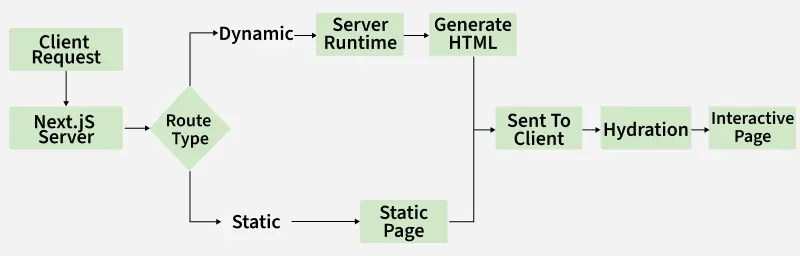
Next.js works as a React framework that handles rendering, routing, and optimization automatically, making web apps faster and SEO-friendly.
- Pre-rendering: Pages can be rendered on the server (SSR) or per-rendered at build time (SSG) for faster load and better SEO.
- Routing: File-based routing automatically maps pages to URLs.
- API Routes: Allows backend functionality within the application. Each file inside
pages/api/ automatically becomes an API endpoint. - Automatic Code Splitting: Loads only the necessary JavaScript for each page, improving performance.
- Optimized Builds: Bundling, minification, and image optimization happen out-of-the-box.
- Easy Deployment: Supports multiple deployment options like static site hosting and serverless functions, simplifying the release process.
This enables developers to build full-stack, production-ready applications with minimal configuration.
2. What are API Routes?
Next.js lets you create backend endpoints inside your project without setting up a separate server (like Express or Django).
- By placing files within the /pages/api directory (for the Pages Router) or /app/api directory (for the App Router), each file automatically becomes an API endpoint.
- These files contain server-side code that can handle various HTTP methods (GET, POST, PUT, DELETE, etc.) and perform tasks like fetching data, interacting with databases, or handling form submissions.
- When deployed to platforms like Vercel, these API routes are often treated as serverless functions, meaning they scale automatically and only run in response to requests.
3. What do you mean by SSR?
SSR stands for Server-Side Rendering, a technique where the server generates the full HTML of a page before sending it to the client. Key points:
- Request from Client: The user requests a web page from the server.
- Server-Side Processing: The server executes the JavaScript code, fetches data if needed, and renders the complete HTML.
- Sending Rendered HTML to Client: The fully rendered HTML, along with necessary CSS and JavaScript, is sent to the browser.
- Client-Side Hydration: Once the HTML is received, JavaScript runs to enable interactive elements on the client.
4. How does Next.js handle client-side navigation?
Next.js uses a client-side navigation approach that leverages the HTML5 History API. This enables smooth transitions between pages on the client side without a full page reload. The framework provides a built-in Link component that facilitates client-side navigation, and it supports both traditional anchor (<a>) tags and programmatically navigating through the next/router module.
Here's an overview of how Next.js handles client-side navigation:
Link Component:
- The
Link component is a core part of client-side navigation in Next.js. It is used to create links between pages in your application. - Using the
Link component, when users click the link, Next.js intercepts the navigation event and fetches the necessary resources for the new page without triggering a full page reload.
JavaScript
import Link from 'next/link';

const MyComponent = () => (
    <Link href="/another-page">
        <a>Go to another page</a>
    </Link>
);
Programmatic Navigation:
- In addition to using the
Link component, Next.js provides a useRouter hook and a router object to allow for programmatic navigation. This is useful when you want to navigate based on user interactions or in response to certain events.
JavaScript
import { useRouter }
    from 'next/router';

const MyComponent = () => {
    const router = useRouter();
    const handleClick = () => {
        router.push('/another-page');
    };

    return (
        <button onClick={handleClick}>
            Go to another page
        </button>
    );
};
5. Explain the concept of dynamic routing in Next.js:
Dynamic routing in Next.js allows developers to create routes with dynamic parameters, enabling pages to handle different data or content based on these parameters. Key points:
- A single page template can serve multiple routes by dynamically generating content.
- Reduces the need to create separate pages for each variation.
- Useful for applications like blogs, e-commerce sites, or user profiles where content changes based on parameters.
6. What is meant by Styled JSX in Next.js?
Styled JSX is a CSS-in-JS library used in Next.js to create encapsulated and scoped styles for components. Key points:
- Styles applied to a component do not affect other components.
- Allows seamless addition, modification, or removal of styles without impacting unrelated parts of the application.
- Ensures predictable and maintainable styling for Next.js components.
7. Difference between the pre-rendering types available in Next.js.
Static Generation (SG) | Server-Side Rendering (SSR) |
|---|
HTML is pre-generated at build time. | HTML is generated on each request. |
The pre-generated HTML can be reused on every request. | HTML is generated anew for each request. |
Recommended for performance and efficiency. | Suitable for cases where content changes frequently or cannot be determined at build time. |
Export the page component or use 'getStaticProps' | Export 'getServerSideProps' |
Less dependent on server resources during runtime. | Depends on server resources for generating content dynamically. |
Typically faster as HTML is pre-generated. | Can introduce higher server load due to on-the-fly HTML generation. |
Easily cache static HTML. | Requires server-side caching mechanisms. |
Scales well as static content can be served efficiently. | May require additional server resources to handle dynamic content generation. |
8. What is client-side rendering, and how does it differ from server-side rendering?
Client-side rendering (CSR) renders web pages in the browser using JavaScript after the initial HTML, CSS, and JavaScript are delivered from the server. Key points:
- Server-Side Rendering (SSR): Sends a fully rendered HTML page from the server to the browser.
- Client-Side Rendering (CSR): Sends an initially minimal HTML page, which is then populated and rendered using JavaScript in the browser.
- CSR may result in slower initial page load compared to SSR but allows for highly interactive client-side applications.
9. How do you pass data between pages in a Next.js application?
There are multiple ways to pass data between pages:
- URL Query Parameters: Send data through the URL and access it via the
useRouter hook. - Router API: Use Next.js routing to programmatically navigate and pass state.
- State Management Libraries: Use tools like Redux or React Context to share data across pages.
- Server-Side Data Fetching: Use
getServerSideProps to fetch data on the server and pass it as props to the page component.
10. What is the difference between Next.js and React JS?
Next.js | React |
|---|
The Next.js framework was developed by Vercel. | The React front-end library was originated by Facebook. |
Next.js, an open-source framework based on Node.js and Babel, seamlessly integrates with React to facilitate the development of single-page apps. | React, a JavaScript library, empowers the construction of user interfaces through the assembly of components. |
Supports SSR and Static Site Generation (SSG) | Primarily client-side rendering (CSR) |
Built-in features like Image Optimization, SSR, and automatic static optimization | No out-of-the-box performance optimizations |
Enhanced by SSR and SSG for better SEO and faster load times | Requires extra configuration for SEO optimization |
11. What is the purpose of the public folder in Next.js? How do you serve static files like images, fonts, and icons?
The public folder stores static assets that are served directly to the browser without processing. It’s ideal for images, fonts, icons, and other static files.
Example:
JavaScript
// File: public/logo.png
// Usage in pages/index.js
export default function HomePage() {
  return (
    <div>
      <img src="/logo.png" alt="Logo" />
    </div>
  );
}
In this Example:
- The browser can access
/logo.png directly via its URL. - You don’t need to import static files into components.
- This approach keeps static file handling simple and efficient, ensuring assets are served quickly without extra build steps.
12. How do you add meta tags and titles to pages in Next.js using the Head component? Why is this important for SEO?
The Head component from next/head is used to add meta tags, titles, and other head elements to a page. This allows each page to have custom SEO attributes.
Example:
JavaScript
import Head from "next/head";

export default function HomePage() {
  return (
    <>
      <Head>
        <title>My Next.js App</title>
        <meta name="description" content="This is a sample Next.js application with SEO-friendly meta tags." />
        <meta name="keywords" content="Next.js, SEO, React" />
      </Head>
      <h1>Welcome to My Next.js App</h1>
    </>
  );
}
Importance for SEO:
- Helps search engines understand the page content.
- Improves search ranking and click-through rates.
- Influences how pages appear when shared on social media.
- Provides better accessibility and structured data for crawlers.
13. What is Hot Module Replacement (HMR) in Next.js, and how does it improve the development experience?
Hot Module Replacement (HMR) is a feature in Next.js that updates modules in a running application without requiring a full page reload. Key Points:
- HMR injects updated modules directly into the running app.
- Keeps the application state intact, avoiding data or scroll loss.
- Provides instant feedback for UI and logic changes.
- Speeds up development, debugging, and testing without restarting the server.
14. What is the difference between layouts and templates in Next.js App Router?
App Router, layouts and templates are used to structure pages, but they serve different purposes:
Layouts:
- Persist across nested routes.
- Maintain state and components (like headers, sidebars) while navigating between pages.
- Useful for shared UI that should not reset on route changes.
Templates:
- Do not preserve state between navigations.
- Render fresh UI for each page visit, even if nested under the same layout.
- Useful when the page should reset components or state on every render.
15.How do you deploy a Next.js application?
Next.js applications can be deployed on multiple platforms depending on the rendering strategy and hosting preferences.
- Vercel : Native platform for Next.js, supporting SSR, SSG, and API routes out-of-the-box.
- Static Export: Use
next build and next export to generate static HTML for hosting on static site providers (Netlify, GitHub Pages). - Custom Node.js Server: Deploy with
next start on servers like AWS, DigitalOcean, or Heroku. - Docker: Containerize the app for deployment on Kubernetes, AWS ECS, or other container platforms.
- Environment Variables: Set proper environment variables for production (API keys, database URLs).
- CDN & Caching: Use CDNs to improve global performance for static assets.
16. What is the difference between getServerSideProps & getStaticProps functions in Next.js?
getServerSideProps
| getStaticProps
|
|---|
Executes on every request. | Executes at build time. |
Used for server-side rendering (SSR). | Used for static site generation (SSG). |
Suitable for pages with frequently changing or dynamic content. | Ideal for pages with relatively static content that can be determined at build time. |
Fetches data on every request, allowing for real-time updates. | Fetches data at build time, so the data is static until the next build. |
Receives a context object containing information about the request. | Also receives a context object, but primarily used for dynamic parameters. |
Handles errors during each request. | Errors during data fetching result in a build-time error. |
Returns an object with a props key. | Returns an object with a props key, but may also include a revalidate key for incremental static regeneration. |
Tends to be slower due to on-the-fly data fetching on each request. | Generally faster as data is fetched at build time, reducing server load. |
17. What is the purpose of the getStaticPaths function in Next.js?
The 'getStaticPaths' function is used to generate dynamic routes for pages with dynamic data. Key points:
- Runs at build time to create a list of possible dynamic values.
- The generated paths are used to pre-render static pages for each dynamic value.
- Commonly used with
getStaticProps to fetch data for each dynamic route.
18. What is the purpose of the useEffect hook in React, and how does it relate to Next.js?
In Next.js, the useEffect hook is used to perform side effects in functional components, such as fetching data, updating the DOM, or subscribing to events. Key points in Next.js:
- Can be used for client-side data fetching using
fetch or libraries like Axios or SWR. - Runs after the component renders, making it suitable for actions that should happen on the client side.
- Complements Next.js data fetching methods like
getServerSideProps and getStaticProps for client-side logic.
19. What do you understand by code splitting in Next.js?
Code splitting stands out as one of the most compelling features provided by webpack. This functionality allows us to divide our code into multiple bundles, which can be loaded either on-demand or in parallel. Its primary purpose is to create smaller bundles and enables us to manage the prioritization of resource loading, ultimately contributing significantly to improved load times.
There are mainly three approaches to code splitting:
- Entry Points: Employed for manual code splitting by configuring entry points.
- Avoiding Redundancy: Utilizes entry dependencies or the SplitChunksPlugin to deduplicate and divide chunks.
- Dynamic Imports: Achieves code splitting through inline function calls within modules.
Its primary purpose is to facilitate the creation of pages that never load unnecessary code.
20. How do you handle data fetching in Next.js?
Data retrieval from an external API or database can be achieved using the built-in functions, namely, `getStaticProps` or `getServerSideProps`. The `getStaticProps` function fetches data during the build process and provides it as props to the page, whereas `getServerSideProps` fetches data for each incoming request. Alternatively, client-side data fetching libraries such as `axios` or `fetch` can also be employed in conjunction with the `useEffect` or `useState` hooks.
21. What are the different options for styling Next.js apps?
Next.js provides multiple ways to style applications, each with its own use case:
- CSS Modules: Enable modular CSS that applies only to specific components, preventing naming conflicts and keeping styles organized.
- CSS-in-JS Libraries: Libraries like styled-components or emotion allow writing CSS directly within JavaScript, integrating styles with component logic.
- Global CSS Files: Apply styles that affect the entire application.
When choosing a styling approach, consider performance, maintainability, and developer familiarity with the method.
22. How do you work with custom server middleware in Next.js?
Custom server middleware is added by creating a Node.js server. Key points:
- Middleware functions are added using the
app.use method in a server.js file located at the root of the application. - Middleware can modify incoming requests and outgoing responses.
- Enables custom logic such as authentication, logging, or API request handling before reaching Next.js pages or API routes.
23. Explain the purpose of the _app.js file in Next JS.
The _app.js file is the main component for a Next.js application and allows overriding the default App component. Key points:
- Enables customization of application-wide behavior across all pages.
- Commonly used for adding global styles, persisting layout components, or initializing third-party libraries.
- Ensures consistent functionality and layout throughout the application.
24. How would you implement server-side rendering (SSR) for a Next JS page?
JavaScript
import React from 'react';

const PageAbout =
    ({ dataFromServer }) => {
        return <div>
            {dataFromServer}
        </div>;
    };

export async function getServerSideProps() {
    const dataFromServer = 'Server-rendered data for this page';

    return {
        props: {
            dataFromServer,
        },
    };
}

export default PageAbout;
25. Explain the concept of "Serverless" deployment in the context of Next JS. How does it work, and what are the advantages?
Serverless deployment means hosting your Next.js app without managing dedicated servers. Instead, your code runs in lightweight, on-demand functions (lambdas) provided by platforms like Vercel, Netlify, or AWS Lambda. Each API route or server-side rendering (SSR) request is handled by an isolated function that scales automatically.
How It Works
- Static Pages (SSG/ISR): Pre-rendered at build time or updated incrementally and served via CDN.
- Dynamic Pages (SSR): Rendered using serverless functions that run only when requested.
- API Routes: Mapped to serverless functions, executing on demand.
Advantages
- Auto-Scaling: Functions scale instantly based on traffic.
- Cost-Efficient: Pay only for execution time, not idle servers.
- Reduced Ops Burden: No server management or maintenance.
- Global Performance: Deployed across edge networks for faster delivery.
26. What are some best practices for debugging and testing Next JS applications?
Debugging and testing are crucial to ensure a Next.js application works correctly and efficiently. Following best practices helps catch issues early and maintain reliable code.
- Use browser developer tools to inspect UI, network requests, and performance.
- Add console logs or use a debugger to trace code execution.
- Write unit tests with Jest and test components with React Testing Library.
- Perform end-to-end testing using Cypress or Playwright.
- Use ESLint and TypeScript to detect errors during development.
- Integrate tests into CI/CD pipelines to automate quality checks.
- Keep tests simple, focused, and close to the code they cover.
27. Why use Create Next App?
create-next-app allows you to swiftly initiate a new Next.js application. Officially maintained by the creators of Next.js, it offers several advantages:
- Interactive Setup: Executing `npx create-next-app@latest` (with no arguments) initiates an interactive experience that guides you through the project setup process.
- Dependency-Free: Project initialization is remarkably fast, taking just a second, as Create Next App comes with zero dependencies.
- Offline Capabilities: Create Next App can automatically detect offline status and bootstrap your project using the local package cache.
- Example Support: It can initialize your application with an example from the Next.js examples collection (e.g., `npx create-next-app --example api-routes`).
- Thorough Testing: As part of the Next.js monorepo, this package undergoes testing with the same integration test suite as Next.js itself. This ensures consistent and expected behavior with every release.
28. What is Image Component and Image Optimization in Next.js?
The Next.js Image component, next/image, represents a modern evolution of the HTML <img> element with built-in performance enhancements tailored for the contemporary web.
- Enhanced Performance: Ensures the delivery of appropriately sized images for each device, utilizing modern image formats.
- Visual Stability: Automatically mitigates Cumulative Layout Shift issues to enhance visual stability.
- Expedited Page Loads: Images are loaded dynamically when they come into the viewport, and optional blur-up placeholders can be employed for faster page rendering.
- Asset Flexibility: Supports on-demand image resizing, even for images stored on remote servers, providing flexibility in handling assets.
29. What is Environment Variables in Next.js?
Next.js is equipped with native support for managing environment variables, providing the following capabilities:
- Utilize .env.local for loading environment variables.
- Expose environment variables to the browser by prefixing them with NEXT_PUBLIC_.
- Default Environment Variables: Typically, only one .env.local file is required. However, there may be instances where you want to establish defaults specifically for the development (next dev) or production (next start) environment.
- Next.js enables you to define defaults in .env (applicable to all environments), .env.development (specific to the development environment), and .env.production (specific to the production environment).
- It's important to note that .env.local always takes precedence over any defaults that are set.
30. What is Docker Image in Next.js?
Next.js is deployable on hosting providers that offer support for Docker containers. This approach is applicable when deploying to container orchestrators like Kubernetes or HashiCorp Nomad, or when operating within a single node on any cloud provider.
To implement this deployment method:
- Install Docker on your machine.
- Clone the example named with-docker.
- Build your container using the command:
docker build -t Next.js-docker. - Run your container with the command:
docker run -p 3000:3000 Next.js-docker
Next.js Intermediate Interview Questions
31. How can you fetch data in Next.js and when to use each method?
Next.js provides multiple ways to fetch data, depending on whether you need it at build time, request time, or on the client side. Choosing the right method improves performance, user experience, and SEO.
- getStaticProps fetches data at build time. It is ideal for pages that don’t change often, such as blog posts or marketing pages.
- getStaticPaths works with dynamic routes to pre-render pages at build time. It is useful for generating multiple pages, for example,
/blog/[id]. - getServerSideProps fetches data on every request. It is suitable for pages that require fresh data for each user, such as dashboards or user-specific content.
- Client-side fetching uses hooks like
useEffect along with fetch, SWR, or React Query to fetch data after the page loads in the browser. This method is useful for interactive or real-time content, such as comments sections or live updates.
Prefetching in Next.js automatically downloads JavaScript and assets for linked pages in the background.
- It happens before the user actually clicks the link, reducing page load time.
- Enhances user experience by making navigation smoother and faster.
- Prefetching is enabled by default for
<Link> components in production builds. - Helps improve perceived performance, especially for large or multi-page applications.
33. Can you explain how to internationalize a Next.js application to support multiple languages?
Next.js supports internationalization (i18n) using libraries like next-i18next or custom solutions.
- Language-based routing allows URLs to reflect the selected language (e.g.,
/en, /fr). - Users can switch languages seamlessly using a language selector or automatic detection.
- Proper i18n ensures your application is accessible and user-friendly for a global audience.
34. How can you handle cross-origin requests (CORS) in a Next.js application when making API requests to a different domain?
CORS is controlled by the server or API endpoint receiving the request.
- The server must set appropriate CORS headers to allow requests from your Next.js domain.
- You can use serverless functions in Next.js as a proxy to handle API requests and set CORS headers.
- Proper CORS handling ensures secure communication between your app and external APIs.
35. What is serverless architecture, and how does it relate to Next.js?
Serverless architecture is a cloud computing model where the provider manages infrastructure and automatically scales resources based on demand.
- With Next.js, you can deploy applications to serverless platforms like Vercel, AWS Lambda, or Google Cloud Functions.
- Each API route or server-side rendered page can run as an isolated serverless function on demand.
- This approach ensures efficient resource utilization and automatic scaling with varying workloads.
- Serverless deployment reduces operational overhead as you don’t need to manage traditional servers.
Optimizing the performance of a Next.js application involves various strategies such as:
- Use code splitting and dynamic imports to load only the necessary code for each page.
- Implement lazy loading for components and images to reduce initial load time.
- Optimize images using the built-in Next.js Image component.
- Apply server-side caching for SSR/SSG pages to reduce repeated computations.
- Use CDN caching for static assets to deliver content faster globally.
- Monitor performance with tools like Lighthouse, WebPageTest, or Next.js Analytics.
37. Explain the purpose of the getServerSideProps function.
The getServerSideProps function in Next.js plays a crucial role in enabling server-side rendering (SSR) for dynamic pages. It allows pages to fetch data on the server during each request, ensuring that content is always fresh and up-to-date. Key points:
- Runs on the server every time a page is requested.
- Fetches data dynamically from APIs, databases, or external sources.
- Pre-renders the page with the most current information for every request.
- Ideal for content that changes frequently or relies on real-time data.
- Improves SEO by sending fully rendered pages to search engines.
- Provides a real-time experience for users by ensuring fresh content.
38. What is the purpose of the next.config.js excludes property?
The excludes property in the next.config.js file is used to specify patterns for files and directories that should be excluded from the automatic code splitting and bundling performed by Next.js. By defining exclusion patterns, developers can control which files are not subject to the default behavior of code splitting.
Here's an example of how the excludes property can be used in next.config.js:
JavaScript
// next.config.js
module.exports = {
  excludes: ['/path/to/excluded/file.js', /\/node_modules\//],
  // other configurations...
}
The headers property in the next.config.js file is used to define custom HTTP headers that should be included in the responses served by your Next.js application. This property allows developers to set various HTTP headers, such as caching policies, security-related headers, and other custom headers, to control how browsers and clients interact with the application.
Here's an example of how the headers property can be used:
JavaScript
// next.config.js
module.exports = {
    async headers() {
        return [
            {
                source: '/path/:slug',
                headers: [
                    {
                        key: 'Custom-Header',
                        value: 'Custom-Header-Value',
                    },
                    {
                        key: 'Cache-Control',
                        value: 'public, max-age=3600',
                    },
                ],
            },
        ]
    },
    // other configurations...
}
40. What is the purpose of the next.config.js experimental property?
The experimental property in next.config.js serves two main purposes in Next.js:
Accessing and enabling pre-release features:
- Next.js constantly innovates and introduces new features before being officially released. The
experimental property provides a safe space to access and experiment with these features before they become stable and widely available. - You can configure specific flags or options under the
experimental property to activate these pre-release features in your app. This allows you to test them out, provide feedback, and shape their development before public release.
Fine-tuning advanced capabilities:
- Beyond pre-release features, the
experimental property also offers access to specific configurations aimed at experienced developers who want to further customize and optimize their Next.js applications. - These configurations might involve low-level optimizations, alternative build mechanisms, or deeper control over internal Next.js behavior. While powerful, they demand a thorough understanding of their impact and potential caveats.
Optimizing a large-scale Next.js application involves multiple strategies across rendering, code management, and asset delivery. Key Points:
- Code Splitting and Dynamic Imports: Load only the required code for each page.
- Lazy Loading Images and Components: Defer loading non-critical elements until they enter the viewport.
- Server-Side and Static Rendering: Use
getStaticProps, getServerSideProps, or Incremental Static Regeneration (ISR) where appropriate. - Caching and CDN: Cache static assets and API responses, and serve them via a CDN.
- Monitoring and Profiling: Use tools like Lighthouse, WebPageTest, or Next.js Analytics to identify performance bottlenecks.
42. What is the difference between redirects and rewrites in Next.js, and when would you use each?
Redirects and rewrites in Next.js are used to control how URLs behave, but they function differently.
Redirects: Change the URL in the browser. They are used for permanent (301) or temporary (302) moves.
Example:
JavaScript
module.exports = {
  async redirects() {
    return [
      {
        source: '/old-blog',
        destination: '/new-blog',
        permanent: true,
      },
    ];
  },
};
In this example, When a user visits /old-blog, the browser URL changes to /new-blog, and search engines update their links accordingly.
Rewrites: Keep the URL in the browser unchanged. They internally map a URL to a different page or API route.
Example:
JavaScript
module.exports = {
  async rewrites() {
    return [
      {
        source: '/about',
        destination: '/info',
      },
    ];
  },
};
In this example, When a user visits /about, the browser still shows /about, but Next.js internally renders content from /info. This is useful for clean URLs or proxying API requests.
43. How can you achieve dynamic route-based code splitting without using getServerSideProps in Next.js?
Here are effective ways to achieve dynamic route-based code splitting in Next.js without relying on getServerSideProps:
Dynamic Imports with next/dynamic:
- Utilize
next/dynamic to wrap components that you want to load lazily based on route parameters or other conditions. - When the wrapped component is required for rendering, Next.js automatically fetches its code and dependencies in a separate chunk, reducing initial load time.
JavaScript
import dynamic from 'next/dynamic';

const BlogPost = dynamic(() => import('../components/BlogPost'), {
    loading: () => <p>Loading post...</p>,
});

function BlogPage({ postId }) {
    // ...fetch post data...

    return <BlogPost post={postData} />;
}

export default BlogPage;
Client-Side Rendering (CSR) with Router:
- Employ Next.js's
router object within a client-side rendered component to handle navigation and dynamic route loading. - When a user navigates to a route that hasn't been loaded yet, the JavaScript code for that route is fetched and executed on the client-side.
JavaScript
import { useRouter } from 'next/router';

function BlogPage() {
    const router = useRouter();
    const { postId } = router.query;

    // ...fetch post data based on postId...

    return <div>...</div>;
}

export default BlogPage;
44. Describe scenarios where you would choose to use getStaticProps over getServerSideProps, and vice versa.
Choosing between getStaticProps and getServerSideProps depends on several factors in your Next.js application. Here's a breakdown of scenarios where each method shines:
Choose getStaticProps when:
- Content is static and rarely changes: Pre-rendering pages at build time with
getStaticProps delivers lightning-fast performance and optimal SEO, as search engines can readily crawl and index the content. - Scalability and cost-effectiveness: Since page generation happens at build time, no server requests are needed on every visit, improving server performance and reducing costs.
- Improved user experience: Pages load instantly as they’re already pre-rendered, leading to a smooth and responsive user experience, especially for initial visits.
Choose getServerSideProps when:
- Dynamic content that frequently updates: Use
getServerSideProps to fetch data and pre-render pages at request time when content changes frequently, like news articles, stock prices, or personalized user data. - User authentication and personalization: Access user-specific data like shopping carts or logged-in states, personalize UI elements, and implement authentication logic dynamically based on user requests.
- API data integration: For real-time data from external APIs or databases,
getServerSideProps allows fetching and integrating data directly into page responses during server-side rendering.
45. Explain the purpose of the next export command. When would you use it, and what are its limitations?
As of Next.js 12.2, the next export command has been deprecated. Static exports are now configured in next.config.js using the output: 'export' option. Understanding the old command can still be useful for older projects or migrations.
Purpose:
- Previously used to generate a fully static version of a Next.js app.
- Pre-rendered all pages into HTML, CSS, and JavaScript files in the
/out folder. - Allowed hosting on any static web server without a Node.js backend.
Use Cases:
- Faster deployment and lower server costs.
- Improved SEO and faster initial page loads.
- Ideal for websites with mostly static content.
Limitations:
- Cannot handle dynamic content or server-side logic.
- Higher build times for large sites.
- Limited flexibility in configuring output.
Current Approach:
- Deprecated in Next.js 12.2.
- Static exports are now configured via
next.config.js using output: 'export'. - Provides more control over which pages to pre-render and route handling.
46. How can you implement authentication in Next.js? Compare JWT, NextAuth, and Firebase approaches.
Next.js does not include built-in authentication, but you can implement it using JWT, NextAuth, or Firebase.
JWT (JSON Web Tokens):
- Stateless authentication where the server issues a token after login.
- Token is sent with each request to verify the user.
- Ideal for APIs and custom authentication systems.
- Requires manual implementation of login, token storage, and verification.
NextAuth.js:
- Full-featured authentication library for Next.js.
- Supports social logins and email/password authentication.
- Handles sessions, token management, and secure cookies automatically.
- Good for quick setup with minimal boilerplate.
Firebase Authentication:
- Managed service by Google with email/password, phone, and social login options.
- Provides easy integration with Firebase SDK and database services.
- Suitable for serverless apps or projects already using Firebase backend.
47. What is the significance of the _error.js and 404.js files in the pages directory, and how can they be customized for error handling in Next.js?
Here's an explanation of the _error.js and 404.js files in Next.js, along with how to customize them for effective error handling:1.
1. _error.js:
Purpose:
- Serves as a catch-all mechanism for handling unhandled errors that occur during rendering or runtime in your Next.js application.
- It's a special file within the
pages directory that Next.js automatically invokes when errors arise.
Customization:
- Create a custom
_error.js file to render a user-friendly error page instead of the default stack trace. - Access and display relevant error information within the component:
statusCode: The HTTP status code of the error.error: The error object itself.
Example:
JavaScript
import React from 'react';

export default
    function Error({ statusCode }) {
    return (
        <div>
            <h1>Something went wrong!</h1>
            <p>
                We're working on it.
                Please try again later.
            </p>
            {statusCode !== 404 && (
                <p>Status Code: {statusCode}</p>
            )}
        </div>
    );
}
2. 404.js:
Purpose:
- Handles 404 Not Found errors specifically, providing a tailored experience when users try to access non-existent pages.
Customization:
- Create a custom
404.js file to render a more informative or visually appealing 404 page. - Optionally, implement custom logic to redirect users to relevant pages or handle 404 errors differently.
Example:
JavaScript
import React from 'react';

export default
    function NotFound() {
    return (
        <div>
            <h1>Page Not Found</h1>
            <p>
                Sorry, the page you're
                looking for doesn't exist.
            </p>
            <p>
                Try searching for what you need,
                or go back to the
                <a href="/">homepage</a>.
            </p>
        </div>
    );
}
48. How can you implement conditional redirects in Next.js based on certain criteria, such as user authentication status or role?
Here are several methods to implement conditional redirects in Next.js based on criteria like authentication status or user roles:
Redirects in getServerSideProps or getStaticProps:
- Check conditions within these functions and initiate redirects using
res.writeHead() and res.end():
JavaScript
export async function getServerSideProps(context) {
    const isAuthenticated =
        await checkAuth(context.req);

    if (
        !isAuthenticated &&
        context.resolvedUrl !== '/login'
    ){
        context.res
            .writeHead(302, { Location: '/login' });
        context.res.end();
        return { props: {} };
    }

    // ...fetch data for authenticated users...
}
Client-Side Redirects with useEffect and router.push:
- Execute redirects on the client-side after component rendering:
JavaScript
import { useEffect } from 'react';
import { useRouter } from 'next/router';

function MyPage() {
    const router = useRouter();

    useEffect(
        () => {
            const isAuthenticated = checkAuth();
            if (!isAuthenticated) {
                router.push('/login');
            }
        }, []);

    // ...page content...
}
49. Explain the purpose of the publicRuntimeConfig and serverRuntimeConfig options in Next.js. How do they differ from regular environment variables?
Next.js provides two distinct options for configuring your application: publicRuntimeConfig and serverRuntimeConfig. They differ from regular environment variables in terms of accessibility and security. Let's explore each option:
1. publicRuntimeConfig:
- Purpose: Stores configuration values accessible both on the client and server-side. Ideal for settings like API endpoints, base URLs, or theme information.
- Accessibility: Values are serialized into the built JavaScript bundle during server-side rendering. This means they are easily accessible within any component on the client-side.
2. serverRuntimeConfig:
- Purpose: Stores configuration values accessible only on the server-side.
- Security: Ideal for storing sensitive information as it is never exposed to the client.
3. Differences from Environment Variables:
- Environment variables: Set at the system or deployment level and accessible at runtime in both server and client-side processes.
publicRuntimeConfig: Offers controlled client-side access without needing environment variables.
50. How can you implement custom error boundaries in a Next.js project to gracefully handle errors and prevent the entire application from crashing?
Here's how to implement custom error boundaries in Next.js to gracefully handle errors and enhance application resilience:
1. Create a Custom Error Boundary Component:
- Define a class component that extends React's
React.Component class. - Implement the
static getDerivedStateFromError(error) lifecycle method to capture errors and update the component's state. - Render a fallback UI in the
render() method when errors occur, preventing the entire application from crashing.
JavaScript
import React from 'react';

class ErrorBoundary extends React.Component {
    constructor(props) {
        super(props);
        this.state = { hasError: false };
    }

    static getDerivedStateFromError(error) {
        return { hasError: true };
    }

    componentDidCatch(error, errorInfo) {
        // Optionally log the error or send
        //it to an error reporting service
    }

    render() {
        if (this.state.hasError) {
            return <h1>Something went wrong.</h1>;
        }
        return this.props.children;
    }
}
2. Wrap Components with the Error Boundary:
- Use the
<ErrorBoundary> component as a wrapper around any components or sections of your application you want to protect.
JavaScript
<ErrorBoundary>
    <MyComponent />
</ErrorBoundary>
Key Points:
- Error Handling: Error boundaries catch both JavaScript errors (e.g., syntax errors, runtime exceptions) and React errors (e.g., errors thrown during rendering).
- Error Propagation: Unhandled errors within the error boundary itself propagate up to the nearest parent error boundary, creating a hierarchy for error handling.
Explore
React Fundamentals
Components in React
React Hooks
Routing in React
Advanced React Concepts
React Projects