The React Context API allows data to be shared across components without passing it through each level. It simplifies state management and avoids "prop drilling" in larger applications.
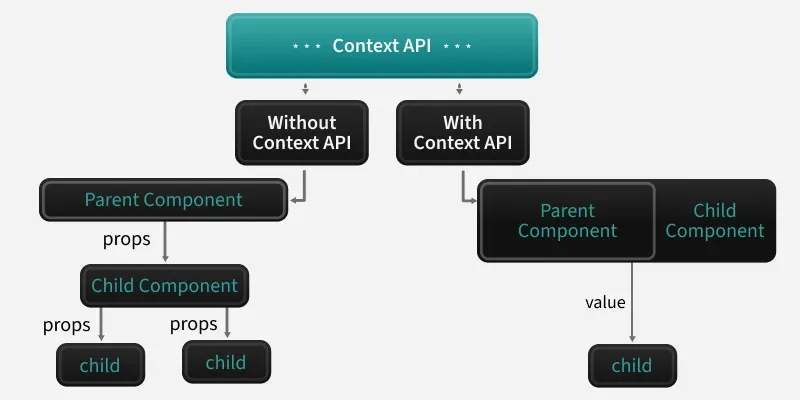
Without Context API (Props Drilling):
- Data is passed down from the Parent Component to the Child Component through props.
- This method involves passing data through each intermediary component until it reaches the target child, which can become difficult to manage as the component grows.
With Context API:
- The Parent Component provides a value through the Context API, making it accessible to any child component within the tree, without the need for prop drilling.
- The Child Component can directly access the value provided by the parent without receiving props at each intermediate level.
How Context API Works
Below are steps of context API working:
1. Create a Context
First, you need to create a Context using React.createContext(). This creates a Context object that will be used to share data.
const MyContext = React.createContext();
2. Create the Provider
Next, you use the Provider component from the Context object you created. The Provider will wrap the part of the component tree where you want the data to be accessible. The value prop of the Provider holds the data that will be shared.
<MyContext.Provider value={{ name: "John", age: 30 }}>
  <ChildComponent />
</MyContext.Provider>
3. Consume the Context
With the useContext hook, you can access the context data directly inside your functional components.
JavaScript
import { useContext } from 'react';

const ChildComponent = () => {
  const contextData = useContext(MyContext);
  return <div>Name: {contextData.name}, Age: {contextData.age}</div>;
};
Now let's understand this with the help of example:
TodoContext.js
// TodoContext.js
import React, {createContext, useState} from "react";
const TodoContext = createContext();
const TodoProvider = ({children}) => {
    const [todos, setTodos] = useState([]);
    const addTodo = (text) => {
        setTodos([...todos, { text, id: Date.now() }]);
    };
    const removeTodo = (id) => {
        setTodos(todos.filter((todo) => todo.id !== id));
    };
    return (
        <TodoContext.Provider value={{
            todos,
            addTodo, removeTodo
        }}>
            {children}
        </TodoContext.Provider>
    );
};
export { TodoProvider, TodoContext };
// index.js
import React from "react";
import ReactDOM from "react-dom";
import App from "./App";
import {TodoProvider} from "./TodoContext";
ReactDOM.render(<React.StrictMode><TodoProvider><App />
                </TodoProvider>
  </React.StrictMode>,
                document.getElementById("root"));
// TodoForm.js
import React, {useContext, useState} from "react";

import {TodoContext} from "./TodoContext";

const TodoForm = () => {
    const {addTodo} = useContext(TodoContext);
    const [text, setText] = useState("");
    const handleSubmit = (e) => {
        e.preventDefault();
        addTodo(text);
        setText("");
    };
    return (
        <form onSubmit={handleSubmit}>
            <input
    type = "text"
                value={text}
                onChange={(e) => setText(e.target.value)}
                placeholder="Add a new todo"
            />
            <button type="submit">Add Todo</button>
        </form>
    );
};
export default TodoForm;
// TodoList.js
import React, {useContext} from "react";
import {TodoContext} from "./TodoContext";
const TodoList = () => {
    const { todos, removeTodo } = useContext(TodoContext);
    return (
        <ul>
            {todos.map((todo) => (
                <li key={todo.id}>
                    {todo.text}
                    <button onClick={() =>
                        removeTodo(todo.id)}>Remove</button>
                </li>
            ))}
        </ul>
    );
};
export default TodoList;
// App.js
import React from "react";
import TodoForm from "./TodoForm";
import TodoList from "./TodoList";

const App = () => {
  return (
    <div>
      <h1>My Todo List</h1>
      <TodoForm />
      <TodoList />
    </div>
  );
};
export default App;
Output:
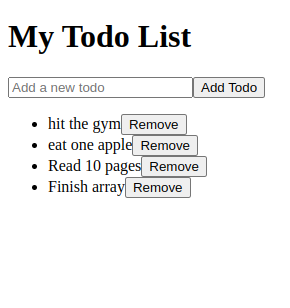 todo list app
In this example:
- TodoContext.js: Creates a context to manage todos and provides functions (addTodo, removeTodo) to update the state.
- index.js: Wraps the App component with TodoProvider to provide global access to the context.
- TodoForm.js: Allows users to add new todos by using the addTodo function from context.
- TodoList.js: Displays the list of todos and allows users to remove them using the removeTodo function.
- App.js: Renders the todo form and list.
What problem does the React Context API primarily solve?
-
Improving performance of React components
-
Avoiding prop drilling by sharing data globally
-
Handling asynchronous operations
-
Explanation:
Context API enables sharing data without passing props manually through every component, eliminating prop drilling.
Which React hook is used inside functional components to access context values?
Explanation:
useContext(ContextName) allows components to directly consume values provided by a context’s Provider.
What is the purpose of the Provider component in the Context API?
-
-
To wrap components that need access to shared values
-
To optimize component rendering
-
To trigger lifecycle methods
Explanation:
The Provider wraps part of the component tree and supplies a value that becomes accessible to all children using useContext.
In the Todo app example, what role does the TodoProvider play?
-
It renders the UI for each todo item
-
It initializes and manages the global todo state and functions
-
It handles form input validation
-
It connects to an external database
Explanation:
TodoProvider manages global state (todos) and exposes functions (addTodo, removeTodo) to any component within its tree.
Quiz Completed Successfully
Your Score : 2/4
Accuracy : 0%
Login to View Explanation
1/4
1/4
< Previous
Next >
Explore
React Fundamentals
Components in React
React Hooks
Routing in React
Advanced React Concepts
React Projects