
Web Tables are used to organize similar types of content on the web page, Web tables are groups of elements that are logically stored in a row and column format. Web table has various HTML tags like., table, th, tr, td. Let's understand these tags a bit more:
- <table> - It defines a table
- <th> - It defines a header cell
- <tr> - It defines a row in a table.
- <td>- It defines a cell in a table. the <td> tag always lies inside the <tr> tag.
Example of HTML Table
Static Demo Table
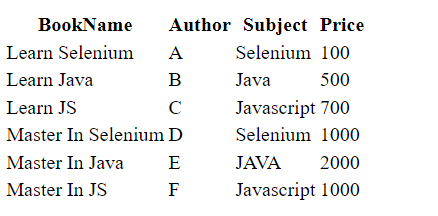
The below table is a static demo table and the HTML code for the table:
<html>
   <head>
      <style></style>
   </head>
   <body>
      <table name="BookTable">
         <tr>
            <th>BookName</th>
            <th>Author</th>
            <th>Subject</th>
            <th>Price</th>
         </tr>
         <tr>
            <td>Learn Selenium</td>
            <td>A</td>
            <td>Selenium</td>
            <td>100</td>
         </tr>
         <tr>
            <td>Learn Java</td>
            <td>B</td>
            <td>Java</td>
            <td>500</td>
         </tr>
         <tr>
            <td>Learn JS</td>
            <td>C</td>
            <td>Javascript</td>
            <td>700</td>
         </tr>
         <tr>
            <td>Master In Selenium</td>
            <td>D</td>
            <td>Selenium</td>
            <td>1000</td>
         </tr>
         <tr>
            <td>Master In Java</td>
            <td>E</td>
            <td>JAVA</td>
            <td>2000</td>
         </tr>
         <tr>
            <td>Master In JS</td>
            <td>F</td>
            <td>Javascript</td>
            <td>1000</td>
         </tr>
      </table>
   </body>
</html>
Save the code as “table.html”, then you will get an HTML table like below.
To print the total cost of all the books listed in the table:
- Open URL
- Find the x-path
- compute the cost for each book,
Find the X-Path of the Table:
- Go to the website
- Right-click on the table and select inspect and copy the x-path.
- If any doubts check this article
- For finding the price we have to copy the x-path for the 4th column ie. the price column
/html/body/table/tbody/tr/td[4]
package GFG_Maven.GFG_MAven;
import java.util.List;

import org.openqa.selenium.By;
import org.openqa.selenium.WebElement;
import org.openqa.selenium.chrome.ChromeDriver;

public class Geeks {
    public static void main(String args[]) throws InterruptedException {

        System.setProperty("webdriver.chrome.driver","C:\\Users\\ADMIN\\Documents\\chromedriver.exe");
        ChromeDriver driver = new ChromeDriver();

        // Maximize the browser
        driver.manage().window().maximize();

        // Launch Website
        driver.get("file:///C:/Users/ADMIN/Desktop/table.html");
        List<WebElement> costColumns= driver.findElements(By.xpath("/html/body/table/tbody/tr/td[4]"));

          int sum_price=0;

          for(WebElement e : costColumns)
        {
           sum_price= sum_price+Integer.parseInt(e.getText());
        }

        System.out.println("total price: "+sum_price);

    }

}
Step by Step Code Explanation:
- In setup method do all the config stuff, like launch a browser, open URL.
- To get the URL you should define the address of the file which saved as table.html in your system
- Creating a List of data type web elements and storing all the values in the 4th column in the table
- Now looping through the List and convert the data into integer and sum the price.
- Print the total cost
- Then click on run java application in eclipse.
For setting the chrome driver and selenium webdriver refer to this article How to Open Chrome Browser Using Selenium in Java?
Output:
