SQL Aggregate Functions allow summarizing large sets of data into meaningful results, making it easier to analyze patterns and trends across many records. They return a single output value after processing multiple rows in a table.
- Perform calculations like totals, averages, minimum or maximum values on data.
- Ignore NULL values in most functions except COUNT(*), improving result accuracy.
- Work with clauses such as GROUP BY, HAVING and ORDER BY for analysis.
Example: First, we create a demo SQL database and table, on which we use the Aggregate functions.
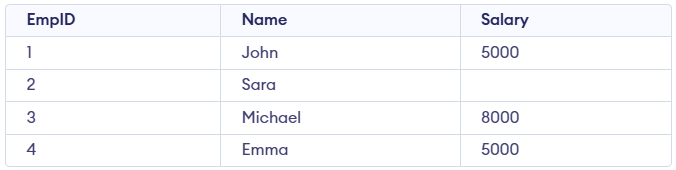 Employee Table
Query:
SELECT SUM(Salary) FROM Employee;
Output:

Syntax:
AGGREGATE_FUNCTION(column_name)
Aggregate Functions in SQL
Below are the most frequently used aggregate functions in SQL.
1. Count()
It is used to count the number of rows in a table. It helps summarize data by giving the total number of entries. It can be used in different ways depending on what you want to count:
- COUNT(*): Counts all rows.
- COUNT(column_name): Counts non-NULL values in the specified column.
- COUNT(DISTINCT column_name): Counts unique non-NULL values in the column.
Query:
-- Total number of records in the table
SELECT COUNT(*) AS TotalRecords FROM Employee;

-- Count of non-NULL salaries
SELECT COUNT(Salary) AS NonNullSalaries FROM Employee;

-- Count of unique non-NULL salaries
SELECT COUNT(DISTINCT Salary) AS UniqueSalaries FROM Employee;
Output:

- COUNT(*) returns the total number of rows in the table, including rows with NULL values.
- COUNT(Salary) counts only the rows where Salary is not NULL.
- COUNT(DISTINCT Salary) counts unique non-NULL salary values, ignoring duplicates.
2. SUM()
It is used to calculate the total of a numeric column. It adds up all non-NULL values in that column for Example, SUM(column_name) returns sum of all non-NULL values in the specified column.
Query:
-- Calculate the total salary
SELECT SUM(Salary) AS TotalSalary FROM Employee;

-- Calculate the sum of unique salaries
SELECT SUM(DISTINCT Salary) AS DistinctSalarySum FROM Employee;
Output:

- SUM(Salary) adds all non-NULL salary values to get the total salary amount.
- SUM(DISTINCT Salary) adds only unique non-NULL salary values, avoiding duplicates.
- NULL values are ignored in both SUM calculations.
3. AVG()
It is used to calculate average value of a numeric column. It divides sum of all non-NULL values by the number of non-NULL rows for Example, AVG(column_name) returns average of all non-NULL values in the specified column.
Query:
-- Calculate the average salary
SELECT AVG(Salary) AS AverageSalary FROM Employee;

-- Average of distinct salaries
SELECT AVG(DISTINCT Salary) AS DistinctAvgSalary FROM Employee;
Output:

- AVG(Salary) calculates the average of all non-NULL salary values.
- AVG(DISTINCT Salary) computes the average only from unique non-NULL salary values.
- Both ignore NULL values when performing the calculation.
4. MIN() and MAX()
The MIN() and MAX() functions return the smallest and largest values, respectively, from a column.
Query:
-- Find the highest salary
SELECT MAX(Salary) AS HighestSalary FROM Employee;

-- Find the lowest salary
SELECT MIN(Salary) AS LowestSalary FROM Employee;
Output:

- MAX(Salary) returns the highest non-NULL salary value from the Employee table.
- MIN(Salary) returns the lowest non-NULL salary value from the Employee table.
- Both functions ignore NULL values while determining the result.
Aggregate Functions and GROUP BY Statement in SQL
Visit Course

Explore
Basics
Queries & Operations
SQL Joins & Functions
Data Constraints & Aggregate Functions
Advanced SQL Topics
Database Design & Security