Summary: in this tutorial, you will learn how to use the Go if else statement to perform conditional execution of code.
Go if statement
In programming, you often need to execute a code block when a condition is true. In Go, you can use the if statement to do so:
if condition {
   // code block to execute
}Code language: Go (go)
In this syntax:
- The
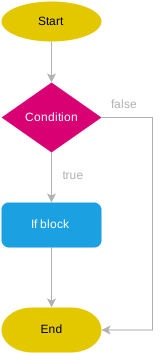
conditionis evaluated to a boolean value, which can be eithertrueorfalse. - If the condition is
true, Go will execute the code block within the opening and closing curly braces{}. Otherwise, it will pass the control to the next statement after theifstatement.
Unlike programming languages such as JavaScript and C#, Go requires curly braces {} in the if statement.
The following flowchart illustrates how the Go if statement works:
For example:
package main

import "fmt"

func main() {
    temperature := 26
    if temperature > 20 {
        fmt.Println("It's warm.")
    }
}Code language: Go (go)
Output:
It's warm.Code language: Go (go)In this example, the temperature is 26 which is greater than 20, therefore, the condition temperature > 20 is true. So the program displays the message It's warm on the screen.
Go if Statement with Initialization
Go allows you to include a short variable declaration in the if statement like this:
package main

import "fmt"

func main() {
    if temperature := 26 ; temperature > 20 {
        fmt.Println("It's warm.")
    }
}Code language: Go (go)
In this example, we declare and initialize the temperature variable within the if statement. The temperature variable will be accessible only within that block.
In practice, you’ll use this pattern to call a function and handle the error:
if err := fn(); err != nil {
    // handle error here
}Code language: JavaScript (javascript)
In this statement, we call the fn() function and assign the return value to the err variable. The condition checks if an error occurs (err != nil) and handles it accordingly.
Go if…else statement
To execute another code block when a condition is false, you can use the else branch:
if condition {
   // if block
} else {
   // else lock
}Code language: Go (go)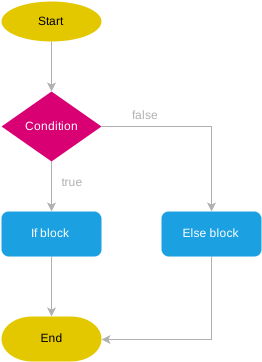
For example:
package main

import "fmt"

func main() {
    temperature := 19
    if temperature > 20 {
        fmt.Println("It's warm.")
    } else {
        fmt.Println("It's cold.")
    }
}Code language: Go (go)
Output:
It's cold.Code language: Go (go)In this example, the temperature is 19, so the condition temperature > 20 is false and executes the code in the else branch.
Go if…else…if statement
So far, you have learned how to evaluate a single condition and execute a code block in the if or else branch.
To evaluate multiple conditions and execute different blocks, you can chain multiple if else statements like this:
if condition1 {
   // ...
} else if condition2 {
   // ...
} else if condition 3 {
   //...
} else {
   // ..
}Code language: Go (go)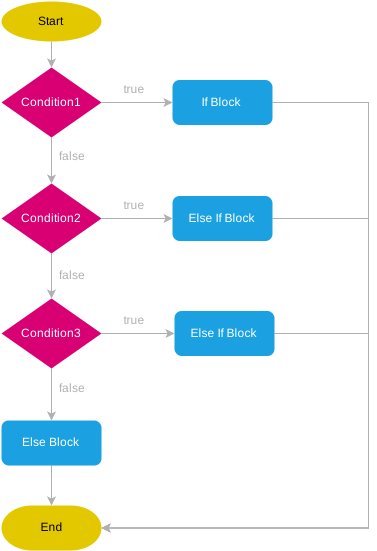
For example:
package main

import "fmt"

func main() {
    temperature := 9
    if temperature > 24 {
        fmt.Println("It's hot.")
    } else if temperature <= 24 && temperature > 18 {
        fmt.Println("It's cold.")
    } else if temperature <= 18 && temperature > 10 {
        fmt.Println("It's chilly.")
    } else {
        fmt.Println("It's cold.")
    }
}Code language: Go (go)
Output:
It's cold.Code language: Go (go)This example evaluates the temperature based on multiple conditions and displays the corresponding weather conditions.
Summary
- Use the
ifandif elsestatements to assess a condition and execute a code block when the condition is true. - Use the
if else ifstatement to evaluate multiple conditions. - Go requires the curly braces
{}for the code blocks followingif,if else,if else ifstatements, even if the block contains a single statement.


