Summary: in this tutorial, you will learn how to use the Go switch statement to match a value against multiple values to determine which branch to execute.
Introduction to the Go switch statement
In Go, the switch statement allows you to match a value against multiple possible values to decide which branch to execute.
Here’s the general syntax of the Go switch statement:
switch expression {
   case value1:
      // Code to run when expression == value1
   case value2:
      // Code to run when expression == value2
   default:
      // Code to run when no cases match
}Code language: Go (go)
In this syntax:
- First, compare the
expressionwith thevalue1,value2, … using the=operator and execute the corresponding branch if theexpressionis equal tovalue1,value2,… respectively. - Second, if the
expressionis not equal to any values, execute thedefaultbranch.
In Go, the switch statement is more concise compared to other programming languages such as C# and Java because it includes an implicit break in each case.
This Go’s design choice prevents a common mistake: forgetting to add a break statement, which can lead to unexpected behaviors. Go’s approach eliminates this issue.
In Go, you can have multiple values in each case of the switch statement like this:
switch expression {
   case value1, value2:
      // Code to run when expression == value1 or expression == value2
   case value3:
      // Code to run when expression == value2
   default:
      // Code to run when no cases match
}Code language: Go (go)
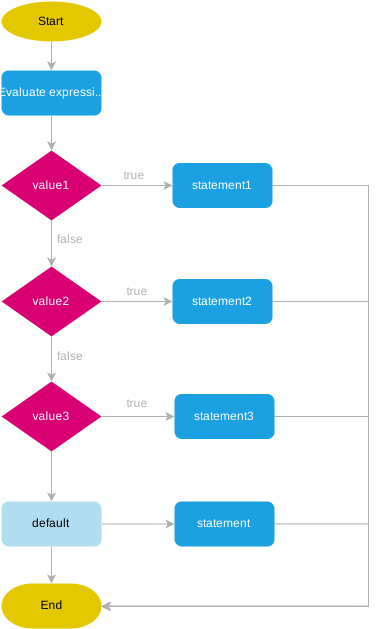
The following flow chart illustrates how the Go switch statement works:
Go switch statement examples
Let’s take some examples of using the switch statement.
Basic Go switch statement example
The following example uses the switch statement to determine the day of the week based on an integer (e.g., 1 for Monday, 2 for Tuesday, etc).
package main

import "fmt"

func main() {
    dayNumber := 2
    var day string

    switch dayNumber {
    case 1:
        day = "Monday"
    case 2:
        day = "Tuesday"
    case 3:
        day = "Wednesday"
    case 4:
        day = "Thursday"
    case 5:
        day = "Friday"
    case 6:
        day = "Saturday"
    case 7:
        day = "Sunday"
    default:
        day = "Invalid day"
    }
    fmt.Println(day)
}Code language: Go (go)
Output:
TuesdayIn this example:
First, declare the dayNumber variable and initialize its value to 2:
dayNumber := 2Code language: Go (go)Second, declare the day variable with the string type:
var day stringCode language: Go (go)Third, check the dayNumber against numbers from 1 to 7, and assign the day to the corresponding value i.e., 1 for Monday, 2 for Tuesday, etc.
switch dayNumber {
case 1:
    day = "Monday"
case 2:
    day = "Tuesday"
case 3:
    day = "Wednesday"
case 4:
    day = "Thursday"
case 5:
    day = "Friday"
case 6:
    day = "Saturday"
case 7:
    day = "Sunday"
default:
    day = "Invalid day"
}Code language: Go (go)
Finally, display the dayName variable:
fmt.Println(day)Code language: Go (go)Since the dayNumber variable is 2, the day will be Tuesday, and the output will show Tuesday.
Multiple values example
To specify multiple values in the same case, you can use a comma-separated list:
package main

import "fmt"


func main() {
    day := 3
    var result string

    switch day {
    case 1, 2, 3, 4, 5:
        result = "Weekday"
    case 6,7:
        result = "Weekend"
    default:
        result = "Invalid day"
    }

    fmt.Println(result)
}Code language: Go (go)
Output:
WeekdayCode language: Go (go)In this example, if the day is 1 to 5, the result is Weekday. If the day is 6 and 7, the result is Weekend. Otherwise, it’ll be an invalid day.
Go switch statement with initialization
Like the if statement, Go allows you to include a short variable declaration in the switch statement. In this case, the variable will be accessible only within the switch block. For example:
package main

import "fmt"

func main() {

    var result string

    switch day := 3; day {
    case 1, 2, 3, 4, 5:
        result  = "Weekday"
    case 6,7:
        result  = "Weekend"
    default:
        result    = "Invalid day"
    }

    fmt.Println(result)
}Code language: Go (go)
In this example, we declare and initialize the day variable within the switch statement. If you attempt to access the day variable outside the switch statement, you’ll encounter a compile error.
Switch on true example
Go allows you to omit the expression in the switch statement. In this case, the switch with no value means the switch true. It is a more clear version of an if-else chain.
The following example uses a switch statement without an expression to determine the quarter based on the month number:
package main

import "fmt"

func main() {

    month := 9
    var quarter string

    switch {
    case month >= 1 && month <= 3:
        quarter = "Q1"
    case month >= 4 && month <= 6:
        quarter = "Q2"
    case month >= 7 && month <= 9:
        quarter = "Q3"
    case month >= 10 && month <= 12:
        quarter = "Q4"
    default:
        quarter = "Invalid month"
    }

    fmt.Println(quarter)
}Code language: Go (go)
Output:
Q3Code language: Go (go)In this example:
- The
switchstatement has no expression, each case is a boolean expression. - Since the month is 9, the third case is executed
month >= 7 && month <= 9, resulting in the outputQ3.
Fallthrough
To fall through the next case, you use the fallthrough keyword within a case block of the switch statement:
switch expression {
   case value1:
      // Code to run when expression == value1
      fallthrough
   case value2:
      // Code to run when expression == value2
      // or expression == value1 due to fallthrough
   default:
      // Code to run when no cases match
}Code language: Go (go)
The fallthrough keyword allows you to transfer control to the next case block, regardless of whether the condition for that block is true or false.
Go requires that you place the fallthrough keyword as the last line of a case block or it’ll issue a compile error.
For example:
package main

import "fmt"

func main() {
    switch number := 1; number {
    case 1:
        fmt.Println("One")
        fallthrough
    case 2:
        fmt.Println("Two")
    case 3:
        fmt.Println("Three")
    }
}Code language: Go (go)
Output:
One
TwoCode language: Go (go)
In this example, the keyword fallthrough transfers the control to the first line of case 2 so that this block also gets executed.
Summary
- Use
switchstatement to compare a value against multiple values and execute the respective code block. - The
switchstatement uses an implicitbreakstatement in eachcase. - The
switchstatement without an expression is like theswitch true; each case is a boolean expression. It is a clearer version of anif elsechain. - Use the
fallthroughkeyword to transfer the control to the next case, regardless of whether the condition for that case block is true or false.


