Summary: in this tutorial, you will learn how to use the JavaScript String padStart() method to pad the beginning of a string with another string until the resulting string reaches a specified length.
Introduction to the JavaScript String padStart() method
The padStart() method allows you to pad the beginning of a string with another string until the resulting string reaches a certain length.
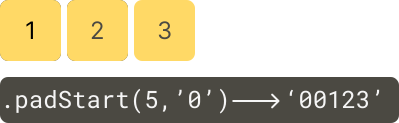
Here’s the syntax of the padStart() method:
string.padStart(targetLength, padString)Code language: JavaScript (javascript)In this syntax:
- The
targetLengthis the length of the resulting string after the current string is padded. If thetargetLengthis less than or equal to the length of the input string, the method returns the input string as-is.
- The
padStringis an optional parameter, specifying the string to pad the current string with. If thepadStringis too long to stay within the target length, thepadStart()method will truncate it. ThepadStringdefaults to a space character (' '). This means that thepadStart()method will use a space character to pad the input string if you omit thepadString.
To pad the end of a string with another string, you use the padEnd() method.
JavaScript padStart() method examples
Let’s take some examples of using the padStart() method.
1) Basic JavaScript string padStart() method example
The following example uses the padStart() method to pad "0" to a string until it reaches 5 characters:
const results = ['120', '242', '10'].map((str) => {
  return str.padStart(5, '0');
});

console.log({ results });
Code language: JavaScript (javascript)
Output:
{ results: [ '00120', '00242', '00010' ] }Code language: JavaScript (javascript)2) Formatting Numbers
In practice, you often use the padStart method for formatting numbers, especially when you need to ensure that numbers have a consistent length.
For example, you might want to format invoice numbers with 8 characters in length:
const invoiceNumbers = [1, 12, 123, 1234, 12345];

const formattedInvoiceNumbers = invoiceNumbers.map((no) => {
  return no.toString().padStart(8, '0');
});

console.log(formattedInvoiceNumbers);Code language: JavaScript (javascript)
Output:
[ '00000001', '00000012', '00000123', '00001234', '00012345' ]Code language: JSON / JSON with Comments (json)3) Aligning Text in Console Output
When developing command-line interface (CLI) apps, you might want to align text for better readability. The padStart method can help you to achieve this:
let items = ['Apple', 'Banana', 'Cherry'];
items.forEach((item) => {
  console.log(item.padStart(20, '.'));
});Code language: JavaScript (javascript)
Output:
...............Apple
..............Banana
..............CherryCode language: CSS (css)
Summary
- Use the
padStart()method to pad the beginning of a string with another string until the resulting string reaches a specified length.


