The for statement in Python is a bit different from what you usually use in other programming languages.
Rather than iterating over a numeric progression, Python’s for statement iterates over the items of any iterable (list, tuple, dictionary, set, or string). The items are iterated in the order that they appear in the iterable.
Syntax
Here’s the syntax of the for statement:
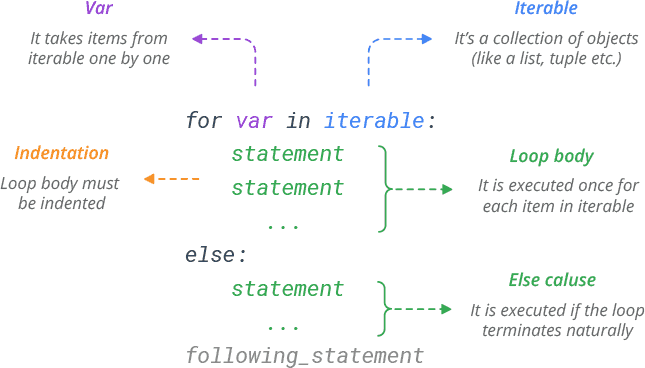
Basic Examples
# Iterate through a list
colors = ['red', 'green', 'blue', 'yellow']
for x in colors:
    print(x)
# Prints red green blue yellow
# Iterate through a string
S = 'python'
for x in S:
print(x)
# Prints p y t h o nBreak in for Loop
Python break statement is used to exit the loop immediately. It simply jumps out of the loop altogether, and the program continues after the loop.
# Break the loop at 'blue'
colors = ['red', 'green', 'blue', 'yellow']
for x in colors:
    if x == 'blue':
        break
    print(x)
# Prints red green
Continue in for Loop
The continue statement skips the current iteration of a loop and continues with the next iteration.
# Skip 'blue'
colors = ['red', 'green', 'blue', 'yellow']
for x in colors:
    if x == 'blue':
        continue
    print(x)
# Prints red green yellow
Else in for Loop
Python allows an optional else clause at the end of a for loop. The else clause will be executed if the loop terminates naturally (through exhaustion).
colors = ['red', 'green', 'blue', 'yellow']
for x in colors:
    print(x)
else:
    print('Done!')
# Prints red green blue yellow
# Prints Done!
If the loop terminates prematurely with break, the else clause won’t be executed.
colors = ['red', 'green', 'blue', 'yellow']
for x in colors:
    if x == 'blue':
        break
    print(x)
else:
    print('Done!')
# Prints red green
range() function in for loop
If you need to execute a group of statements for a specified number of times, use built-in function range().
The range(start,stop,step) function generates a sequence of numbers from 0 up to (but not including) specified number.
# Generate a sequence of numbers from 0 6
for x in range(7):
    print(x)
# Prints 0 1 2 3 4 5 6
range() provides a simple way to repeat an action a specific number of times.
# Print 'Hello!' three times
for x in range(3):
    print('Hello!')
# Prints Hello!
# Prints Hello!
# Prints Hello!
The range starts from 0 by default. But, you can start the range at another number by specifying start parameter.
# Generate a sequence of numbers from 2 to 6
for x in range(2, 7):
    print(x)
# Prints 2 3 4 5 6
You can generate a range of negative numbers as well.
for x in range(-5,0):
    print(x)
# Prints -5 -4 -3 -2 -1
The range increments by 1 by default. But, you can specify a different increment by adding a step parameter.
# Increment the range with 2
for x in range(2, 7, 2):
    print(x)
# Prints 2 4 6
Nested for Loop
A loop inside another loop is called a nested loop.
# Flatten a nested list
list = [[1, 2, 3],[4, 5, 6],[7, 8, 9]]
for sublist in list:
    for number in sublist:
        print(number)
# Prints 1 2 3 4 5 6 7 8 9
Access Index in for Loop
To iterate over the indices of a sequence, you can combine range() and len() as follows:
colors = ['red', 'green', 'blue']
for index in range(len(colors)):
    print(index, colors[index])
# Prints 0 red
# Prints 1 green
# Prints 2 blue
However, in most such cases it is convenient to use the enumerate() function.
colors = ['red', 'green', 'blue']
for index, value in enumerate(colors):
    print(index, value)
# Prints 0 red
# Prints 1 green
# Prints 2 blue
Unpacking in a for loop
Below for loop does a multiple assignment (unpack the current tuple) each time through the loop.
# Tuple unpacking
T = [(1, 2), (3, 4), (5, 6)]
for (a, b) in T:
    print(a, b)
# Prints 1 2
# Prints 3 4
# Prints 5 6
Likewise, you can iterate through both keys and values in a dictionary.
# Dictionary unpacking
D = {'name': 'Bob', 'age': 25}
for x, y in D.items():
	print(x, y)
# Prints age 25
# Prints name Bob
Modify a List While Iterating
Don’t alter mutable objects while looping on them. It may create an infinite loop.
# infinite loop
colors = ['red', 'green', 'blue']
for x in colors:
    if x == 'red':
        colors.insert(0, 'orange')
        print(colors)
It is recommended that you first make a copy. The slicing operator makes this especially convenient.
colors = ['red', 'green', 'blue']
for x in colors[:]:
	if x == 'red':
		colors.insert(0, 'orange')
print(colors)
# Prints ['orange', 'red', 'green', 'blue']
Looping Through Multiple Lists
Using built-in zip() function you can loop through multiple lists at once.
# Loop through two lists at once
name = ['Bob', 'Sam', 'Max']
age = [25, 35, 30]
for x, y in zip(name, age):
    print(x, y)
# Prints Bob 25
# Prints Sam 35
# Prints Max 30
