Summary: in this tutorial, you will learn how to use the Oracle COUNT() function to get the number of items in a group.
Introduction to Oracle COUNT() function #
In Oracle, theCOUNT() function is an aggregate function that returns the number of items in a group.
Here’s the syntax of the COUNT() function:
COUNT( [ALL | DISTINCT | * ] expression)Code language: SQL (Structured Query Language) (sql)The COUNT() function accepts a clause which can be either ALL, DISTINCT, or *:
COUNT(*)function returns the number of rows in a group, including rows with NULL and duplicates. TheCOUNT(*)does not ignoreNULLbecause it counts rows, not specific column values.COUNT(DISTINCT expression)function returns the number of unique, non-null values in the specified column or expression. It does not count duplicates and ignoresNULL.COUNT(ALL expression)evaluates the expression and returns the number of non-null values in the specified colm or expression. It ignoresNULLbut count duplicates.
If you don’t explicitly specify DISTINCT or ALL, the COUNT() function uses the ALL by default.
The follownig table illustrates the differences between three forms of the COUNT function:
| Function | Ingore NULLs | Ingore Duplicates | Notes |
|---|---|---|---|
COUNT(*) | No | No | Count every row. |
COUNT(ALL expression) | Yes | No | Count non-null values, includes duplicates. |
COUNT(DISTINCT expression) | Yes | Yes | Count only unique and non-null values. |
Oracle COUNT() function examples #
Let’s take some examples of using the COUNT() function.
COUNT(*) vs. COUNT(DISTINCT expr) vs. COUNT(ALL) #
Let’s create a table calleditems that consists of a val column and insert some sample data into the table for the demonstration:
CREATE TABLE items(val number);

INSERT INTO items(val) VALUES(1);
INSERT INTO items(val) VALUES(1);
INSERT INTO items(val) VALUES(2);
INSERT INTO items(val) VALUES(3);
INSERT INTO items(val) VALUES(NULL);
INSERT INTO items(val) VALUES(4);
INSERT INTO items(val) VALUES(NULL);

SELECT * FROM items;Code language: SQL (Structured Query Language) (sql)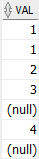
The following statement uses the COUNT(*) function to return the number of rows in the items table including NULL and duplicate values:
SELECT
  COUNT(*)
FROM
  items;Code language: SQL (Structured Query Language) (sql)
The following statement uses the COUNT(DISTINCT val) to return only the number of distinct and non-null rows from the items table:
SELECT
  COUNT(DISTINCT val)
FROM
  items;Code language: SQL (Structured Query Language) (sql)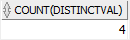
The following statement uses the COUNT(ALL val) function to return the number of non-null rows in the items table, considering duplicates.
SELECT
  COUNT(ALL val)
FROM
  items;Code language: SQL (Structured Query Language) (sql)
Basic Oracle COUNT() function example #
The following example uses the COUNT(*) function returns the number of rows in the products table:
SELECT
  COUNT(*)
FROM
  products;Code language: SQL (Structured Query Language) (sql)
Using the Oracle COUNT() with WHERE clause example #
If you want to find the number of products in the category id 1, you can add a WHERE clause to the query above:
SELECT
    COUNT(*)
FROM
    products
WHERE
    category_id = 1;Code language: SQL (Structured Query Language) (sql)
Using Oracle COUNT() with GROUP BY clause example #
To find the number of products in each product category, you use the following statement:
SELECT
  category_id,
  COUNT(*)
FROM
  products
GROUP BY
  category_id
ORDER BY
  category_id;Code language: SQL (Structured Query Language) (sql)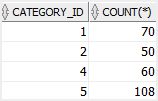
In this example:
- First, the
GROUP BYclause divides the products into groups based on the product category (category_id). - Second, the
COUNT(*)function returns the number of products for each group.
Using Oracle COUNT() function with LEFT JOIN clause #
The following examples get all category names and the number of products in each category by joining the product_categories with the products table and using the COUNT() function with the GROUP BY clause.
SELECT
  category_name,
  COUNT(product_id)
FROM
  product_categories
  LEFT JOIN products USING (category_id)
GROUP BY
  category_name
ORDER BY
  category_name;Code language: SQL (Structured Query Language) (sql)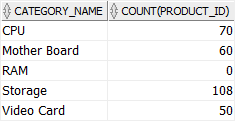
Using Oracle COUNT() function with HAVING clause example #
The following statement retrieves category names and the number of products in each. In addition, it uses a HAVING clause to return the only category whose number of products is greater than 50.
SELECT
  category_name,
  COUNT(product_id)
FROM
  product_categories
  LEFT JOIN products USING (category_id)
GROUP BY
  category_name
HAVING
  COUNT(product_id) > 50
ORDER BY
  category_name;Code language: SQL (Structured Query Language) (sql)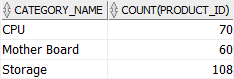
Using Oracle COUNT() and HAVING clause to find duplicate values #
You can use the COUNT() function and a HAVING clause to find rows with duplicate values in a specified column.
For example, the following statement returns the contacts’ last names that appear more than once:
SELECT
  last_name,
  COUNT(last_name)
FROM
  contacts
GROUP BY
  last_name
HAVING
  COUNT(last_name) > 1
ORDER BY
  last_name;Code language: SQL (Structured Query Language) (sql)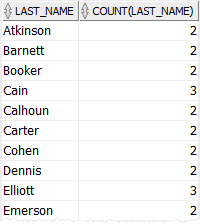
In this statement:
- Firstly, the
GROUP BYclause divides the rows in thecontactstable into groups based on the values in thelast_namecolumn. - Secondly, the
COUNT()function returns the number of the same last names for each last name. - Finally, the
HAVINGclause returns only groups that have more than one value of the last name.
Summary #
- Use the Oracle
COUNT()function to return the number of items in a group.


